Get up to $6,000 in TikTok Ad CreditsClaim Credits
Koala Apps

Free Shopify spy extension

Spy on any Shopify store in one click.

Its theme, every app it runs, its catalogue and best-sellers, its traffic and the ads it is paying for. Koala Inspector puts all of it one click away, free, on any store you open.

Merchants researching competing Shopify stores
4.7Chrome Web Store

Trusted by 250,000+ merchants & marketers

Works withShopifyWooCommerceWixBigCommerceSquarespace

A Shopify spy tool reads what a competitor's storefront already shows the public and turns it into one report. Open a rival store, click the tool, and you see the theme it runs, the apps it has installed, what it sells and at what prices, roughly how much traffic it gets, and which ads it is currently paying for. No login, no store access, nothing to paste.

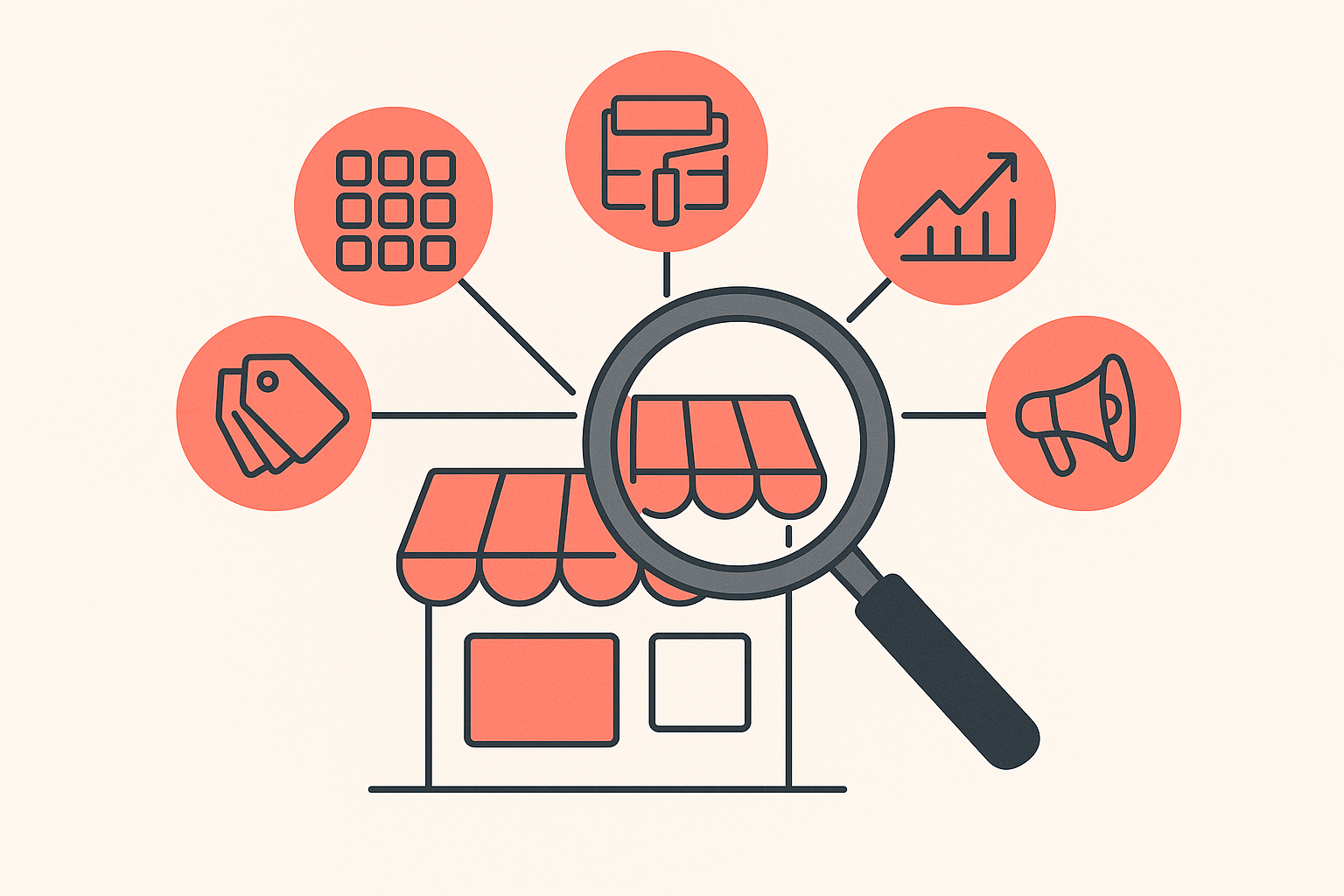
A magnifying glass over a storefront, breaking one Shopify store into its apps, theme, prices, traffic and ads

Three groups of people need one. Dropshippers and product researchers use it to check whether a product is already crowded before spending on ads. Store owners use it to see what the shops beating them in search and in the feed are actually doing, from the theme up. Agencies, developers and app founders use it to read a client's or a prospect's stack in seconds instead of asking for admin access.

The whole category exists because the manual version is brutal. One merchant who studies stores for a living described going through a shop top to bottom as eating 30 to 40 minutes per store and still producing nothing usable, until they narrowed it to a fixed handful of checks. A spy tool is that narrowing, automated.

Install Koala Inspector free and run your first store read in under a minute.

The six things a Shopify spy tool can tell you

Every tool in this category does some subset of these six jobs. Koala Inspector does all six, and the first four are free forever.

1. Store analysis

The overview: theme, store category, product count, creation date, last update, currency, country and language. This is the sanity check that tells you whether you are looking at a five-year-old brand or a storefront opened three weeks ago. Free in Koala Inspector, no tokens.

2. App detection

Every app the store has installed, grouped by job, with a link to each listing in the Shopify App Store. The app stack is the closest thing to a public statement of strategy a store makes. Free in Koala Inspector, no tokens.

3. Theme detection

The active theme name, including paid and customised themes, with a button that takes you straight to it in the Shopify theme store. Free in Koala Inspector, and also available as a paste-a-URL tool if you would rather not install anything.

4. Product and best-seller research

The full catalogue with prices and variants, filtered to likely best-sellers, sortable by date added or price, with favourites that persist between sessions and a stats header showing product count and price range. Free in Koala Inspector.

5. Traffic and sales estimates

Average monthly traffic over the last three months, the month-over-month change, bounce rate, pages per visit, traffic sources, top keywords, social split, demographics and a geography map. Costs 3 tokens per store in Koala Inspector.

6. Competitor ads

The Google and Facebook or Instagram campaigns a store is running, each card carrying the URL, title, description and tags. This is a competitor's tested messaging, handed to you. Costs 2 tokens per store in Koala Inspector.

All six, on any Shopify store, free to start

Store analysis, app detection, theme detection and best-sellers cost nothing at all. Traffic and ads cost tokens, and the free plan gives you 15 a month with no card.

What each check costs, and where the free line sits

Most Shopify spy tools put a subscription in front of the first useful answer. Koala Inspector puts the four checks you run most often on the free side of the line permanently, and prices the heavy reports in tokens so you only spend on the stores worth the depth.

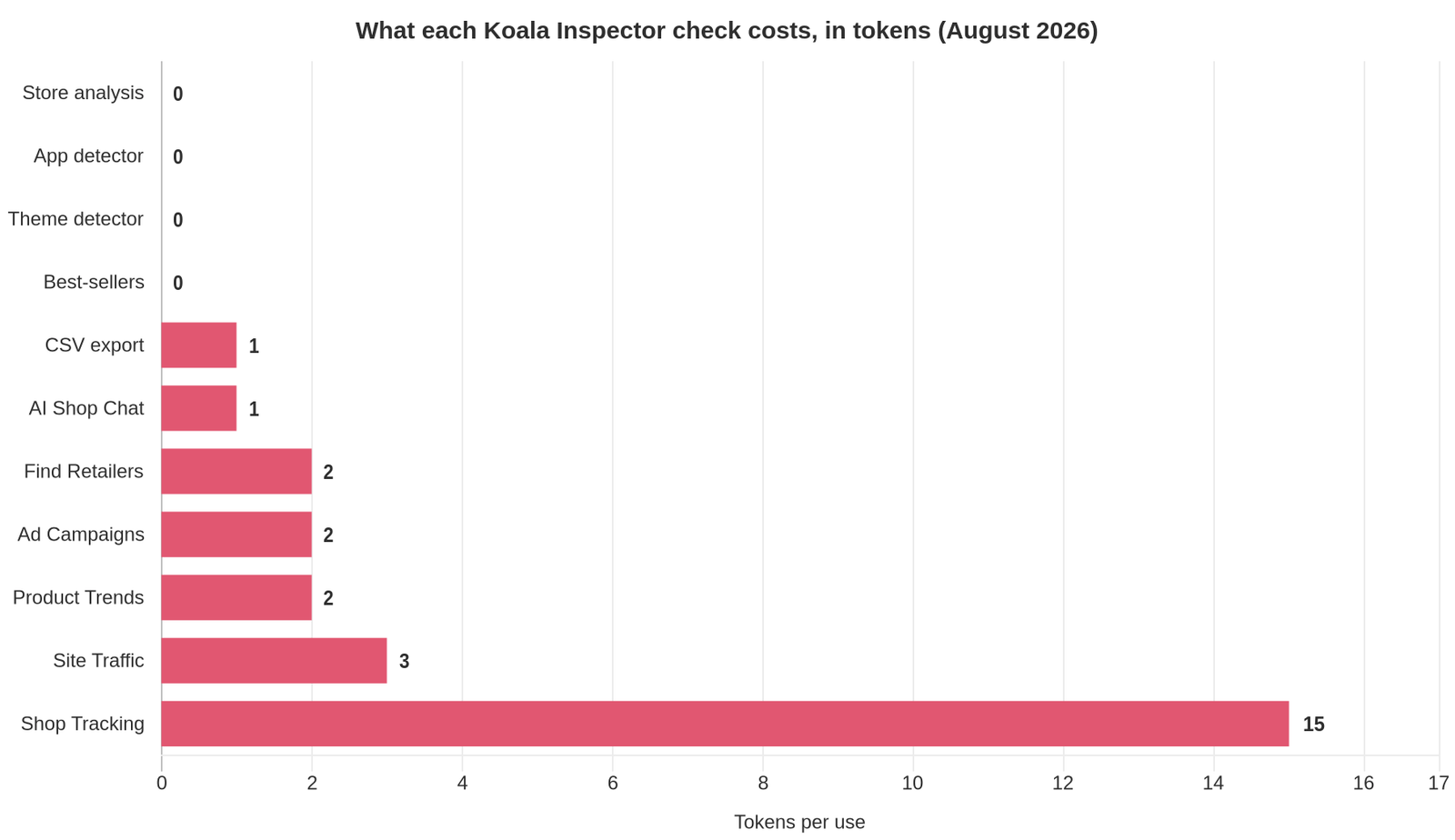
Token cost of every Koala Inspector check, from free store analysis up to 15 tokens for ongoing shop tracking

CheckWhat you getToken cost
Store analysisTheme, category, product count, creation date, last update, currency, country, languageFree
App detectorEvery installed app, grouped by job, with a link to each Shopify App Store listingFree
Theme detectorActive theme name with a button through to the Shopify theme storeFree
Product researchFull catalogue, likely best-sellers, prices, variants, favourites, price rangeFree
Inspection historyA log of every store you have analysedFree
CSV exportProducts, apps, theme or store data as a spreadsheet1 token
AI Shop ChatAsk questions about the store you are looking at1 token
Find SuppliersSuppliers for a product with landed cost, delivery time and profit per unit2 tokens
Ad CampaignsThe store's live Google and Facebook or Instagram ads2 tokens
Product TrendsLive trending products with sales signals2 tokens
Site TrafficMonthly visits, trend, sources, keywords, demographics, geography3 tokens
Shop TrackingOngoing monitoring of one store, 10+ change event types15 tokens per shop

The free plan carries 15 tokens a month with no credit card, which is roughly five full traffic profiles or seven ad-campaign checks. Premium is $22 a month for 220 renewing tokens and tracking of up to 50 stores, and one-time token packs run from $3.99 for 10 up to $11.99 for 100. Pack tokens stack on your monthly allocation and never expire. Those figures are current as of August 2026; the pricing page always carries the live version.

Shop tracking is the one feature the free plan does not include. It is also the one that catches what a twice-a-year look never will: apps added or removed, a theme swap, new and dropped products, price changes and variant changes, all logged to a per-store feed you can switch notifications on for.

How the tools in this category compare

Category-wide price comparisons go stale fast, so here is the one comparison that is public, checkable and dated: what merchants who actually installed each extension say about it. Figures read from the Chrome Web Store listings on 28 August 2026.

ExtensionRatingRatingsUsers
Koala Inspector4.73 out of 5758200,000
PPSPY3.9 out of 5122100,000
Dropship4.6 out of 5651100,000

Beyond the ratings, the split in this category is about shape. Some tools are curated feeds: they pick trending products for you and everyone on the subscription sees the same list on the same morning. Others are per-store readers: you choose the shop, they tell you everything about it.

That difference decides whether you can be early. The merchant who wrote up losing about 2,800 euros chasing products in 2024 diagnosed it precisely: "by the time i SAW the product on minea or wherever, it had already been hot for like 3 weeks", and "the moment something hits their trending feed, every other subscriber sees it the same day". A seven-figure seller in the same subreddit reached the same conclusion from the other end, writing that their best performing products "aren't ones you see on spy tools".

Both are arguments for reading the stores in your niche yourself rather than subscribing to someone else's shortlist. That is the job Koala Inspector is built for: you pick the store, it reads the whole thing.

Install Koala Inspector free and start with the competitor you already have open.

A full spy pass on one store, start to finish

Run the same five steps every time, in this order. Each narrows what the next one means, and the whole pass takes about four minutes. Take a real store you compete with, open it in Chrome, and click the extension.
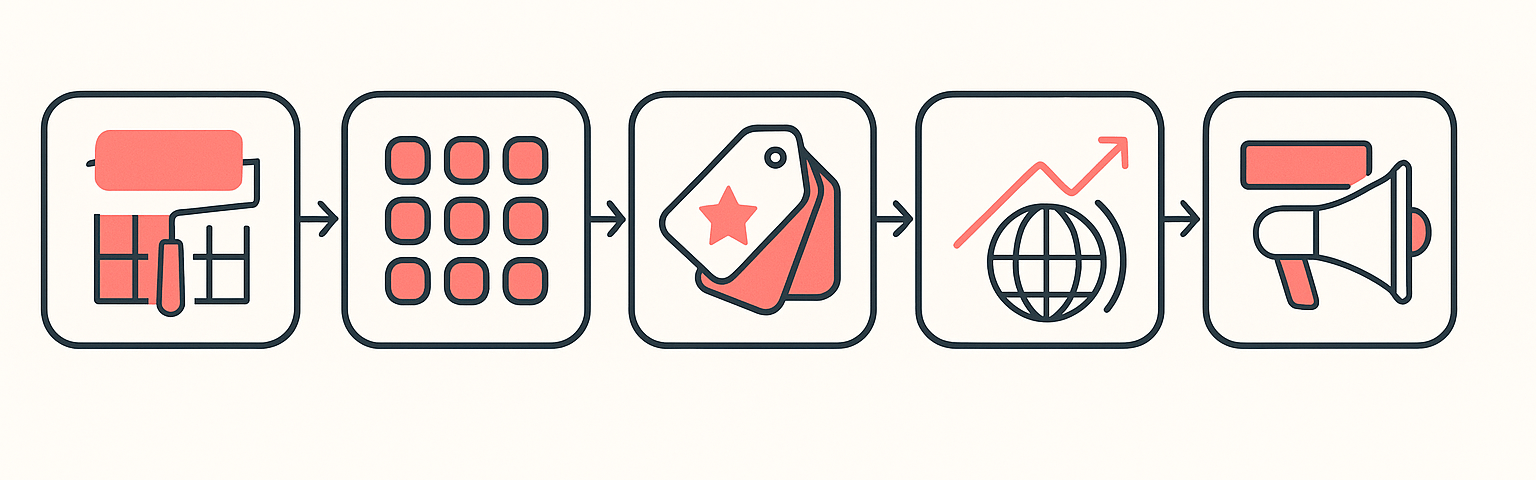
The five steps of a Shopify spy pass in order: theme, apps, catalogue and prices, traffic, then ads

Step 1: read the theme

The Explorer screen opens with the theme name and a "Use Theme" button that links to it in the Shopify theme store. Free, no tokens.

A free base theme says the store is spending its money on ads or product. A premium conversion theme says the storefront itself is the lever they are pulling. A heavily customised build says there is a developer on the payroll, which changes how realistic copying them actually is. If their storefront converts and you are still choosing, start from their theme rather than from a gallery: same section layout, same mobile behaviour, same speed profile on day one. Our free online Shopify theme detector does this check from a pasted URL if you prefer not to install anything.

Step 2: read the app stack

The Apps screen lists every installed app grouped by job, each with a link to its Shopify App Store listing. Free, no tokens.

This is where you learn what a store has decided its growth comes from. Reviews plus email plus a bundle builder is a social-proof-and-AOV strategy. A page builder means they are testing landing pages. A currency converter plus a tracking app means they sell internationally and expect the shipping questions.

Stacks are bigger than most merchants assume. Across the 300 top Shopify stores Koala tracks, the median store runs 11 apps, the average is 11.9, and 177 of the 300 run ten or more:
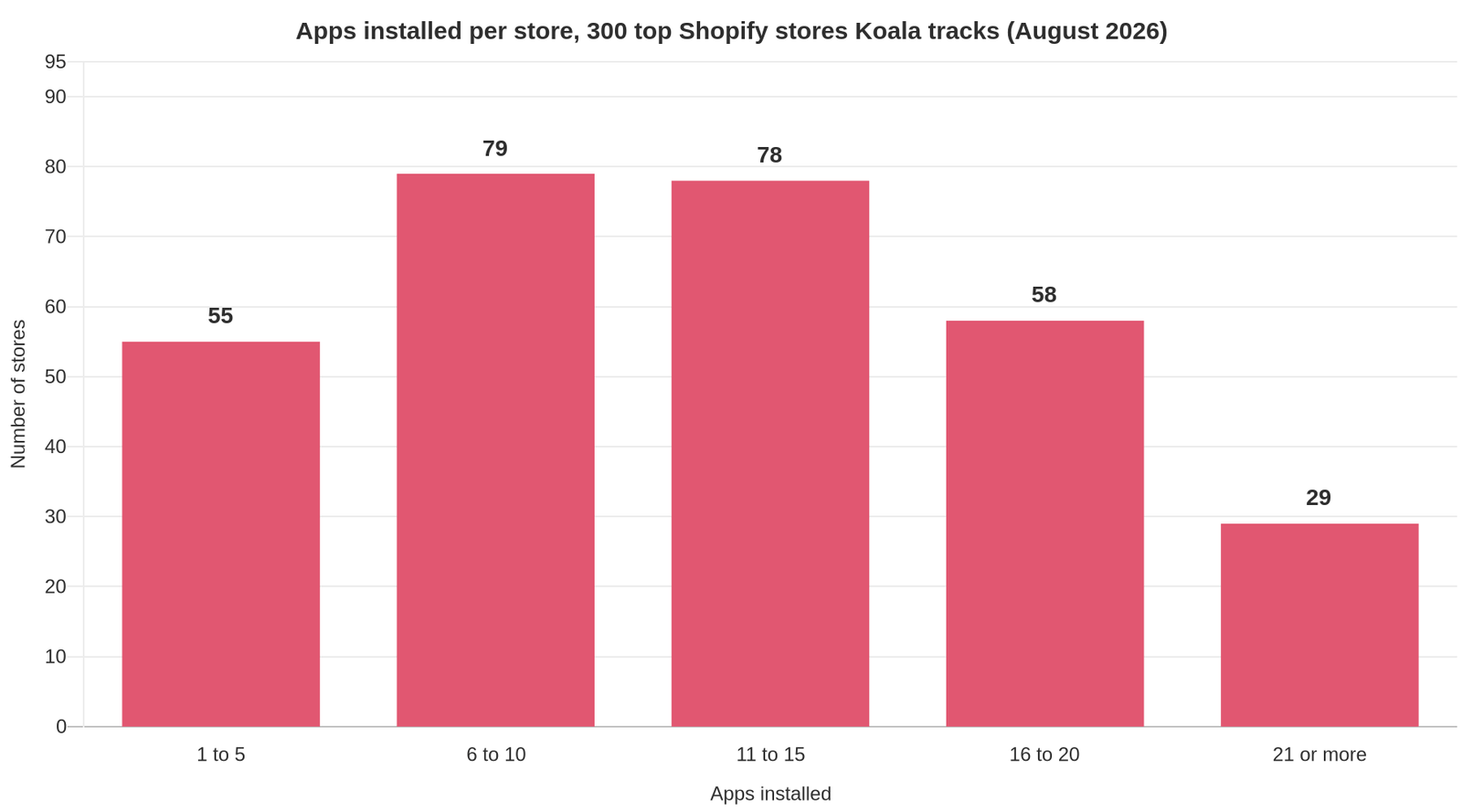
Distribution of how many apps are installed across the 300 top Shopify stores Koala tracks in August 2026

Those counts cover the stores Koala tracks rather than all of Shopify, so read them as what serious stores keep choosing. The practical takeaway is that a competitor beating you probably has ten to fifteen deliberate decisions in their stack, and you can see every one of them for free. Our free Shopify app detector runs the same check from a pasted URL, and the most popular Shopify apps shows what the field converges on.

Step 3: pull the catalogue and the price ladder

The Products screen gives you the full catalogue, the likely best-sellers, total product count, the price range from low to high, and the first-published date. Sort by date added to see what the store has been pushing lately, favourite anything you want to re-check next month, and export the list to CSV for 1 token.

Product count plus price range tells you which game you have walked into. A twelve-product store with one item at four times the price of the rest is a hero-product operation and that single product carries everything. A 900-product catalogue with a flat price band is a volume play living on ad efficiency. Put their price ladder next to yours: if they anchor at $89 and you anchor at $39, you are selling to a different shopper, and matching their ad angle will not work.

Step 4: size the store

The Website Traffic screen costs 3 tokens and returns average monthly visits over the last three months, the month-over-month change, bounce rate, pages per visit, the split across direct, search, referral and social, the top keywords, the social distribution, demographics and a geography map.

Read the estimate as a range and a direction. No outside tool reports exact sales, because only the owner sees the real dashboard: these figures are modeled from public signals any visitor's browser can already see, sampled over time. Three reads across three weeks tell you far more than one, which is exactly what our Shopify sales tracker page walks through in detail.

Step 5: read the ads

The Ad Campaigns screen costs 2 tokens and splits into Google and Facebook or Instagram, with each campaign card carrying the URL, title, description and tags.

Ad copy is the only part of a competitor's marketing that has already been through real money and real feedback. The angle they lead with is the angle that worked. Note the hook and the offer, then check whether the landing page matches: a store running a heavy discount in its ads while its site shows full price is testing a segment, and that gap is where you undercut. Spying on competitor Facebook ads covers what to take from a creative rotation.

Finish by tracking the store if it is worth following. Shop Tracking costs 15 tokens per shop and logs apps added or removed, theme swaps, new and dropped products, price changes and variant changes across more than ten event types. That is the check that catches a competitor's price cut in the week it happens instead of the quarter after.


What merchants say after installing it

Real, unedited reviews from the Chrome Web Store.

★★★★★
“Very easy to use and install. Helps with identifying Shopify stores quickly and saves time by listing best sellers. Also has handy feature of the traffic which I found very valuable.”
Ali Baloch
★★★★★
“I was a bit skeptical about all the hype but gave Koala Inspector a shot. It's user-friendly and provides useful data on what's working for others. The support team is also there when you need them.”
Martin René
★★★★★
“Great tool for competitor research and customer support is really quick!”
Aiswarya S
★★★★★
“great app for ecommerce, there are a lot of useful information. Friendly customer service!”
Lavender Yuzu
★★★★★
“Excellent tool for Shopify research! simple, accurate, and packed with insights. Highly recommend it.”
Data Analysis
★★★★★
“The service has been great, very responsive and the most comprehensive spying of global markets Ive seen!”
Adrienne Greenwood

What Shopify creators say about it

Ecommerce creators with hundreds of thousands of subscribers use Koala Inspector in their store-research videos.

What a Shopify spy tool cannot tell you

Being straight about the ceiling saves you from bad decisions later.

It cannot see inside the admin. Orders, customers, real revenue, ad spend and margin all sit behind a login that no browser tool reaches. Traffic and sales figures are modeled estimates: good for comparing two stores and spotting a trend, useless as accounting.

It cannot read a shop that is not on Shopify. Open the extension on a WooCommerce or BigCommerce site and it tells you so rather than guessing.

It cannot name a fully bespoke or headless build, because there is no standard theme underneath to identify.

And it cannot tell you whether a competitor is profitable. A store can look enormous and lose money on every order. What the pass gives you is the shape of their operation: what they sell, at what price, on what foundation, with which tools, and what they are paying to say. That is enough to decide who is worth copying and who is worth ignoring.

Shopify spy tool FAQ

What merchants ask before they install one, and the Shopify questions that come up while they are researching.

What is a Shopify spy tool?+

A Shopify spy tool reads what a competitor's storefront already shows the public and organises it into one report. The category covers six jobs: store analysis, app detection, theme detection, product and best-seller research, traffic and sales estimates, and competitor ad research. Koala Inspector is a free Chrome extension that covers all six on any Shopify store you open, and the first four cost nothing at all.

Is there a free Shopify spy extension?+

Yes. Koala Inspector is free forever with no credit card. Store analysis, app detection, theme detection, catalogue browsing, best-sellers, favourites and inspection history never cost anything. The free plan also carries 15 tokens a month for the deeper reports, which covers about five full traffic profiles at 3 tokens each or seven ad-campaign checks at 2 tokens each. Premium is $22 a month for 220 renewing tokens and tracking of up to 50 stores, as of August 2026.

Can a store owner tell that I am spying on their Shopify store?+

No. Koala Inspector works from inside your own browser and reads only what the storefront already shows any visitor. It never touches the store's admin, orders, customers or checkout, and the owner sees nothing.

Are there free online theme detectors?+

Yes. Koala runs a free online Shopify theme detector that names the active theme from a pasted store URL, with nothing to install and no sign-up. The Koala Inspector Chrome extension does the same check from inside the store page, also free and with no token cost, and adds a link straight through to that theme in the Shopify theme store. Neither can name a fully bespoke build or a headless storefront, because there is no standard Shopify theme underneath to identify.

Can I use Shopify's ecommerce platform to sell internationally?+

Yes. Shopify Markets lets one store serve several countries and regions and tailor each with its own currency, language, pricing and theme content. Research the destination market before you switch it on: open the stores already winning in that country and check which currency and language apps they run and which ads they are paying for locally. Koala Inspector reports a store's currency, country and language on its first screen for free.

Read your first competitor store in the next five minutes

Free forever, no credit card, no store access. Install it, open a rival shop, and see the theme, the apps, the best-sellers and the ads in one click.