Get up to $6,000 in TikTok Ad CreditsClaim Credits
Koala Apps

Free Chrome Extension

Shopify Store Analyzer

Open any Shopify store and read its theme, its apps, its catalogue and its live ads in one click. Free forever, no sign-up, no store access.

Koala Inspector analyzing a Shopify store's revenue and performance
4.7Chrome Web Store

Trusted by 250,000+ merchants & marketers

Works withShopifyWooCommerceWixBigCommerceSquarespace

What is a Shopify store analyzer? It is a tool that reads what a Shopify storefront already shows the public and organises it into one report. A good one answers four questions about any store you open: which theme it runs, which apps it has installed, what it sells and at what prices, and whether it is paying for ads. Koala Inspector is a free Chrome extension that does all four on any Shopify store you visit, with no login, no store access, and nothing to paste.

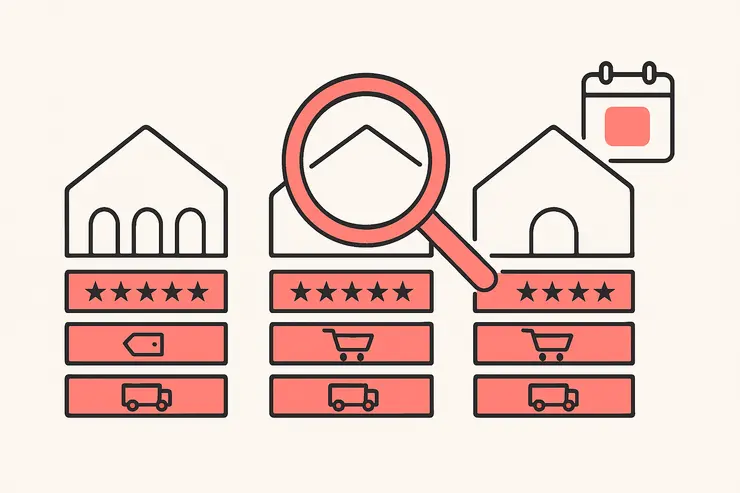
A Shopify storefront broken into its theme, its installed apps, its price points and its ads

That list is deliberately short. Analyzing a competitor is not a research project, and treating it as one is why people give up. One merchant who studies stores for a living put it plainly on r/dropshipping: going through a store top to bottom was "eating 30-40 minutes per store" and still produced nothing useful, until they cut it down to a fixed handful of checks. Narrowing the questions is what turns two stores an afternoon into fifteen.

How to analyze a Shopify store, step by step

Run the four checks in this order every time. Each one narrows what the next one means, and the whole pass takes about four minutes.
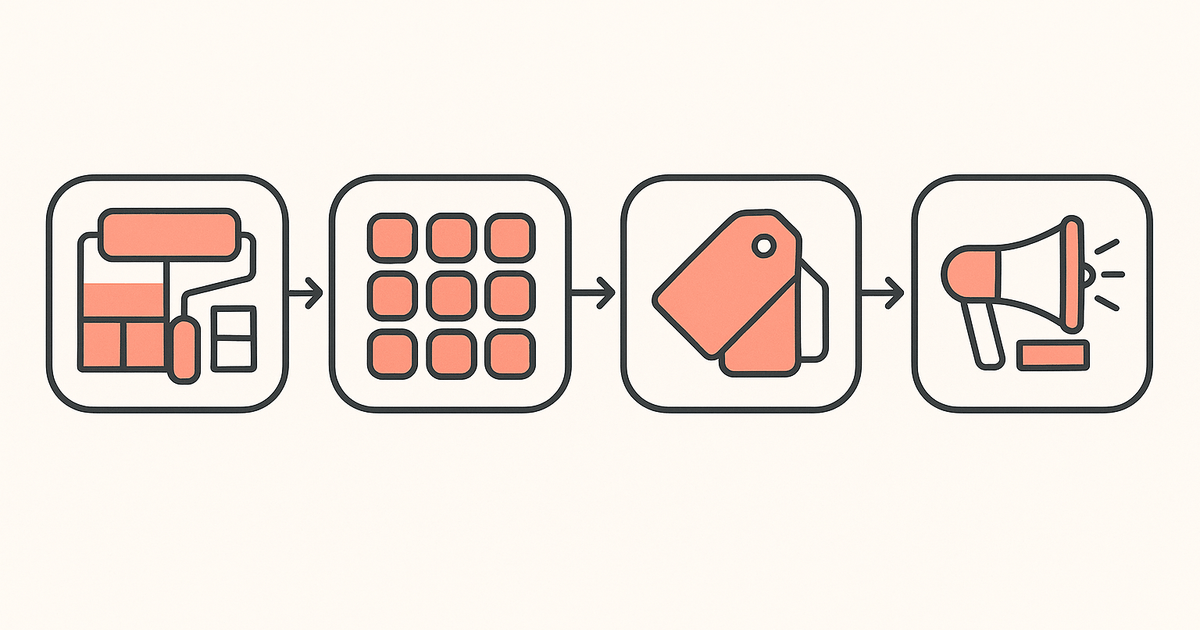
The four steps of a store analysis in order: theme, apps, catalogue and prices, then ads

1. Identify the theme

The theme is the foundation everything else sits on, so it goes first. Koala Inspector shows the active theme name on its first screen, with a link straight through to that theme in the Shopify theme store. Theme detection is free and costs no tokens.

What it tells you. A store on a free Shopify base theme is spending its money elsewhere, usually on ads or product. A store on a premium conversion theme has decided the storefront itself is the lever. And a heavily customised build tells you there is a developer on the payroll, which changes how realistic it is to copy them.

How to act on it. If a competitor's storefront converts and you are still choosing, start from their theme rather than from a gallery. You get the same section layout, the same mobile behaviour and the same speed profile on day one. Our free Shopify theme detector does this check without installing anything if you only need the name.

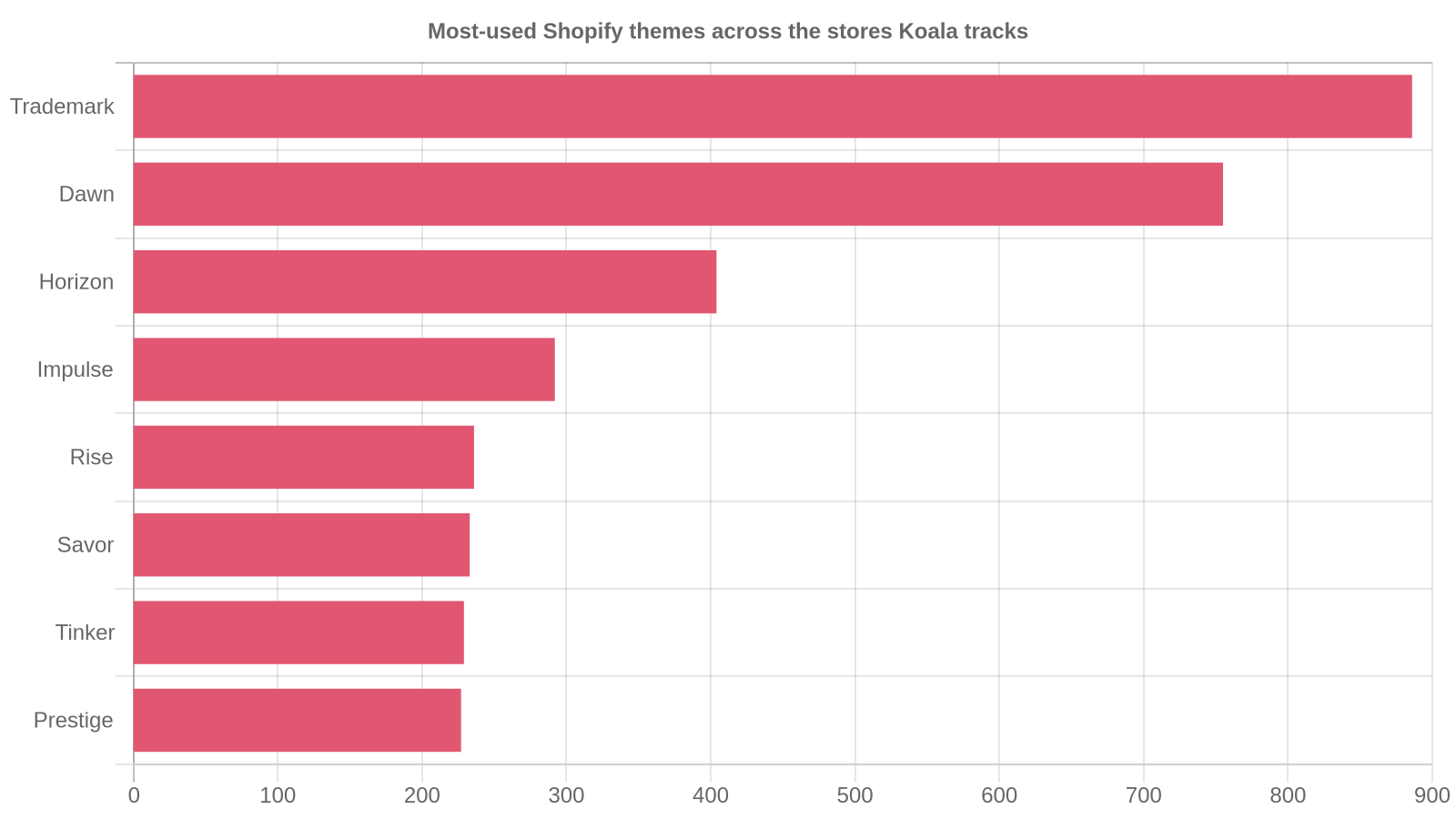
Across the Shopify stores Koala tracks, theme choice clusters hard around a handful of names:
Most-used Shopify themes across the stores Koala tracks

Trademark leads with 886 stores, then Dawn at 755, Horizon at 404, Impulse at 292, Rise at 236 and Savor at 233. Those counts cover the stores Koala tracks rather than all of Shopify, so read them as what active stores keep choosing, not as a global census. The useful takeaway is that the field is narrow: your competitor is probably on one of ten themes, and you can have the same one this afternoon.

2. Read the app stack

Apps are the closest thing to a public statement of strategy a store makes. Koala Inspector lists every app the store has installed and groups them by job, with a link out to each one's Shopify App Store listing. App detection is free too.

What it tells you. Where the money and attention go. A store with a review app, an email and SMS app and a bundle builder has decided its growth comes from social proof, owned audience and average order value, in that order. A store with a page builder is testing landing pages. A store with a currency converter and a tracking app is selling internationally and expects the shipping questions.

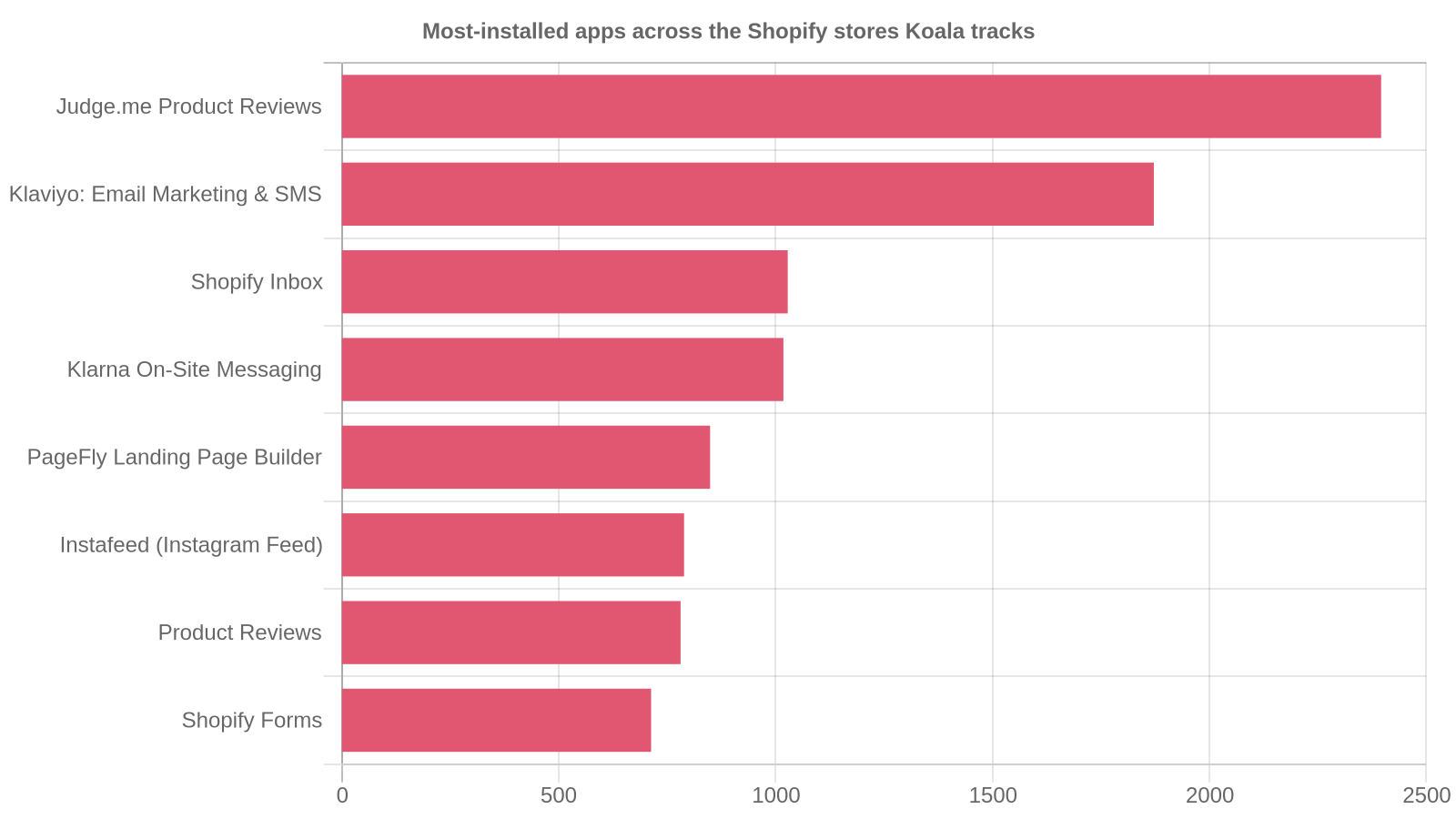
How to act on it. Copy the categories before you copy the tools. Across the stores Koala tracks, the same jobs come up again and again:
Most-installed apps across the Shopify stores Koala tracks

AppStores running it
Judge.me Product Reviews2,396
Klaviyo: Email Marketing & SMS1,872
Shopify Inbox1,028
Klarna On-Site Messaging1,018
PageFly Landing Page Builder849

Reviews and email sit at the top by a wide margin. If a store you are studying skips both, it is leaving the two cheapest conversion levers untouched, and that is as useful a finding as anything it does run. Our free Shopify app detector runs the same check from a pasted URL.

3. Pull the catalogue and the price points

Now open the products view. You get the full catalogue, the likely best-sellers, the total product count, the price range from low to high, and the date the first product was published. Sort by date added to see what the store has been pushing lately, and favourite anything you want to check again next month. All of it is free, and you can export the list to CSV for 1 token.

What it tells you. The offer, and the margin they are chasing. A twelve-product store with one item at four times the price of the rest is a hero-product operation, and that one product is carrying everything. A 900-product catalogue with a flat price band is a volume play living on ad efficiency. Price range plus product count tells you which game you have walked into before you read a single product page.

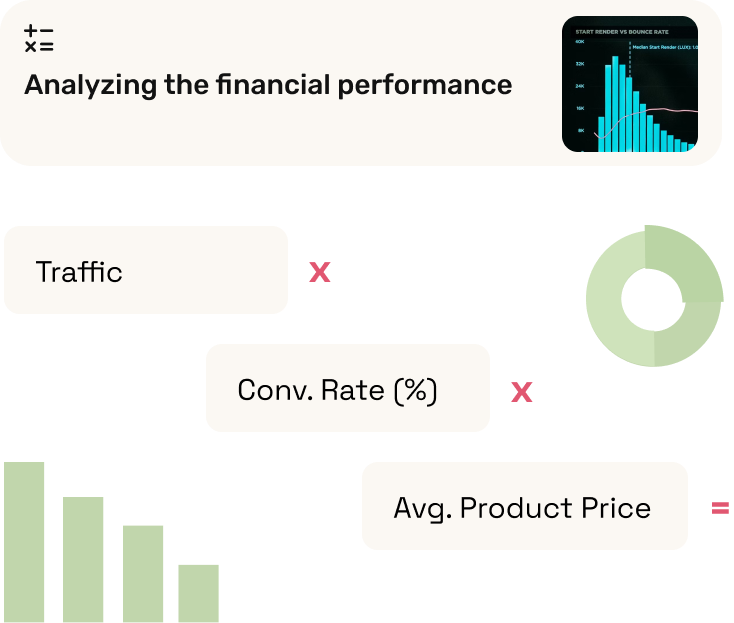
How to act on it. Pull their price ladder and put it next to yours. If they anchor at $89 and you anchor at $39, you are not competing on the same shopper. Then run the arithmetic: our free Shopify revenue calculator multiplies traffic by conversion rate by average order value, so you can size the store from its own numbers rather than guessing.

4. Check what ads it is running

Last, look at what the store is paying to say. The Ad Campaigns view splits into Google and Facebook or Instagram, and each campaign card carries the URL, title, description and tags. It costs 2 tokens, so a free plan covers about seven ad checks a month.

What it tells you. Their tested messaging, handed to you. Ad copy is the one part of a competitor's marketing that has been through real money and real feedback. The angle they lead with is the angle that worked, and the offer in the ad is the offer they are willing to pay to promote.

How to act on it. Note the hook and the offer, then check whether the landing page matches. A store running a heavy discount in its ads while its site shows full price is testing a segment, and that gap is where you can undercut. In Koala's own ad-activity data the busiest advertisers are running dozens of Facebook creatives at once, so what you see is a portfolio of tests rather than one message.

Finish by adding the store to tracking if it is worth following. Shop Tracking costs 15 tokens per store and logs apps added or removed, theme swaps, new and dropped products, price changes and variant changes across more than ten event types. It is the one feature the free plan does not include; Premium covers up to 50 stores. This is the check that catches the thing you cannot catch by looking twice a year: one merchant spent three weeks debugging ads and copy before finding out a competitor had cut prices 22% the whole time.

Three questions people ask a store analyzer

Most searches that land here are really one of three specific jobs. Each has a short answer and a tool page that does only that job.

How do I check what theme a Shopify store is using? Open the store and click Koala Inspector; the theme name is on the first screen with a link to install it. It handles customised and renamed themes, and the two it cannot name are a fully bespoke build and a headless storefront, because neither is based on a standard Shopify theme. No install needed? Use the Shopify theme detector.

How do I see what apps a Shopify store uses? The Apps screen lists every installed app, grouped by type, with a "Get App" link to each listing. It is free and unlimited. From a pasted URL instead, use the Shopify app detector.

How do I estimate a Shopify store's sales? No outside tool reports exact sales, because only the owner sees the real dashboard. Koala Inspector gives you an estimated traffic and sales read modeled from public signals any visitor's browser can already see, sampled over time. Treat it as a range and a direction rather than a figure: a store reading around $40k a month is a $30k to $60k store, and three reads across three weeks tell you far more than one. To do the arithmetic yourself, use the Shopify revenue calculator, or see the full method on our Shopify sales tracker page.

What a store analyzer cannot tell you

Honesty here saves you from bad decisions later.

It cannot see inside the admin. Orders, customers, real revenue, ad spend and margin all live behind a login, and no browser tool reaches them. Sales and traffic figures are modeled estimates, useful for comparing two stores and for spotting a trend, and useless as accounting.

It cannot read a store that is not on Shopify. Open the extension on a WooCommerce or BigCommerce site and it says so rather than guessing.

It cannot name a fully bespoke theme, because there is no standard theme underneath to recognise.

And it cannot tell you whether a competitor is profitable. A store can look enormous and still be losing money on every order. What the analysis gives you is the shape of their operation: what they sell, at what price, on what foundation, with what tools, and what they are paying to say. That is enough to decide who is worth copying.


See What Any Shopify Store Is Actually Doing

Most merchants build strategy from guesswork: copying stores that look successful, picking products because they seem trendy, pricing by gut feel. Koala Inspector replaces that with real data. Open any Shopify store, click the extension, and see the theme, apps, bestsellers, and pricing the store is running right now. No subscriptions required to start.

See What Any Shopify Store Is Actually Doing

Competitor Research Without the Spreadsheets

Other tools require you to log into a dashboard, search for a store, wait for data to load, then cross-reference what you find. Koala Inspector works as you browse. Visit a competitor's store and the panel opens automatically with the full breakdown. Theme version, installed apps, top products by sales velocity, traffic sources, and social links, all in one view without leaving the page.

Competitor Research Without the Spreadsheets

Watch Inventory Change Over Time

Spotting a competitor's bestsellers is useful. Knowing when they quietly added 12 new products last Tuesday is more useful. Koala Inspector logs new product additions and removals over time so you can see how fast a store refreshes inventory, which categories they are doubling down on, and whether they are testing price changes on specific items.

Watch Inventory Change Over Time

Copy the Theme and App Stack of Stores You Admire

Choosing a Shopify theme is easier when you know which theme the store you want to copy is running. Koala Inspector shows you the exact theme name and version alongside the full app stack for any store you visit. See which checkout apps, review tools, and upsell widgets successful stores in your niche have installed, then make your stack choices with real examples to reference.

Copy the Theme and App Stack of Stores You Admire

What our clients are saying

Rated 4.72 stars by merchants who already use it.

Absolutely fantastic app! It's incredibly easy to use and has provided me with valuable insights for my e-commerce strategy. I use it on competitors and on my own store.
Rob Rose
I'm new to this kind of research environment, and this app makes everything easy. Customer service is also super friendly and will answer any questions you have so that you keep getting the best out of the app.
Nadia Am
Started out with the free Koala Inspector tool, was B-L-O-W-N AWAY at the information it brought back so I went back to the site to try a 3-day free trial of the best of the best. And again, was NOT disappointed at all!
Susan Campbell
Very handy tool for working out what products to add on our site. See particular trends and get ideas for advertising by looking at other companies all in one streamlined view.
Charles
It is an incredible tool that allows me to see information about my competitors and go one step ahead. Very detailed information.
Jonatan Correa
Incredibly powerful tool for any e-commerce retailer. All of the necessary competitive data you need to run your business efficiently against your competition is just a click away.
Nick Bozzuto

Shopify Store Analyzer FAQ

Common questions about how Koala Inspector works and what data it shows.

What is a Shopify store analyzer?+

A Shopify store analyzer is a tool that reads what a Shopify storefront already shows the public and organises it into one report. A good one answers four things about any store you open: which theme it runs, which apps it has installed, what it sells and at what prices, and whether it is currently paying for ads. Koala Inspector is a free Chrome extension that does this on any Shopify store you visit, with no login, no store access, and nothing to paste.

How do I analyze a Shopify store?+

Work in a fixed order so you never lose your place. First identify the theme, which tells you the foundation the storefront is built on. Second read the app stack, which shows where the store spends effort on reviews, email, bundles and upsells. Third pull the catalogue and the price points, which tell you the offer and the margin they are chasing. Fourth check the ads, which show the messaging they are paying to put in front of shoppers. Koala Inspector puts all four in one panel.

Is Koala Inspector free to use?+

Yes, free forever with no credit card. Store analysis, app detection, theme detection, catalogue browsing and best-sellers never cost anything. The free plan also carries 15 tokens a month for the deeper reports, such as the full traffic profile at 3 tokens and ad campaigns at 2. Premium is $22 a month for 220 renewing tokens and tracking of up to 50 stores, and one-time token packs run from $3.99 to $11.99.

How do I check what theme a Shopify store is using?+

Open the store and click Koala Inspector: the active theme name appears on the first screen with a link straight to that theme in the Shopify theme store. If you would rather not install anything, paste the store URL into our free online Shopify theme detector. Both are free, and both work on customised and renamed themes.

What is the Chrome extension for Shopify that shows a store's apps?+

Koala Inspector. It is a free Chrome extension that detects the apps installed on any Shopify store and groups them by job, such as reviews, email and SMS, page building, bundles and upsells, with a link out to each app's Shopify App Store listing. App detection costs no tokens. There is also a paste-a-URL version of the app detector if you prefer not to install anything.

How can I tell whether a Shopify store is legitimate?+

Check facts rather than vibes. Look at the store's creation date, because a storefront opened three weeks ago selling hundreds of unrelated products is a different risk from a five-year-old catalogue. Look at the product count and price range for the same reason. Look for a real review app rather than hardcoded star graphics, and for a working returns and contact page. Koala Inspector shows the creation date, product count, price range and installed apps for free, which covers most of that check in about thirty seconds.

Can the store owner tell when I analyze their store?+

No. Koala Inspector reads information the storefront already shows any visitor, from inside your own browser. It never touches the store's admin, orders or checkout, and the owner sees nothing.

Other Shopify questions we get asked

Questions merchants bring up while they are researching stores.

Am I eligible for the offer after I transfer the development stores?+

No. Shopify's partner documentation is explicit that after transfer to the client, a store is not eligible for promotions or free trials. So claim any introductory offer before you hand development stores over to the merchant. Analyzing a store from the outside has nothing to do with this: Koala Inspector reads public storefronts and never touches a plan, a trial or billing.

Anyone else notice big swings day to day even with a stable store?+

Yes, and anyone else running a modest catalogue sees the same thing. A single day is a small sample, so what you notice as a crash is usually normal variance on a stable store. Compare seven days against the previous seven before you change anything. Real swings usually have an outside cause, and the two most common are a competitor cutting prices and a competitor changing an offer, which is exactly what a store analyzer or an ongoing tracker is for.

Are Shopify and MyShopify the same?+

They point at the same store. Every store gets a myshopify.com URL when it signs up for Shopify, and that address stays the store's permanent internal handle even after a custom domain is connected. Shopify lets you change the myshopify.com name only once. So brand.myshopify.com and brand.com are usually the same shop, which is why a store analyzer reports the same result for both.

Can I use my own domain name with Shopify?+

Yes. Shopify lets you use a domain you buy from Shopify or from any third-party domain provider, and a personalised domain name helps build trust compared with the default myshopify.com address. Connecting one does not change what a store analyzer can read, because the storefront is the same either way.

Are Shopify point of sale payments secure?+

Shopify is certified Level 1 PCI DSS compliant, and that compliance applies by default to every store on the platform across all six PCI standard categories. Card payments taken at a Shopify point of sale terminal run on the same certified rails as the online checkout, so the secure handling of card data is Shopify's job rather than yours. Your own risk sits in staff permissions and refund policy.

Are you ready to upgrade to Shopify Plus?+

You are ready to upgrade to Shopify Plus when the standard plan starts costing you money in ways you can measure: checkout logic you cannot express, wholesale or B2B buyers you are serving by hand, several regional storefronts you are running as separate accounts, or peak traffic your promotions cannot absorb. Shopify Plus is pitched at enterprise and mid-market brands and quotes capacity like 10,000+ checkouts per minute. If none of those pinch, the money buys more growth in ads and product.