How do you check a Shopify store's revenue? You estimate it, because no store publishes the real figure. Install Koala Inspector free, open the store in Chrome, and the extension reads that store's estimated sales and traffic, its likely best-sellers, its installed apps, and its active theme in one view. Prefer to do the arithmetic yourself? Our free Shopify revenue calculator multiplies traffic by conversion rate by average product price for you.
How to read a Shopify sales estimate
The number you get back is a modeled estimate, not a bank statement, and the sellers who get real value out of it read it in a specific way.
Treat it as a range, not a figure. A store that reads at roughly $40k a month is a $30k to $60k store. That band is enough to answer the only question that matters early on: is this competitor operating at a scale worth copying, or are they smaller than you assumed?
Expect it to move, and watch which way. Estimates shift as a store's traffic, catalog, and ad spend shift, and they are sampled over time rather than pulled from one moment. A single read is a snapshot. Three reads across three weeks tell you whether a competitor is climbing, flat, or fading, and that direction is far more actionable than any single month's total.
Sanity-check it against the catalog. Two cross-checks take ten seconds each. First, the product count: a 12-product store reading at enterprise revenue is almost always one hero product carrying everything, so go find out which one. Second, the best-seller ordering: if the products the store pushes hardest on its homepage also sit at the top of the best-seller list, the estimate is consistent with the storefront. If the revenue read looks huge but the best-sellers are scattered and the prices are low, you are probably looking at heavy traffic on thin margins.
Compare stores against each other rather than treating one number as gospel. Two stores in the same niche, read the same way on the same day, give you a ranking you can trust even when neither absolute figure is exact.
Shopify sales tracker: follow a store instead of checking it once
A revenue checker answers "how big is this store right now." A sales tracker answers "what changed." Koala Inspector's Shop Tracking does the second job: add a competitor and it re-checks that store for you and logs what moved, including apps added or removed, a theme swap, new or dropped products, price changes, and variant changes, across more than ten event types. Notifications are a per-store toggle.
Tracking costs 15 tokens per store and is the one feature the free plan does not include. Premium ($22 a month, 220 renewing tokens) covers up to 50 tracked stores, enough to keep an entire niche under watch. For most categories a monthly check is plenty. In fast movers like fashion and electronics, where catalogs and ad spend swing week to week, tracking is what keeps you from finding out a month late.
Shopify revenue estimator: what the number is built from
Every credible revenue estimate rests on the same three inputs: how many people visit the store, what share of them buy, and what they spend per order. Multiply those and you have a working monthly figure.
That is exactly what our Shopify revenue calculator does when you already know the inputs. The hard part is never the multiplication, it is getting honest inputs for a store that is not yours. Koala Inspector fills them in: estimated traffic volume and sources, the store's price range and average product price, and which products are actually moving. All of it is modeled from the public signals any visitor's browser can already see, never from a store's private dashboard.
Free plan users get 15 tokens a month, and a full traffic profile costs 3 of them, so you can run about five deep store reads a month without paying anything. The store overview, app list, theme, product catalog, and best-sellers stay free and unlimited.
How to check another Shopify store's sales
Four steps, and the whole run takes less time than reading this section.
- Install Koala Inspector from the Chrome Web Store. Free, under a minute, no card.
- Open the store you want a number on in Chrome and click the Koala icon.
- Read the store overview: estimated sales and traffic, product count, price range, and the best-seller list.
- Come back in a couple of weeks, or add the store to tracking so the changes come to you.
You never touch the store's admin, and you never need permission. If the site is not on Shopify, the extension says so instead of guessing.
A worked example: from an unfamiliar store to its full playbook
Say a competitor's ad keeps showing up in your feed and you have never heard of the brand. Here is the run, start to finish.
Minute one: size the store. Click the extension on their homepage. You get the estimated sales and traffic read, the product count, the price range, and the date the store was created. A store created eight months ago already pulling meaningful traffic is a very different competitor from a five-year-old catalog coasting on brand search.
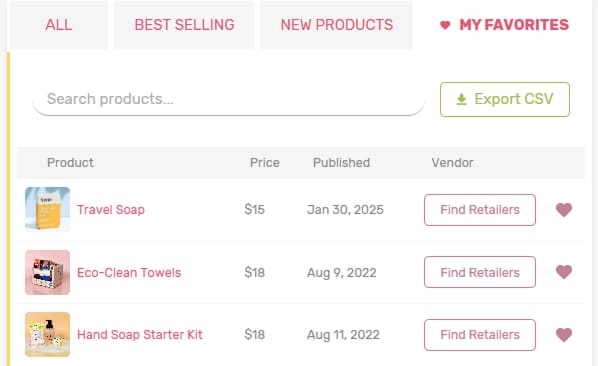
Minute two: find the hero product. Open the best-sellers view and sort the catalog. In most dropshipping stores one or two products carry the revenue and the rest is padding. Now you know what the ad spend is actually funding, and you can favorite those products to check them again later.
Minute three: read the stack. Switch to the apps list and the theme name. This is where the estimate turns into a plan. The apps tell you how they capture email, collect reviews, and build offers. The theme tells you which foundation to start from if you want a storefront that behaves like theirs. Both are free to check, and both link straight out to the Shopify App Store and theme store.
Minute four: check the ads. If they are running Google or Meta ads, the Ad Campaigns view (2 tokens) shows the creatives and offers they are paying to put in front of shoppers. That is a competitor's tested messaging, handed to you.
What a competitor's app and theme stack tells you
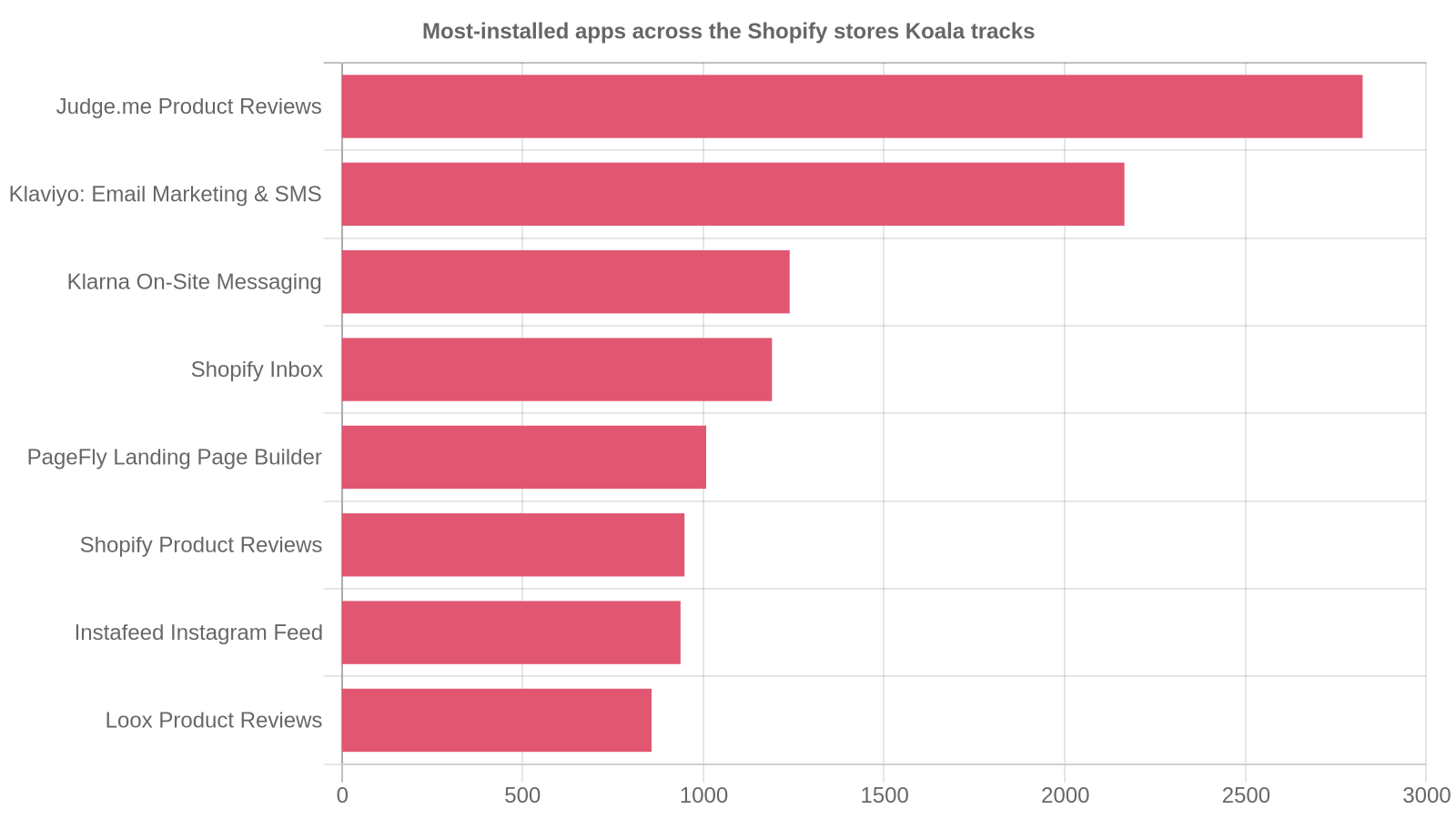
App choices are the closest thing to a public statement of strategy a store makes. Across the Shopify stores Koala tracks, the apps that turn up most often cluster hard around social proof and email:
| App | Stores running it |
|---|---|
| Judge.me Product Reviews | 2,824 |
| Klaviyo: Email Marketing & SMS | 2,165 |
| Klarna On-Site Messaging | 1,239 |
| Shopify Inbox | 1,190 |
| PageFly Landing Page Builder | 1,008 |
Those counts cover the stores Koala tracks rather than all of Shopify, so read them as what serious stores keep choosing, not as a global census. The signal is clear enough: reviews and email show up before almost anything else, and a store you are studying that skips both is leaving the two cheapest conversion levers on the table.
Themes cluster the same way. Trademark leads the stores Koala tracks with 1,067, followed by Dawn at 875, Horizon at 507, Impulse at 339, and Rise at 308. When you find a competitor whose storefront converts, checking their theme first is the fastest shortcut to a similar build. Our Shopify theme index has the full list.
Other free Shopify revenue checkers
You have options, and they are worth knowing. ShopScan's Shopify Store Revenue Checker and BrandSearch's Shopify revenue estimator both return a figure from a URL, and SellerCenter's sales tracking tool does the same. Paste a domain, get a number.
The difference is what happens next. A one-shot estimate leaves you with a figure and nothing to do with it. Koala Inspector sits in the browser you are already researching in, so the revenue read arrives alongside the best-sellers, the apps, the theme, the ad creatives, and an ongoing change feed for the stores you care about. That is the gap between knowing a competitor does well and knowing why.