How to Research Shopify Stores in Claude and ChatGPT (5 Real Prompts)
 By Assaf ShalinNovember 20, 2026
Ask a chat assistant which apps a Shopify store runs and it has two options: guess from what it learned in training, or search the web and summarize somebody's two-year-old blog post. Neither tells you what the store runs today, what it sells best, or how many other stores are chasing the same customers.
Koala Inspector now plugs straight into your assistant. Koala MCP - AI Connector, open to every Koala Inspector user since 18 November 2026, gives Claude, ChatGPT, Cursor, VS Code and other AI apps a set of research tools backed by Koala's continuous analysis of about 970,000 Shopify stores. You ask in plain words. The assistant picks the tool, shows you its price in Koala tokens, and writes the answer up.
We connected it to Claude and asked five questions a seller would actually ask. Below are the prompts, what came back, and what each one cost.
Table of contents
- What Koala MCP gives your assistant
- How to connect it
- Five real prompts and what came back
- Chain questions into a research session
- What it costs
- Prompts to copy
- FAQ
What Koala MCP gives your assistant
MCP (Model Context Protocol) is the open standard that lets ChatGPT, Claude and Cursor use outside tools, and Koala MCP is how they use Koala Inspector. Once you connect it, your assistant can call 24 tools, and they fall into three groups:
- One store. Its profile (apps, theme, niche, markets, social profiles), best-selling products, recent changes, ad campaigns, Live Trends, website traffic with an estimated revenue range, and the apps bigger stores in its niche use that it doesn't.
- One product. Its price and stock history, where else it is sold (AliExpress and other Shopify stores), how many stores sell the same listing, and where its price sits against the market.
- A whole market. How many stores a niche has and how many closed, what sells there and at what prices, what is heating up, how much stores are discounting, which countries to sell in, and Top 10 lists of stores and products.
Most of what the extension's panel shows for one store, your assistant can now pull for many stores in one go, then compare, summarize and turn into a plan or a table. If you already use Koala Inspector to analyze a store, this is the same data with an analyst on top.
How to connect it
Connecting happens entirely inside the Koala Inspector extension. There is no code to write and no API key to copy.
- Install Koala Inspector from the Chrome Web Store (free).
- Open the panel menu, go to Account, then Koala MCP.
- Pick your assistant: Claude, ChatGPT, Cursor or Other apps.
- Koala copies your link and opens the right page in that assistant.
- When the assistant connects, Koala Inspector opens over its page. Click Allow.
- Ask your first question.
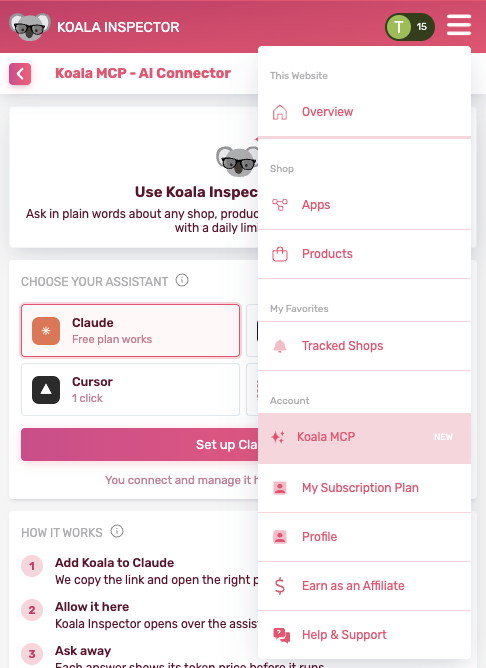
On Koala Inspector 4.36 and earlier, the same menu item and screen are called AI assistants. Update the extension and they read Koala MCP.
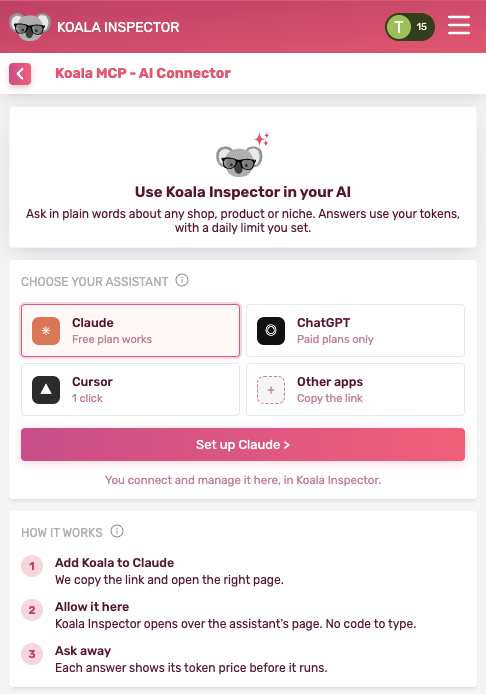
The steps differ a little by assistant:
- Claude (claude.ai and the desktop app). Koala opens Claude's connectors page. Click + Add, then Custom, then Web, paste the link Koala copied, and click Connect. It takes about a minute, and the free plan works. Claude's free plan allows one custom connector, so remove another one first if you already have one. On Claude Team or Enterprise, the workspace owner adds the connector first.
- ChatGPT (paid plans). Turn on Developer mode in ChatGPT's settings under Advanced, choose Create, paste the link, choose OAuth, and click Create. About two minutes. Then pick Koala Inspector from the + menu in each chat where you want it.
- Cursor. One click: Cursor asks to install it, then a page opens where Koala Inspector asks you to allow it.
- VS Code and other apps. Pick Other apps. VS Code has a one-click button. Claude Code takes one command, and any app that accepts a remote MCP server takes the link
https://koala-inspector.koala-apps.io/mcp(choose OAuth if it asks how to sign in).
Whichever you pick, the last step is the same screen:
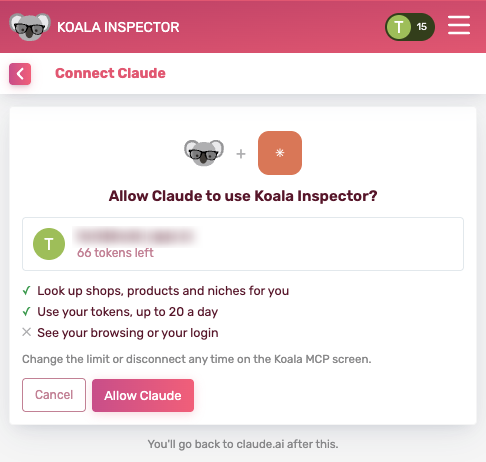
That screen says exactly what the assistant gets: it can look up shops, products and niches for you, and spend your Koala tokens up to your daily limit.
Five real prompts and what came back
We asked each of these in Claude on 20 November 2026. The figures below are what Koala Inspector returned that day, and the token cost is what the call charged.
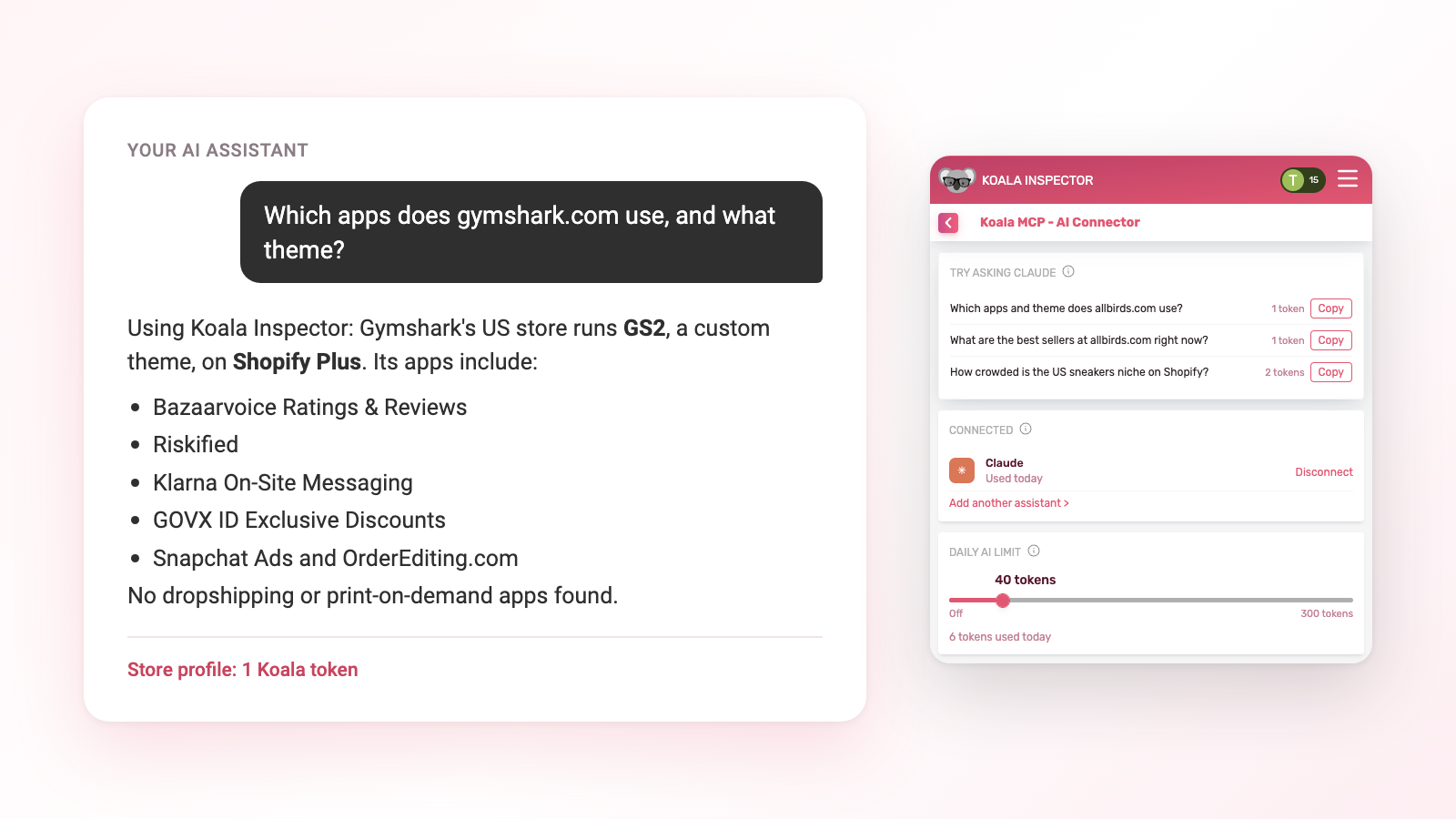
1. "Which apps does gymshark.com use, and what theme?"
Tool called: Store profile. Cost: 1 Koala token.
Gymshark's US store runs GS2, a custom theme that isn't in the Shopify Theme Store, on Shopify Plus. The app list came back with what each app is for, its rating and its pricing. Among them: Bazaarvoice Ratings & Reviews, Riskified, Klarna On-Site Messaging, GOVX ID Exclusive Discounts, Snapchat Ads, Smartzer Live & Video Shopping and OrderEditing.com, plus the Facebook & Instagram and Google & YouTube sales channels. It found no dropshipping or print-on-demand apps. The same answer covered the store's size: about 10,400 live products at a median price of $24.
What to do with it. A big brand's stack is a shortlist you can test. GOVX ID, for example, is a discount app for military and first responders, a segment worth a look for any activewear store. Ask the follow-up straight away: "Which of these apps are free to install?" The answer already holds the pricing, so your assistant can filter it without another paid call.
2. "What are the best sellers at allbirds.com right now?"
Tool called: Best selling products. Cost: 1 Koala token.
The answer listed the top 10 in the store's best-seller order, with prices, sale prices and stock. The Men's Wool Runner in Natural Grey led at $77, marked down from $110. Second was the Women's Tree Breezer in Jet Black at $31.50, down from $105. Six of the top 10 were on sale, and every one was in stock.
What to do with it. Read the ranking together with the discounts. When most of a store's best sellers are marked down, the list tells you what is clearing, which is a different signal from what customers pay full price for. Best Selling Products is a ranking, so treat it as an order, never as unit counts. For more on reading these lists, see how to find a Shopify store's best sellers.
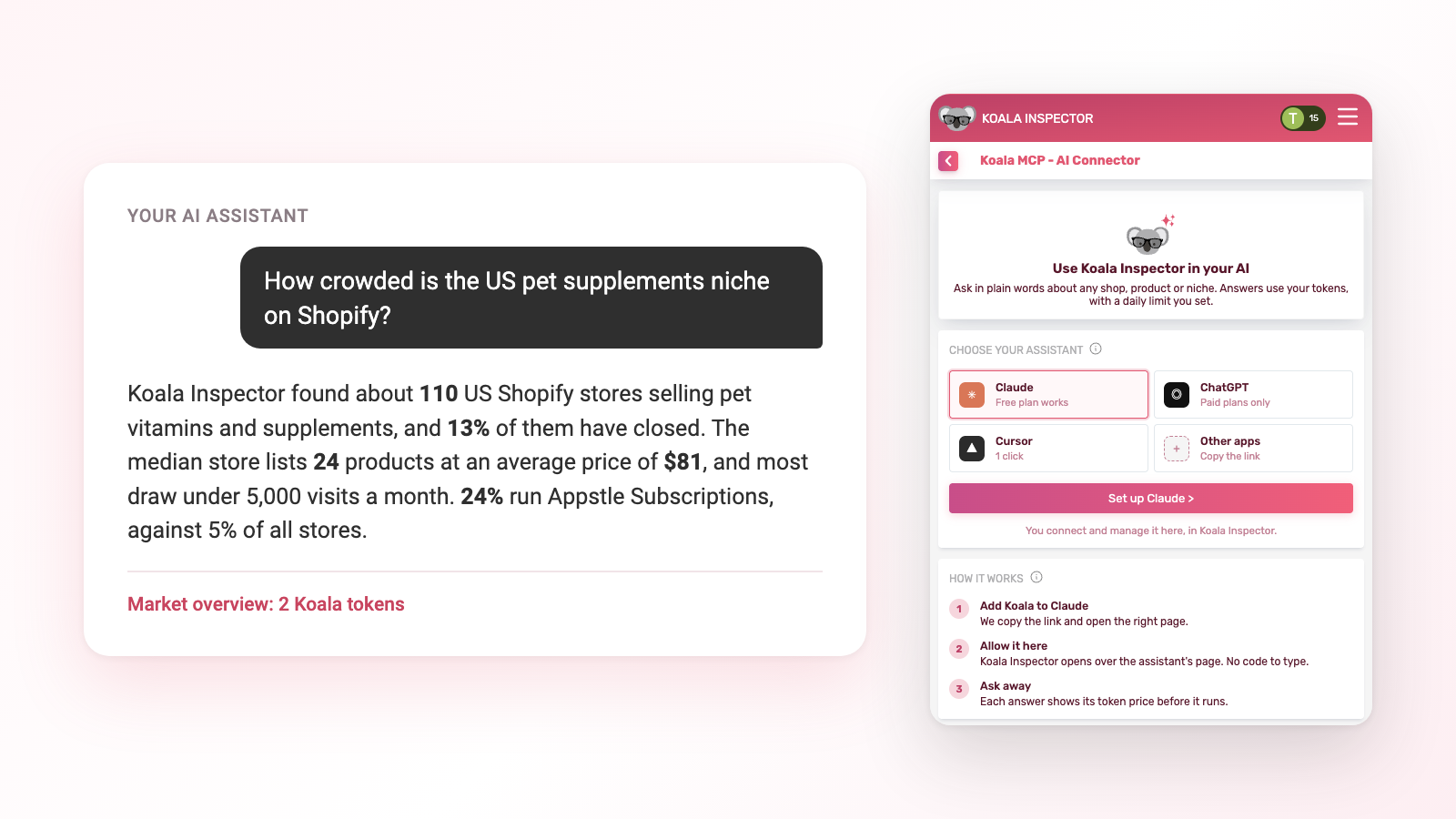
3. "How crowded is the US pet supplements niche on Shopify?"
Tools called: Find (free), then Market overview. Cost: 2 Koala tokens.
The assistant first resolved "pet supplements" to the niche Pet Vitamins & Supplements, for free, then ran the market overview on US stores:
- Koala Inspector found about 110 US Shopify stores in the niche, and 13% of them have closed.
- The median store lists 24 products, at a median average price of $81.
- Of the stores with known visits, about 3 in 4 draw under 5,000 visits a month.
- 24% run Appstle Subscriptions, against 5% of all Shopify stores. Klaviyo is on 41% (25% across Shopify) and Judge.me reviews on 36% (27%).
What to do with it. A small niche of small stores, where a quarter sell on subscription, tells you how the winners make their money: repeat orders. If you enter, plan for subscriptions from day one. And for the deeper "which product, at what price" question, ask "What sells in this market?" next.
4. "Is $39 a good price for a yoga mat?"
Tool called: Price check. Cost: 2 Koala tokens.
Against about 650 yoga and Pilates mats from about 82 US stores, $39 sits at the 10th percentile: cheaper than most. The median was $129, the middle half of the market ran from $83 to $149, and the usual range was $40 to $189.
What to do with it. At $39 you would be the budget option in a market that mostly charges three times as much. That works if your product and sourcing are built for it, and leaves money on the table if they aren't. One tip: the answer names the product category it compared against, so check it. "Yoga mat bags and straps" and "yoga and Pilates mats" are different markets with very different prices, and naming the product type precisely gets you the right one. Once you have a price, find a supplier for the product and check your margin against it.
5. "Which countries should a skincare brand sell to next?"
Tool called: Where to sell. Cost: 2 Koala tokens.
Koala Inspector counted about 24,000 skin care stores. A third are based in the US (about 7,900), far ahead of the UK (1,900), Pakistan (1,800), India (1,500) and Australia (1,400).
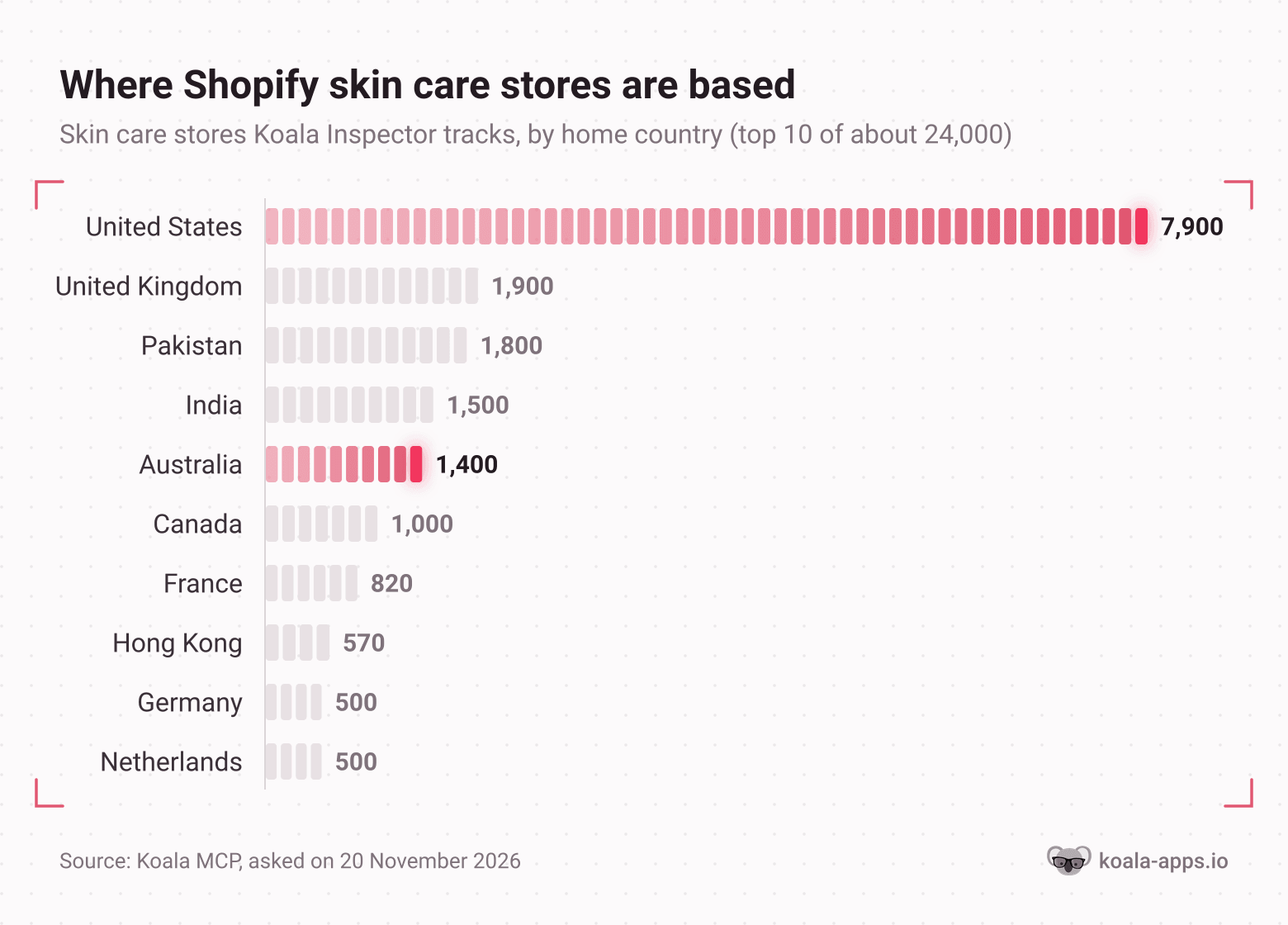
How to read this: the longer the bar, the more home-grown competition you meet in that country. The answer carried two more columns that change the picture:
- Price. Australian skin care stores have a median average price of $47, against $41 in the US and $9 in India. Australia has about a sixth of the US store count and charges more.
- Growth. 32% of Spain's skin care stores launched in the last 12 months, and 40% of Hong Kong's, against 13% in the US. Those markets are filling up fast.
The answer also counted where stores ship: 68% ship to the US and 54% to the UK, so a country with few local stores can still be crowded by brands shipping in.
What to do with it. Shortlist the countries where local competition is thin and prices hold up (Australia stands out here), then ask for a market overview of that country before you spend on ads.
Chain questions into a research session
The real gain shows up when you stop asking one question at a time. Your assistant keeps the context, so a research session reads like a conversation with an analyst:
Look at gymshark.com. What's its app stack, what are its 10 best sellers, and roughly how much traffic and revenue does it get?
That calls Store profile (1), Best selling products (1) and Website traffic and revenue (3): 5 Koala tokens for a full store teardown. A few more combinations and what they cost:
| The question | Tools the assistant calls | Koala tokens |
|---|---|---|
| "How much does this store make and what sells?" | Store profile, Best selling products, Website traffic and revenue | 5 |
| "Is the MagSafe wallet niche worth entering?" | Find, Market overview, What sells in a market | 4 |
| Same, plus who leads it | add Top 10 stores | 9 |
| "Should I sell this product?" | Product saturation, Find retailers, Price check | 6 |
| "What should I launch in France this winter?" | What is heating up, Where to sell, Top 10 products | 9 |
Ask your assistant to turn the result into whatever you need next: a comparison table, a launch checklist or a list of apps to install. Those steps cost nothing, because it works from answers it already has. If you research the same competitors every week, the Shopify competitor analysis guide pairs well with this.
What it costs
You pay per answer in Koala tokens: your prepaid Koala Inspector credits, the same balance the extension uses. They have nothing to do with your AI assistant's own usage. As of November 2026:
| Koala tokens | Tools |
|---|---|
| Free | Find a store, niche, app or theme; Account and prices; Tracked shops; Stop tracking a shop |
| 1 | Store profile; Best selling products |
| 2 | Recent changes; Ad campaigns; App stack against bigger stores; Live Trends; Product details; Find retailers; Product saturation; Price check; Market overview; What sells in a market; What is heating up; Discounts and sales; Where to sell; App adoption |
| 3 | Website traffic and revenue |
| 5 | Top 10 stores; Top 10 products |
| 15 | Track a shop (paid plans, as in the extension) |
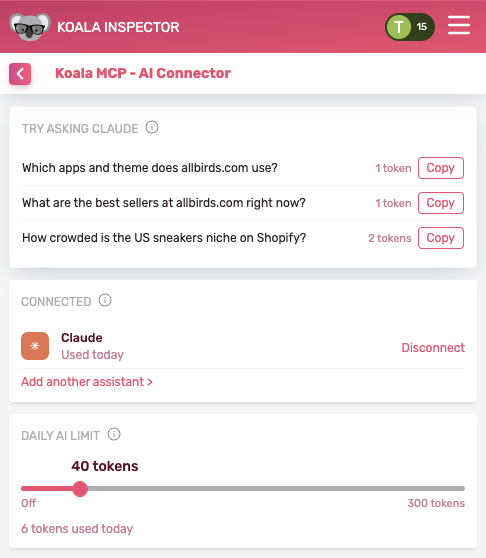
Four rules keep spending predictable. Each tool's price shows before it runs. The same question with the same input within 24 hours is free. Answers that find nothing cost nothing. And you set a daily limit on the Koala MCP screen, starting at 20 Koala tokens a day; set it to 0 to switch the assistant off. Every answer also lands in the extension's Token Usage as Koala MCP · tool · store, so you can see what each question cost.
As of November 2026, the free plan includes 15 Koala tokens a month, enough for a dozen store profiles or a handful of market questions. Premium is $22 a month with 220, and token packs start at $3.99. You buy them in the extension under My Subscription; see the pricing page for every plan.
Prompts to copy
Paste any of these into Claude or ChatGPT once Koala MCP is connected:
- "Which apps does gymshark.com use and what theme?"
- "What are the best sellers at allbirds.com right now?"
- "How crowded is the US pet supplements niche on Shopify?"
- "Where else is this product sold? (paste a product URL)"
- "Is $39 a good price for a yoga mat?"
- "Which countries should a skincare brand sell to next?"
- "What changed at this store in the last 90 days? (paste a store URL)"
- "What do bigger stores in my niche use that mine doesn't? (paste your store URL)"
- "Which ads is this store running, and which products do they point at?"
- "Track this store and tell me what changes."
For a feature overview, prices for every tool and the full FAQ, see the Koala MCP page.
FAQ
Can ChatGPT or Claude look up data about a Shopify store?
On their own they rely on what they learned in training and on web search. Connect Koala MCP and they can call Koala Inspector's tools instead, which return a store's apps, theme, best sellers, traffic and an estimated revenue range, plus market numbers for any niche, from Koala's analysis of about 970,000 Shopify stores.
Does Koala MCP work on Claude's free plan?
Yes. Claude's free plan allows one custom connector, so if you already use one, remove it first. ChatGPT needs a paid plan, because custom connectors there sit behind Developer mode.
How much does a question cost?
Between 0 and 15 Koala tokens, depending on the tool the assistant calls, and the price shows before it runs. A store profile or a store's best sellers is 1, most research tools are 2, traffic and revenue is 3, a Top 10 list is 5 and tracking a shop is 15. The same question with the same input within 24 hours is free.
Does it use the same Koala tokens as the extension?
Yes. It draws on your one Koala balance, and a feature that exists in both costs the same in your assistant: traffic is 3, ad campaigns are 2 and tracking a shop is 15.

Want to see data on any Shopify store?
Download for free and start exploring a whole new ecommerce world!

Written by
Assaf Shalin
Co-founder & Developer, Koala Apps
Assaf Shalin is a co-founder of Koala Apps and one of the developers behind Koala Inspector. He builds the tools that let Shopify sellers see what is actually working in other stores, from installed apps and themes to best-selling products. On the blog he covers the technical side of store research: how competitor research really works, what public store signals can and cannot tell you, and how to turn them into decisions.
Connect on LinkedIn