Best Shopify Bundle Apps in 2026, Ranked by Real Install Counts
 By Koala TeamOctober 19, 2026
The three most-installed Shopify bundle apps are Kaching Bundles App & Upsells on 25,328 stores, Bundler » Product Bundles App on 20,754, and Frequently Bought Together CBB on 12,968, counted across the Shopify stores Koala tracks on 19 October 2026. Kaching and Bundler both build quantity breaks and fixed sets on the product page. Frequently Bought Together CBB does a different job: it recommends companion products and lets the shopper add the whole set in one click.
Most bundle roundups rank on an editor's shortlist. This one ranks on installs, so the order below reflects what working merchants chose and kept paying for.

Want to see apps on any Shopify store?
Download for free and start exploring a whole new ecommerce world!

What the install counts actually tell you
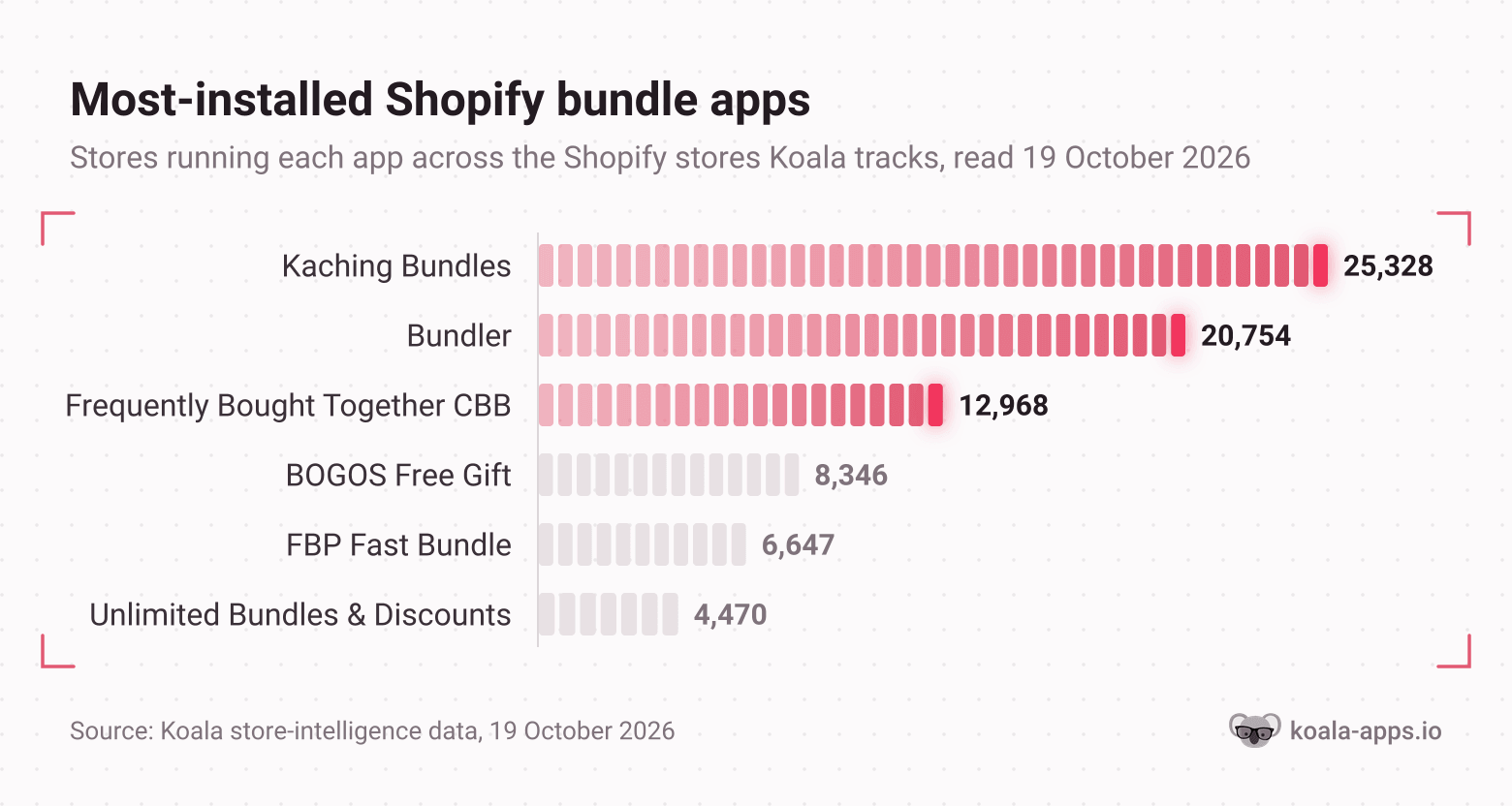
Read the shape of that chart before you read the names. The top two are separated by about 4,500 stores and the third sits at roughly half the leader, then the field drops away. That spread says the category has settled: quantity breaks and fixed sets are the default bundle merchants reach for, and everything more exotic is a minority choice.
Two honest caveats. These are counts across the Shopify stores Koala tracks, not a census of every store on the platform, and the coverage skews toward the dropshipping and direct-to-consumer stores our users research. And an install count measures adoption, not results. A popular app tells you which problem merchants in your niche keep paying to solve, which is a better starting point than a ranked opinion, and it is still your store that decides whether the offer converts.
The three bundle types, and which one your store needs
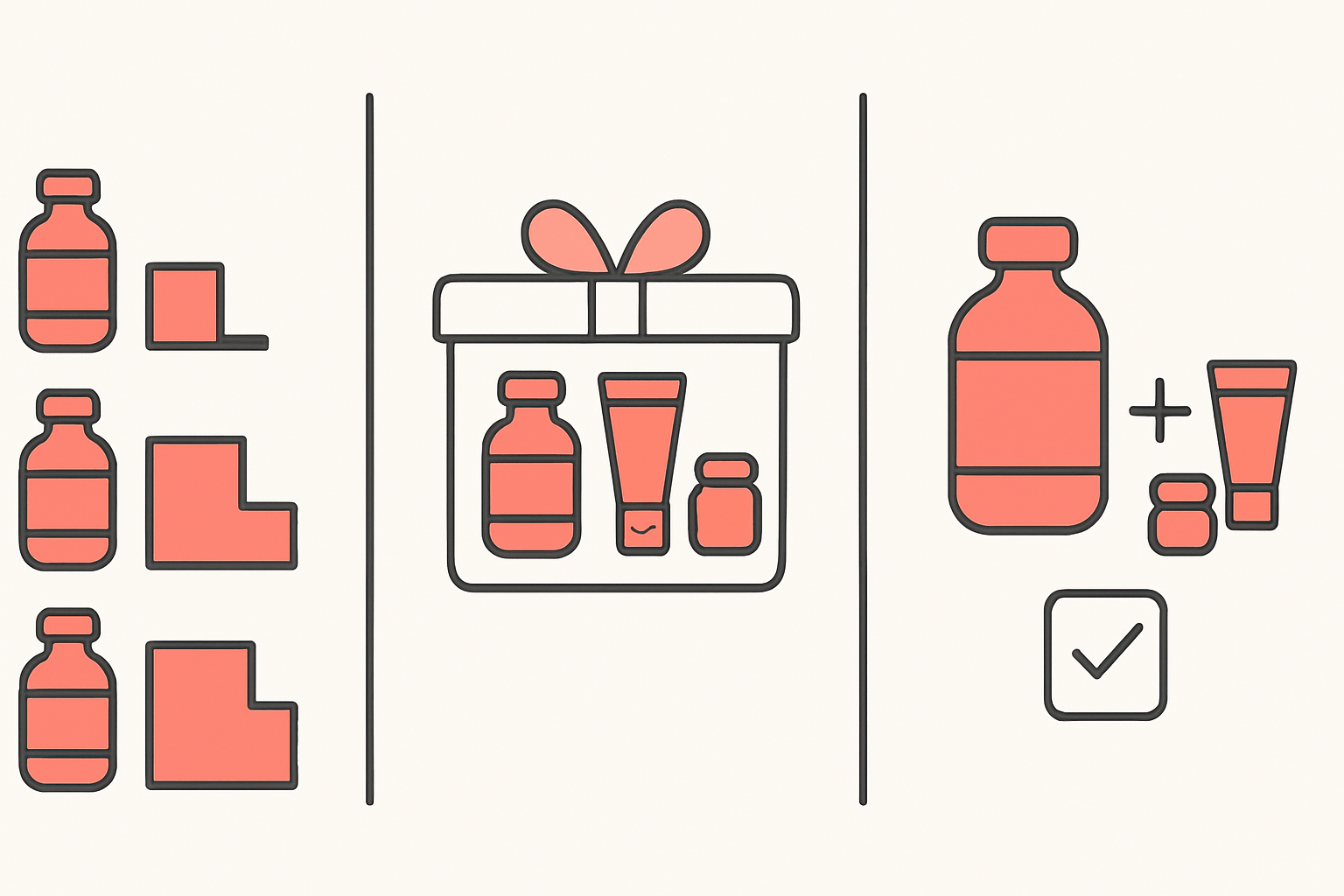
Quantity breaks price the same product cheaper as the shopper takes more of it. Buy 2 save 15 percent, buy 3 save 25 percent. This is the format for consumables and anything people restock: supplements, coffee, skincare refills, socks.
Fixed sets package different products at one price. A starter kit, a gift box, a three-step routine. These raise order value hardest because the shopper buys several SKUs in one decision, and they double as a way to move slow stock alongside a hero product.
Frequently-bought-together recommendations suggest companions to whatever the shopper is already looking at, with a single button to take the whole set. This is the accessories format: phone case plus screen protector, camera plus memory card.
Free-gift thresholds sit slightly apart. The shopper spends above a line and something is added at no charge. It raises cart value without discounting the product itself, which protects the price you worked to establish.
Kaching Bundles App & Upsells: 25,328 stores
The most-installed bundle app in Koala's data by a clear margin, and it is a product-page specialist. Kaching Bundles builds quantity breaks and volume discounts, fixed bundles, multipacks and mix-and-match sets, BOGO pricing, free gifts, and tiered discounts expressed as a percentage, a flat amount or a fixed price. It carries a 5.0 rating across 6,398 reviews, checked on 19 October 2026.
What the install count is telling you is which problem this app gets bought to fix. A store reaches 25,328 installs by solving the most common version of a problem, and the common version here is a single hero product with a healthy conversion rate and an order value stuck at one unit. The buy-2-save ladder is the shortest route out of that, and Kaching does little else to distract you.
It suits single-product and hero-product stores, consumables, and anyone running paid traffic who needs the first order bigger rather than a second order later. It is free to install with a 7-day trial, and the Starter plan runs 14.99 dollars a month.
Bundler » Product Bundles App: 20,754 stores
Bundler covers the same product-page ground and reaches further at the back end. Quantity breaks and volume discounts are on the free plan, mix-and-match bundles come with Premium, and it also builds fixed bundles and subscription bundles including subscription boxes. It rates 4.9 across 2,735 reviews.
The subscription support is why this one is worth a look even if Kaching fits your offers. Bundling and subscriptions collide constantly in practice. One merchant laying out a build-your-own-box stack on Shopify wanted three box sizes at flat prices, around 20 selectable SKUs priced at zero inside the box, a locked item count per size, and Recharge showing the real box price instead of zero. That is a specific, ordinary requirement, and the app that handles it is the one that understands a bundle as a product rather than as a discount rule.
Bundler suits stores with a real catalog, subscription or replenishment offers, and merchants who want to prove the format works on a free plan before paying. Premium starts at 9.99 dollars a month after a 7-day trial.
Frequently Bought Together CBB: 12,968 stores
Frequently Bought Together CBB from Code Black Belt is the recommendation app of the three. It puts an Amazon-style block on product and cart pages with AI-powered or manually set bundles, one-click add to cart, and four discount types: percentage, fixed, free item or free shipping. It can display star ratings pulled from review apps such as Judge.me, Loox and Yotpo, which matters more than it sounds, since the companion product is the one the shopper has no opinion about yet. It rates 4.9 across 1,210 reviews.
Its install count sits around half the leader's, and the reason is catalog shape rather than quality. Recommendations need products that genuinely pair, so a store with one hero SKU has nothing for it to suggest. The 12,968 stores running it are the accessory, component and multi-category catalogs where "what else do I need with this" is a question the shopper is already asking.
It suits catalogs with natural companions and enough order history for the recommendations to sharpen. The free plan covers testing, and Professional I is 9.99 dollars a month for up to 50 orders a month after a 14-day trial.
The comparison table
Install counts are Koala's own, read on 19 October 2026. Bundle types, ratings and prices come from each app's Shopify App Store listing, read the same day, and are linked so you can check them yourself before you subscribe.
| App | Bundle types it builds | Stores in Koala's tracked set | Free plan | Paid entry | Rating |
|---|---|---|---|---|---|
| Kaching Bundles App & Upsells | Quantity breaks, volume discounts, fixed bundles, multipacks, mix and match, BOGO, free gifts | 25,328 | Free to install, 7-day trial | $14.99/month | 5.0 (6,398) |
| Bundler » Product Bundles App | Quantity breaks, volume discounts, mix and match, fixed bundles, subscription bundles and boxes | 20,754 | Free plan, 7-day trial | $9.99/month | 4.9 (2,735) |
| Frequently Bought Together CBB | AI and manual frequently-bought-together recommendations, one-click add, four discount types | 12,968 | Free plan, 14-day trial | $9.99/month | 4.9 (1,210) |
| BOGOS: Free Gift Bundle Upsell | Free gift with purchase, BOGO, buy X get Y, custom and build-a-box bundles, quantity breaks | 8,346 | Free plan (30 orders lifetime), 7-day trial | $29.99/month | 5.0 (4,505) |
| FBP | Fast Bundle & Upsell App | Fixed, multipack, mix and match, variant bundles, build a box, gift and subscription boxes, wholesale, cross-sell | 6,647 | Free to install, 7-day trial | $19/month | 5.0 (3,565) |
| Unlimited Bundles & Discounts | Fixed, multipack, mix and match, variant bundles, build a box, sample packs, wholesale, quantity breaks, BOGO | 4,470 | Free up to $100 in bundle sales | $9.99/month | 4.8 (728) |
One name is deliberately missing from the table. Vitals, the 40-in-one app, shows up on 11,819 stores in Koala's data and includes bundles among its features. It would place third on install count, and it would mislead you, because almost nobody installs Vitals for its bundle builder. Judge an all-in-one on the job you are hiring it for.
How to see which bundle app a competitor is running
A bundle subscription is a guess until you have seen which format already works in your niche. There is a faster way to find out than testing three apps yourself.
Koala Inspector's Shopify app detector names every app installed on any live Shopify storefront and groups them by type. It is free and costs no tokens, so you can check as many competitors as you like.
The check takes five minutes per store:
- Search your main keyword and open the top three stores outranking you, or paste a competitor's URL straight into the extension.
- Click Koala Inspector and read the app list. Bundle apps show under the marketing and conversion grouping.
- Open a product page on the same store and look at what the bundle widget actually offers. Quantity breaks, a fixed set, a recommendation block or a gift threshold.
- Match the two. The app in the list tells you what they bought; the product page tells you how they configured it, which is the part no roundup can give you.
Running that check across three competitors separates a category standard from one store's marketing budget. If all three run quantity breaks and none runs recommendations, your catalog probably does not pair well and you should stop trying to make it.
This is the fix for the complaint merchants post most often about their own stores, which is a conversion rate that will not move and no idea what is missing. Guessing at that from inside your own admin is slow. Reading the stack of three stores already beating you turns it into an afternoon. Install Koala Inspector free and run the check before your next subscription.
Picking one
Two store shapes cover most of the decision.
Low average order value with decent traffic: install quantity breaks. If people find you, buy once and spend too little, the problem is the size of the order rather than the number of them. A buy-more-save-more ladder on the product page is the cheapest lever you own, and Kaching or Bundler both do it well. Bundler if you want to prove it on a free plan first, Kaching if you want the deepest single-purpose builder.
A catalog with accessories: install frequently-bought-together. If your products have natural companions, the shopper is already wondering what else they need, and a recommendation block answers it before they leave to search. Frequently Bought Together CBB is the specialist here.
Merchants are right to be sceptical about the discount. One Shopify store owner testing bundles saw average order value rise but was unsure the extra discount was worth it long-term, and another asked whether bundles still convert in 2026 or get ignored now that constant discounting reads as salesy. Both doubts are answerable with arithmetic rather than opinion. Set the threshold before you install: work out what gross profit the app needs to add per day to cover its fee, run one format for two weeks, and uninstall it if it misses. Our profit margin calculator and break-even ROAS calculator run those sums against your own figures.
Run one format at a time. Stacking quantity breaks, a gift threshold and a recommendation block on the same product page is where merchants start tripping over their own discounts and can no longer tell which offer moved anything.
How we counted
- Install counts: the number of Shopify stores in Koala's tracked set observed running each app, read on 19 October 2026. This is Koala's own store coverage, weighted toward the dropshipping and direct-to-consumer stores our users research, so treat it as a strong sample of working merchants rather than a Shopify-wide census.
- Bundle types, ratings, review counts and prices: taken from each app's Shopify App Store listing on 19 October 2026 and linked in the table above. Paid entry means the cheapest recurring plan. A free plan is listed separately from a free trial, because they are different offers.
- Rankings: by install count only. No app paid for a position on this page.
What merchants say about Koala Inspector
Verified reviews from the Chrome Web Store.
“Great tool for competitor research and customer support is really quick!”
 Aiswarya S
“great app for ecommerce, there are a lot of useful information. Friendly customer service!”
 Lavender Yuzu
“Excellent tool for Shopify research! simple, accurate, and packed with insights. Highly recommend it.”
 Data Analysis
Sources for the Shopify platform answers below: PCI compliance, Shopify pricing, app charges on your bill, managing your plan and ads in ChatGPT.
Shopify bundle apps: frequently asked questions
Are Shopify point of sale payments secure?+
Shopify is certified Level 1 PCI DSS compliant, and that compliance extends by default to all stores powered by Shopify. Shopify Payments is the processor behind in-person sales on integrated POS hardware, so card data is handled by Shopify's payment infrastructure rather than sitting in your own systems. What remains yours is account hygiene: staff permissions, two-step verification and a locked-down admin.
Anyone actually running ChatGPT ads for their Shopify store?+
It is a real channel now. OpenAI began testing ads in ChatGPT in the United States on 9 February 2026, then opened a self-serve Ads Manager with cost-per-click bidding and budget controls, and has since extended buying to the United Kingdom, Mexico, Brazil, Japan, South Korea, India, Europe, the Middle East and North Africa. Treat it as an early channel with thin benchmarks. Before you move budget there, raise the order value the traffic lands on, because a bundle offer lifts the revenue every channel is measured against.
How do I stop Shopify from taking money from my account?+
App subscriptions ride on your regular Shopify bill, so stopping them means uninstalling the app from Settings then Apps. Cancelling inside the app or on the developer's website does not uninstall it and does not stop Shopify billing. Uninstalling halts future cycles, though a pending charge already generated for your upcoming invoice can still land, and only the app developer can credit or refund that. To stop the platform fee itself, use Settings then Plan, where you can change, pause or deactivate your plan.
Is Shopify still worth it in 2026?+
For a store doing real volume, yes. Basic is $39 a month billed monthly or $29 a month billed yearly, with a 2.9% plus 30 cent online card rate, and Shopify runs a 3-day free trial followed by $1 a month for 3 months. The question that matters more is what each order is worth. A store at $45 average order value paying $25 to acquire a customer is one bundle offer away from a different business.
What is Shopify?+
Shopify is a hosted commerce platform that runs your storefront, checkout, payments, inventory and shipping on a monthly subscription, with an App Store of third-party tools for everything the core product leaves out. Bundles are a good example: the platform handles the cart and checkout, and a bundle app adds the quantity breaks, fixed sets and free-gift thresholds that sit on the product page.
How do I access my Shopify store?+
Go to shopify.com and click Log in, then pick your existing Shopify account. Your admin launches once you are signed in, and that is where Settings then Apps lists every app you are paying for. If you are working out which apps are worth the money, start there and compare the list against what competing stores in your niche run.
Keep going
- Best Shopify upsell apps covers the cart-drawer and post-purchase surfaces a bundle offer does not reach.
- How to upsell on Shopify walks through building the offers themselves.
- How to improve your Shopify conversion rate tackles the problem underneath a flat order value.
- High-converting Shopify product pages covers the page your bundle widget sits on.
- How much Shopify apps cost puts subscription spend in context across every category.
- Best Shopify apps is the full category index.
Written by
Koala Team
Koala Apps Editorial Team
The Koala Team is the crew behind Koala Inspector. We test tools, track what is selling across Shopify, and turn it into practical roundups and reference guides for store owners and dropshippers.