Best Shopify Page Builder Apps in 2026, Ranked by Real Install Counts
 By Koala TeamOctober 28, 2026
PageFly is the most-installed Shopify page builder by a long way, running on 66,347 of the stores Koala tracks, with GemPages second on 22,581 and Replo third on 16,804, counted on 28 October 2026. PageFly is also the seventh most-installed Shopify app of any kind in Koala's data, which puts a page builder in the same adoption bracket as reviews and email.
Most page builder roundups rank on an editor's shortlist. This one ranks on installs, so the order reflects what working merchants chose and kept paying for.

Want to see apps on any Shopify store?
Download for free and start exploring a whole new ecommerce world!

What the install counts actually tell you
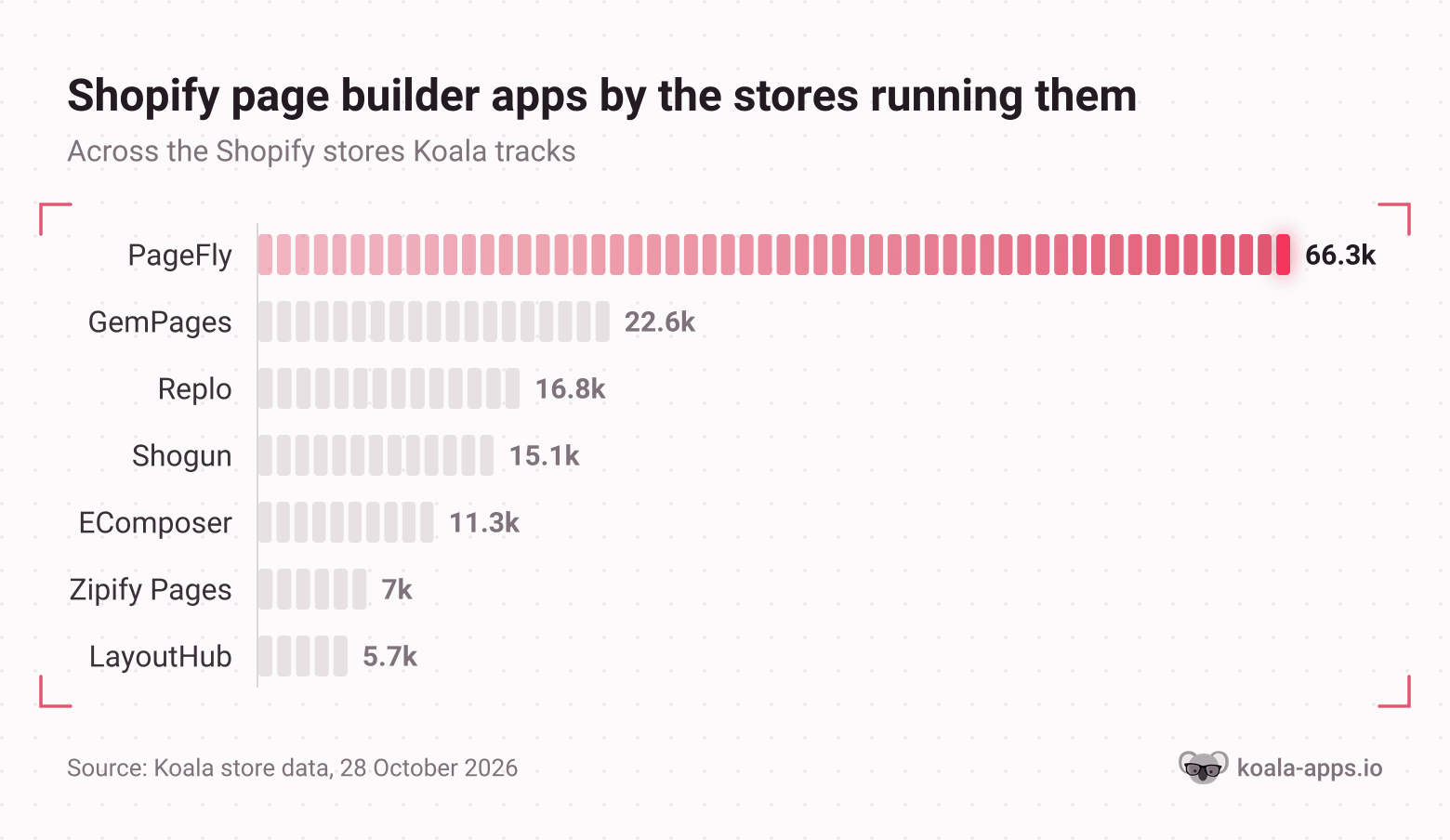
Read the shape before the names. PageFly runs on roughly three times as many stores as the second-placed builder, and the gap between second and sixth is smaller than the gap between first and second. One app owns this category, and the rest are competing for the merchants it does not fit.
Two honest caveats. These are counts across the Shopify stores Koala tracks, not a census of the whole platform, and the coverage leans toward the dropshipping and direct-to-consumer stores our users research. And an install count measures adoption, not results. It tells you which problem merchants in your niche keep paying to solve, which beats a ranked opinion as a starting point, and your own traffic still decides whether the page converts.
PageFly: 66,347 stores
PageFly is the default answer in this category, and the breadth is why. It builds home, product, collection, landing and custom pages, plus blogs, FAQs, pop-ups, forms, 404 pages, thank-you pages and legal pages, from a library the listing puts at 320 templates and sections. It rates 4.9 across 5,919 reviews, read on 28 October 2026.
Free plan: yes. One published slot, which is either one page or one section, 10 AI credits a month, the full template library and 24/7 live chat.
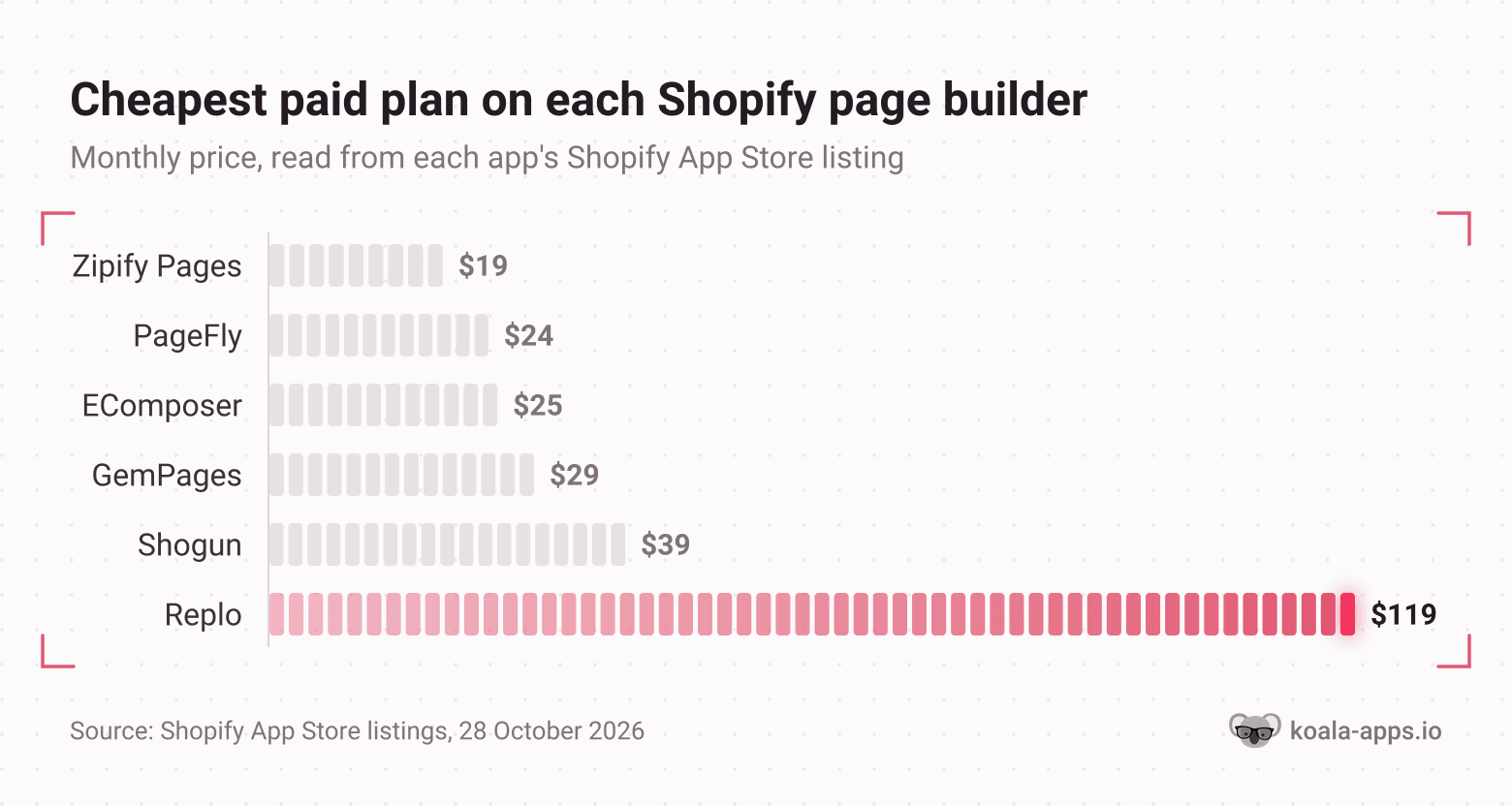
Entry price: $24 a month on Builder, which starts at five published pages or sections. Extra slots are $5 per five. Accelerate is $99 a month for unlimited pages plus A/B testing, click heatmaps and funnel analytics. Enterprise is $299.
What it is good at: publishing a lot of different page types from one subscription without the bill scaling per page. The AI Page Checkup scores a published page and flags what may be costing sales, which is a useful second opinion when you have built something you are too close to judge.
Who should skip it: anyone who needs exactly one landing page and nothing else. The free slot covers that, and if you only want to drop a few extra sections into an existing theme, a sections app does the job for less. The slot pricing also gets fiddly if you publish dozens of small sections rather than a handful of full pages.
GemPages: 22,581 stores
GemPages is the closest competitor and sells on campaign machinery. Alongside the drag-and-drop builder it ships countdown timers, stock counters, quantity breaks and bundles as native elements, plus sales funnels with post-purchase upsells, downsells and A/B offer testing. It rates 4.9 across 4,268 reviews.
Free plan: yes, with one published page, the builder, sales funnels and 24/7 live chat.
Entry price: $29 a month on Build, which unlocks unlimited publish slots for every page type, 20 theme sections and 400 prebuilt conversion sections. Optimize is $59 and adds scheduled publishing, 100 theme sections and headless pages. Enterprise is $199.
What it is good at: campaigns with a date on them. Unlimited publish slots at the entry tier and scheduled publishing one tier up mean a Black Friday page, a Valentine's page and three ad variants cost the same as one page, which is the opposite of how PageFly's slots price.
Who should skip it: merchants counting the first $30. The free tier is a single published page, and the cheapest paid tier is $5 a month more than PageFly's. If you are testing whether a builder earns its place at all, start somewhere with a bigger free allowance.
The rest of the field
Replo: 16,804 stores
Replo is third on installs and the most expensive by a distance. Its free tier builds and previews pages but publishes nothing. Starter is $119 a month for 15 published items, one store and 10,000 A/B testing sessions, with each additional 20 published items at $100 a month. Pro is $599. It rates 4.7 across 186 reviews, the smallest review count of the six, which is a long way behind its install base.
Good at: brands that publish pages as a routine rather than an occasion, and want analytics and experiments in the same tool. The Replo Experts network also lets you hand a build to someone else, which is the real product for a team with budget and no in-house designer.
Skip it if: you are not yet spending $119 a month on anything optional. That is the price before a single page goes live.
Shogun: 15,135 stores
Shogun is the longest-established name here and sells to teams. The free plan builds draft pages only, with no publishing. Build is $39 a month for 25 published pages after a 10-day trial, Grow is $199 for unlimited pages with content scheduling and global sections, and Advanced is $499 and adds content syncing between stores and custom CMS collections. It rates 4.8 across 1,973 reviews.
Good at: multi-store operations and anyone who needs one edit to a global section to land everywhere at once.
Skip it if: you want split testing bundled in. Shogun sells A/B testing as a separate app, where GemPages, EComposer and Replo all include it in a paid tier.
EComposer: 11,268 stores
EComposer is the value pick. The free plan gives one live page or section, five saved templates and 50 AI credits. Standard is $25 a month for 15 live pages, and Pro is $49 for 50 live pages with 29 conversion extensions, global blocks, pop-ups, Shopify Markets support and A/B testing. Premium is $129 for unlimited. Every paid tier carries a 7-day trial. It rates 4.9 across 3,478 reviews.
Good at: getting A/B testing for $49 a month. PageFly puts testing on a $99 tier and Shogun sells it separately, so this is the cheapest route to running a real experiment on a built page.
Skip it if: you want the biggest template library and the deepest integration list. PageFly and GemPages both carry more.
Zipify Pages: 6,955 stores
Zipify Pages comes out of a direct-response background and the templates show it. Starter is $19 a month, Basic $39 and Advanced $99, each with a 14-day trial. The free plan exists only for development and partner stores, so a live store pays from day one. Features listed include a drag-and-drop editor, direct-response templates, built-in split testing, AI text generation, and global sections and styles that sync across pages. It rates 4.7 across 423 reviews.
Good at: offer pages for paid traffic, which is the job the template library was designed around.
Skip it if: you wanted to prove the format on a free plan first. On a live store there is no free tier to prove it on.
LayoutHub: 5,732 stores
LayoutHub is still running on 5,732 stores in Koala's data, and its Shopify App Store listing now says the app is not currently available on the App Store. Support runs through layouthub.com directly.
Good at: nothing you can act on today.
Skip it if: you are choosing a builder now. This entry earns its place for a different reason: it is the clearest reminder that an install count records decisions merchants already made, and a big one can belong to an app you cannot join.
The comparison table
Install counts are Koala's own, read on 28 October 2026. Prices, ratings and review counts come from each app's Shopify App Store listing, read the same day, and every app is linked so you can check them yourself before you subscribe.
| App | Stores in Koala's tracked set | Free plan | Cheapest paid plan | Rating |
|---|---|---|---|---|
| PageFly | 66,347 | 1 published slot, 10 AI credits/month | $24/month | 4.9 (5,919) |
| GemPages | 22,581 | 1 published page | $29/month | 4.9 (4,268) |
| Replo | 16,804 | Build and preview only, no publishing | $119/month | 4.7 (186) |
| Shogun | 15,135 | Draft pages only, no publishing | $39/month | 4.8 (1,973) |
| EComposer | 11,268 | 1 live page or section, 50 AI credits | $25/month | 4.9 (3,478) |
| Zipify Pages | 6,955 | Development and partner stores only | $19/month | 4.7 (423) |
| LayoutHub | 5,732 | Listing says the app is not currently available | Not available | Not listed |
One name sits deliberately outside the table. Section Store & Cart Drawer shows up on 11,121 stores in Koala's data and would place fifth, and it is a different kind of product: free to install, premium sections bought individually for a one-time charge, with a $15 a month Plus tier. It drops sections into the theme you already have rather than giving you a canvas. If your theme is 90 percent right, that is the cheaper fix.
Which one, by what you are building
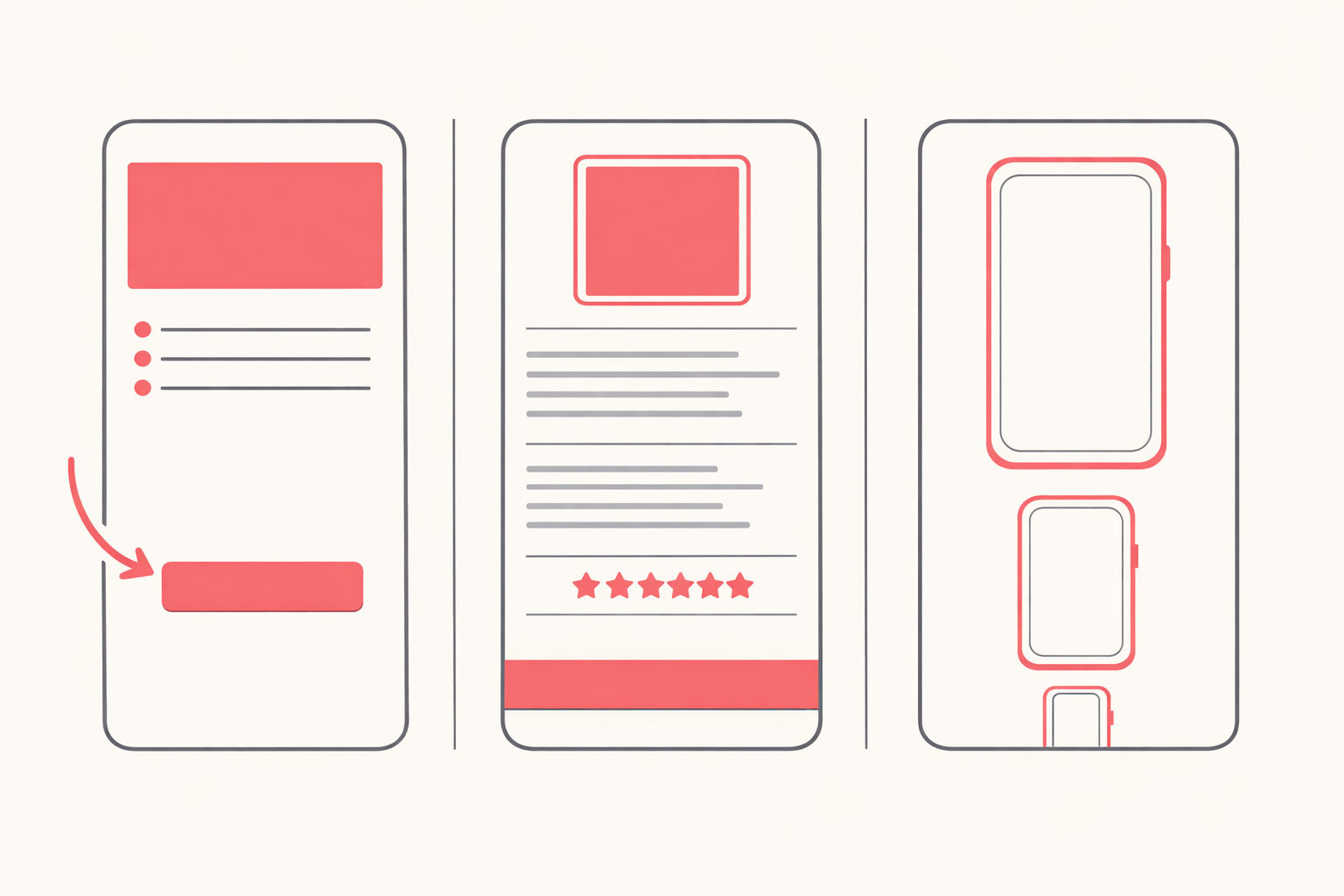
A feature matrix will not decide this for you. What you are building will.
A landing page for paid traffic. You need one page, fast, with a template that already knows the shape of a direct-response offer, and split testing so the second version beats the first. Zipify Pages at $19 and EComposer Pro at $49 are the two that carry testing at a sane price. Start on EComposer's free tier, build the page, and pay only when you are ready to publish a second variant.
A full product page rebuild. This is the heaviest job on the list, because the page has to carry gallery, specifications, social proof, objections and a buy button that stays reachable on a phone. You want depth of elements and room to iterate, which points at PageFly at $24 or GemPages at $29. Take GemPages if the rebuild is going to spawn seasonal variants, since its entry tier publishes without slot limits. Our product page teardown covers what to put on the page once you have the canvas.
A one-product store. One page is the entire shop, so the builder choice matters less than the free tier. PageFly's free slot or GemPages' free published page both cover it, and neither costs anything until you add a second page. Spend the money you saved on traffic instead.
You are not sure the theme is the problem. Then do not install a builder yet. Run a conversion rate check first. A builder fixes a layout, and it has no effect on a price objection, a shipping cost revealed at checkout or traffic that was never going to buy.
Does a page builder slow your store down, and what to check
Every page builder adds scripts and markup your theme was not shipping before, so a built page is heavier than the template it replaced. The question is whether it crossed the line that costs you money, and Shopify gives you the instrument to answer it.
Shopify's web performance reports grade your store on the three Core Web Vitals using real visitor data from the last 90 days, scored on the top 75 percent of experiences. The thresholds are published:
- Largest Contentful Paint, loading speed: good at 2,500ms or less, moderate to 4,000ms, poor above that. Google's own LCP guidance sets the same 2.5 second bar at the 75th percentile.
- Interaction to Next Paint, interactivity: good at 200ms or less, poor above 500ms.
- Cumulative Layout Shift, visual stability: good at 0.1 or less, poor at 0.25 or more.
The check takes four steps and no apps:
- Before you build anything, open the Page Type report and write down the current figures for the template you are about to replace. Without that number you have nothing to compare against later.
- Build and publish the page, then wait. The reports run on real visitor data with a delay of up to 36 hours, so a reading taken an hour after publishing tells you nothing.
- Open the Page URL report for the built page and set its LCP against the template figure you wrote down. A builder that added 200ms to a page already at 1,800ms is fine. One that pushed you past 2,500ms is costing you the slowest quarter of your visitors.
- Read the Over Time chart. Shopify annotates app installations as events on it, so you can line up the day the builder went on against any change in the score, which separates the builder from the four other things you changed that week.
If the page did cross the line, the fix is usually subtraction rather than a different builder. Full-width autoplay video, image carousels and stacked review widgets are the three heaviest things merchants put on a built page, and the first one you remove usually buys back most of the difference. Our guide to Shopify speed scores covers the rest.
Before you pick one, read what three converting stores in your niche run
A subscription is a guess until you have seen which builder already works in your market. There is a faster way to find out than trialling four of them.
Koala Inspector's Shopify app detector names every app installed on any live Shopify storefront and groups them by type, so a page builder shows up next to everything else the store is paying for. It is free and costs no tokens, so check as many competitors as you like.
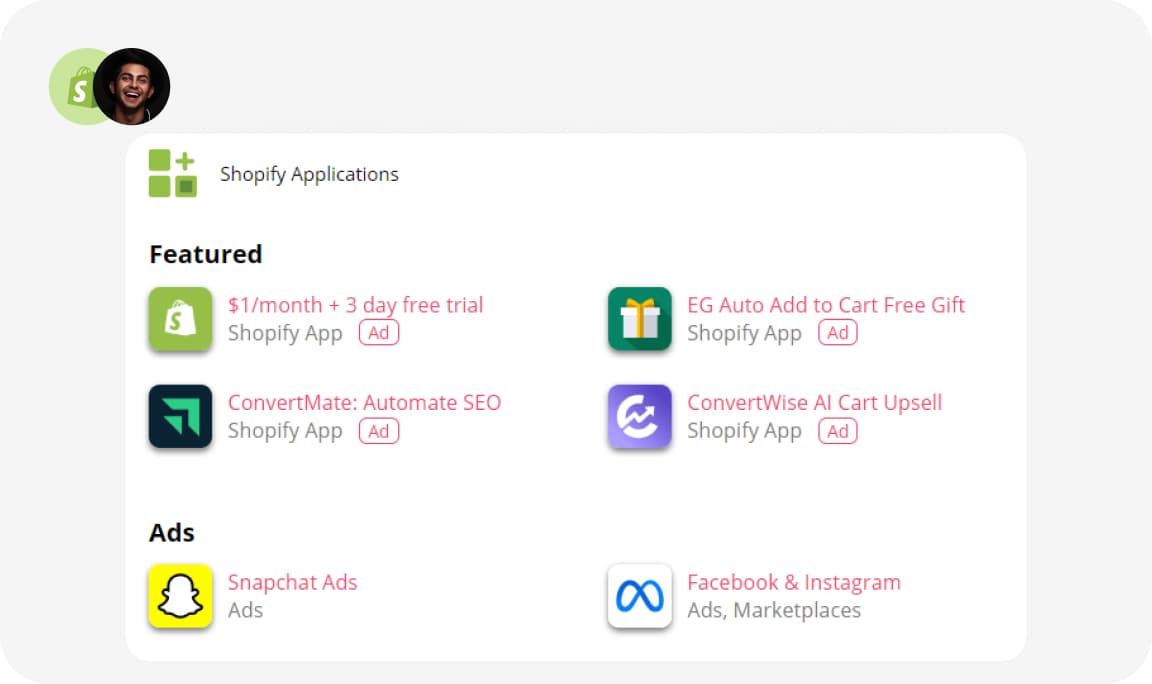
Five minutes per store:
- Search your main keyword and open the top three stores outranking you, or paste a competitor's URL straight into the extension.
- Click Koala Inspector and read the app list. A page builder shows under the store design and conversion grouping.
- Open the product page on the same store and look at what the page actually does. Sticky buy bar, specification tabs, comparison block, review wall.
- Match the two. The app list tells you what they bought; the page tells you how they configured it, which is the part no roundup can hand you.
- Repeat on two more stores. Three stores running the same builder is a category standard. One store running an outlier is one store's marketing budget.
That check is the direct fix for the complaint merchants post most often about their own stores: a conversion rate that will not move and no idea which part of the page is wrong. Guessing at it from inside your own admin is slow. Reading the stack of three stores already beating you turns it into an afternoon. The full walkthrough is in find the theme, page builder and apps behind a high-converting store.
Install Koala Inspector free and run the check before your next subscription.
How we counted
- Install counts: the number of Shopify stores in Koala's tracked set observed running each app, read on 28 October 2026. This is Koala's own store coverage, weighted toward the dropshipping and direct-to-consumer stores our users research, so treat it as a strong sample of working merchants rather than a Shopify-wide census.
- Prices, ratings and review counts: taken from each app's Shopify App Store listing on 28 October 2026 and linked in the table above, in US dollars billed monthly. Cheapest paid plan means the lowest recurring tier, which matters more than usual here: on Replo and Shogun the free tier cannot publish at all, and Zipify's free tier is limited to development and partner stores.
- Rankings: by install count only. No app paid for a position on this page.
What merchants say about Koala Inspector
Verified reviews from the Chrome Web Store.
“Great tool for competitor research and customer support is really quick!”
 Aiswarya S
“great app for ecommerce, there are a lot of useful information. Friendly customer service!”
 Lavender Yuzu
“Excellent tool for Shopify research! simple, accurate, and packed with insights. Highly recommend it.”
 Data Analysis
Sources for the Shopify platform answers below: PCI compliance, Shopify pricing, custom domains, customizing themes, bot protection and reporting on ChatGPT ads.
Shopify page builder apps: frequently asked questions
Anyone actually running ChatGPT ads for their Shopify store?+
It is a real channel, and an early one. Ad testing began in the United States in February 2026 and went live in Canada, Australia and New Zealand in mid-April 2026, with ads served only to free-tier ChatGPT users. Reporting at the time described the self-serve ads manager as still in closed testing, running reach and CPM campaigns with no conversion pixel. For a Shopify store that means the platform cannot yet tell you what an order cost you, so send the clicks to a dedicated landing page and judge the channel on what your own analytics records for that one URL.
Are Shopify point of sale payments secure?+
Shopify states that it is Level 1 PCI DSS compliant and that the compliance extends by default to all stores powered by Shopify, in-person sales included. Card data is handled by Shopify's payment infrastructure rather than stored in your own systems. The part that stays your responsibility is account hygiene: staff permissions scoped to the job, two-step verification on every account, and an admin nobody shares a login to.
Can I use my own domain name with Shopify?+
Yes. Every store gets a myshopify.com address by default, and you can show customers a custom domain instead, either bought through Shopify or connected from any third-party domain provider. You manage it on the Domains page in your admin. Two details catch people out: the myshopify name itself can only be changed once, and international domains for regional markets are available on the Basic, Grow, Advanced and Plus plans. Pages built with a page builder publish on your own domain, so the URLs stay yours.
Can you make 10k a month on Shopify?+
Yes, and the arithmetic is small enough to check before you commit. At a $50 average order, $10,000 a month is 200 orders. At a 2% conversion rate that is 10,000 sessions. Shopify Basic costs $39 a month billed monthly or $29 a month billed yearly, and the online card rate on Basic is 2.9% plus 30 cents, so card fees on $10,000 across 200 orders come to roughly $350. The two numbers worth attacking are the conversion rate and the average order, and both are decided largely by the page the traffic lands on.
Do I need to be a designer or developer to use Shopify?+
No. Shopify's theme editor lets you preview your theme, change its settings, and add, remove, edit and reorder content without touching code, and Shopify's own documentation presents code editing as the fallback for when a theme has no setting for the change you want. A page builder covers that gap with drag and drop instead, which is why 66,347 stores in Koala's data run PageFly. Every builder in this roundup is visual, and most have a free tier you can build on before you pay.
Has anyone experienced a drop in sales when bot add to cart activity suddenly spikes on Shopify?+
Check orders and revenue before you conclude sales dropped. A bot spike inflates sessions and add-to-cart counts, so the conversion rate in your reports falls while the order count sits where it always was. Shopify's own bot protection is a Shopify Plus flash-sale control rather than general traffic filtering: you schedule a protection event of up to 60 minutes on up to 500 products, it challenges visitors with reCAPTCHA or hCaptcha on the checkpoint page, and it applies only to the Online Store sales channel. It targets auto-checkout bots, and Shopify says it is not meant to combat fraud related to bot activity.
Keep going
- Find the theme, page builder and apps behind a high-converting store is the detection walkthrough in full.
- Product page teardown covers what belongs on the page once you have a builder.
- Shopify conversion rate tackles the problem underneath a redesign.
- Shopify store speed score goes deeper on what to do when a page gets heavy.
- How much Shopify apps cost puts a builder subscription next to the rest of the bill.
- Top Shopify apps ranks every category by the stores running them.
- Best Shopify apps is the full category index.
Written by
Koala Team
Koala Apps Editorial Team
The Koala Team is the crew behind Koala Inspector. We test tools, track what is selling across Shopify, and turn it into practical roundups and reference guides for store owners and dropshippers.