How Much Do Shopify Apps Cost? What Top Stores Actually Spend (Koala Data)
 By Assaf ShalinJuly 23, 2026
Across the high-revenue Shopify stores in Koala's data, the typical store runs about 13 apps and spends roughly $5,500 a month keeping them on, with the middle half landing between about $2,500 and $14,000. That is the real answer to "how much do Shopify apps cost" at the top of the market, and it looks nothing like the "apps are basically free" assumption a lot of new merchants start with.
But that headline number is also misleading if you stop there, because those are large, established stores. Read on for the full distribution, the apps stores install most, and what a store just starting out should actually budget.
A note on the data first. These figures are modeled from public signals any visitor's browser can already see, sampled across the several hundred top-performing stores Koala has current data for, not every store on Shopify. So read this as a strong directional signal from the leaders, not a global census. Coverage refreshes constantly, which is why we talk in ranges and medians rather than one fixed number.
What top stores actually spend on apps
Among the high-revenue stores in our sample, monthly app spend is heavily skewed. A handful of very large stores spend tens of thousands a month, which drags the average up, so the median is the honest center: about $5,500 a month. The middle 50% of these stores spend roughly $2,500 to $14,000. In other words, once a store is genuinely doing volume, its app bill is a real line item, not a rounding error.
Here is how monthly app spend splits across the top stores we track.
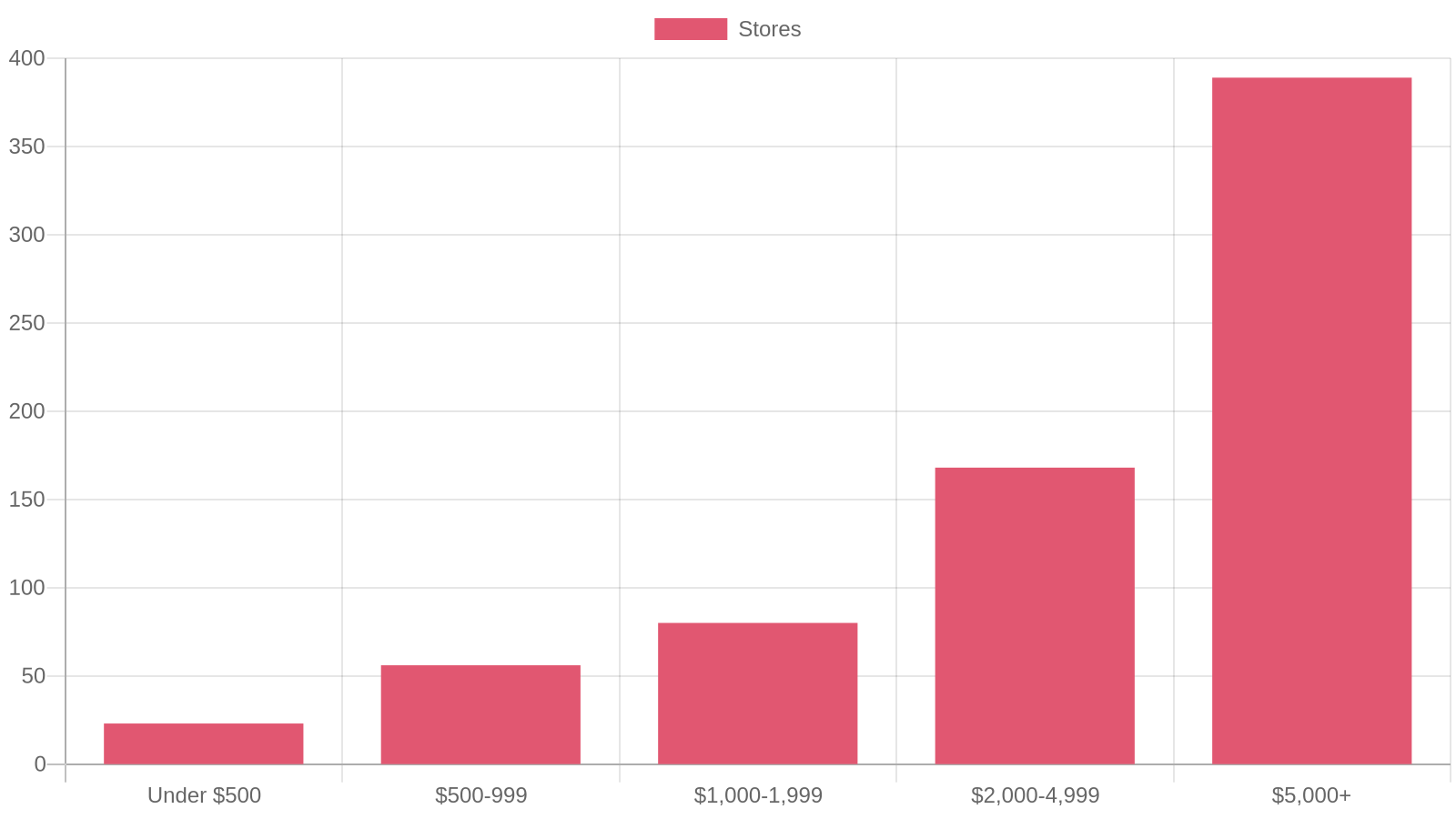
The takeaway is the shape. The largest single group sits at $5,000 a month or more, but there is a real tail of high-revenue stores running lean, under $1,000 a month, on apps. Spending more is not what makes these stores successful. Their revenue funds a bigger stack, and they add paid tools because the volume justifies the cost, not the other way around.
How many apps does a top store run?
App spend tracks app count, so the second question answers the first. In our data the median top store runs about 13 apps, and the distribution clusters tightly in the middle.
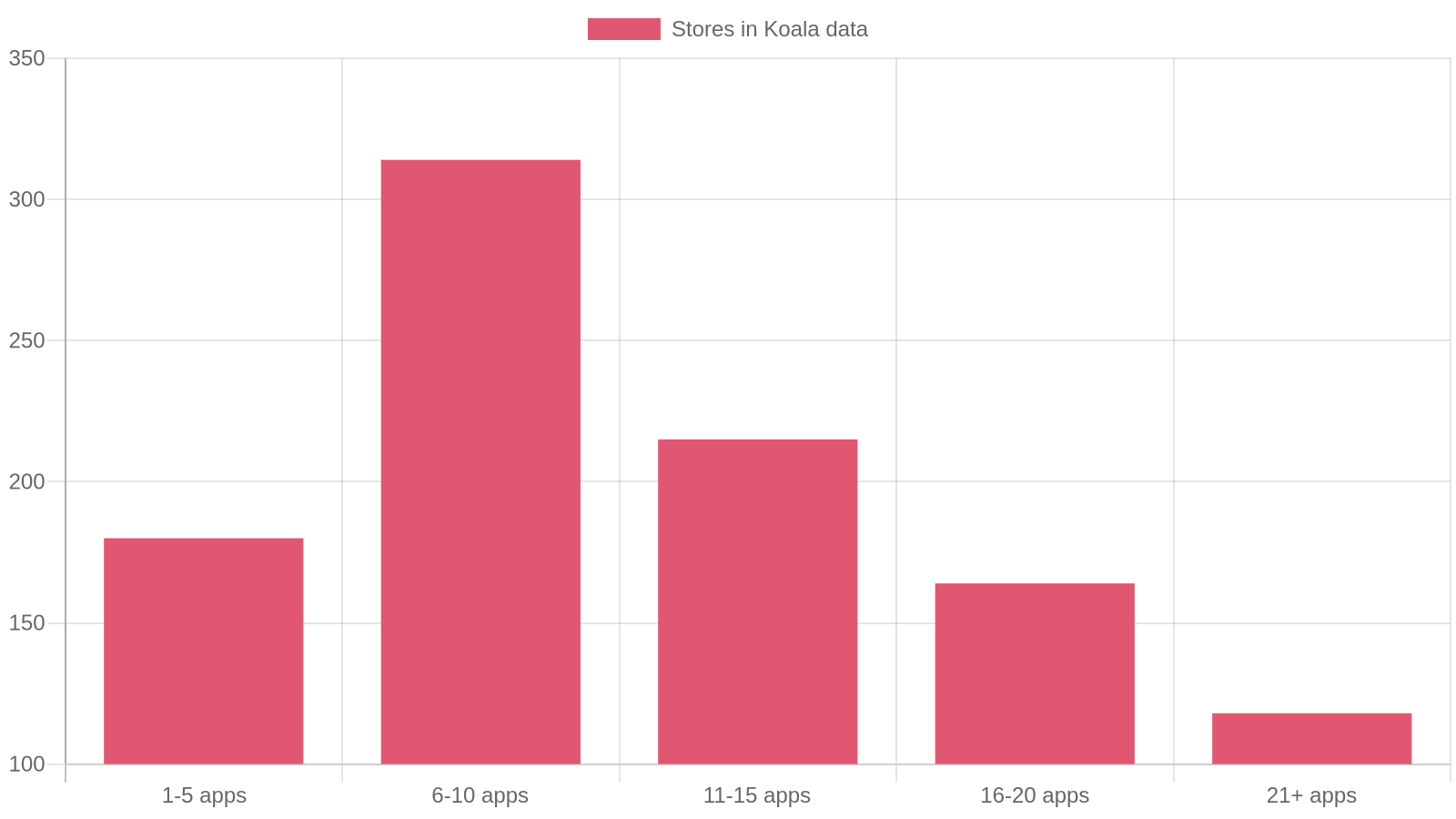
Roughly two thirds of these stores run between 6 and 15 apps. Very few run only one or two, and a smaller group past 20 apps tends to be the largest catalogs with dedicated teams to manage them. For most stores, the useful range is clear: enough tools to cover the core jobs, not so many that every page load carries a tax.
That is the real lesson hiding in the count. The strongest stores are not the ones with the most apps. They keep a focused stack, one lean tool per job, and every app on it is earning its place.
Why the most popular apps do not mean the biggest bill
Here is the part that reassures a new store. The apps stores install most are not the expensive ones. In Koala's data the two most widely installed apps are Judge.me for product reviews and Klaviyo for email and SMS, followed by names like Shopify Inbox, PageFly, Loox, Microsoft Clarity, and 17TRACK. We break the full ranking down in our look at the most popular Shopify apps.
What matters for budgeting is that several of the most-installed apps have a genuine free tier. Judge.me offers a free plan, Shopify Inbox is free, Microsoft Clarity is free, and Shopify Forms is free. That is why a huge install base does not translate into a huge bill for a small store. You can cover reviews, live chat, behavior analytics, and lead capture without spending a cent, then move to paid tiers only when order volume makes the upgrade pay for itself.
Paid apps, the ones you find in the Shopify App Store, almost always bill as a recurring monthly subscription, and many scale their price with your order count or email list size. That is the mechanism behind the spend distribution above: as a store grows, the same apps cost more, and the store adds a few premium tools it could not justify earlier.
What a new store should budget for apps
If you are starting out, do not benchmark against the $5,500 median. That is what a business doing serious revenue spends, and copying its stack on day one just buys you cost and a slower store before you have the sales to support either.
A sensible starter budget looks more like this:
- Reviews: start free with an app that has a real free tier, since social proof is close to non-negotiable.
- Email and SMS: free until your list grows, then upgrade when repeat revenue justifies it.
- Support and analytics: free tools cover live chat and behavior insight from day one.
- Everything else: add a paid app only when you hit the specific problem it solves, not because a bigger store runs it.
Done this way, a new store can cover its core jobs for under $100 a month, often far less, and let app spend rise in step with revenue rather than ahead of it. The mistake to avoid is copying a leader's full stack. You inherit their monthly bill and their page weight without their sales.
See any store's real app stack for yourself
A best-of list tells you which apps are common. It does not tell you which apps the specific store crushing it in your niche actually chose, or how lean they keep the stack. For that, look at the store itself.
Koala Inspector is a free-to-start Chrome extension with a built-in Shopify app detector that reads what a store already loads in your browser and lists the Shopify apps it runs, grouped by category. Open any competitor, and you can read its real stack in a couple of minutes instead of guessing.
Here is the workflow:
- Install Koala Inspector from the Chrome Web Store. It runs in your browser, so there is nothing else to set up.
- Open a store you want to study on its live site, a competitor or a brand you admire.
- Click the Koala Inspector icon to load the store's breakdown: theme, estimated traffic, running ads, products, and installed apps.
- Open the Apps tab to see the exact apps that store runs, then judge how much of that stack you actually need at your stage.
- Compare a few strong stores in the same niche. When a lean set of apps keeps showing up across stores that are clearly doing well, that is your budget template, backed by real examples.
You learn which tools winning stores invest in, you get real names to price against your own stage, and you avoid buying a stack you cannot yet afford to run. For the category-level version of this, see what apps top Shopify stores actually run.
Install Koala Inspector free and check the app stack of the first store on your list today.
FAQ
How much do Shopify apps cost?
It ranges from free to thousands a month. Many of the most-installed apps have a genuine free tier, so a new store can cover reviews, chat, and analytics for close to nothing. Paid apps usually bill as a recurring monthly subscription, and the cost scales with your order volume and how many premium tools you stack. In Koala's data the typical high-revenue store spends about $5,500 a month across its apps, with the middle half between roughly $2,500 and $14,000, but those are large stores. A store starting out can keep its core stack under $100 a month.
How many apps does the average Shopify store use?
Among the high-revenue stores in Koala's data, the median store runs about 13 apps, and roughly two thirds run between 6 and 15. Smaller and newer stores typically run far fewer. The pattern worth copying is that strong stores keep a focused stack, one lean tool per job, rather than collecting apps.
Are Shopify and MyShopify the same?
They are the same platform, just two different URLs. Every Shopify store gets a permanent yourstore.myshopify.com address that runs the admin and backend, while the public storefront usually sits on a custom domain like yourbrand.com. MyShopify is not a separate product or plan, it is the underlying Shopify address for your store.
Are Shopify theme detectors free to use?
Koala Inspector's theme detector is free. Open any Shopify store in Chrome with the extension installed and it names the active theme, including paid and custom themes, with a link to that theme in the Shopify theme store. The app detector that lists a store's installed apps is free as well.
Can I make $10,000 per month dropshipping?
It is possible but not typical or guaranteed. Reaching $10,000 a month in revenue takes a winning product, tight margins after ad spend and app costs, and steady testing. Many stores never get there, and app subscriptions are one of the recurring costs that eat into profit along the way, which is exactly why keeping a lean stack matters.
Does Shopify automatically fulfill orders for dropshipping?
No. Shopify records the order and payment, but it does not source or ship the product for you. For dropshipping you connect a supplier or a fulfillment app that routes each order to the supplier, who ships it. That app is often one of the recurring costs in a dropshipping store's stack.
How can AI help lower cost per acquisition?
AI lowers cost per acquisition mainly by cutting wasted spend: sharper audience targeting, faster creative testing, and better research before you commit budget. A practical version of that research is studying which ads and offers competitors already run so you skip the losers. Koala Inspector's ad campaigns view shows the Google and Facebook or Instagram ads a store is running, so you can learn from proven creatives instead of paying to discover them yourself.
How does Shopify work?
Shopify is a hosted commerce platform. You pick a monthly plan, add products, choose a theme, connect a payment provider, and Shopify hosts the store and processes checkout for you. Apps extend what the store can do, from reviews and email to fulfillment, and most of those apps carry their own recurring cost on top of your Shopify plan.
Written by
Assaf Shalin
Co-founder & Developer, Koala Apps
Assaf Shalin is a co-founder of Koala Apps and one of the developers behind Koala Inspector. He builds the tools that let Shopify sellers see what is actually working in other stores, from installed apps and themes to best-selling products. On the blog he covers the technical side of store research: how competitor research really works, what public store signals can and cannot tell you, and how to turn them into decisions.
Connect on LinkedIn