The Shopify Conversion Stack Report: What Stores That Convert Actually Have Installed
 By Assaf ShalinOctober 12, 2026
Across the Shopify stores Koala tracks, the conversion stack has six layers and they are nothing like the same depth. Reviews are near-universal: Judge.me alone runs on 185,858 stores, and 20 distinct review apps appear in the 250 most-installed set. Explicit trust badges are the shallowest layer by far, with the category leader on 11,227 stores, more than sixteen times fewer. Below is every layer with its real counts, what each one is there to fix, and how to read your own store against it.
This is a report rather than a recommendation list. Nothing here is ranked by opinion or by how good an app is. It is a count of what is actually installed, measured on 11 October 2026.
| Conversion layer | Most-installed app | Stores running it | Distinct apps in the set |
|---|---|---|---|
| Social proof and reviews | Judge.me Product Reviews | 185,858 | 20 |
| Payment and affordability messaging | Klarna On-Site Messaging | 85,834 | 3 |
| Currency and localisation | BUCKS Currency Converter PRO++ | 44,318 | 10 |
| Post-purchase and order tracking | CWILL Order Tracking | 26,538 | 5 |
| Cart and upsell | iCart Cart Drawer Cart Upsell | 24,167 | 30 |
| Cash on delivery checkout | Kwik COD & Checkout | 15,404 | 4 |
| Explicit trust | Conversion Bear Trust Badges | 11,227 | 5 |
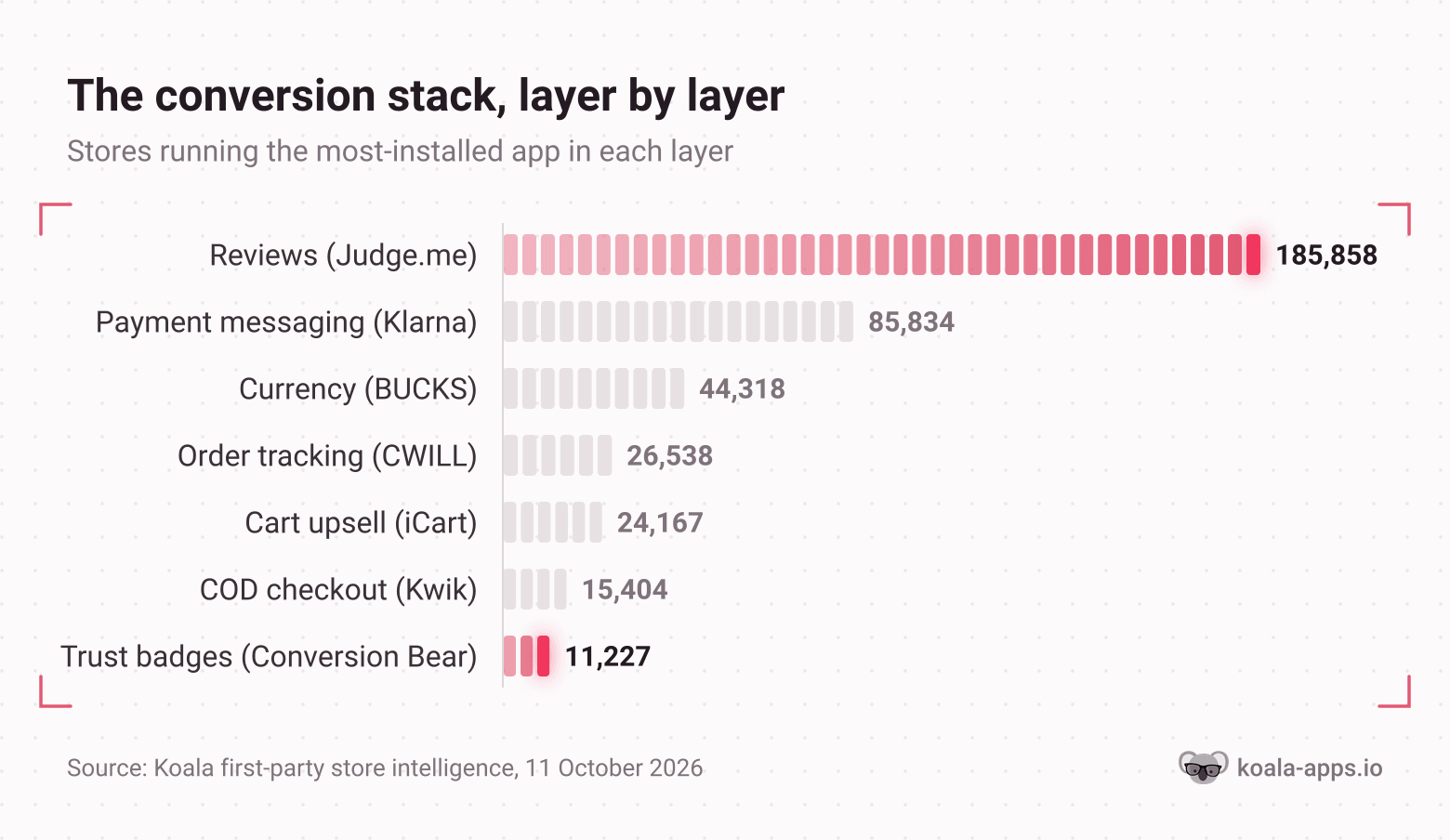
How to read this chart: each bar is the number of stores running that single app, not the whole layer. The layer is wider than its leader in every case, because stores pick different apps for the same job. What the chart shows is the relative depth of the layers, and the drop from the first bar to the last is the whole story of this report.
Layer one: social proof and reviews
This is the layer stores buy first and the one they double up on.
| App | Stores running it |
|---|---|
| Judge.me Product Reviews | 185,858 |
| Product Reviews (Shopify's own) | 79,161 |
| Loox Product Reviews | 48,236 |
| Yotpo Product Reviews | 16,660 |
| Stamped Reviews & Loyalty | 13,847 |
| Ryviu Loyalty & Reviews | 12,007 |
| Trustoo Ali Reviews Importer | 11,328 |
| Vitals Reviews & Bundles | 11,217 |
| Okendo Reviews & Loyalty | 11,015 |
| AfterShip Product Reviews | 9,226 |
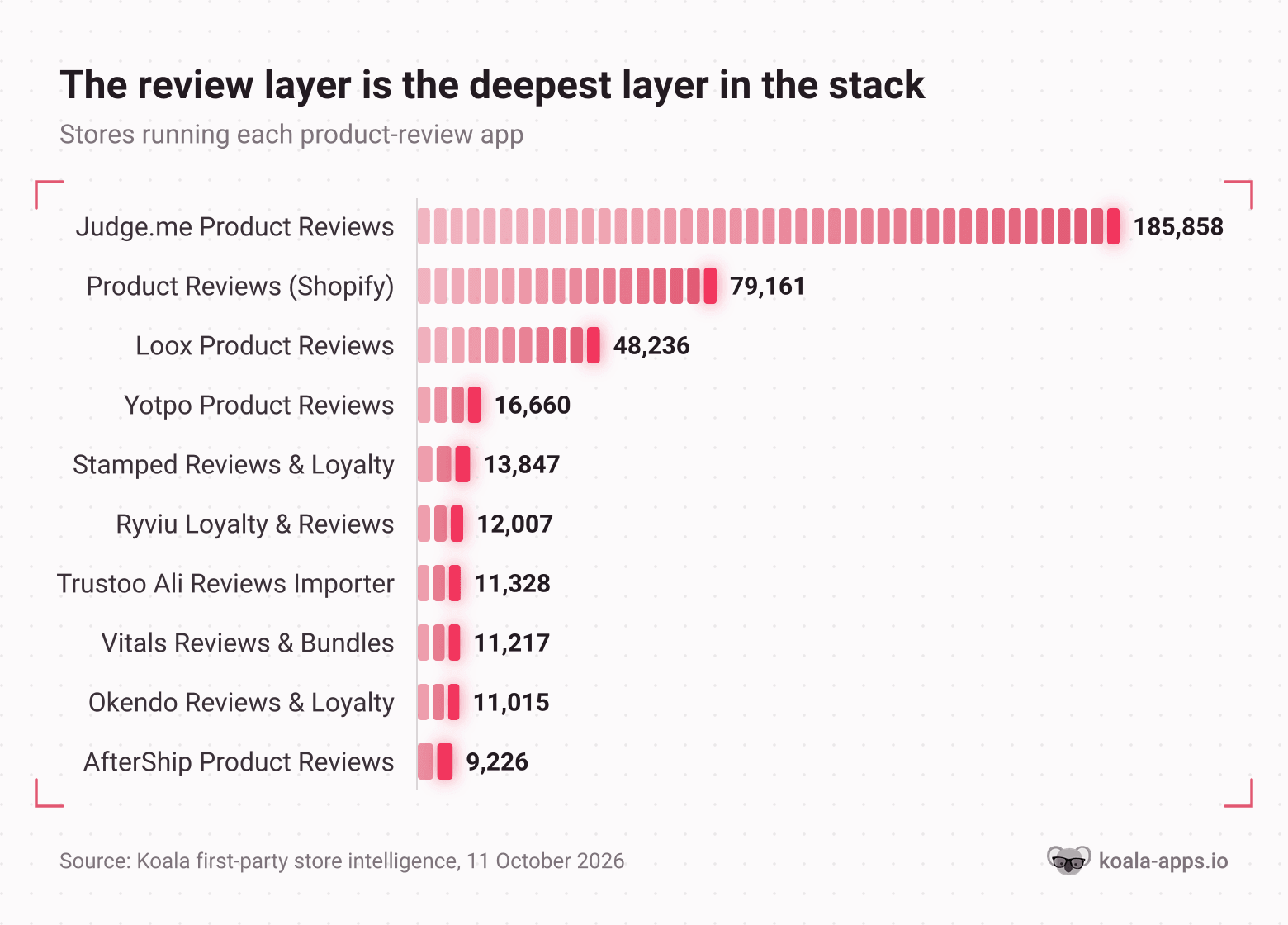
How to read this chart: these are store installs in Koala's data, so a tall bar means an app is widespread rather than good. Judge.me's listing in the Shopify App Store carries a 5.0 rating from 48,352 merchant reviews and a free plan, which goes some way to explaining both the install count and the gap behind it.
Two things in this table are worth stopping on.
The first is the sheer concentration. Judge.me runs on more than double the next app and more than the next four combined. Reviews are the one layer where the market has picked a default.
The second is the row in second place. "Product Reviews" is Shopify's own legacy app, and its Shopify App Store page now reads: this app is not currently available on the Shopify App Store. It still sits on 79,161 storefronts in Koala's data. If your store is one of them, you are running a retired app on your highest-stakes page. That is the single most actionable row in this entire report, and it is worth checking your own admin before you read any further.
Layer two: payment and affordability messaging
Klarna On-Site Messaging runs on 85,834 stores, making it the fifth most-installed app in the whole set and the most-installed app whose entire job is to change how the price reads.
| App | Stores running it |
|---|---|
| Klarna On-Site Messaging | 85,834 |
| Afterpay On-Site Messaging | 5,565 |
| Affirm pay-over-time messaging | 5,559 |
Klarna's lead here is roughly fifteen times its nearest rival, and the reason is partly structural. The app is free, and it is the on-site display layer for a Klarna Payments integration a merchant already has, so installing it is closer to switching something on than to choosing a tool. Its Shopify App Store listing carries a 2.4 rating from 114 merchant reviews, which is the lowest of any app we quote in this report. Read the install count as reach, never as a verdict on quality.
The job this layer does is narrow and worth naming. It takes a price a shopper has decided is too high and splits it into a number they will say yes to, at the moment they are looking at the price. There is a related group beside it that solves affordability a different way: four cash on delivery checkout apps appear in the set, led by Kwik COD & Checkout on 15,404 stores, Releasit on 10,884, Fastrr on 6,947 and EasySell on 5,731. That is a layer built for markets where the objection is paying before the parcel arrives.
Layer three: currency and localisation
| App | Stores running it |
|---|---|
| BUCKS Currency Converter PRO++ | 44,318 |
| Transcy AI Language Translate | 17,401 |
| Geolocation (Shopify's own) | 14,102 |
| T Lab AI Language Translate | 9,653 |
| Beast Currency Converter | 8,697 |
| Tranzi Translate and Currency | 7,643 |
| Weglot AI Translation & SEO | 6,512 |
| Nova Multi Currency Converter | 6,127 |
| langify | 3,980 |
| Hextom AI Translate & Currency | 3,325 |
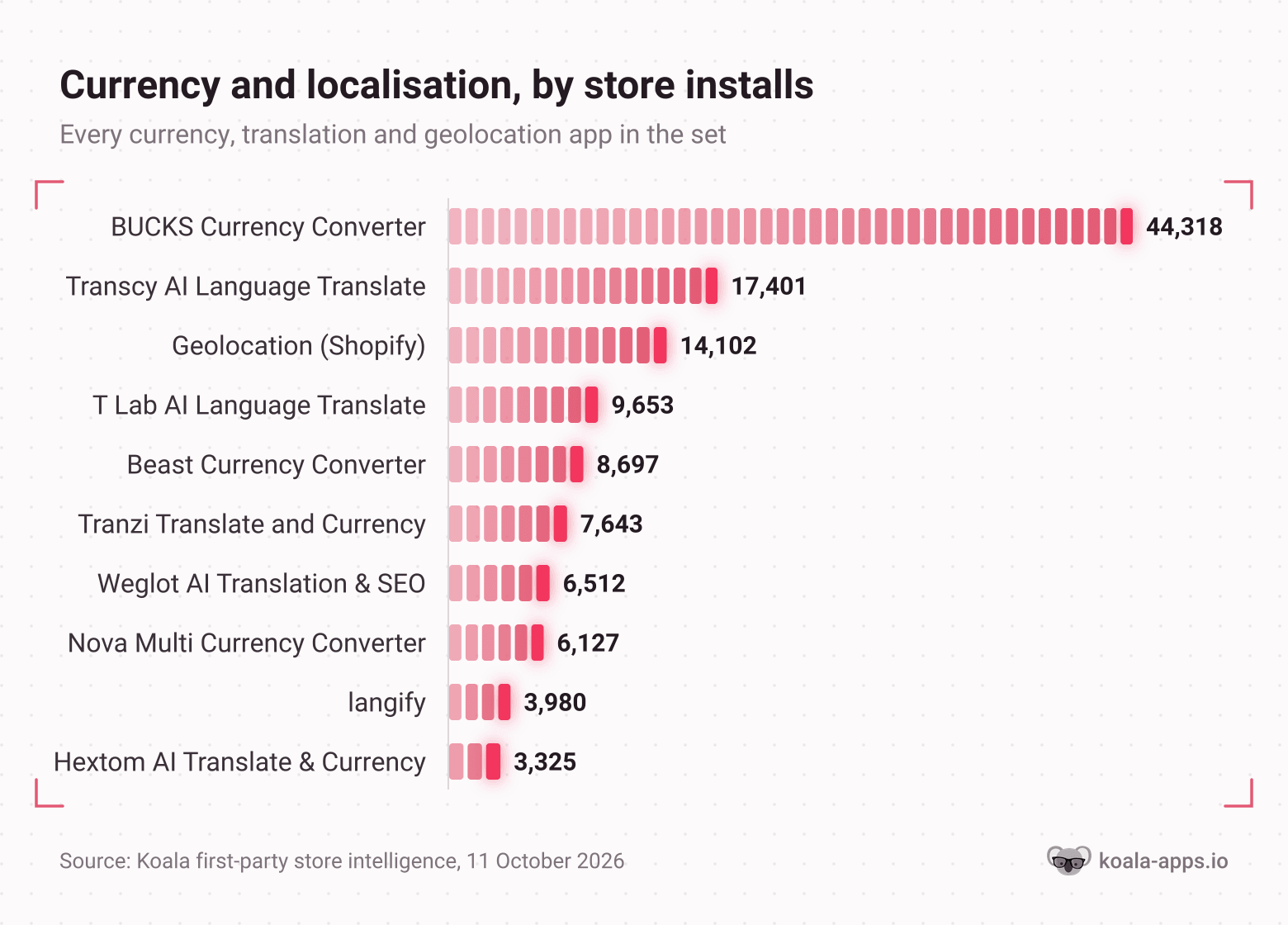
How to read this chart: these ten apps are every currency, translation and geolocation app in the 250 most-installed set, so the chart is the whole layer rather than a top ten.
BUCKS leads this layer by more than two and a half times, and like Judge.me it has a free plan. The split inside the layer is informative: currency conversion is more installed than translation, which tracks with the shape of the problem. A foreign visitor can usually read your English, and will still bounce at a price in a currency they cannot value.
If a meaningful share of your sessions come from outside your home market and you have neither a currency app nor Shopify Markets configured, this is a layer you are missing rather than a layer you have chosen to skip.
Layer four: cart and upsell
This is the widest layer in the report and the one with no winner.
| App | Stores running it |
|---|---|
| iCart Cart Drawer Cart Upsell | 24,167 |
| Kaching Bundles | 22,836 |
| Bundler Product Bundles | 20,020 |
| Selleasy Upsell & Cross Sell | 19,552 |
| Amp Slide Cart Upsell Drawer | 14,980 |
| Revy Unlimited UpSell Offers | 13,969 |
| Frequently Bought Together CBB | 12,533 |
| Essential Upsell & Cross Sell | 10,296 |
| Rebuy Personalization Engine | 10,111 |
| UpCart Cart Drawer | 9,597 |
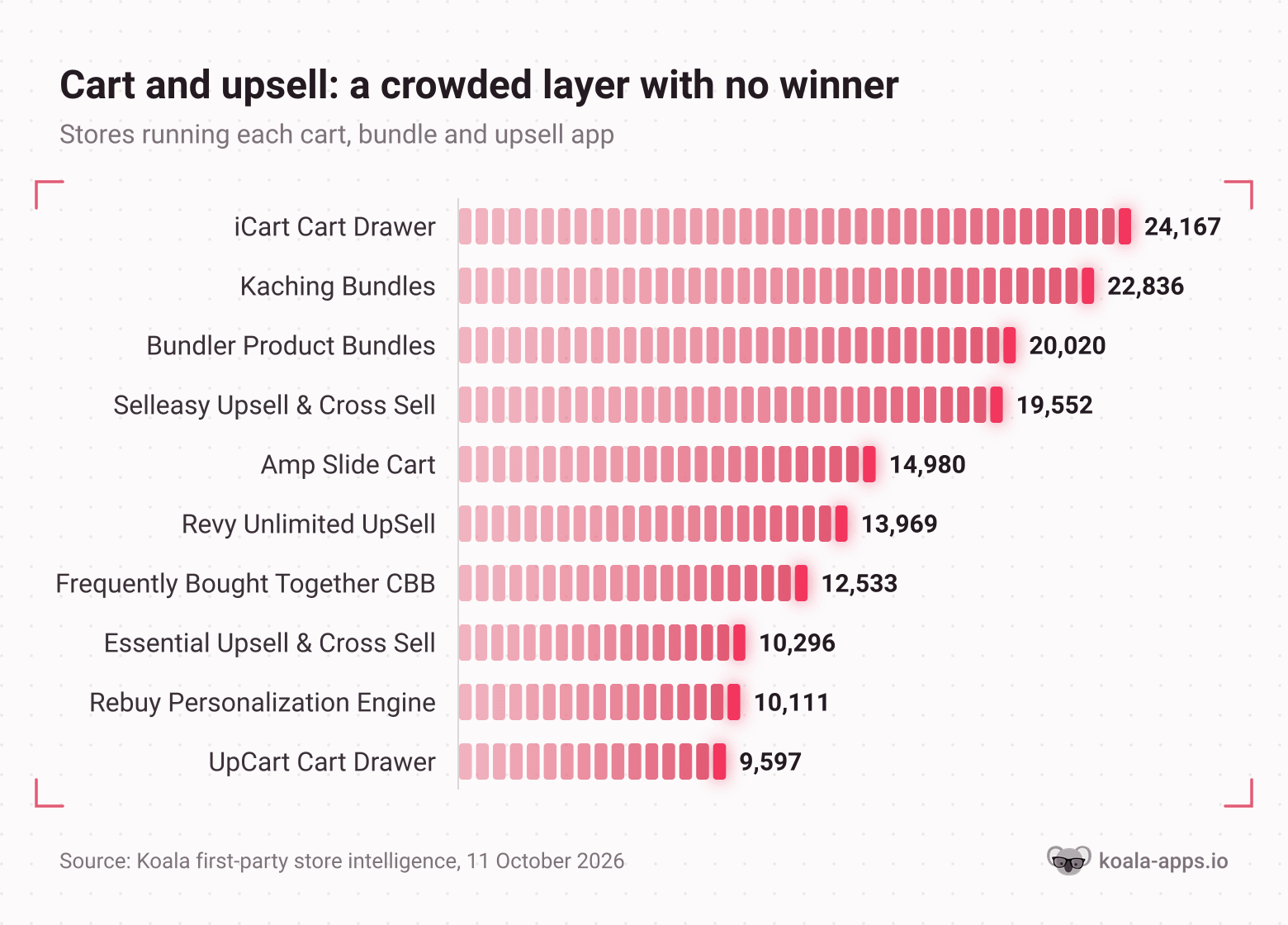
How to read this chart: 30 distinct cart, bundle and upsell apps appear in the 250 most-installed set and the top ten are plotted here. The bars are close together, which is the finding.
Compare the shape of this layer with the review layer. There, one app out-installs the next four put together. Here, the leader is on 24,167 stores and the tenth app is on 9,597, with eight apps packed between them. No default has emerged because the job is not one job: a slide-out cart drawer, a bundle builder and a post-purchase offer are three different products sold to the same merchant under the same banner.
The practical read is that this layer rewards picking for the specific mechanic you want rather than picking the most popular name. It also rewards restraint. Average order value apps are the easiest thing in the world to stack three deep, and every one of them puts script weight on the page where your buyer has already said yes.
Layer five: post-purchase and order tracking
| App | Stores running it |
|---|---|
| CWILL Order Tracking | 26,538 |
| 17TRACK Order Tracking | 25,720 |
| Track123 Order Tracking | 14,136 |
| AfterShip Order Tracking | 6,513 |
| Route Protection & Tracking | 5,362 |
Order tracking sits after the sale, which is exactly why it belongs in a conversion report. A branded tracking page is the answer to "where is my order", and the store that answers it on its own domain keeps the customer inside its own experience instead of handing them to a carrier's website. Two apps lead this layer almost neck and neck, with CWILL on 26,538 and 17TRACK on 25,720.
For a store shipping long distances, this layer also removes the single most common support ticket in ecommerce. Count how many of your emails this week were a tracking question, and you have measured whether you need it.
Layer six: explicit trust
| App | Stores running it |
|---|---|
| Conversion Bear Trust Badges | 11,227 |
| TrustedSite Trust Badges | 5,459 |
| Essential Trust Badges & Icons | 4,594 |
| SEOWILL Trust Badges & Icon | 4,072 |
| Avada Boost Sales Trust Badges | 3,850 |
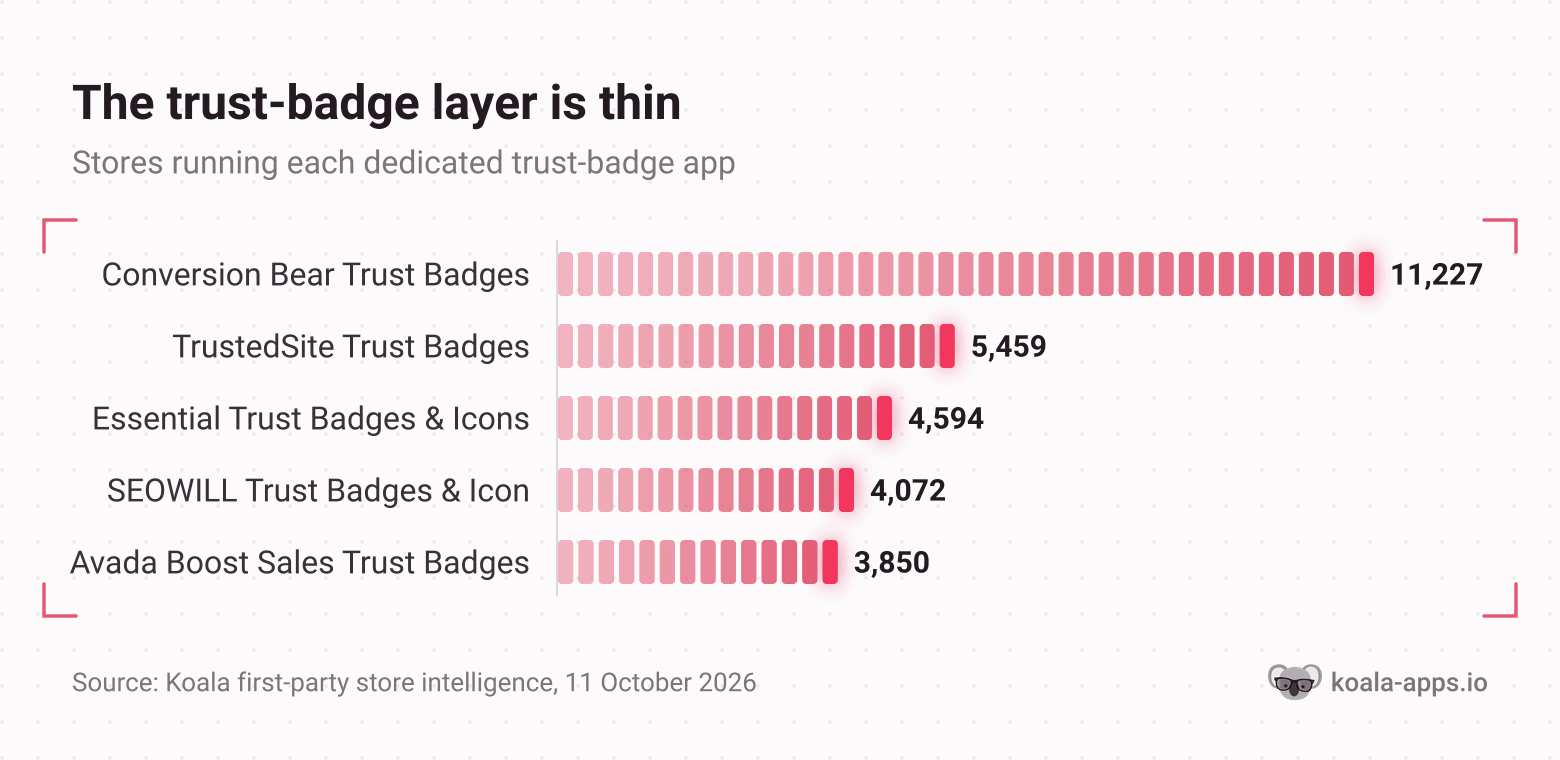
How to read this chart: five dedicated trust-badge apps appear in the 250 most-installed set and all five are plotted. Set the scale against the first chart in this report: the whole layer fits inside the gap between Judge.me and the app below it.
What the shape of the data says
Put the layers side by side and one pattern dominates everything else.
The review layer is roughly sixteen times deeper than the trust-badge layer. Judge.me on 185,858 stores against Conversion Bear on 11,227. Even the second review app, a retired one, outnumbers every trust-badge app in the set put together.
That is worth stating plainly, because the advice you read about building trust on a Shopify store usually treats badges and reviews as two items on one checklist. The installed base says merchants have voted overwhelmingly for one of them. A badge is a claim a store makes about itself. A review is a claim somebody else made about the store, in public, with a name attached. When a shopper is deciding whether a storefront they have never heard of will send them a real product, those two things do not carry the same weight, and the market has priced that in.
The second pattern is about consolidation. Where a layer solves one clear job, a default emerges and takes most of the installs: reviews, payment messaging, currency. Where a layer bundles several jobs under one label, installs scatter: 30 cart and upsell apps with the leader holding a modest lead. When you are shopping for a layer, that tells you how much the popularity ranking is worth. In reviews, following the crowd is a reasonable default. In cart and upsell, it is close to meaningless.
The third is about cost. Judge.me, Loox, BUCKS and Klarna On-Site Messaging all have a free tier, so the leaders of three of the six layers can be installed for nothing. A store missing those layers is usually missing them through inattention rather than through budget.
How to read your own gap
The mistake to avoid is comparing app for app. Finding out a competitor runs Loox while you run Judge.me tells you nothing. Finding out they have a review layer and you do not tells you everything. Compare layers.
- Pick three competitors who outrank you. Real ones, in your category, at your price point. Search your main product term and take the stores above you.
- Read each one's stack. Install Koala Inspector free from the Chrome Web Store, open the storefront in Chrome and click the extension icon. The Apps tab lists every Shopify app the store runs, grouped by type, with a link to each in the Shopify App Store. App detection and theme detection are permanently free features and cost no tokens.
- Sort what you find into the six layers above. Reviews, payment messaging, currency, cart and upsell, order tracking, trust. Ignore the app names at this stage.
- Build one row per layer: them, them, them, you. Three stores agreeing on a layer you do not have is your shortlist. One store running something unusual is a test they are paying for, not a gap.
- Fix the deepest missing layer first. The order in the headline table is the order the market installs them in, and it is a reasonable default for the order you should.
Two features make this faster. CSV export turns an app list into a spreadsheet, so three competitors become one comparison table instead of three browser tabs. Shop tracking watches a store over time and records when it adds or removes an app, changes theme or moves a price, which turns your competitors' testing into your reading list. Export costs 1 token, tracking costs 15 tokens per shop and needs a paid plan.
Prefer not to install anything yet? The browser-based Shopify app detector takes a store URL and returns the same app list.
What sellers say about Koala Inspector
Verified reviews from the Chrome Web Store.
“The service has been great, very responsive and the most comprehensive spying of global markets Ive seen!”
 Adrienne Greenwood
“Super simple to use and gives tons of detail of other stores. It helped me learn how to improve my store.”
 Jessica Walker
“Awesome customer support. Insights into store AOV, products, traffic and campaign tracking is extremely helpful!”
 Gabe Abramovich
This report in context
This is the third study in the series, and each one answers a different question about the same tracked-store set.
- The Shopify App Stack Report measures stack size: how many apps a high-traffic store runs, the full distribution, and the category averages. Read it if your question is "am I running too many apps".
- Shopify Store Revenue Benchmarks measures outcomes: modeled monthly visits and sales across the busiest stores, with app and theme leaderboards. Read it if your question is "what does a store my size do".
- This report measures the conversion layer specifically: which jobs the installed apps are doing on the path from product page to checkout, and how deep each of those layers runs. Read it if your question is "what do stores that convert actually have installed".
For the longer general ranking see the most popular Shopify apps by store installs, for the category cut see what apps top Shopify stores use, and for what a stack costs see how much Shopify apps cost.
How we measured
Sample size: the 250 most-installed Shopify apps across the stores Koala tracks, with the store count for each. Every figure in this report is one of those 250 rows or a count of rows within a layer.
Window: 1 day. Every figure is a single daily snapshot of the tracked-store set rather than an average over a period, and the counts move as the set is refreshed. Measured on: 11 October 2026.
What is counted: Shopify apps that a store's public storefront runs, and the number of tracked stores running each one. Layers are assigned by what the app does: an app is counted in the review layer if it collects or displays product reviews or user-generated content, in the trust layer only if it is a dedicated trust-badge app, and so on. A handful of multi-feature apps genuinely belong in two layers. Vitals is the clearest case, and it is counted in the review layer only, so the cart and upsell count of 30 excludes it.
What is not counted: private or custom apps that leave no public storefront footprint, apps installed but switched off on the storefront, anything outside the 250 most-installed set, back-office tooling outside Shopify, and any store outside Koala's tracked set. No conversion rates are measured here. This report counts what is installed, and installation is not proof that an app works.
Coverage caveat: these are the Shopify stores Koala tracks, not every Shopify store. Store Leads counts 3,143,979 live Shopify stores in its October 2026 update, so read every figure as a measurement of Koala's tracked set and cite it that way. Store counts are facts about what storefronts load, not estimates.
Numbers, tables and charts on this page are free to quote with a link back to this URL.
FAQ
Shopify conversion stack FAQ
The questions sellers ask once they have seen the layers.
Are Shopify point of sale payments secure?+
Shopify answers this on its own POS payments page: card payments run on PCI-compliant servers with support for chip card technology, so the sensitive part of the transaction is handled by Shopify rather than sitting on your hardware. That covers payments you take in person. It says nothing about the storefront side of a store, which is the part a shopper judges before they ever reach a card reader, and that is what this report measures: across the Shopify stores Koala tracks, 11,227 run a dedicated trust-badge app and 185,858 run Judge.me product reviews.
What is the best Shopify product hunting tool?+
Koala Inspector, and the reason is that product hunting and store hunting are the same job. The extension opens any Shopify storefront and shows the full catalog with prices and variants, filters it to best-sellers, and sits beside the store's apps, theme, product count and creation date, so you can see whether the product is selling and what the store around it is doing to sell it. Browsing the catalog, best-sellers, app detection and theme detection are free features on the free plan, which gives 15 tokens a month with no card. Paid research features such as traffic analysis and ad checks draw on tokens, and Premium is 22 dollars a month for 220 tokens.
What Shopify app stack do you use on your store?+
Koala Apps does not run a Shopify store, it reads them, so the honest version of this answer is the stack the data points to. Across the Shopify stores Koala tracks, the layers that recur are reviews on the product page, payment and affordability messaging at the price, currency and language handling for international visitors, a cart and upsell layer, order tracking after the sale, and an explicit trust badge. Reviews are the deepest of those by a wide margin: Judge.me alone runs on 185,858 stores and 20 distinct review apps appear in the 250 most-installed set. Build that order, one layer at a time, and stop when a layer has no job to do.
Does Kim Kardashian use Shopify?+
Yes. SKIMS, the brand she co-founded, runs on Shopify, which you can confirm in a second by opening skims.com and looking at what the storefront loads. That is the same signal competitor research runs on: a storefront publishes its platform, its theme and its apps to every visitor's browser, so any Shopify store a celebrity brand operates can be read the way this report reads 250 apps. Open it with Koala Inspector and you get the apps and theme it runs, grouped and listed.
How do I stop Shopify from taking money from my account?+
Cancelling your Shopify subscription in the admin stops the plan charge, and pausing the store is the middle option if you want to keep your data without paying full price. The charge people forget is the app one. App subscriptions bill through your Shopify invoice rather than through the app vendor, so an app you stopped using keeps charging until you uninstall it. Go through the installed app list before you touch the plan. Stacks get heavy quietly: this report counts 250 distinct apps in common use across the stores Koala tracks, with 30 of them in the cart and upsell layer alone.
What is Shopify?+
Shopify is a hosted ecommerce platform that gives a merchant a storefront, a checkout, payments and an admin for products and orders, all on a monthly subscription. Store Leads counts 3,143,979 live Shopify stores as of its October 2026 update. The part that matters for research is that each of those storefronts publishes what it is built from, so apps and themes are readable facts about any Shopify store rather than private information, which is what makes a report like this one possible.
Read a competitor's conversion stack in one click
You now know what the layers are and how deep each one runs. The fastest way to use that is to stop guessing about your own store and go and look at three that are beating you.
Install Koala Inspector free, open the best store in your niche, and read its whole conversion stack in the time it takes the page to load.
Sources
- Koala Apps first-party store intelligence, measured 11 October 2026: every store count in this report, the layer assignments and the per-layer app counts. Methodology in the "How we measured" section above.
- Shopify App Store, Judge.me Product Reviews - 5.0 rating from 48,352 merchant reviews, free plan available, read 12 October 2026.
- Shopify App Store, Product Reviews - Shopify's own legacy review app, listed as not currently available on the Shopify App Store, read 12 October 2026.
- Shopify App Store, Klarna On-Site Messaging - free, 2.4 rating from 114 merchant reviews, read 12 October 2026.
- Shopify App Store, Loox Product Reviews - 4.9 rating from 9,833 merchant reviews, free plan available, read 12 October 2026.
- Shopify App Store, BUCKS Currency Converter PRO++ - free plan available, 5.0 rating from 1,287 merchant reviews, read 12 October 2026.
- Shopify, Shopify POS payments - PCI-compliant servers and chip card support, read 12 October 2026.
- Store Leads, The State of Shopify in 2026 - 3,143,979 live Shopify stores, updated 9 October 2026, read 12 October 2026.
- SKIMS - storefront confirming the brand runs on Shopify, read 12 October 2026.
- r/ecommerce, "I've improved everything I can think of. My conversion rate keeps getting worse." - a merchant describing an add-to-cart rate under 1% and asking what to investigate next, read 12 October 2026.
- r/dropshipping, "What's your biggest challenge with your Shopify store right now: getting traffic, improving conversions, or building customer trust?" - the framing this report answers, read 12 October 2026.
Written by
Assaf Shalin
Co-founder & Developer, Koala Apps
Assaf Shalin is a co-founder of Koala Apps and one of the developers behind Koala Inspector. He builds the tools that let Shopify sellers see what is actually working in other stores, from installed apps and themes to best-selling products. On the blog he covers the technical side of store research: how competitor research really works, what public store signals can and cannot tell you, and how to turn them into decisions.
Connect on LinkedIn