The Shopify App Stack Report: How Many Apps High-Traffic Stores Actually Run
 By Assaf ShalinSeptember 7, 2026
Across the 300 highest-traffic Shopify stores Koala tracks, the mean installed app count is 14.4 and the median is 14. The lightest stacks run a handful of apps, the heaviest single stack observed runs 42, and 91 of the 300 stores get by on nine apps or fewer. Below is the full distribution, the breakdown by store category, the ten apps that form the baseline stack, and the modeled monthly cost of running one.
That headline number is worth sitting with, because the figure most often quoted for Shopify merchants is about six apps per store. High-traffic stores run roughly twice that. Scale buys complexity, and complexity arrives as apps.
How many apps is normal
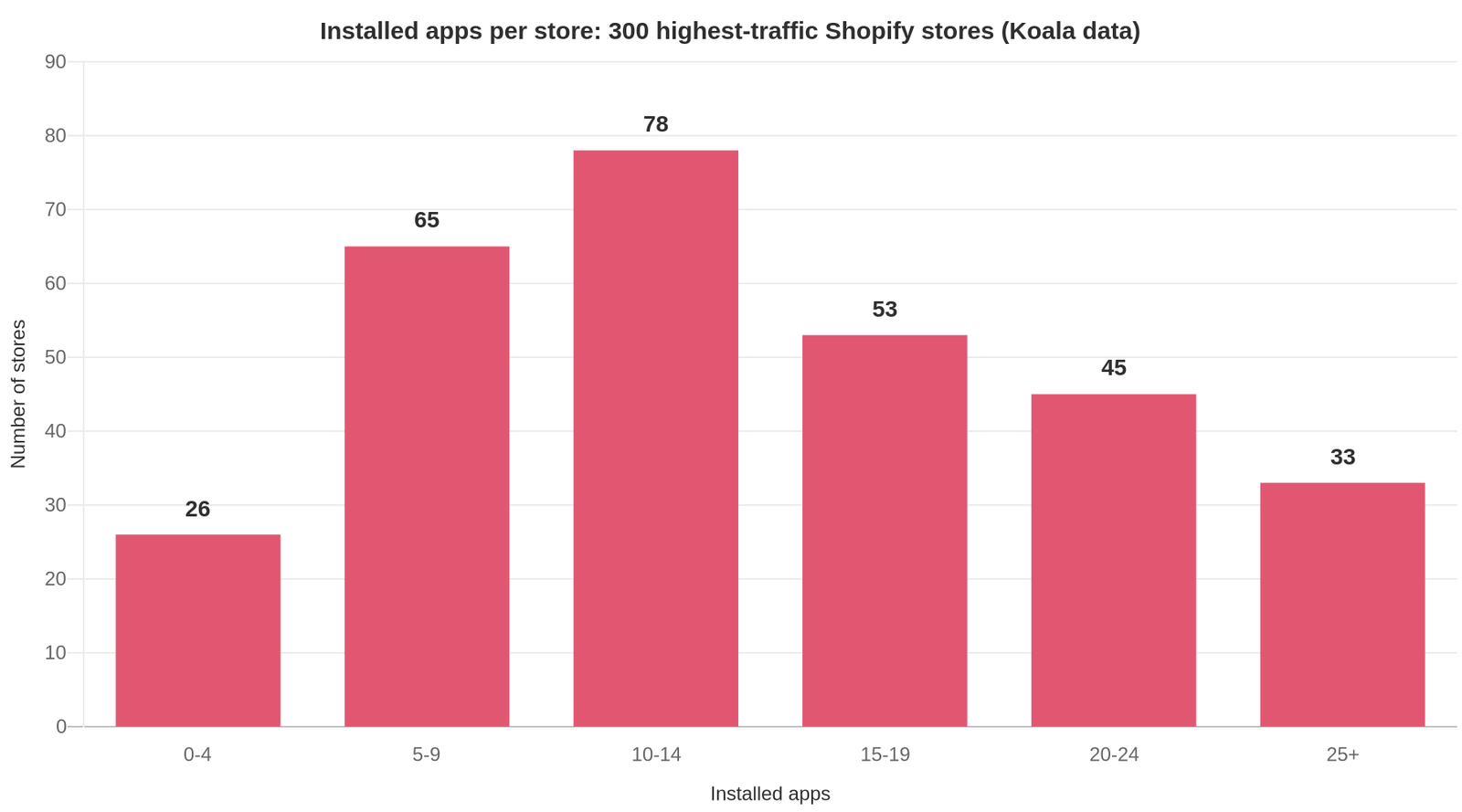
The distribution is wide and it leans heavy. Here is where the 300 stores fall:
| Installed apps | Stores | Share of sample |
|---|---|---|
| 0 to 4 | 26 | 8.7% |
| 5 to 9 | 65 | 21.7% |
| 10 to 14 | 78 | 26.0% |
| 15 to 19 | 53 | 17.7% |
| 20 to 24 | 45 | 15.0% |
| 25 or more | 33 | 11.0% |
How to read this chart: each bar is the number of stores in that app-count band, so the tall middle bar means the most common stack size is 10 to 14 apps. The bars to the right of it matter as much as the peak: 78 stores, more than a quarter of the sample, run 20 apps or more.
Two things follow. A stack of 10 to 14 apps is the centre of gravity for a store with real traffic, so if you are sitting at that number you are in ordinary company. And there is no single correct answer, because 26 stores in this sample pull high traffic on four apps or fewer while 33 run 25 or more. Both strategies are represented at the top of the traffic curve.
What costs you money is the app nobody can justify. Sellers who post their own numbers keep describing the same cleanup: one merchant on r/dropshipping wrote up cutting from 14 apps to 3 alongside a 3.54% conversion rate, and another posting a separate day's revenue described the identical trim from 14 to 3 and put the reasoning on page speed. Two stores, same starting number as our median, same conclusion about what to do with it.
App count by category
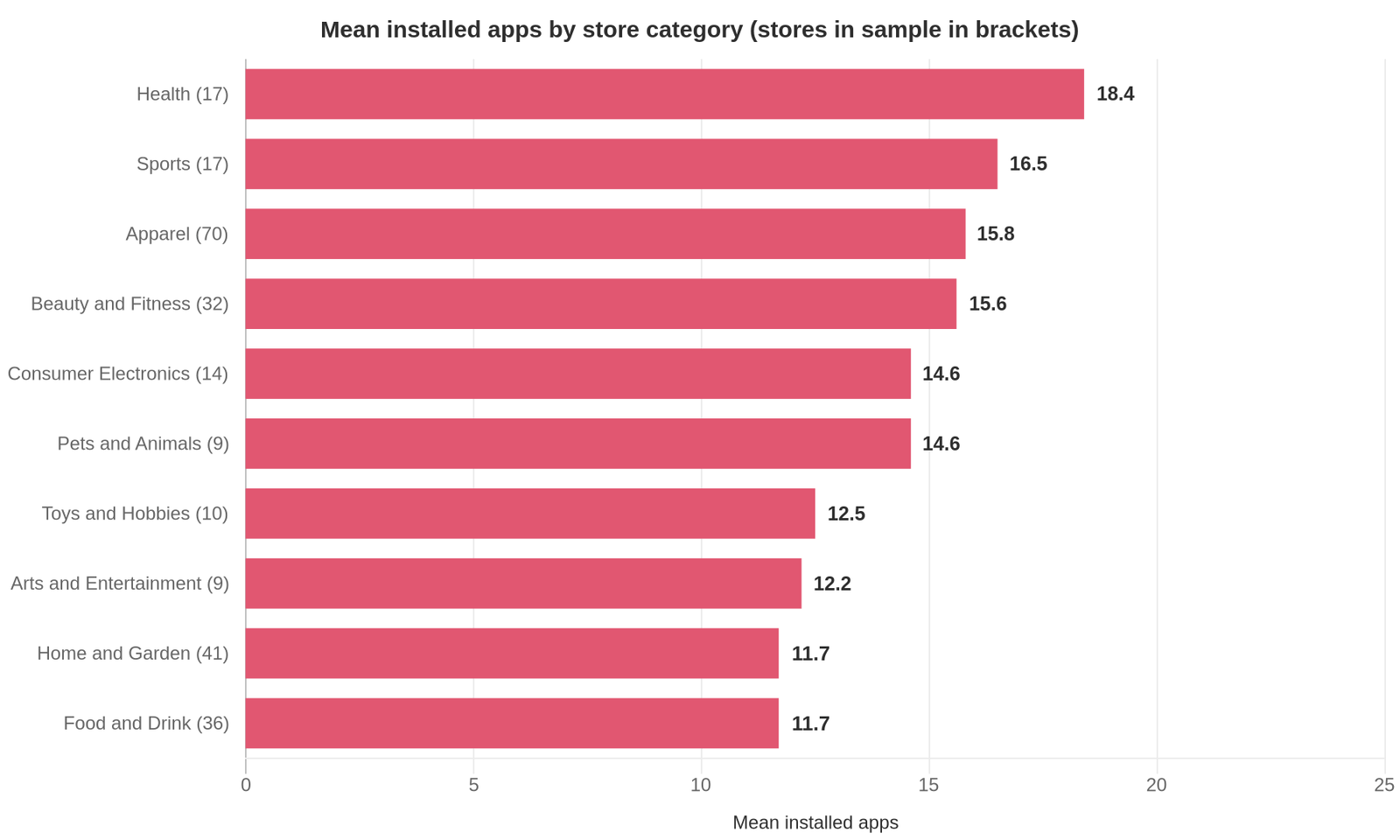
Category matters more than most stack advice admits. Health stores in this sample average 18.4 apps while Food and Drink stores average 11.7, and both averages come from a decent number of stores.
| Store category | Mean apps | Stores in sample |
|---|---|---|
| Health | 18.4 | 17 |
| Sports | 16.5 | 17 |
| Apparel | 15.8 | 70 |
| Beauty and Fitness | 15.6 | 32 |
| Consumer Electronics | 14.6 | 14 |
| Pets and Animals | 14.6 | 9 |
| Toys and Hobbies | 12.5 | 10 |
| Arts and Entertainment | 12.2 | 9 |
| Home and Garden | 11.7 | 41 |
| Food and Drink | 11.7 | 36 |
How to read this chart: the bars are mean installed apps per category, and the sample size in the table tells you how much weight to put on each row. Apparel (70 stores), Home and Garden (41) and Food and Drink (36) are the sturdy rows. Pets and Animals and Arts and Entertainment rest on nine stores each, so treat those as directional.
The pattern that holds up on the sturdy rows: categories that sell on identity and fit, like Apparel and Health, carry heavier stacks than categories that sell on repeat convenience, like Food and Drink. Sizing tools, subscription logic, reviews with photos and quiz-style finders all cost an app apiece, and the stores that need them install them.
If you sell apparel, the useful benchmark is 15.8, not 14.4. Pick the row that matches your category before you decide your stack is bloated.
The apps almost everyone runs
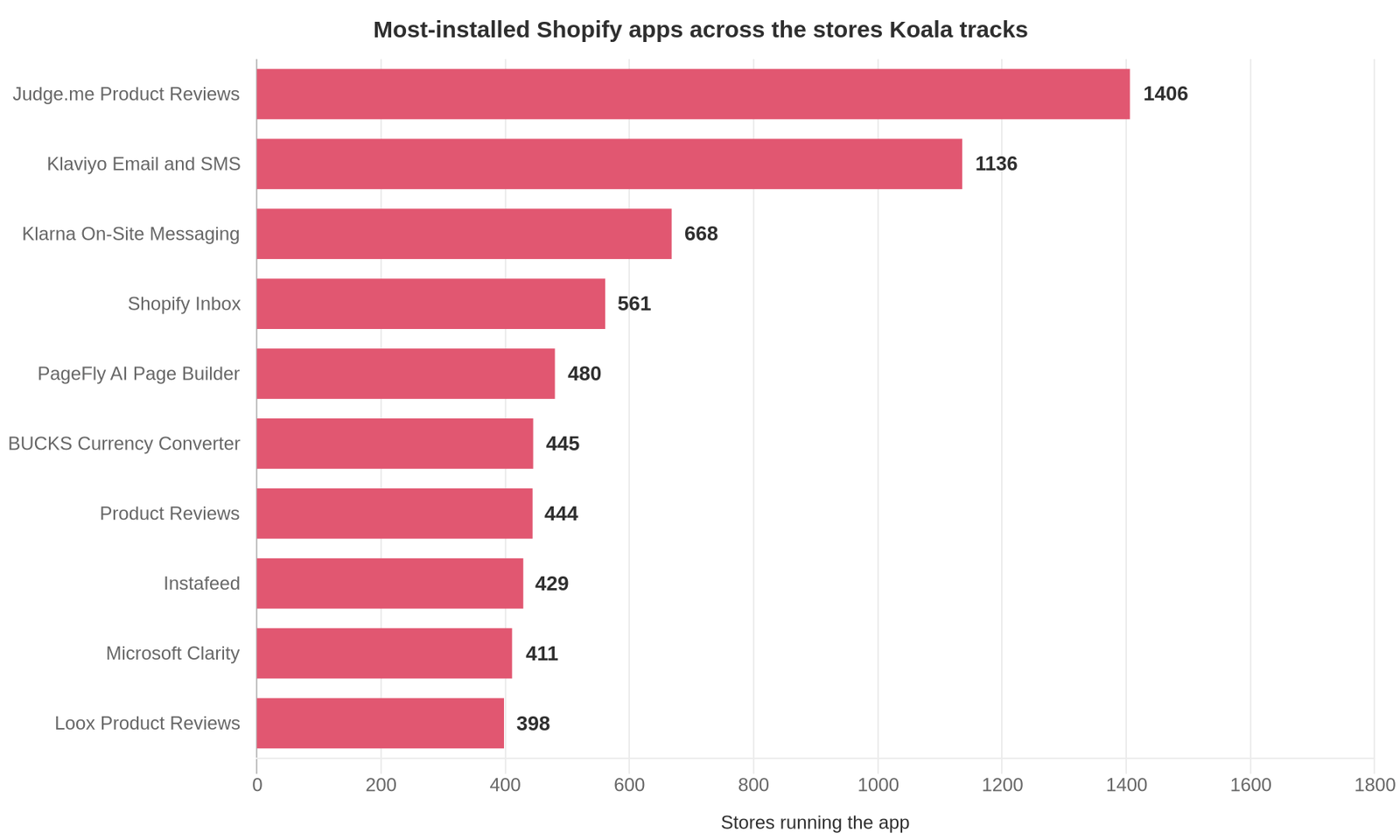
Across the wider set of Shopify stores Koala tracks, ten apps show up far more often than anything else. Read this as the baseline stack: the jobs that stores solve first.
| Rank | App | Stores running it (Koala data) | Job it does |
|---|---|---|---|
| 1 | Judge.me Product Reviews | 1,406 | Reviews and social proof |
| 2 | Klaviyo: Email Marketing and SMS | 1,136 | Email and SMS |
| 3 | Klarna On-Site Messaging | 668 | Payment messaging |
| 4 | Shopify Inbox | 561 | Customer chat |
| 5 | PageFly AI Page Builder | 480 | Landing and product pages |
| 6 | BUCKS Currency Converter PRO++ | 445 | Multi-currency display |
| 7 | Product Reviews | 444 | Reviews and social proof |
| 8 | Instafeed (Instagram Feed) | 429 | Social proof on-site |
| 9 | Microsoft Clarity: AI Insights | 411 | Session analytics |
| 10 | Loox Product Reviews | 398 | Photo reviews |
How to read this chart: the bars are store installs in Koala's data, not app store rankings or revenue. Three of the ten are review apps, which is the clearest signal in the whole dataset: proof on the product page is the first thing a serious store buys.
The rest of the list reads like a checklist of the jobs a storefront has to do before it can scale. Capture and message an audience (Klaviyo). Remove payment friction (Klarna). Answer questions without losing the sale (Shopify Inbox). Ship a page the theme cannot build (PageFly). Show prices in the shopper's currency (BUCKS). Watch what people actually do (Microsoft Clarity).
If your stack is missing an entire row from that list, that gap is more interesting than your app count. For the longer ranking see the most popular Shopify apps by store installs, and for the category-by-category view of what winners run, what apps top Shopify stores use.
What a stack costs
Of the 300 stores in the sample, 246 carry a modeled monthly app spend figure. Across that group the mean is about 22,600 US dollars a month and the median is about 11,448 US dollars a month.
Read that carefully, because it is easy to misuse:
- It is a modeled figure, not a billing statement. It estimates what a stack of this shape costs at published app pricing for a store of this size.
- It describes the highest-traffic stores Koala tracks, which sit at the very top of the platform. It is not a Shopify-wide average and it is nothing like what a typical small store pays.
- The gap between the mean (22,600) and the median (11,448) is the whole story. A handful of enterprise-scale stacks pull the mean up. Half the group sits below eleven and a half thousand.
- It covers 246 of 300 stores. The other 54 have no modeled figure, so they are excluded rather than counted as zero.
For a store doing normal numbers, the useful takeaway is the shape rather than the total: app spend scales with traffic, and it is a recurring cost line that lives on your Shopify bill instead of in your sales reports. We break down real per-app pricing tiers in how much Shopify apps cost.
How to read another store's stack yourself
Every number above came from reading storefronts. You can do the same thing on any single store in about ten seconds, for free.
- Install Koala Inspector from the Chrome Web Store. The app detector is one of its permanently free features and costs no tokens.
- Open any Shopify storefront in Chrome, including a competitor's.
- Click the extension icon. The Explorer dashboard loads with the store's theme, category, product count and creation date.
- Open the Apps tab. You get every Shopify app the store runs, grouped by type, with a link through to each app in the Shopify App Store.
- Compare it against your own admin. Build one table: their apps, your apps, the difference. The rows where they have something and you have nothing are your shortlist.
Two extras worth knowing. Koala Inspector's CSV export turns that app list into a spreadsheet so you can benchmark five competitors side by side. And Shop Tracking monitors a store over time and records when it adds or removes an app, changes theme or moves a price, which is a running feed of the tests your competitors are paying to run.
Prefer not to install anything yet? The browser-based Shopify app detector takes a store URL and returns the same app list.
What sellers say about Koala Inspector
Verified reviews from the Chrome Web Store.
“Very easy to use and install. Helps with identifying Shopify stores quickly and saves time by listing best sellers. Also has handy feature of the traffic which I found very valuable.”
 Ali Baloch
“I was a bit skeptical about all the hype but gave Koala Inspector a shot. It's user-friendly and provides useful data on what's working for others. The support team is also there when you need them.”
 Martin René
“Great tool for competitor research and customer support is really quick!”
 Aiswarya S
How we measured
Sample size: 300 Shopify stores, the highest-traffic stores in Koala's tracked-store set. The app-install ranking in "The apps almost everyone runs" is drawn from Koala's wider tracked-store set rather than from those 300, so its counts are store installs across that broader group.
Window: 1 day. Every figure is a single daily snapshot of the tracked-store set rather than an average over time. Measured on: 6 September 2026. The set is refreshed daily, so the numbers move day to day; the modeled spend figure is expressed per month because app subscriptions are billed monthly.
What is counted: installed Shopify apps that a store's public storefront runs, the store's category, and a modeled monthly app spend where one can be derived (246 of the 300 stores). Category averages are reported only where a category held at least nine stores in the sample, and every category row carries its sample size.
What is not counted: private or custom apps that leave no public storefront footprint, apps that a store has installed but disabled on the storefront, back-office tooling outside Shopify, and any store outside Koala's tracked set. Traffic and sales figures used to rank the sample are modeled from public signals any visitor's browser can already see, sampled over time, never from a store's private dashboard.
Coverage caveat: these are the stores Koala tracks, not all of Shopify. Store Leads counts 3,027,144 live Shopify stores as of Q2 2026, so treat every figure here as a benchmark for high-traffic stores rather than a platform-wide statistic. Cite it as such and it holds up.
Numbers, tables and charts on this page are free to quote with a link back to this URL.
FAQ
Shopify app stack FAQ
The questions sellers ask once they know the benchmark.
How many apps should a Shopify store have?+
Across the 300 highest-traffic Shopify stores Koala tracks, the mean is 14.4 installed apps and the median is 14, with a range from single digits to 42. Ninety-one of those 300 stores run nine apps or fewer, so a lean stack is compatible with high traffic. Treat 14 as the ceiling a busy store tends to land at rather than a target: install an app when it does a job you can name, and remove it when the job is done.
Do too many apps slow a Shopify store down?+
Apps that add front-end scripts to your storefront add weight to every page load, so speed is the practical limit on stack size rather than any hard app cap. Shopify publishes a web performance report in the admin so you can measure your own store instead of guessing. Merchants who post their numbers publicly regularly describe cutting from around fourteen apps to three and seeing conversion improve, which matches the pattern in Koala's data: heavy stacks and high traffic coexist, but only where each app earns its place.
How do I see what apps a store uses?+
Install the free Koala Inspector Chrome extension, open any Shopify storefront, and click the extension icon. The app detector lists every Shopify app the store runs, grouped by type such as reviews, marketing and store management, with a link to each app in the Shopify App Store. It is a free feature with no token cost, and there is also a browser-based Shopify app detector on koala-apps.io if you would rather paste a store URL than install anything.
How do I see my Shopify store online?+
Your store is live at its myshopify.com address the moment the online store channel is published and password protection is off, and at your custom domain once you connect one. From the Shopify admin, open the online store section and use the preview option to see the storefront exactly as a visitor does. Opening it in a normal browser window is also the fastest way to audit it with a tool like Koala Inspector, because the extension reads the storefront the same way a shopper's browser does.
How do you pack Shopify numbers for your accountant each month?+
Export the finance summary and payouts reports from the Shopify admin for the month, add the payment processor's own statement so fees reconcile, and include an app subscription list, because recurring app charges appear on your Shopify bill rather than in your sales reports. That last line is the one most sellers forget. Across the stores in this study that carry a modeled spend figure, app subscriptions are a real monthly cost line, so listing every app you pay for keeps the profit-and-loss honest.
Can Shopify spy on sales?+
No outside party can read another merchant's private Shopify dashboard. What is visible is whatever a storefront publishes to every visitor, which is why competitor research tools describe sales and traffic as estimates rather than as reported figures. Koala Inspector works the same way: the apps and theme it lists are facts about what the storefront loads, while traffic and sales are modeled from public signals any visitor's browser can already see, so read them as a range and not as an invoice.
Am I eligible for the offer after I transfer the development stores?+
Development store transfer offers are set by Shopify's Partner Program and change over time, so check the current terms in Shopify's partner documentation on client transfers before you count on one. In practice the offer applies to the client store after the transfer completes and the merchant selects a paid plan, and it does not survive a store that stays unpaid. Nothing in this report changes that, but it is worth budgeting app subscriptions into the first paid month, because they are billed separately from the plan.
Can I use my own domain name with Shopify?+
Yes. You can buy a domain through Shopify or connect one you already own from another registrar, and Shopify documents both routes. The myshopify.com address keeps working underneath as the store's permanent identifier. Plenty of large stores in Koala's own store data still run on a myshopify.com address, so a custom domain is a trust and branding upgrade rather than a technical requirement.
Is myshopify.com a trusted website?+
A myshopify.com address is the default domain Shopify issues to every store on its platform, so the domain itself is legitimate and the checkout behind it is Shopify's. It says nothing about the individual merchant, which is where store research pays off: open the store with the Koala Inspector app detector and look at whether it runs a real reviews app, a support channel and a page builder, then check how long the store has existed. A storefront with a considered stack and a history behind it is a very different proposition from one built last week.
Read a stack before you copy one
The benchmark tells you where you stand. The stores in your category tell you what to do about it. Fourteen apps is the middle of the high-traffic pack, apparel runs heavier, food and drink runs lighter, and three of the ten most-installed apps in the whole dataset do the same job: proof on the product page.
Install Koala Inspector free and read the exact stack of the best store in your niche before you add your next app.
Sources
- Koala Apps first-party store intelligence, measured 6 September 2026 - the 300-store sample, the app-count distribution, the category averages, the store-install ranking and the modeled app spend. Methodology in the "How we measured" section above.
- Store Leads, The State of Shopify in 2026 - 3,027,144 live Shopify stores as of Q2 2026, read 7 September 2026.
- Uptek, Shopify App Store Statistics - the widely cited benchmark of roughly six apps installed per merchant and 87% of merchants using apps, read 7 September 2026.
- r/dropshipping, "$3,344 today and I deleted half my apps" - a merchant cutting from 14 apps to 3 alongside a 3.54% conversion rate, read 7 September 2026.
- r/dropshipping, "$3,046 today and my store setup still makes dropshipping gurus cringe" - a second merchant describing the same 14-to-3 app trim on page-speed grounds, read 7 September 2026.
- r/shopify, "How many apps are recommended on an average (non-headless) Shopify ecom store?" - the demand for this benchmark from merchants, read 7 September 2026.
- Shopify Help Center, Online store web performance - the store speed report merchants can use to measure their own stack's impact.
- Shopify Help Center, Adding a domain to Shopify and Client transfer stores and collaborations - the domain and development-store-transfer answers in the FAQ.
Written by
Assaf Shalin
Co-founder & Developer, Koala Apps
Assaf Shalin is a co-founder of Koala Apps and one of the developers behind Koala Inspector. He builds the tools that let Shopify sellers see what is actually working in other stores, from installed apps and themes to best-selling products. On the blog he covers the technical side of store research: how competitor research really works, what public store signals can and cannot tell you, and how to turn them into decisions.
Connect on LinkedIn