Shopify Abandoned Cart Apps: What Winning Stores Actually Install
 By Koala TeamAugust 26, 2026
Somebody added your product to their cart, chose a variant, started checkout, and walked away. That shopper cost you the full ad spend of a customer and returned nothing. Across 50 studies compiled by the Baymard Institute, the documented average cart abandonment rate is 70.22%, so seven out of every ten carts on a normal store end exactly that way.
The recovery stack is what you run to win some of them back. This guide ranks the apps busy Shopify stores actually install for it, counted across the stores Koala tracks, and then shows you how to read the recovery stack on any competitor's store yourself so you buy what your niche has already validated instead of what a listicle recommends.
What's in this guide
- Why carts get abandoned, and what a recovery stack has to do
- The recovery apps busy stores install
- How we measured
- Read any competitor's recovery stack in about a minute
- If you only fix one thing this week
- What good looks like
- Shopify abandoned cart questions people ask
Why carts get abandoned, and what a recovery stack has to do
Baymard's research separates browsing from real intent. 42% of US online shoppers say they abandoned because they were just browsing and not ready to buy, and that share is not winnable. The rest is. Among the shoppers who did intend to buy, the reasons rank like this:
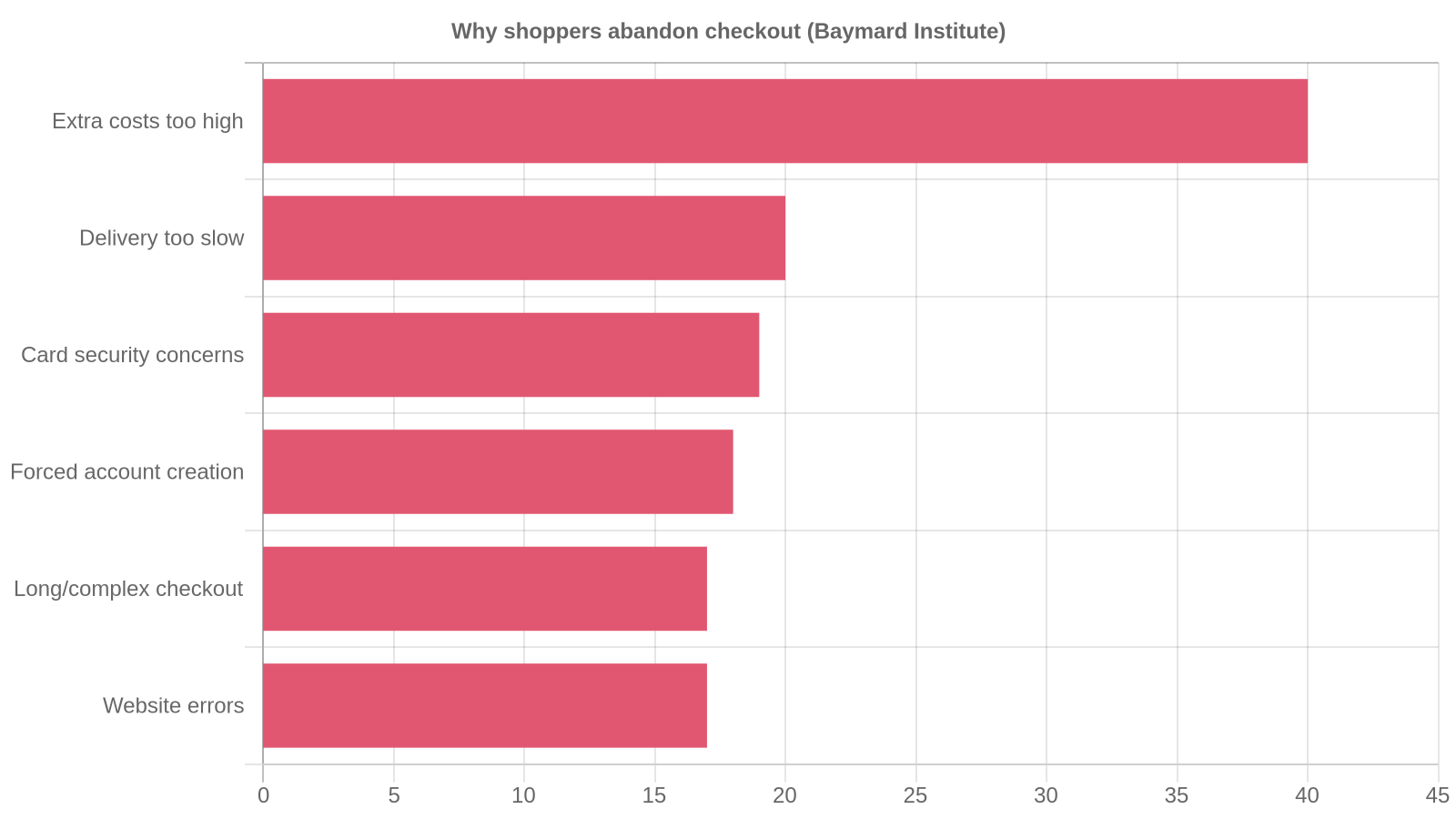
Extra costs top the list at 40%, delivery being too slow follows at 20%, then credit card security concerns at 19%, forced account creation at 18%, and a long or complicated checkout and site errors at 17% each. Every one of those is a design decision somebody made, which means every one of them is fixable.
That splits the job in two. The first half is stopping the leak: showing shipping cost before the email step, offering guest checkout, cutting form fields, adding express payment buttons. The second half is recovery, and it is what apps are for. A recovery stack has three layers:
- Capture. Get an email or phone number before the shopper disappears, usually through a popup or a form on the storefront.
- Reach. Follow up on a channel they will actually open. Email is the default. SMS, web push and WhatsApp all convert differently by market and price point.
- Cart experience. Give people a reason to finish inside the session, through a slide-out cart drawer, a bundle, a free-shipping threshold or a timed offer.
Merchants argue about which of those three deserves the budget, and the argument is live. One Shopify apparel brand of five years posted a thread titled "Cart abandonment, I'm getting fed up" that drew 160 replies, and the answers pulled in every direction. Rather than settle it with an opinion, we counted what stores run.
The recovery apps busy stores install
Across the stores Koala tracks, these are the apps doing recovery work, with the number of tracked stores running each one on 24 August 2026.
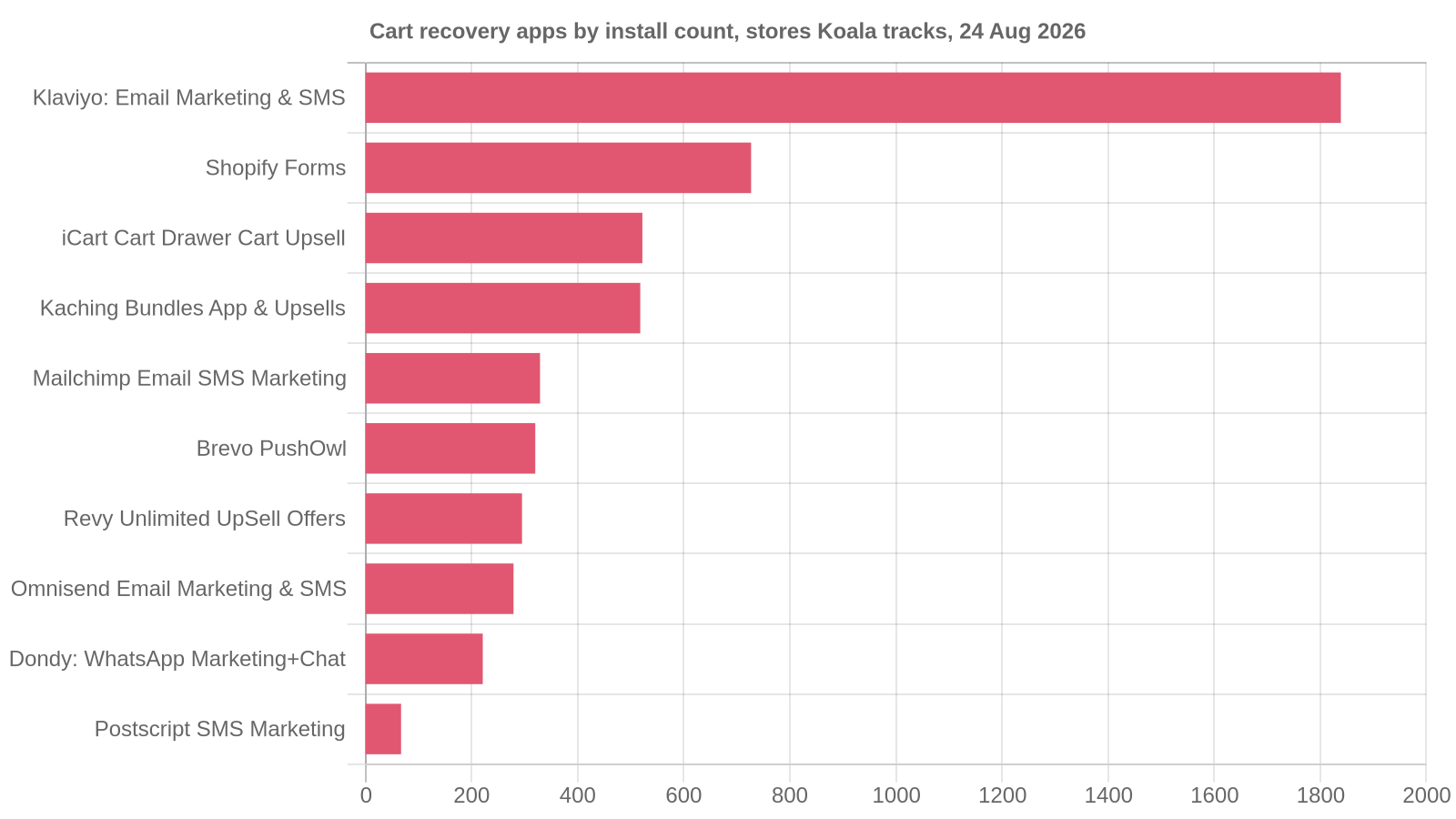
| Rank | App | Layer | Tracked stores |
|---|---|---|---|
| 1 | Klaviyo: Email Marketing & SMS | Reach (email + SMS) | 1,839 |
| 2 | Shopify Forms | Capture | 727 |
| 3 | iCart Cart Drawer Cart Upsell | Cart experience | 522 |
| 4 | Kaching Bundles App & Upsells | Cart experience | 518 |
| 5 | Mailchimp Email SMS Marketing | Reach (email + SMS) | 329 |
| 6 | Brevo PushOwl: Email, Push, SMS | Reach (push + email) | 320 |
| 7 | Revy Unlimited UpSell Offers | Cart experience | 295 |
| 8 | Omnisend Email Marketing & SMS | Reach (email + SMS) | 279 |
| 9 | Dondy: WhatsApp Marketing+Chat | Reach (WhatsApp) | 221 |
| 10 | Postscript SMS Marketing | Reach (SMS) | 67 |
Three things in that table are worth acting on.
Klaviyo is the default, by a distance. At 1,839 tracked stores it runs on more than twice as many as the next app on this list, Shopify Forms on 727, and on nearly as many stores as ranks 2 to 5 put together (2,096). Nothing in the data says it is the best product for a store your size, but it does mean the flows, templates and agency knowledge around it are the deepest in the category, and that is a real cost saving when you are setting up a three-email sequence for the first time.
The cart drawer layer is bigger than most guides admit. iCart on 522 stores and Kaching Bundles on 518 both work inside the session, before anyone has abandoned anything. They earn their place in a recovery stack because the cheapest cart to recover is the one that never gets abandoned. Our Shopify upsell app roundup goes deeper on that layer.
WhatsApp is the surprise. Filter to apps whose primary job Koala records as abandoned cart, and the list is dominated by WhatsApp tools: Dondy leads on 221 tracked stores, with Postscript's SMS on 67 behind it and four more WhatsApp apps in between. If you sell into markets where WhatsApp is the normal messaging channel, that is where your recovery messages get opened, and an email-only stack is leaving the channel on the table.
One more note on the free option before you spend anything. Shopify's built-in abandoned checkout email is not on by default. You turn it on in the Messaging app's automations and choose how long to wait, and you find the carts themselves under Orders, then Abandoned checkouts, as Shopify documents. That single email is the baseline every app on the list above is trying to beat. Turn it on this afternoon, then decide what to buy.
How we measured
What was counted. App installations recorded across the Shopify stores in Koala's store intelligence, rolled up to 250 distinct apps and 36,841 total store installations.
Window and date. A single snapshot, taken on 24 August 2026. Install counts move between snapshots as the tracked set changes, so quote the date with the number.
Coverage. These are the stores Koala tracks, which skews toward active, established merchants. It is a large sample of Shopify, not a census of it, so read every count as a ranking signal rather than a platform-wide market share.
What is not counted. Apps with no recorded installation in the snapshot are absent rather than counted as zero, and the recovery grouping above reflects the job each app's Shopify listing does, so a broad marketing suite like Klaviyo appears once even though it covers several layers.
Read any competitor's recovery stack in about a minute
A ranking across thousands of stores tells you what is normal. It does not tell you what works in your niche at your price point, and that is the number you actually need before you spend $100 a month on an app. The answer is sitting on your competitors' storefronts.
Koala Inspector is a free Chrome extension with a Shopify app detector built in. Open a competitor's store, open the extension, and the Apps screen lists every app that store has installed, grouped by what each one does, with a link out to each app's Shopify App Store listing. It costs no tokens and no card.
Here is the read on a real store. bigislandcoffeeroasters.com is a Food and Drink merchant in Koala's data with about 104,301 modeled monthly visits, running 20 installed apps at roughly $312 a month in app subscriptions. That is four times the median app spend across the 300 busiest stores Koala tracks, which sits at about $49.97 on 11 apps. Open it in Koala Inspector and the Apps screen shows you which 20, so you can see exactly where a store at that traffic level chose to spend: how much of the stack is capture, how much is reach, and how much is cart experience.
Do that on three stores in your niche and the pattern falls out fast:
- Pick three competitors who are clearly ahead of you. Same category, same rough price point, ideally stores you already lose customers to.
- Open each one and read the Apps screen. Write down every app in the marketing, email, SMS and cart groups.
- Count the overlaps. An app that appears on two of three stores is your niche's default. An app that appears on one is somebody's experiment.
- Check the cart experience while you are there. Add an item and watch what happens: a drawer, a bundle offer, a shipping threshold bar, a popup on exit.
- Buy the overlap, not the listicle. You now have a shortlist validated by stores that are already winning your customers.
That last step is why this is worth the ten minutes. Every roundup on this topic, including this one, ranks apps across the whole market. Your niche is not the whole market, and a $180 candle store and a $19 phone case store need different recovery stacks. For a wider view of what top stores run beyond the cart, see what apps top Shopify stores use and our Shopify store revenue benchmarks.

Want to see apps on any Shopify store?
Download for free and start exploring a whole new ecommerce world!

If you only fix one thing this week
Show the full cost earlier. Extra costs are the number one reason shoppers who intended to buy walk away, at 40% in Baymard's data, and they are the cheapest thing on the list to fix because it costs you nothing to move information forward in the flow.
Practically: put a shipping cost or a free-shipping threshold on the cart page and in the cart drawer, before the email step. Add a progress bar showing how far the shopper is from free shipping. State duties and taxes for the markets you sell into on the product page rather than at payment. That one change is worth more than a three-email sequence, because it stops the abandonment instead of chasing it.
Then turn on Shopify's built-in recovery email, watch a week of abandoned checkouts, and only then buy an app. Merchants on the Shopify Community consistently name low conversion as their biggest store problem, and the thread's most useful reply says to find where customers actually drop off before optimising anything. A stack bought before you have that answer is a monthly bill on a guess.
What good looks like
| Symptom | What to aim at | The change that gets there |
|---|---|---|
| Shipping cost first appears at the payment step | Cost visible on the cart page and in the cart drawer | Shipping rate or free-shipping threshold shown before the email field |
| Checkout requires an account | Guest checkout available | Turn account creation optional in checkout settings |
| No follow-up after an abandoned checkout | At least one automated recovery message going out | Enable Shopify's abandoned checkout automation, then add a reach app |
| Email is your only recovery channel | Second channel matched to your market | SMS, web push or WhatsApp, chosen from what your niche's stores run |
| Cart is a plain page with a checkout button | An in-session reason to finish | Cart drawer with a shipping-threshold bar or a bundle offer |
| App stack copied from a blog post | Stack validated against your niche | Read three competitors' Apps screens and buy the overlap |
More on the wider conversion picture in our guide to improving your Shopify conversion rate.
What researchers say about Koala Inspector
Verified reviews from the Chrome Web Store.
“Very easy to use and install. Helps with identifying Shopify stores quickly and saves time by listing best sellers. Also has handy feature of the traffic which I found very valuable.”
 Ali Baloch
“I was a bit skeptical about all the hype but gave Koala Inspector a shot. It's user-friendly and provides useful data on what's working for others. The support team is also there when you need them.”
 Martin René
“Great tool for competitor research and customer support is really quick!”
 Aiswarya S
Shopify abandoned cart questions people ask
Shopify abandoned cart questions people ask
The questions merchants ask alongside cart recovery, answered straight.
Can I use my own domain name with Shopify?+
Yes. Shopify gives every new store a default myshopify.com address, and you can either buy a custom domain through Shopify or connect one you already own from a third-party registrar. Shopify's own guidance is that a domain matching your brand helps build trust in your online store, which matters at the cart step: a checkout that suddenly shows an unfamiliar address is one of the small trust gaps that costs orders. Note that the default myshopify.com name itself can only be changed once.
Can Koala Inspector inspect Shopify shops?+
Yes, that is what it is built for. Koala Inspector is a free Chrome extension that opens on any Shopify store and shows the store overview, the active theme, the full product catalogue with likely best-sellers and prices, and every app the store has installed, grouped by what each app does. Those features cost no tokens. Traffic breakdowns, ad campaigns, product trends and ongoing competitor tracking sit behind tokens, and the free plan includes 15 tokens a month with no card required. On a site that is not built on Shopify it tells you so instead of guessing.
Can you actually make money using Shopify?+
Yes, and Koala's own store data shows the range. Across the 300 busiest stores in Koala's store intelligence on 24 August 2026, the median store showed roughly $323,478 of modeled monthly sales on about 33,272 modeled monthly visits. Two caveats keep that honest. Those are gross figures before product cost, shipping, payment fees, ad spend and refunds, and the sample is the busy end of the market rather than a typical new store. The stores at that level are not doing anything exotic: the median one runs 11 apps and spends about $49.97 a month on them.
Can you make 10k a month on Shopify?+
Yes, and by the standard of an established store it is a modest number. The median store in Koala's 300-store snapshot on 24 August 2026 showed roughly $323,478 in modeled monthly sales, so $10,000 a month sits well below the busy end of the market. Recovering abandoned carts is one of the cheaper ways to get there, because those shoppers already chose a product. Fix the reason they left first: Baymard Institute's research puts extra costs such as shipping, tax and fees at the top of the checkout abandonment list at 40 percent.
Are Shopify point of sale payments secure?+
Shopify states that it is certified Level 1 PCI DSS compliant and that this compliance extends by default to all stores powered by Shopify, covering the store, its shopping cart and its hosting. Level 1 is the highest of the four PCI merchant levels. That covers the payment plumbing on both the online store and in-person selling. What it does not cover is your own operational security, so staff account permissions, device access on the shop floor and who is allowed to issue refunds are still your responsibility.
Which Shopify preorder app do you use for partial payments & deposits?+
Downpay: Partial Pay & Deposit is the clearest fit for deposits on the Shopify App Store. It lets customers pay a deposit or pay later on pre-order products and collects the balance by auto-charge, manual collection or invoice, and as of August 2026 it starts at $29 a month with a 5.0 rating from 83 reviews. Better than taking any single recommendation: open two or three stores in your niche that already sell made-to-order or high-value products and read which deposit app they run. Our roundup of the best Shopify pre-order apps covers the wider category.
The pre-order category is covered in full in our best Shopify pre-order apps roundup, and the Downpay listing has the current deposit pricing.
Audit three stacks before you buy anything
You do not need another opinion about which abandoned cart app is best. You need to know what the three stores beating you in your niche have already paid for, and that read takes about a minute per store.
See any Shopify store's recovery stack free
Install Koala Inspector, open a competitor, and read every app they run, grouped by what each one does. No card, no tokens for the app detector.
Sources referenced
- Baymard Institute, Cart Abandonment Rate Statistics, for the 70.22% average across 50 studies and the ranked reasons for checkout abandonment.
- Shopify, Recovering abandoned checkouts and Domains, for the native recovery automation and custom domain rules.
- Shopify, PCI compliance, for the Level 1 PCI DSS certification statement.
- Shopify App Store, Downpay: Partial Pay & Deposit, for deposit and partial-payment pricing as of August 2026.
- Merchant discussion on cart abandonment (r/shopify) and on conversion problems (Shopify Community).
Every install count and store figure on this page is Koala's own store intelligence, snapshotted 24 August 2026. Cite it with the date attached.
Written by
Koala Team
Koala Apps Editorial Team
The Koala Team is the crew behind Koala Inspector. We test tools, track what is selling across Shopify, and turn it into practical roundups and reference guides for store owners and dropshippers.