Shopify Buy Now Pay Later: What Winning Stores Actually Run
 By Koala TeamSeptember 30, 2026
A shopper picked a variant, added to cart, opened the checkout, and left. That is the most expensive event in your store, because you already paid the full acquisition cost and collected nothing. It is also the single loudest complaint merchants bring to public forums, and the answers they get are almost always guesses.
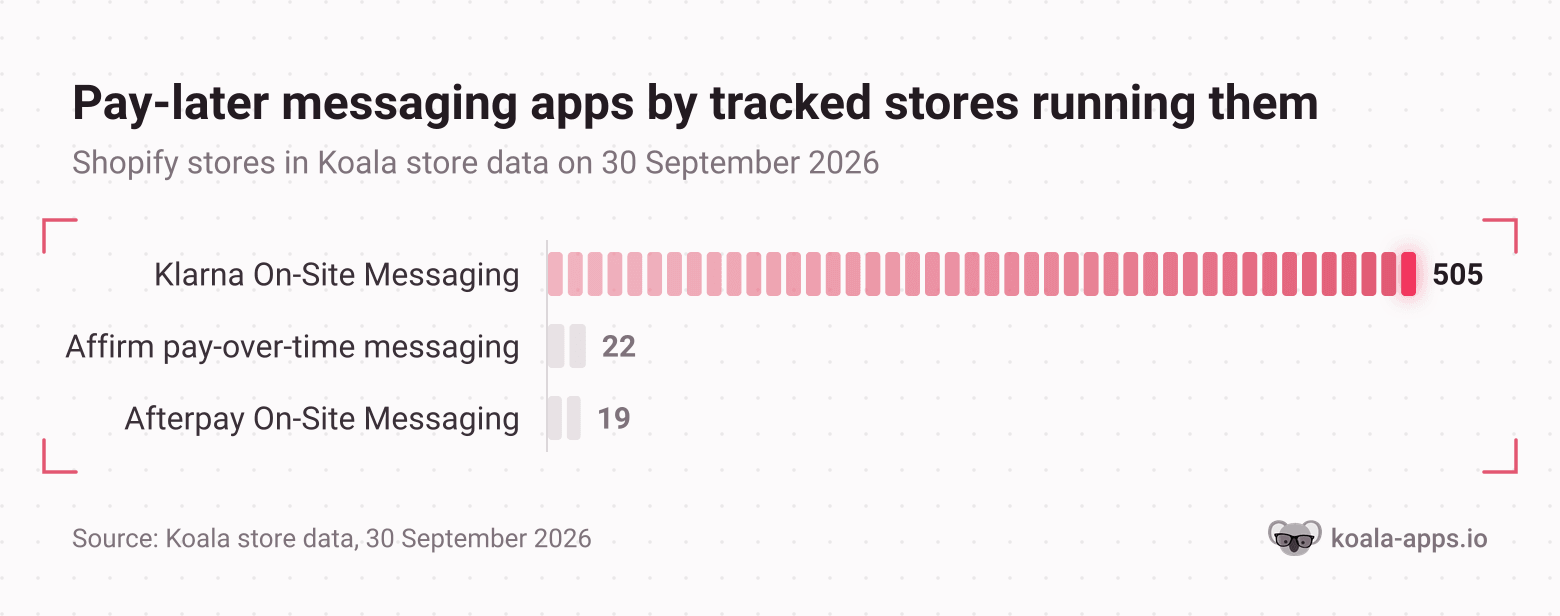
Here is one thing that is not a guess. Across the Shopify stores Koala tracks, counted on 30 September 2026, the third most-installed app of any kind is Klarna On-Site Messaging, on 505 tracked stores. Ahead of it sit only Judge.me Product Reviews on 1,020 and Klaviyo on 756. A payment-messaging app outranks every upsell app, every analytics app and every page builder in that count. Stores are voting with their app bills that telling a shopper about pay-later options before checkout moves the order.
This guide covers what that messaging actually does, what it costs you in fees and risk, and the one check that beats every opinion: reading the checkout stack of three stores already winning in your category.
What's in this guide
- The symptom: carts fill, checkouts stall
- What pay-later messaging actually does
- Your options on Shopify, and how widely each runs
- How we measured
- The honest trade-offs
- Check three stores in your category first
- What to do this week
- Shopify buy now pay later questions people ask
The symptom: carts fill, checkouts stall
The pattern to look for in your own analytics is a healthy add-to-cart rate with a checkout that thins out at a specific step. Merchants describe it precisely. One small-business seller wrote that they keep losing people at the shipping estimate step and could not tell whether showing the cost earlier would help or simply move the drop-off somewhere else. That uncertainty is the real problem. The number is visible, the cause is not.
Price shock is the cause worth testing first, because it has two fixes rather than one. You can lower the number, which costs margin you may not have. Or you can change what the number feels like, which is what pay-later messaging does.
The margin half matters before you touch anything. A merchant who builds pricing tools for Shopify stores laid out the five-minute exercise most stores never do: take one product, write down the selling price, the supplier cost with shipping, payment fees, ad cost per order and a refund allowance. On their worked example, $100 of revenue leaves $9 of profit, and a 20% off sale on the same product puts it at minus $11 per order while the dashboard cheerfully reports that sales are up. Know that figure before you add a payment method that charges more than your card rate.
What pay-later messaging actually does
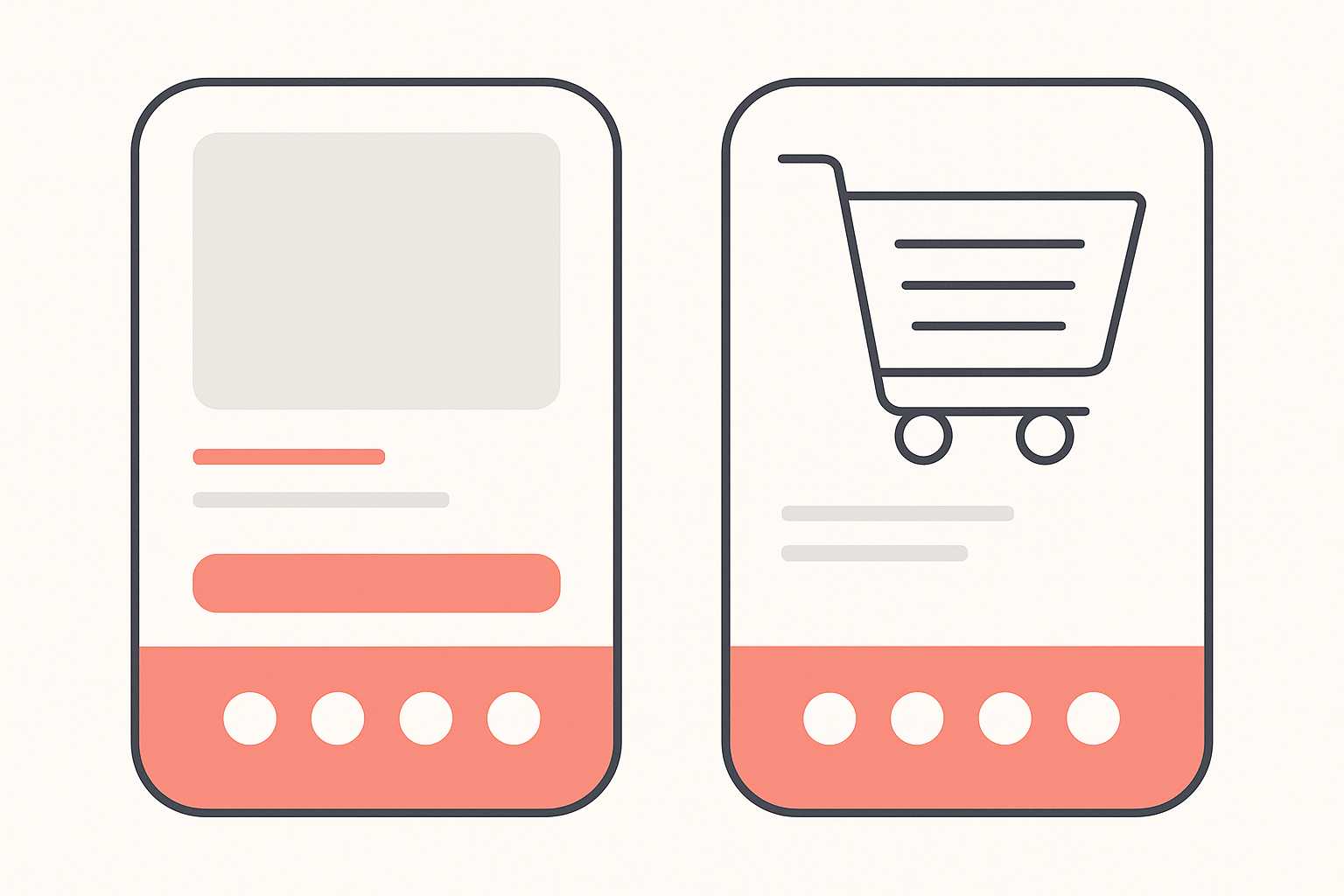
Pay-later messaging is a banner that shows the instalment breakdown of the price a shopper is already looking at. Instead of $180, the product page reads $180 or four payments of $45. Shopify documents two placements for its own version, a product page banner and a cart page banner, and that placement is the whole point. The information lands while the shopper is still deciding, not after they have committed to a checkout and met the total.
One distinction saves people a wasted afternoon. A messaging app is not a payment method. Klarna's own listing states it plainly: the app "is for merchants with an active Klarna Payments integration" and it "will not add Klarna as a payment method." Same for the others. You enable the payment option with the provider or in Shopify's payment settings first, then install the messaging app to advertise it. Installing the app alone changes what shoppers read and nothing about what they can pay with.
Shopify's own marketing claims Shop Pay Installments delivers a "50% increase in average order value for one in four merchants." That is Shopify's figure about Shopify's product, so read it as a vendor claim rather than an independent result, and note what it quietly concedes: three in four merchants saw something smaller. We are not going to hand you a conversion lift number, because nobody can source one for your store. What is sourceable is what other stores do, which is the next section.
Your options on Shopify, and how widely each runs
Four routes exist, and they are not equally popular. Counted across the stores Koala tracks on 30 September 2026:
| Route | How it is added | Tracked stores running the messaging app | App rating |
|---|---|---|---|
| Shop Pay Installments | Native, no app needed | Not an app install | Not applicable |
| Klarna | Klarna On-Site Messaging | 505 | 2.4 from 115 reviews |
| Affirm | Affirm pay-over-time messaging | 22 | 1.7 from 34 reviews |
| Afterpay | Afterpay On-Site Messaging | 19 | 3.0 from 56 reviews |
All three messaging apps are free to install, and all three are rated badly. Read that gap carefully, because it is informative rather than damning. These apps do one narrow job for merchants who have already signed a payment agreement, so their review pages collect the frustration of a much larger relationship: fees, payouts, disputes and support. A one-star review complaining about settlement times is not a review of a banner.
The install gap between 505 and 19 is the more interesting number. It is not a quality ranking. Klarna's reach across European and UK markets is wider, so more stores have a Klarna agreement to advertise in the first place, and Shopify's own Shop Pay Installments needs no app at all, so every US store using it is invisible in an app count. Take the 505 as evidence that the tactic is mainstream, and the 22 and 19 as evidence that the provider you pick is mostly decided by where your customers live.
Shop Pay Installments is the route to check first if you are on Shopify Payments. As documented on 30 September 2026, it requires a business entity in the United States selling in USD, Canada selling in CAD, or the United Kingdom selling in GBP, with Shopify Payments and Shop Pay both activated. Customers can split orders from $35 to $30,000 USD or CAD, and from £50 to £30,000 GBP, with discounts, shipping and taxes counted in the total. Shopify runs it in partnership with Affirm.
That range is a real gate. A merchant on r/shopify asked whether a BNPL option is worth installing on a store with a $45 average order value. At $45 the answer is mostly no. Most carts would sit below or barely above the floor where instalments are offered, so the banner would show up on a minority of sessions while the fee applied to all of them. Pay-later messaging earns its place on a store selling $150 items, not $35 ones.
How we measured
- Sample: 250 Shopify apps ranked by how many of the stores in Koala's app data run each one, plus a separate snapshot of the 300 busiest stores Koala tracks.
- Window: a single snapshot taken on 30 September 2026.
- Measured on: 30 September 2026.
- What is and is not counted: it covers the stores Koala tracks, which skew toward active, higher-traffic shops. It is not a census of Shopify, so read every count as a ranking within that population rather than a global market share. A native feature such as Shop Pay Installments carries no app and therefore cannot appear in an install count at all.
The honest trade-offs
Every figure and term below was checked on 30 September 2026, and all of it moves, so re-read your own agreement before you act on any of it.
It costs more than your card rate, and the gap is bigger than most merchants assume. A dropshipper broke out their own profit and loss by payment method across 391 orders and $58,000 of sales and published the effective rate each one charged them.
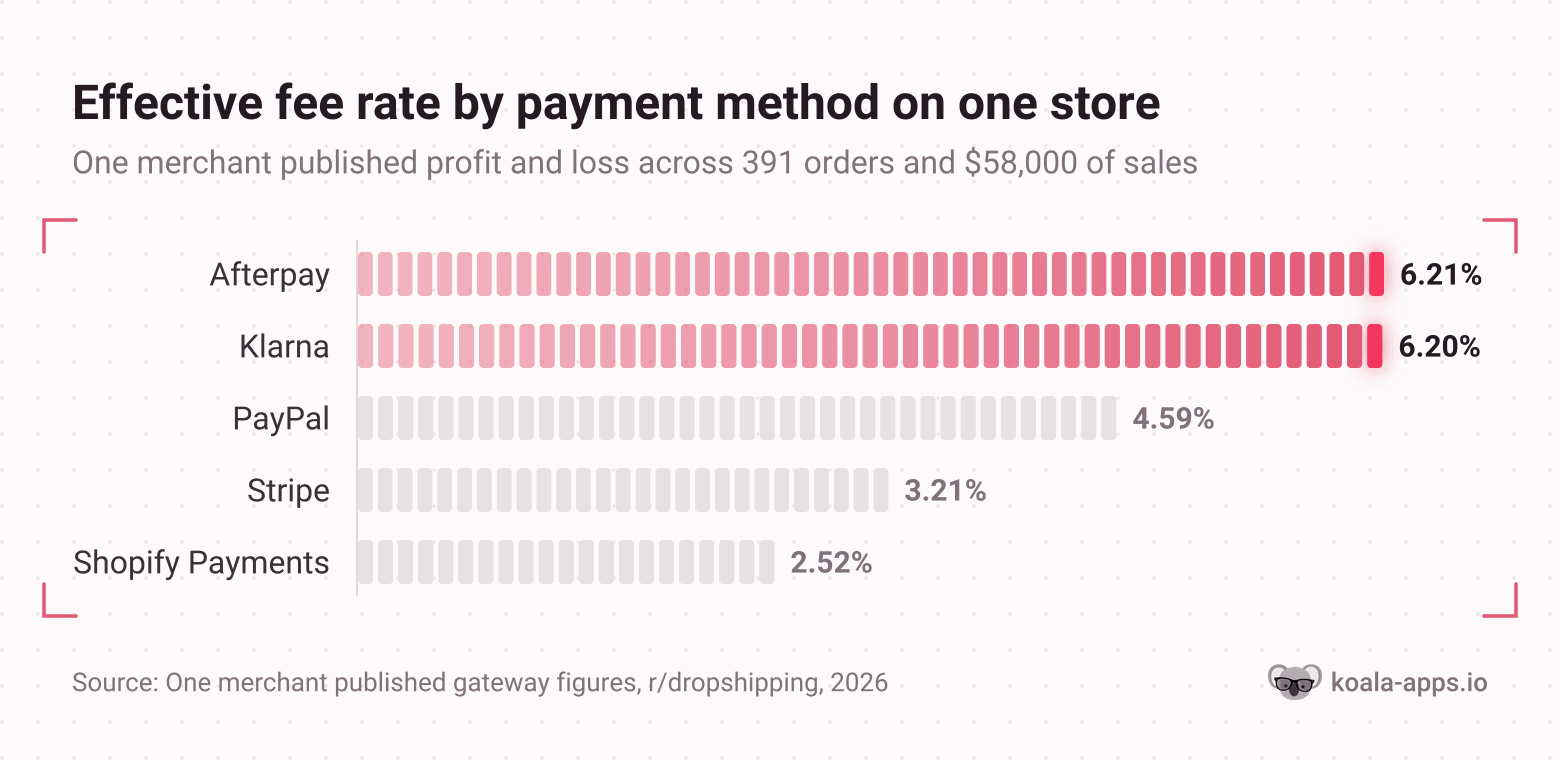
Their figures, same products and same cost of goods: Shopify Payments 2.52%, Stripe 3.21%, PayPal 4.59%, Klarna 6.20%, Afterpay 6.21%. Roughly four margin points between the cheapest and the most expensive. Their own conclusion is the right one to copy: "Not ditching BNPL options since they help conversions, but definitely rethinking how I price for them." One store's measured rates are not a published price list, so get your own from your provider's agreement. The shape of the finding holds anyway, and another merchant asking whether Klarna rates can be reduced reported the same squeeze once most of their customers had moved onto it.
You are not carrying the credit risk, which is the part in your favour. Shopify states that for Shop Pay Installments, "Affirm is responsible for collecting payments from your customers, and you aren't at risk if your customers stop making payments," and that you receive full payment for a captured order within 1 to 3 business days. You are buying conversion with a fee, not with exposure to a stranger's repayment behaviour.
Fraud and disputes behave differently, so watch the first month closely. A Shopify merchant documented an influx of fraudulent orders through Afterpay, shipped some before noticing, and was told by Afterpay's own merchant support that the purchases traced to newly created accounts and that disabling Afterpay temporarily was the recommended step. Another merchant went further and posted that Klarna brought them a disproportionate volume of chargebacks and disputes along with fraudulent return claims. Those are individual experiences rather than measured rates, and plenty of stores run both providers without incident. Treat them as a reason to review orders manually for the first few weeks, not as a verdict.
Read the contract before you offer two providers. A merchant on r/ecommerce quoted section 14.1 of new Klarna merchant terms requiring that Klarna be the store's sole provider of deferred and instalment payments in the countries the agreement covers, with backup and failover solutions the stated exception. If you were planning to stack Klarna alongside a second pay-later option, check your own agreement rather than assuming you can.
Returns get slower and messier. An instalment plan that is part-paid when a return lands creates a refund that has to unwind across a schedule and a third party. Budget support time for it, especially in apparel, where return rates are highest and where Apparel is also the biggest single category among the busiest stores Koala tracks.
Check three stores in your category first
Every trade-off above points the same way: whether pay-later messaging pays depends on your price point, your market and your margin. No roundup can know those. What you can know in about a minute per store is what the stores already winning in your category decided.
The free Shopify app detector in Koala Inspector opens on any Shopify store and shows every app that store runs, grouped by what each one does, at no token cost. Pick three stores in your niche that clearly outsell you and read their checkout stack top to bottom:
- Is a pay-later messaging app there at all? If none of the three run one on a similar price point to yours, that is your answer for this quarter and you just saved a fee.
- Which provider? The one your competitors run is the one your shared customers already have an account with, which matters more than any feature comparison.
- What sits beside it? In Koala's data the apps that appear alongside pay-later messaging most often are review collection and social proof: Judge.me on 1,020 tracked stores, Loox on 324 and Instafeed on 296. A pay-later banner works on a product page a shopper already trusts. If a rival runs reviews and you do not, fix that before you add a payment option.
- What are they charging? The catalogue view gives you their price range, which tells you whether instalments are even relevant at your average order value.
Do that across three stores and you have replaced an opinion with a pattern. Our best Shopify abandoned cart apps roundup covers the recovery layer that sits after this one, and the best Shopify upsell apps roundup covers raising the order value that instalments are supposed to unlock.
Read any Shopify store's checkout stack free
Install Koala Inspector, open a store in your category, and see every app it runs grouped by job, including whether pay-later messaging is one of them. No card needed, and the app detector costs no tokens.
What to do this week
- Write down your profit per order on your best seller, fees included. If four margin points would put it underwater, stop here and fix price or product cost first.
- Check your average order value against the floor. Below roughly $50 most carts never qualify for instalments and the fee applies regardless.
- Inspect three competitors in your category with the app detector and note which pay-later provider, if any, each one runs.
- Enable the payment option before the banner. Shop Pay Installments if you are on Shopify Payments in the US, Canada or the UK; otherwise the provider with the strongest presence in your market.
- Turn on the product page and cart banners, then watch checkout completion and average order value for 30 days against the same window last month. Review orders by hand while you do.
The point of the exercise is measurement rather than faith. A store that adds instalment messaging and cannot tell you what happened to its checkout rate has bought a fee increase and called it optimisation.
Shopify buy now pay later questions people ask
Straight answers to the questions that come up alongside adding a pay-later option.
How much does Shopify cost?+
Checked on 30 September 2026, Shopify's published US plans are Basic at $39 a month billed monthly or $29 on annual billing, Grow at $105 or $79, Advanced at $399 or $299, and Plus from $2,300 a month. Every plan also takes a cut of each online card payment: 2.9% plus 30 cents on Basic, 2.7% plus 30 cents on Grow, 2.5% plus 30 cents on Advanced and 2.25% plus 30 cents on Plus. New stores get 3 days free and then $1 a month for 3 months. Pay-later payments sit on top of that card rate rather than replacing it, which is the part most plan comparisons leave out.
What is Shopify and how does it work?+
Shopify is hosted ecommerce software. You pay a monthly subscription, pick a theme, load products, and Shopify runs the storefront, the cart, the checkout and the payment processing for you. The work you keep is the product, the pricing, the traffic and the apps you bolt on for jobs the core platform does not cover, such as reviews, email or pay-later messaging. Checkout is the part Shopify guards most closely, which is why pay-later messaging mostly appears before checkout, on the product page and in the cart.
Can Shopify spy on sales?+
Shopify gives you no window into another merchant's admin, and no tool can show you a competitor's real order ledger. What is readable from outside is what a store presents publicly plus modeled estimates. Koala Inspector reads a store's theme, its full product catalogue with likely best-sellers and prices, and every app it runs, all free, and it models traffic and sales estimates sampled over time rather than pulling anything from a store's private dashboard. Treat the estimates as a range for comparing stores against each other, and treat the app and theme lists as the hard facts they are.
What Shopify apps or tools do you know?+
The ones that show up most across the stores Koala tracks, counted on 30 September 2026, are Judge.me Product Reviews on 1,020 tracked stores, Klaviyo for email and SMS on 756, Klarna On-Site Messaging on 505, BUCKS Currency Converter on 412, Shopify Inbox on 388, Microsoft Clarity on 360, PageFly on 359, Loox Product Reviews on 324 and Instafeed on 296. That list is worth more than any roundup because it is what stores pay for rather than what a listicle recommends. Use the free Shopify app detector in Koala Inspector to see the same list for any store in your own category.
Can I use my own domain name with Shopify?+
Yes. Every store gets a default myshopify.com address, and you can either buy a custom domain through Shopify or connect one you already own from another registrar. Do it before you turn on any pay-later option. A shopper who has already decided to split a payment across four instalments is making a small credit decision on your site, and an unfamiliar web address at that moment is exactly the kind of trust gap that loses the order. Note that the default myshopify.com name itself can only be changed once.
How do you use Shopify for beginners, step by step?+
Start the trial, pick a free theme, publish five to ten products with copy and photos you made yourself, set your shipping rates so the cost is visible before the email step, connect a payment provider, place a test order yourself on a phone, then send traffic and watch where it stops. Add apps only against a measured problem. For beginners the honest order is traffic first, then checkout friction, then pay-later messaging, because a pay-later banner on a store nobody reaches changes nothing.
Sources referenced
- Shopify, Shop Pay Installments and getting paid, for merchant eligibility by country, the $35 to $30,000 order range, the 1 to 3 business day payout and the statement that Affirm carries the repayment risk.
- Shopify, Shop Pay Installments banners, for the product page and cart page placements.
- Shopify, Shop Pay Installments product page, for the Affirm partnership and the vendor claim about average order value.
- Shopify, pricing, for plan prices and online card rates as of 30 September 2026.
- Shopify App Store listings for Klarna On-Site Messaging, Affirm pay-over-time messaging and Afterpay On-Site Messaging, for price, ratings, review counts and the requirement for an existing payment agreement.
- Merchant discussion on pay-later economics (r/dropshipping, r/shopify), on fraud and disputes (r/shopify), on provider exclusivity (r/ecommerce) and on whether to install one at all (r/shopify).
Every install count and store figure on this page is Koala's own store data, snapshotted 30 September 2026. Cite it with the date attached.
Written by
Koala Team
Koala Apps Editorial Team
The Koala Team is the crew behind Koala Inspector. We test tools, track what is selling across Shopify, and turn it into practical roundups and reference guides for store owners and dropshippers.