Best Shopify Product Options Apps, and How to Pick One
 By Koala TeamSeptember 29, 2026
Shopify gives a product three options. Colour, size, material, and you are out. Push past that and the platform stops you at the option level long before you get near the 2,048 variants a product can hold, which is why a store selling a configurable product hits a wall that has nothing to do with how many things it can stock.
The wall shows up in three shapes. A product needs a fourth choice and there is nowhere to put it. A choice needs its own price, like $8 for engraving or $25 for a rush turnaround, and Shopify's variant grid has no concept of an add-on. Or the choice is not a choice at all but a piece of input, a name to engrave, a date, a logo file, and none of that belongs in a variant. A product options app takes over that part of the product page and answers all three.
What a product options app actually changes
It replaces the option controls on your product page with its own, then decides what happens to the shopper's answers when the order is placed. That second half is where the apps genuinely differ, and it is the thing most buyers do not look at until the app is installed.
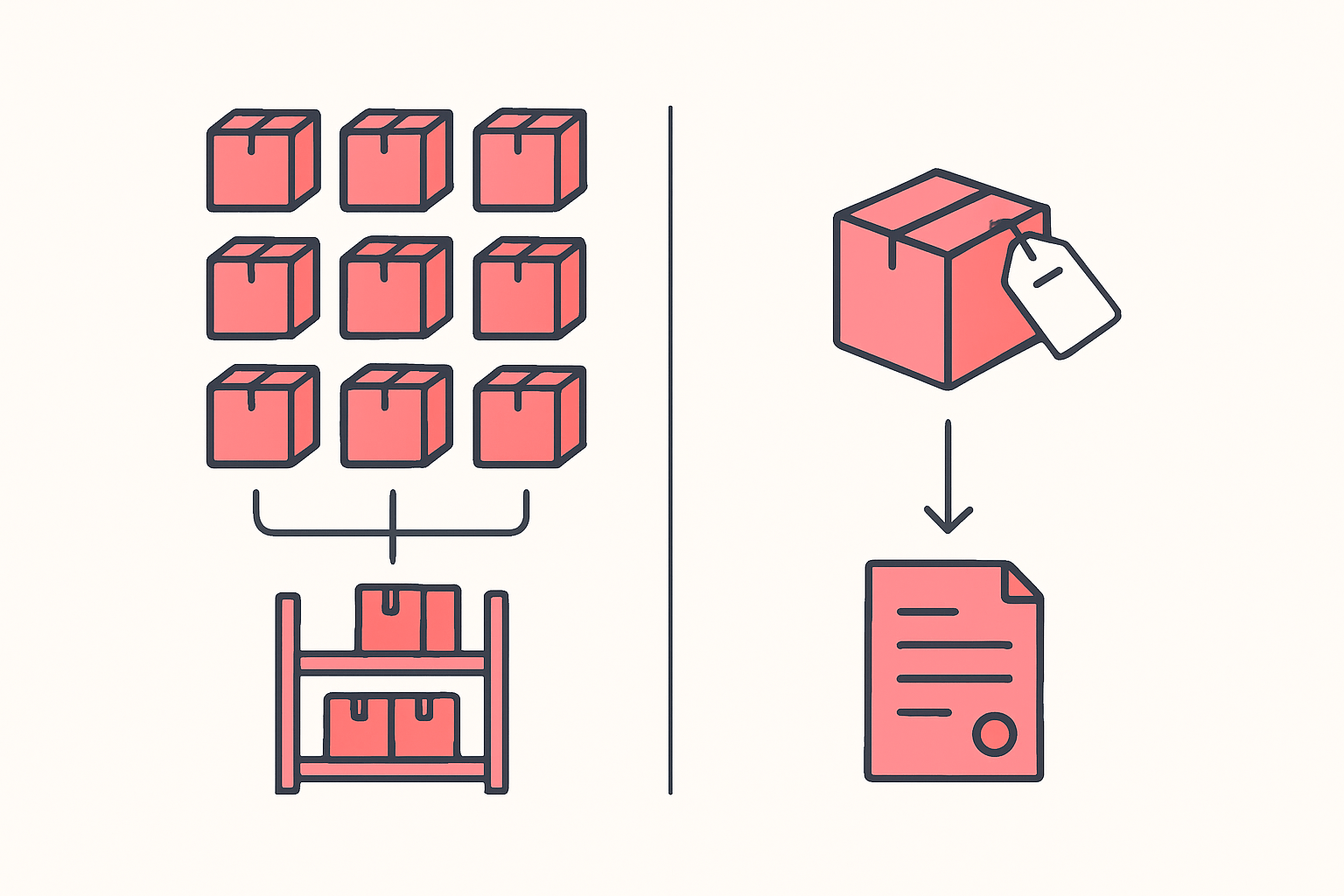
One route creates real variants. Each combination becomes a stocked thing with its own inventory count, its own SKU and its own row in every report. The other attaches the shopper's answers to the cart line as properties. The order arrives with "Engraving: Marta, Font: Serif" printed on it, and nothing in your inventory moved.
Neither route is a better version of the other, and choosing wrong is expensive. A merchant on the Shopify Community ran straight into this while trying to sell customisable race numbers through Shopify Collective: apps that create real variants on the product fight Collective, because the supplier's sync overwrites changes on the retailer side and Collective caps synced products at 100 variants. The working answer there was an app that rides on line item properties instead. A store counting stock on every colourway needs precisely the opposite.
The options apps stores actually run
These are the product options apps Koala sees most often across the Shopify stores it tracks, on 27 September 2026. Three of them sit inside the 25 most-installed apps of any category, which is a strong signal for a category most app roundups treat as a niche.
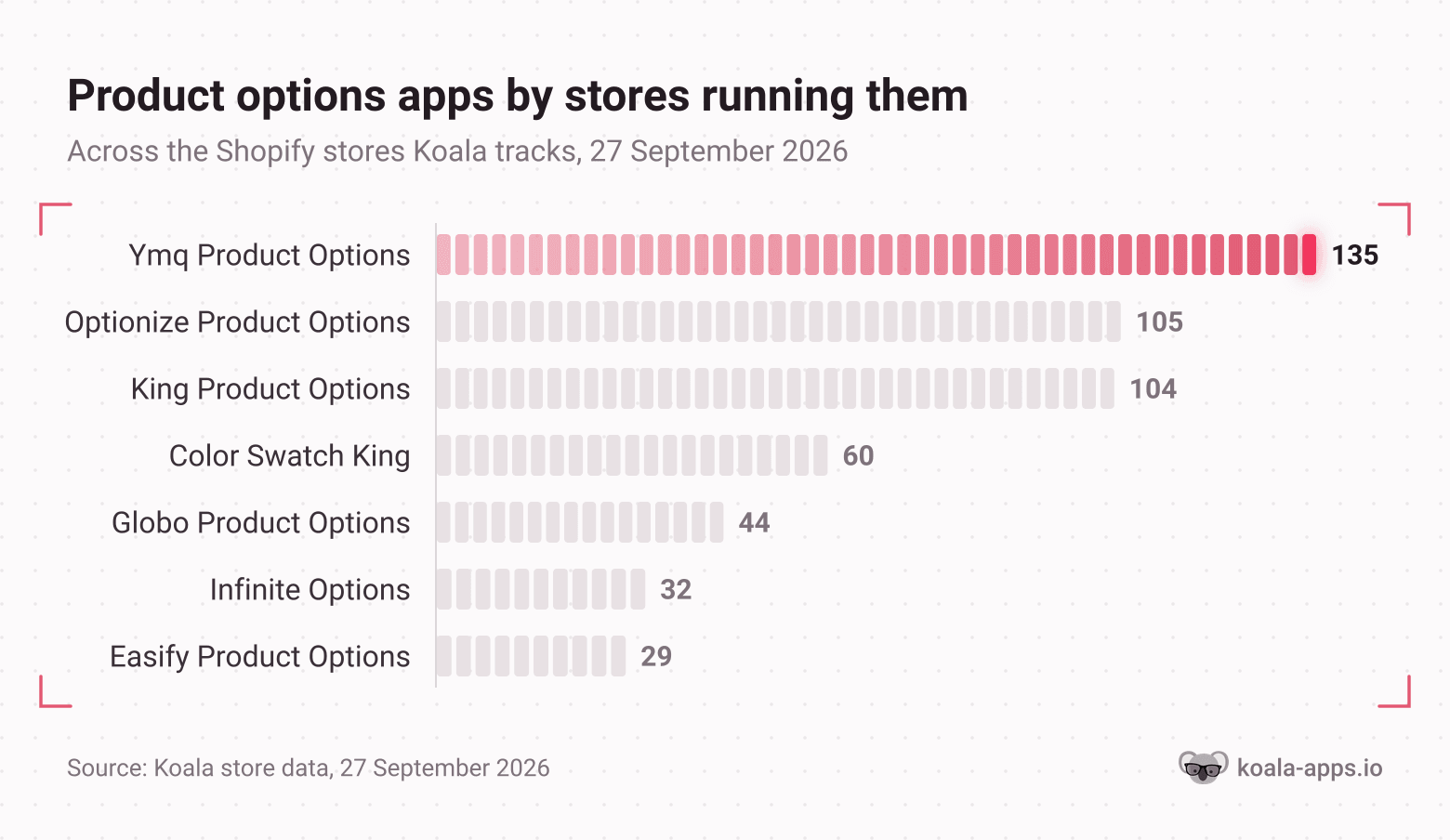
Read those counts as a ranking across the stores Koala tracks, not as a share of Shopify. What they tell you is which apps have survived contact with real catalogs.
| App | Stores running it | Rating | Free plan | Entry price | Best for |
|---|---|---|---|---|---|
| Ymq Product Options, Variants | 135 | 5.0 (422) | Yes | $9.99/mo | Deep option sets with volume and formula pricing |
| Optionize Product Options | 105 | 4.5 (91) | Yes | $9.99/mo | Getting a first option set live fast |
| King Product Options, Variants | 104 | 4.7 (484) | Yes | Free plan | Many combinations sharing one inventory pool |
| Color Swatch King: Variants | 60 | 5.0 (3,175) | Yes | $5/mo | Displaying variants you already have as swatches |
| Globo Product Options, Variant | 44 | 4.9 (5,090) | Yes | $9.90/mo | Add-on pricing that keeps discounts and tax right |
| Infinite Options: Product opt | 32 | 4.7 (2,617) | No | $12.99/mo | Personalisation that must not touch inventory |
| Easify Custom Product Options | 29 | 4.9 (3,088) | Yes | $9.99/mo | Live preview of the configured product |
Ratings, review counts and prices read from each app's Shopify App Store listing on 29 September 2026.
Two more are worth knowing without being common enough to chart. SC Product Options by Shop Circle carries 1,256 reviews at 4.6 and runs $14.99 a month for Basic, $39.99 for Premium, which buys cart-page editing. Kickflip is a different animal at $59 a month plus a per-sale fee: a full visual configurator with layered previews, for stores where the customer is designing the product rather than choosing from a list.
A note on the top three, because their names make them look interchangeable. Ymq is the deepest of them, with 30+ option types, conditional logic that can read your real Shopify variants, and pricing rules that go beyond flat add-ons into percentages, volume tiers and formulas. Optionize is the leanest and generates option sets for you, which is why it moves fastest on a first setup; it carries the smallest review base of the three at 91. King leans on virtual variants, where many option combinations share a single inventory pool, and it is the only one of the three with a free plan that most stores can stay on.
Color Swatch King is solving a different problem from the rest of the table. It does not create options. It takes the variants your product already has and renders them as swatches on product and collection pages, with out-of-stock hiding and size charts. If your real complaint is that your theme shows a dropdown where shoppers expect colour circles, that is the cheaper fix.
Two questions that pick the app
Everything above narrows to two decisions, and both of them are about your store rather than the app's feature list.
Does the option need to write back to inventory?
Ask what happens when the last one sells. If a specific combination can run out, and you want Shopify to stop selling it, you need options backed by real variants or by an app that syncs stock per combination. Globo does SKU management with manual and automatic updates and can hide out-of-stock variants. Easify updates inventory and hides sold-out choices. King's virtual variants deliberately share one pool, which is right when the option changes the product's appearance and not its stock.
If the option is information rather than stock, an engraved name, a delivery date, an uploaded logo, then line item properties are the correct answer and real variants are actively harmful. Infinite Options is built this way and passes options through as line item properties. That is also the route that survives a supplier sync, as the Collective thread above shows.
Will it survive your next theme change?
Theme customization is where merchants are currently getting stuck, and the Shopify Community threads read the same way week after week: hiding unavailable variant combinations on Studio, an unavailable variant staying selected on Dawn, restyling the size picker, showing a variant selector on Horizon when a product only has one option, getting multiple images onto a colour variant without Plus or a paid app. Some of those get answered with a theme setting. Plenty get answered with a code edit to a Liquid snippet, and every code edit is a thing that disappears the day you switch themes.
An options app that installs as an app block on an Online Store 2.0 theme moves with you. One that needs its snippet pasted into your product template does not, and you will be reinstalling it by hand. Before you commit, check that the app names Online Store 2.0 support, and check it works with your cart: King explicitly lists OS 2.0 themes, AJAX cart and buy-now buttons, and Globo handles add-on pricing through Shopify Functions so discounts and tax stay correct through checkout. Test your buy-now button specifically, because it skips the cart and is where option data most often goes missing.
If you are still choosing a theme for a configurable catalog, our roundup of Shopify themes for custom and personalized products starts you on one that needs less of this work.
Check a store that already sells what you want to sell
The shortest route to the right app is a store already doing it. Somebody in your category has solved the exact configuration problem you are looking at, in public, on a product page you can open right now.
Install the free Koala Inspector Chrome extension, open their most heavily configured product, and click the icon. The Apps tab lists every Shopify app that store runs, grouped by type, so the options app shows up beside the rest of their stack. App detection is free and costs no tokens. Do it across five stores in your niche and the shortlist picks itself, because you will see the same one or two names repeatedly.
Three things to read while you are in there:
- Which options app they run, from the Apps tab. If the category leader and two challengers all run the same one, that is a stronger recommendation than any review count.
- How their configured product is priced. Open the product in the catalog view and compare its price to the base product. The gap is what the market will pay for the add-on you are debating charging for.
- Their theme, from the Explorer dashboard. An options app that works cleanly on their theme is far more likely to work on yours if you are running the same one.

Want to see apps on any Shopify store?
Download for free and start exploring a whole new ecommerce world!

Our guide to what a Shopify app detector is covers what the Apps tab can and cannot tell you, and the most popular Shopify apps gives you the full ranking this category sits inside.
What researchers say about Koala Inspector
Verified reviews from the Chrome Web Store.
“Great tool for competitor research and customer support is really quick!”
 Aiswarya S
“great app for ecommerce, there are a lot of useful information. Friendly customer service!”
 Lavender Yuzu
“Excellent tool for Shopify research! simple, accurate, and packed with insights. Highly recommend it.”
 Data Analysis
Pick one this week
Start on a free plan. Ymq, Optionize, King, Globo and Easify all have one, and a free tier is enough to prove the app renders correctly on your theme and that the option data reaches your orders. Build one product, place a test order through both the cart and the buy-now button, and read the order in your admin. If the option text is on the order and your stock moved the way you expected, the app is right for you. If either of those is wrong, you have learned it for free.
Before any of that, spend ten minutes with the extension on the stores already selling your configured product. It is one click each, and it turns a seven-app shortlist into one name.
Shopify product options questions
What merchants ask before they install an options app, answered directly.
Can you make 10k a month on Shopify?+
It is reachable, and the arithmetic decides it. At a $50 average order value you need 200 orders a month, every one of which has to clear what you paid to get the visitor. Configurable products are one of the few levers that move the top half of that equation without buying more traffic, because a paid add-on attaches to an order you were already winning. Every options app in this guide supports add-on pricing, so an engraving, a rush option or a gift box raises the order value at the moment the shopper is already committed. Price the add-ons before you buy more ads.
Are Shopify point of sale payments secure?+
Yes. Shopify states that all stores powered by Shopify are PCI compliant by default and that Shopify itself is certified Level 1 PCI DSS compliant, which is the highest of the four merchant levels. That covers card payments taken in person through Shopify POS as well as online checkout. What stays on you is the human layer: staff permissions in the admin, device security on the tablets and card readers, and keeping every reader accounted for.
What is the best Shopify product hunting tool?+
The one that shows you a real store rather than a curated feed. Koala Inspector is a free Chrome extension that opens on any public Shopify store and gives you that store's full catalog with its likely best sellers, its product count, its price range and its first-published date, plus the apps and theme behind it. Catalog browsing, best sellers, app detection and theme detection cost no tokens on the Free plan. Product Trends and Find Retailers are the paid steps, at 2 tokens each, for live trending products and for finding who else sells a product you have spotted.
What is the best free Shopify review app?+
Judge.me, on the strength of what its free tier includes rather than its reputation. The free plan carries unlimited product and store reviews, unlimited photo and video reviews, the review widget and star badge, carousels and Google rich snippets, with the paid Awesome plan at $15 a month for AI replies, 130+ integrations and Google Shopping. It is also the most common app across the Shopify stores Koala tracks, sitting on 1,052 of them on 27 September 2026, ahead of every other app of any category.
What Shopify app stack do you use on your store?+
The stack most stores converge on is narrower than the App Store makes it look. Across the Shopify stores Koala tracks on 27 September 2026, the four most common installs are Judge.me Product Reviews on 1,052 stores, Klaviyo on 751, Klarna On-Site Messaging on 500 and Shopify Inbox on 410: reviews, email, payment messaging and chat. Options apps sit a tier below that, with the largest on 135 stores. Build the four first, add an options app when a product genuinely needs more than three choices, and read the rest off the competitors already selling to your buyers.
Does Kim Kardashian use Shopify?+
SKIMS, the brand Kim Kardashian co-founded in 2019, sells on Shopify, on Shopify's headless storefront stack rather than a standard theme. You do not have to take that on trust: open skims.com with Koala Inspector and the extension will tell you whether the store is built on Shopify and list what it runs. That check works on any celebrity or competitor store, and it is the same check worth running before you buy an options app.
Sources
- Store counts across the Shopify stores Koala tracks, 27 September 2026 (Koala's own store intelligence).
- Shopify.dev: productOptionsCreate - the three-option maximum per product.
- Shopify.dev: ProductVariant - the default limit of 2,048 variants per product.
- Shopify Community: Variant App that works with collective products - why real-variant apps conflict with Shopify Collective, and the 100-variant sync cap.
- Shopify Community: Studio theme, hide unavailable variant combinations, Dawn theme, unavailable variant remains selected, Customizing the size variant picker, Horizon theme, show variant selector on a single-option product, Native multiple images per colour variant, Moving the cart quantity selector on Spotlight.
- Shopify App Store listings read 29 September 2026: Ymq Product Options, Variants, Optionize Product Options, King Product Options, Variants, Color Swatch King: Variants, Globo Product Options, Variant, Infinite Options, Easify Custom Product Options, SC Product Options, Kickflip product configurators, Judge.me Product Reviews.
- Shopify: PCI compliance.
- Koala Inspector feature and token details are from the product's current plans and pricing, September 2026.
Written by
Koala Team
Koala Apps Editorial Team
The Koala Team is the crew behind Koala Inspector. We test tools, track what is selling across Shopify, and turn it into practical roundups and reference guides for store owners and dropshippers.