Shopify App Detector: How to See Which Apps Any Store Uses
 By Assaf ShalinJuly 25, 2025 · Updated July 29, 2026
A Shopify app detector is a tool that names every third-party app installed on a Shopify store by reading the storefront any shopper can already load. The fastest way to see a store's apps is to install a free detector extension like Koala Inspector, open the store, and click the icon: the app list appears in a couple of seconds, with no login and nothing the store owner ever sees.
How to see which apps a Shopify store uses in under a minute
- Install Koala Inspector free from the Chrome Web Store. It takes one click and no credit card. App detection, theme detection, and store analysis are on the free tier permanently.
- Open the store you want to inspect. Any product page or the homepage works.
- Click the Koala icon in your toolbar. The Explorer dashboard loads with the store's theme, category, product count, creation date, and currency.
- Open the Apps screen. Every app Koala recognizes is listed and grouped by type, with a "Get App" link straight to its Shopify App Store listing.
- Write down the categories, not just the names. Five different review apps do the same job. What matters is that the store decided reviews were worth paying for.
- Repeat on three or four competitors. One store's choice is a preference. The same app on four stores in your niche is a pattern.
Everything above is free. If you want to go deeper on the same store, the traffic profile, its live Google and Facebook ad campaigns, and ongoing change tracking are token-gated features inside the same extension. Check the pricing page for what the free 15 tokens a month cover.
What an app detector can and cannot tell you
Detection is strong evidence, not a full audit. Knowing where the line sits keeps you from over-reading the results.
What it reliably tells you:
- Which storefront-facing apps a store has installed, by name.
- The categories it invests in: reviews, email, upsell, page building, order tracking.
- Roughly how heavy its stack is, which is a decent proxy for how mature the operation is.
- Which apps recur across the winners in a niche.
What it cannot tell you:
- Backend-only apps stay invisible. Fulfillment tools, inventory sync, and some billing systems do their work behind the scenes, so there is nothing on the storefront to recognize.
- Custom builds do not show up. A store running bespoke code instead of an off-the-shelf app has no app to name.
- Installed is not the same as used. An abandoned-cart app can sit there for months without sending a single email.
- Nothing about results. Detection tells you a store runs a bundle app. It cannot tell you whether that app made the store any money.
This is roughly how experienced merchants already treat these tools. In a 2026 r/dropshipping thread on whether Shopify spy tools are still worth using, one reply summed the consensus up: "stopped trusting the revenue estimates entirely, what i actually pull from them now is tracking which apps top stores add or drop over a few months, that signal is way cleaner than the sales guesses" (r/dropshipping). Read the app list as fact and the estimates as comparison, and you get the best of it.
What most Shopify stores actually run
Across the Shopify stores Koala tracks, app installs cluster into a short list of categories. This is Koala's own view of those stores rather than a census of all of Shopify, so treat it as a large, current sample of active merchants and not a global ranking.
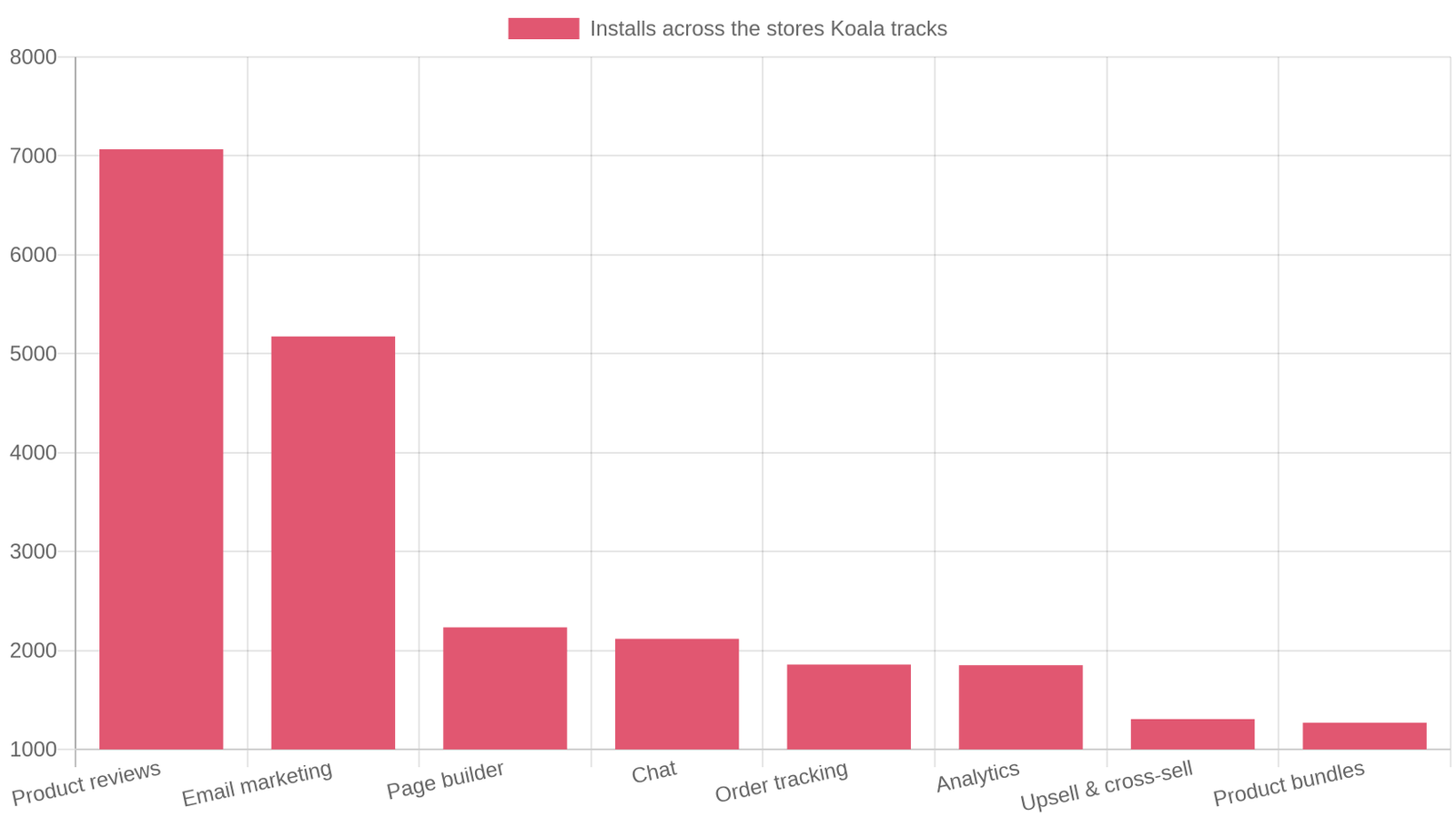
Product reviews lead by a wide margin with roughly 7,000 installs across the tracked stores, followed by email marketing at about 5,200. Page builders, chat, order tracking, and analytics form the next tier, each between roughly 1,800 and 2,300. Upsell and cross-sell tools and product bundles come in just above 1,200 apiece.
Zoom in on individual apps and the concentration gets sharper.
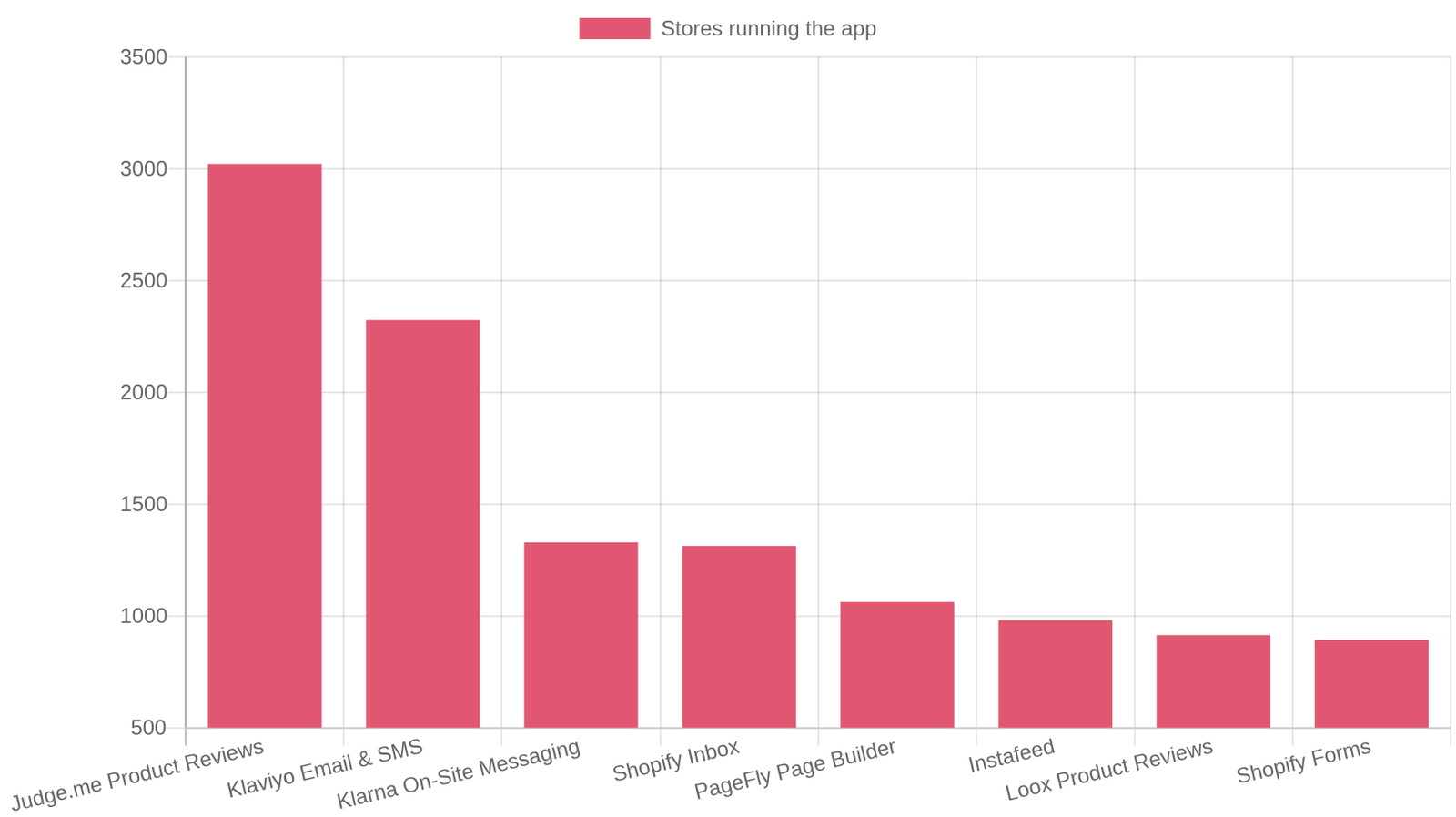
Judge.me is the single most common app in Koala's data, on around 3,000 tracked stores. Klaviyo is next at roughly 2,300. After that the numbers drop quickly: Klarna's on-site messaging and Shopify Inbox sit near 1,300, PageFly near 1,050, and Loox around 910. In the same data the average tracked store carries about 12 apps, which is a useful benchmark when you are wondering whether your own stack is thin or bloated.
Two things follow from that shape. First, the categories at the top are the ones merchants keep paying for, which is a strong hint about where a new store should spend its first app budget. Second, because a handful of apps dominate each category, you will recognize most of what you detect very quickly. The unfamiliar name in a competitor's list is usually the interesting one.
Why the app stack matters when you pick your own apps
The Shopify App Store is enormous, and star ratings tell you almost nothing about whether an app fits your kind of store. An app can be excellent for a 40,000-SKU catalog and useless for a five-product brand.
Detection changes the question from "which app is best" to "which app do stores like mine already run." That is a far more answerable question. If four apparel stores at your size all run the same review app, they have collectively done the trialling for you: they compared options, one of them almost certainly switched away from something worse, and the survivor is what you are looking at.
It also protects you from over-installing. Every app adds weight to your pages and a line to your monthly bill, and the tracked-store average of about 12 apps is a reminder that most healthy stores are selective rather than exhaustive. Seeing what a competitor runs, and just as importantly what they do not bother with, is the fastest sanity check there is. When you have shortlisted candidates, Shopify's own guidance on finding and choosing apps covers how to filter the App Store and what to read in the listings before you install.
How to read a competitor's app stack
A raw list of app names is not insight. Read it category by category, because each category answers a specific question about how the store operates.
Reviews. The most-installed category in Koala's data, and the first thing to check. A store running Judge.me or Loox has decided social proof drives its conversion rate. Open a product page and see how many reviews they have actually collected: a review app with eleven reviews across the catalog means the app is installed but the process behind it is not working.
Email and SMS. Klaviyo, Omnisend, Brevo, or Mailchimp in the list means the store is building an owned audience instead of renting attention from ads forever. Sign up for their list with a spare address and you will see the welcome flow, the discount they lead with, and how aggressively they follow up.
Upsell and cross-sell. Bundle and upsell apps tell you they are working the average order value rather than chasing more traffic. Add something to cart and watch what they offer you. The offer itself is the strategy, in plain view.
Page builders. PageFly, GemPages, Shogun, or Replo in a stack means the store builds custom landing pages, which almost always means it runs paid traffic that needs dedicated pages. This is one of the more revealing detections, because it implies an ad budget without you seeing a single ad.
Order tracking. Track123, 17TRACK, and similar apps show up constantly in the tracked data. They matter most for stores with long shipping times, so a tracking app plus a thin catalog is a fair signal you are looking at a dropshipping operation rather than a brand holding stock.
Then look for the gaps. A store with heavy review and email investment but no loyalty app has told you where it thinks its next win is not. If your own store has the same gap, you have a cheap test waiting.
A worked example: skincare and beauty stores
Beauty is a good category to practise on, because the stacks are deep and the differences between operators are stark.
In Koala's tracked data, the beauty and personal-care stores in the top-store set carry about 12 apps each on average, matching the overall average, but the spread is wide. The heaviest of them run 21 to 27 apps: large catalogs, several review and loyalty layers, subscription billing, and a page builder feeding paid traffic. At the other end, some strong beauty stores in the same set run four to six apps and lean on their theme for everything else.
Run the exercise yourself on three beauty stores and the reading falls out fast:
- A 25-app stack with reviews, loyalty, subscriptions, and a page builder is a funded brand optimizing retention. Copying its full stack would be expensive and mostly wasted at a smaller scale.
- A 12-app stack with reviews, email, upsell, and tracking is the working template most growing stores converge on. This is the one worth copying.
- A 5-app stack on a store doing serious volume is the most instructive of the three. It means the theme and the product are carrying the load, which is a reminder that app count is not a scoreboard.
That contrast is why merchants who research well look at the shape of the stack rather than the length of it. As one seller described the pattern in the same community thread: "Strong stores usually feel narrower to me now. Weak dropshipping stores try to sell everything. Strong ones usually have clear positioning and a smaller number of products pushed very intentionally across the whole site" (r/dropshipping).
Checking whether a site runs on Shopify at all
Before you can detect apps, you need to know you are looking at a Shopify store. Koala Inspector answers that first: on a Shopify store it loads the dashboard, and on anything else it tells you plainly that this is not a Shopify store and offers a store search instead.
If you want to confirm it by hand, the usual manual tells still work. Most Shopify stores keep /cart and /collections/all live, the checkout typically runs on a Shopify-controlled domain, and the theme's markup follows Shopify's conventions. Nudgify has a walkthrough of the manual checks if you would rather not install anything.
App detectors are not all the same
Free web-based detectors like ShopScan are handy for a single lookup: paste a URL, get a list. They ask nothing of you and cost nothing.
An extension earns its place when research stops being a one-off. Because it runs on the store you are already browsing, you can inspect ten competitors in the time a web form takes to handle two, and the rest of the store's picture sits in the same panel: the active theme, the full product catalog with likely best-sellers, the traffic profile, the live ad campaigns, and change tracking that tells you when a competitor adds or drops an app. Koala keeps a history of every store you inspect, so a month of research becomes a reference file instead of a pile of screenshots.
Koala Inspector's free plan covers app detection, theme detection, store analysis, product research, and inspection history with no expiry and no card. Premium is $22 a month for 220 tokens and tracking on up to 50 stores. If you want to compare the field first, we maintain a rundown of the best Shopify spy tools and a guide to analyzing competitors properly.
Frequently asked questions
Shopify app detector FAQ
The questions people search most often before they check a competitor's apps.
How to detect Shopify apps?+
Install a free app-detector Chrome extension such as Koala Inspector, open the store you want to check, and click the extension icon. The Apps screen lists every app it recognizes on that store, grouped by type, with a link out to each one in the Shopify App Store. It takes a few seconds and needs no login, no backend access, and no permission from the store owner.
How does a theme detector work?+
A theme detector reads the public storefront the same way your own browser does and recognizes the signature of the theme the store has published, then names it. Koala Inspector shows the active theme on the first screen, including paid and custom themes, with a Use Theme link straight to it. It is the same one-click work as app detection, and it is free.
Are Shopify theme detectors free to use?+
Plenty of them are, and Koala Inspector's theme detector is free forever with no credit card. Theme detection, app detection, store analysis, product browsing, and best-seller lists all sit on the free tier. The free plan also includes 15 tokens a month for the deeper features such as traffic profiles and competitor ad campaigns.
What is the best way to find a specific app in Shopify?+
Search the Shopify App Store by name or by the job you need done, then filter by category and read the recent reviews rather than the overall star average. Shopify's own guide to finding and choosing apps walks through the filters. To see the app running on a live store before you install it, detect the stacks of a few competitors and open the ones that keep appearing.
How to check if someone is using Shopify?+
Open the site and click a detector extension. Koala Inspector tells you immediately whether the site is a Shopify store, and if it is not, it says so instead of guessing. A quick manual check works too: most Shopify stores keep the /cart and /collections/all paths live, and the checkout usually runs on a Shopify domain.
How does Shopify work?+
Shopify is a hosted platform that gives you a storefront, a product catalog, and a checkout for a monthly fee, so you never run servers or build a payment flow yourself. A theme controls how the store looks and apps add anything the core platform leaves out, from reviews to subscriptions. That app layer is exactly what an app detector reads. Our guide to what Shopify is covers the rest.
How do I get people to find out about my Shopify store?+
The stores that grow fastest usually combine paid social or search ads with content and email, then keep buyers coming back with review requests and post-purchase flows. Detecting the stacks of stores already winning your category shows you which channels they are funding: an email tool means they are building a list, an affiliate app means they are paying partners, and a live ad campaign shows the angles they are testing.
How to dropship with Shopify for beginners?+
Pick a niche, open a Shopify trial, connect a supplier app such as DSers or CJdropshipping, import a small set of products, and test demand with a modest ad budget before widening the catalog. App detection helps at the start: check what proven stores in your niche run for reviews, upsells, and order tracking so your first install list is a copy of what already works rather than a guess.
Has anyone else experienced something similar while scaling a Shopify brand?+
Yes, and merchants say so openly. The pattern that comes up again and again in Shopify and dropshipping communities is that store structure, app stacks, themes, and pricing are the parts of competitor research people still trust, while traffic and revenue estimates get treated as directional at best. One merchant put it plainly: what they pull from these tools now is which apps top stores add or drop over a few months. Read app data as fact and estimates as a comparison tool and you will avoid the mistake most people describe.
Start with one store
Pick the competitor you think about most, install Koala Inspector free, and open their Apps screen. In about thirty seconds you will know which review app they trust, which email platform they are building a list on, whether they are funding landing pages for ads, and how heavy their stack is against the roughly 12-app average across the stores Koala tracks.
Then do it three more times. The pattern that shows up across four stores in your niche is your app roadmap, and it cost you nothing to find.
Related reading: how to detect the theme on any Shopify store, the most-used Shopify themes in 2026, and what Shopify is and how it works.
Written by
Assaf Shalin
Co-founder & Developer, Koala Apps
Assaf Shalin is a co-founder of Koala Apps and one of the developers behind Koala Inspector. He builds the tools that let Shopify sellers see what is actually working in other stores, from installed apps and themes to best-selling products. On the blog he covers the technical side of store research: how competitor research really works, what public store signals can and cannot tell you, and how to turn them into decisions.
Connect on LinkedIn