Shopify Email Marketing Apps: What Stores Actually Install
 By Koala TeamOctober 13, 2026
A merchant with a limited marketing budget asks one question about email before any other: do I have to pay for this? Most roundups answer it with a feature matrix and a vendor's affiliate link. This one starts with the number that actually settles arguments, which is how many live Shopify stores run each app right now.
Across the Shopify stores Koala tracks, Klaviyo sits on 180,076 of them. That is not a close race. What follows is the full ranking, one profile per app with the entry price read off its own listing this week, the two head-to-heads people search before they commit, and a budget-first path that tells you when paying is worth it.
What's in this guide
- The email apps Shopify stores actually install
- How we measured
- What Shopify gives you free before you install anything
- The six apps worth shortlisting
- Klaviyo vs Mailchimp
- Klaviyo vs Omnisend
- Start free, and know when to upgrade
- Where the bill grows, and how to stop it
- Check which email app the stores outranking you run
- Shopify email marketing questions people ask
The email apps Shopify stores actually install
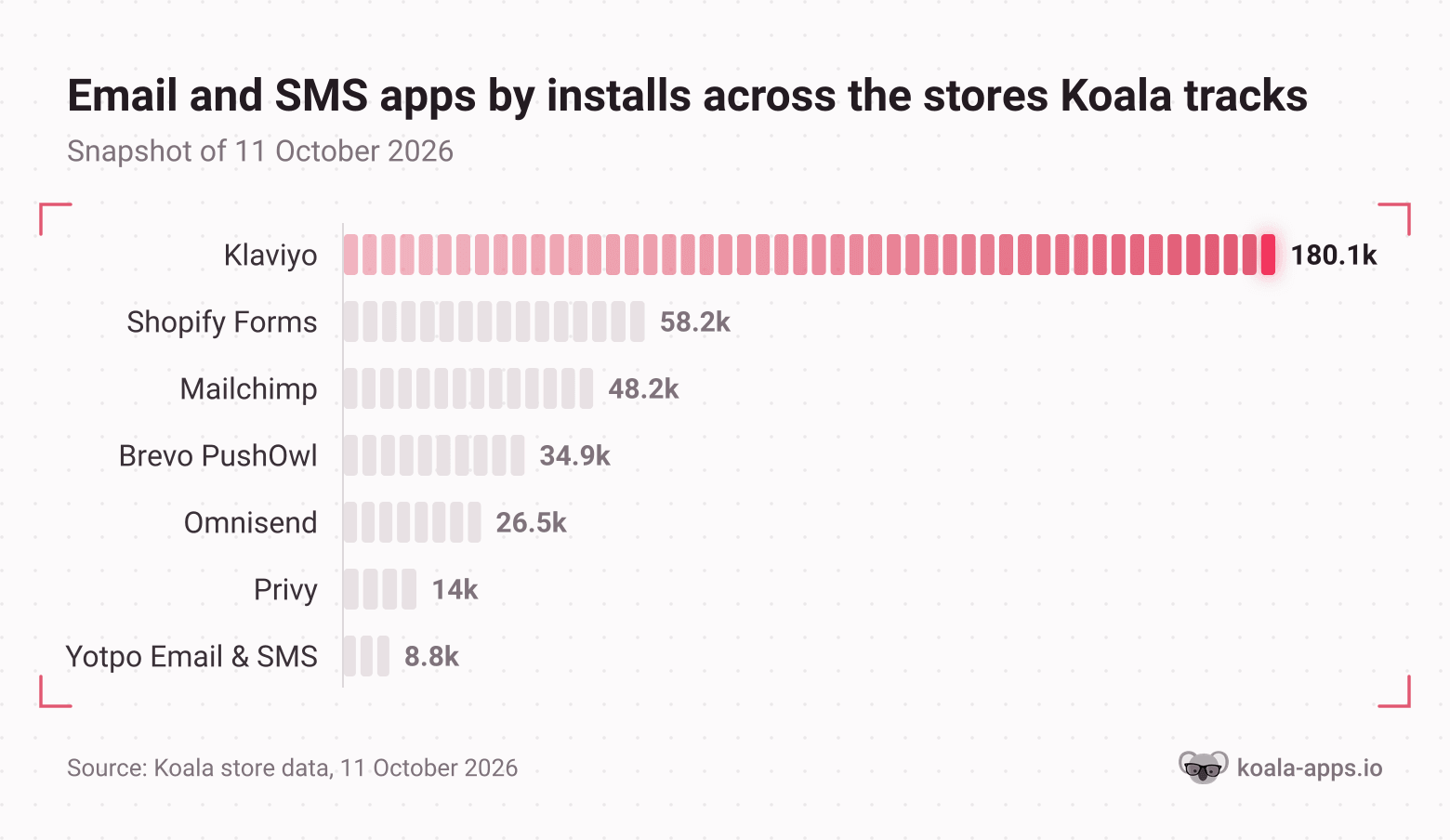
Review counts measure how long an app has been selling. Install counts measure what merchants are choosing. Here is the second number, counted across the Shopify stores in Koala's store data.
| Rank | App | What it does | Tracked stores |
|---|---|---|---|
| 1 | Klaviyo: Email Marketing & SMS | Email, SMS and WhatsApp campaigns and flows | 180,076 |
| 2 | Shopify Forms | Shopify's own signup forms and list growth | 58,152 |
| 3 | Mailchimp Email SMS Marketing | Email, automations, forms, landing pages | 48,188 |
| 4 | Brevo PushOwl: Email, Push, SMS | Web push plus email and SMS marketing | 34,938 |
| 5 | Omnisend Email Marketing & SMS | Email, SMS, popups and automations | 26,497 |
| 6 | Privy: Email, SMS & Pop Ups | Popups first, with email and SMS attached | 14,014 |
| 7 | Yotpo: Email Marketing & SMS | Email and SMS beside Yotpo's reviews suite | 8,778 |
| 8 | Postscript SMS Marketing | SMS only | 8,467 |
| 9 | AfterShip Email Marketing, SMS | Email and SMS beside AfterShip's tracking | 6,507 |
| 10 | Attentive: AI-led Email & SMS | Enterprise email and SMS | 6,455 |
Four things in that table are worth acting on before you read a single feature list.
Klaviyo is the category, by a margin nothing else in Shopify's app ecosystem matches. At 180,076 tracked stores it runs on roughly 3.7 times as many as Mailchimp and 6.8 times as many as Omnisend. For comparison, the most installed app of any kind in the same snapshot is Judge.me at 185,858, so Klaviyo is effectively the second most installed app on Shopify in Koala's data. If you want the stack your competitors will recognise, this is it.
The second name on the list is Shopify's own, and it is free. Shopify Forms on 58,152 tracked stores does the list growth half of the job at no cost, rated 4.5 from 748 reviews. Plenty of those stores are running it underneath a paid sending tool, which tells you the two jobs separate cleanly: collecting the address and sending to it.
Popups and SMS are separate categories wearing the same coat. Privy prices its cheapest plan on monthly pageviews rather than contacts, because the popup is the product. Postscript on 8,467 tracked stores sends no email at all. Read the pricing model and you learn what an app thinks it is for.
One name on the list no longer sells what its install base is running. Yotpo: Email Marketing & SMS sits on 8,778 tracked stores, and as of 13 October 2026 its Shopify App Store page says the app is not currently available on the Shopify App Store, while Yotpo's own pricing page lists Reviews and UGC, Loyalty and Referrals, Discover and a bundle, with no standalone email and SMS product. If you are shopping the category today, it is not a candidate. If you are already on it, it is worth a conversation with your account contact.
How we measured
What was counted. App installations recorded across the Shopify stores in Koala's store data, rolled up to 250 distinct apps and 3,201,367 total store installations.
Window and date. A single snapshot taken on 11 October 2026. Counts move between snapshots as the tracked set changes, so quote the date with the number.
Coverage. These are the stores Koala tracks, which skews toward active, established merchants. It is a large sample of Shopify rather than a census of it, so read every count as a ranking signal, not a platform-wide market share.
What is not counted. An app with no recorded installation in the snapshot is absent rather than counted as zero, and each app is grouped by the job its Shopify listing describes, so a reviews platform that also sends email appears once.
Prices. Every price below was read from that vendor's own Shopify App Store listing or pricing page on 13 October 2026. App pricing moves, so check the listing before you commit.
What Shopify gives you free before you install anything
Know your baseline first, because it is better than it was two years ago and most comparison posts have not caught up.
Shopify's first-party email tool is now Shopify Messaging, the app formerly called Shopify Email, and it covers email, SMS and WhatsApp from one place. Its listing stated it plainly on 13 October 2026: free to install, "Your first 10,000 emails each month are free. After, pricing starts at $1/1000 emails per month." It holds a 4.8 rating from 4,646 reviews. Pair it with Shopify Forms, which is free, and you have collection and sending covered for nothing.
Ten thousand emails a month is a real allowance. A 2,000 contact list emailed twice a week lands at about 16,000 sends a month, so the free tier carries a list of roughly 1,200 at that cadence, or a 5,000 contact list emailed twice a month. Past that the overage is a dollar per thousand emails, which is still the cheapest sending on this page by a wide margin.
Where the native tool stops is segmentation depth, multi-step flow logic branching on browse and purchase behaviour, and predictive analytics. That is the line every paid app on this list sells across, and it is a real line. It is just further out than most merchants assume.
The six apps worth shortlisting
Every plan, price and rating in this section was read from that app's own Shopify App Store listing on 13 October 2026.
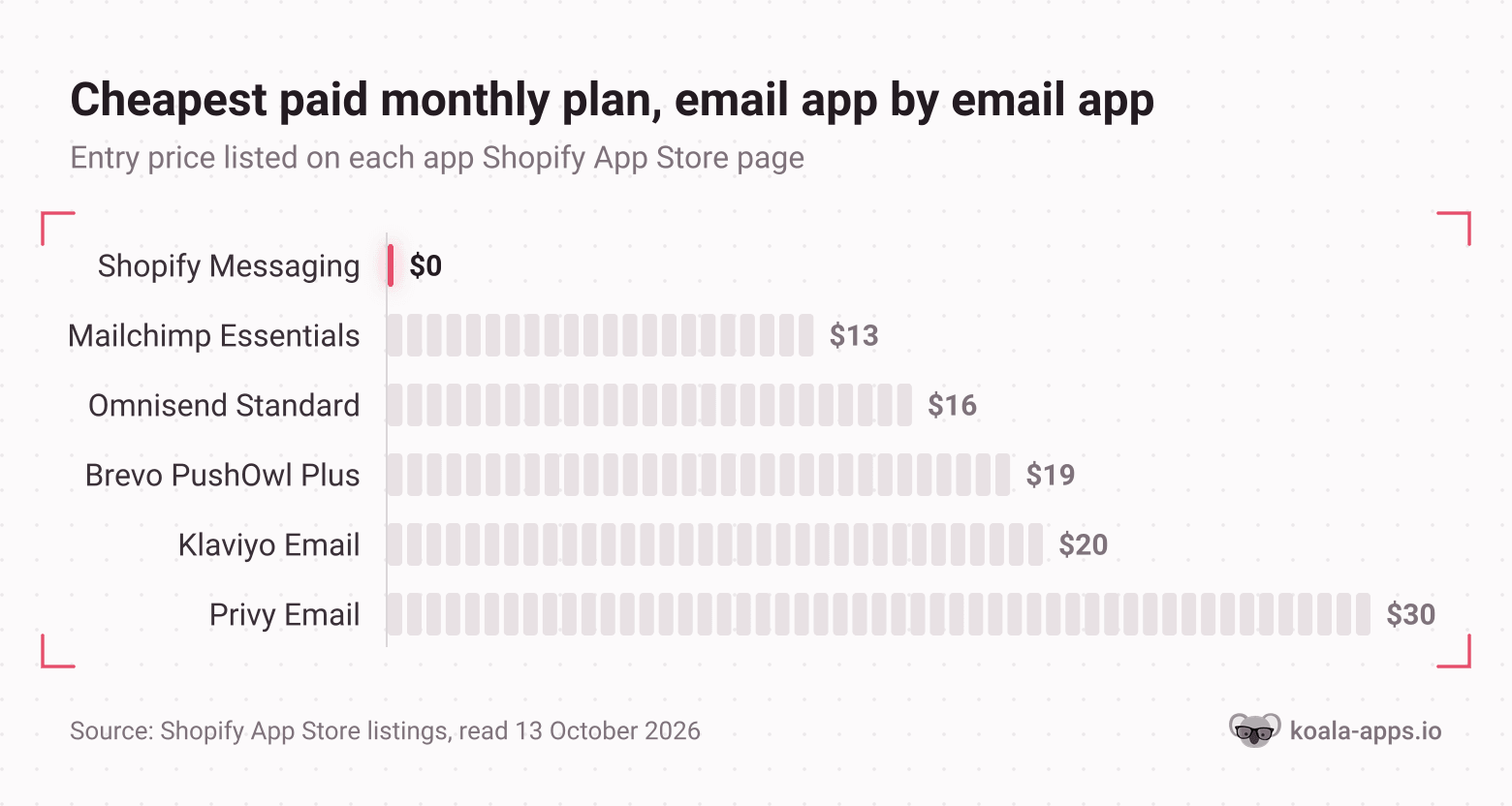
Klaviyo: Email Marketing & SMS leads the category at 180,076 tracked stores, rated 4.7 from 3,374 reviews. Free forever covers up to 250 contacts with 500 email sends a month, plus $5 of mobile messages. Paid email starts at $20 a month for 251 to 500 contacts, and SMS is a separate $15 a month for up to 1,250 credits with carrier fees included. Who it fits: a store whose revenue already depends on repeat purchase, where segmentation and predictive analytics pay for themselves. Where it gets expensive: the price is a function of active profiles, so it climbs every month your list grows, whether or not those profiles open anything. What it does badly: nothing on the free tier is throttled by features, so the 250 contact ceiling arrives fast and the jump feels abrupt.
Mailchimp Email SMS Marketing runs on 48,188 tracked stores with the highest rating in the top five, 4.8 from 1,516 reviews. There is a free plan, Essentials starts at $13 a month, Standard at $20 and Premium at $350, all priced by contact count. Mailchimp's own pricing page puts the free plan at a limit of 250 contacts and a max of 500 sends a month or 250 a day. Who it fits: a merchant who already runs Mailchimp for a newsletter or another business and wants one tool. Where it gets expensive: the automation ceiling is the upsell, with Essentials capped at up to 4 marketing automations against Standard's 200. What it does badly: it was built as a general email platform rather than an ecommerce one, and its Shopify integration has been rebuilt more than once.
Brevo PushOwl: Email, Push, SMS sits on 34,938 tracked stores at 4.8 from 2,301 reviews, and it has the most generous free tier here: the Basic Bundle is free with 500 web push notifications a month, emails from 500 a month, and unlimited subscribers. Plus is $19 a month or $180 a year and adds abandoned cart recovery and custom email popups; Power is $79 a month. Who it fits: a store selling impulse or repeat-purchase products where a browser push arrives faster than an email. Where it gets expensive: the volume ladder is push-led, so a store with a large email list and little push use pays for capacity it does not touch. What it does badly: web push only reaches visitors who opted in on your site in a supported browser, so it never replaces email as the primary channel.
Omnisend Email Marketing & SMS runs on 26,497 tracked stores, rated 4.7 from 3,189 reviews. Free covers 250 contacts and 500 emails a month with every paid feature available, which is unusual and worth knowing. Standard starts at $16 a month covering up to 500 contacts with 6,000 emails a month and removes Omnisend branding; Pro is $59 a month covering up to 2,500 contacts with unlimited emails and SMS from $0.007 a message. Who it fits: the merchant who wants Klaviyo-shaped automations without the Klaviyo bill, especially if SMS is part of the plan. Where it gets expensive: the Standard to Pro jump is steep if you want unlimited sends before you have 2,500 contacts. What it does badly: the live expert support it advertises sits on plans from $400 a month, so at the entry tier you are on your own with the docs.
Privy: Email, SMS & Pop Ups is on 14,014 tracked stores with 4,206 reviews at 4.5, the largest review base in this group and the lowest score. Its cheapest plan is Pop Ups and Displays at $24 a month for up to 10,000 monthly pageviews; Email is $30 a month for up to 1,500 contacts with unlimited sends; Email and SMS is $45 a month. Who it fits: a store whose bottleneck is list growth rather than sending, because the popup builder is genuinely the strongest part. Where it gets expensive: the popup plan is priced on traffic, so a campaign that works raises the bill on its own. What it does badly: there is no free tier at all, which makes it the only app here you cannot test with your real list before paying.
Shopify Messaging, the native option, is free to install with the first 10,000 emails each month free and pricing from $1 per 1,000 emails after, rated 4.8 from 4,646 reviews across email, SMS and WhatsApp. Who it fits: every store under roughly 2,000 contacts, and plenty above it. Where it gets expensive: it does not, which is the point. What it does badly: the automation and segmentation depth stops well short of Klaviyo and Omnisend, and reporting is thinner than a dedicated platform's.
Klaviyo vs Mailchimp
This is the comparison people actually type, and the install gap answers most of it: 180,076 tracked stores to 48,188. Shopify merchants have voted, repeatedly, and they voted for the ecommerce-native tool.
The price comparison is closer than the reputation suggests at the bottom of the ladder. Both are free to 250 contacts. Mailchimp Essentials starts at $13 against Klaviyo's $20 for 251 to 500 contacts, so Mailchimp is the cheaper first paid month. It stops being cheaper the moment you need more than four automations, because that is the Essentials ceiling and Standard is $20.
What separates them is what a flow can know. Klaviyo's entry email plan includes segmentation and flows, product recommendations, send time optimisation and predictive analytics, all of it reading Shopify order data directly. Mailchimp's strength is being a general marketing platform, which is exactly the thing a Shopify store does not need a second of.
The merchant verdict in the wild is unusually consistent. A solo store owner posting a three-year stack on r/shopify put it in one line: "Email: klaviyo, expensive but the segmentation is worth it. Tried cheaper options and always came back." A small business owner on r/smallbusiness opened a platform hunt with "I've asked for Mailchimp alternatives before... So Mailchimp is obviously out", looking to migrate 8,000 contacts and explicitly prioritising cheaper. Nobody describes switching from Klaviyo to Mailchimp.
Pick Mailchimp if you already run it elsewhere, your automations are simple, and the $7 a month difference at the entry tier matters. Pick Klaviyo if repeat purchase is your business and you will build more than four flows. Pick neither yet if you are under 2,000 contacts, because Shopify Messaging covers you for nothing.
Klaviyo vs Omnisend
The real decision for a budget-conscious store, and the closer of the two fights. Klaviyo runs on 180,076 tracked stores to Omnisend's 26,497, but the ratings are level at 4.7 and the review bases are comparable at 3,374 and 3,189.
Free tiers are near identical: 250 contacts and 500 emails a month on both. Omnisend's free plan opens every paid feature at that size, so you can build the flows you intend to run before you pay anything, which Klaviyo's free tier also allows.
Paid entry splits them, on the listings as they stood on 13 October 2026. Omnisend Standard is $16 a month for up to 500 contacts with 6,000 emails a month. Klaviyo Email is $20 a month for 251 to 500 contacts. Four dollars is not a decision. The difference shows up a tier later: Omnisend Pro at $59 covers up to 2,500 contacts with unlimited emails and adds SMS at $0.007 a message, while Klaviyo charges SMS as a separate $15 a month subscription on top of email.
Pick Omnisend if your budget is the binding constraint, SMS is in the plan, and you want one bill instead of two. Pick Klaviyo if you expect to hire an agency or a marketer later, because the depth is there and so is the talent pool who already know it.
Start free, and know when to upgrade
Here is the flat answer to the question the budget forces. Shopify Messaging plus Shopify Forms costs nothing, covers 10,000 emails a month, and will run a list of a few thousand people without a line item. That is the starting point for any store that is not already certain it needs more.
The path from there:
- Install Shopify Messaging and Shopify Forms today. Collect addresses, send a welcome email and a monthly campaign. No cost, no trial clock, no migration later that you cannot do.
- Add a free tier of one real platform when you cross 1,000 contacts. Klaviyo, Omnisend and Brevo PushOwl are all free at small sizes. Build the abandoned cart flow and the welcome series there while the native tool keeps sending campaigns.
- Pay when one flow out-earns the bill. An abandoned cart sequence is the usual first one. If it recovers more revenue in a month than the $16 to $20 entry plan costs (October 2026 prices), upgrade. If it does not, your problem is traffic or product, and a better email tool will not fix either.
- Buy SMS last, and separately. It costs per message everywhere, and it is the channel most likely to burn a list that is not warm yet.
- Re-check the price at every thousand contacts. All of these are priced on list size, so the plan that was obviously right at 500 contacts is a different deal at 5,000.
The trap in that ladder is step three. A merchant on r/ecommerce who ran automated flows for eight years and then stopped wrote the useful corrective: "Entrepreneurs are obsessed with automated email flows. People think they are one Klaviyo or Mailchimp abandoned cart email from 5xing revenue." Buy the tool after the flow earns, not in the hope that it will.
Where the bill grows, and how to stop it
Every app on this page charges by list size, which means the bill grows whether or not the list earns. This is where the budget actually goes, and it catches people quietly.
A merchant on r/shopify described the shape of it exactly: paying $325 a month on Klaviyo for 11,000 contacts, roughly 70% of them dead, "People who signed up for a discount code two years ago and never engaged again." Their blockers were not knowing whether suppressing contacts would reduce the bill or only stop sends, and having previously triggered a permanent delete on Mailchimp that could not be undone.
The answer is documented, and it is worth knowing before you sign up. Klaviyo's help centre defines an active profile as "Any profile that can be emailed through Klaviyo" and states that "suppressed profiles do not contribute towards your billing plan's profile count." So suppressing works. The same article notes you "may be automatically upgraded the next billing cycle" if your plan cannot cover your active profiles, so the ratchet turns upward on its own and downward only when you move the plan yourself.
Three habits keep the bill honest:
- Suppress rather than delete. You keep the history, you stop paying, and you cannot undo a delete.
- Set a calendar reminder for the day after you suppress. The count takes time to settle, and the plan tier does not drop by itself.
- Watch for charges outside the Shopify invoice. Klaviyo, Mailchimp and Privy all carry an external charges notice on their listings, and Shopify's own documentation says uninstalling an app stops future billing cycles on the Shopify bill while third party apps that charge you directly outside of Shopify keep charging.
If you are budgeting the whole stack rather than one app, our guide to how much Shopify apps cost breaks down what a working set adds up to, and the most popular Shopify apps covers the full ranking this snapshot comes from.
Check which email app the stores outranking you run
A ranking across hundreds of thousands of stores tells you what is normal. It does not tell you what works in your niche, at your average order value, with your repeat rate. That answer is sitting on your competitors' storefronts right now, and reading it is free.
Koala Inspector is a free Chrome extension with a Shopify app detector built in. Open a store, open the extension, and the Apps screen names every app that store has installed, grouped by what each one does, with a link out to each app's Shopify App Store listing. Marketing apps land in their own group, so the email tool is the first thing you see. It costs no tokens, needs no card, and the free plan includes 15 tokens a month for the deeper screens.
The read takes about a minute per store:
- Pick the three stores that outrank you for your main product term. Not the giants, the ones you lose customers to.
- Open each one and read the marketing group on the Apps screen. Note the email app, the popup app, and whether there is an SMS tool beside it.
- Count the overlaps. An app on two of three is your niche's default. An app on one is somebody's experiment, and you can let them run it.
- Sign up to the winner's list and abandon a cart. You get their whole sequence in your inbox: the welcome email, the recovery timing, the discount they lead with, the cadence. That is the part worth copying.
- Buy the app that sends the sequence you can execute, not the one with the longest feature list.
Step four is where the budget argument resolves itself. Three competitor sequences in your inbox tell you in a week whether email is worth paying for in your niche, and which tier you need. Guessing at it from a comparison table is how merchants end up paying $325 a month for contacts who stopped reading two years ago.

Want to see apps on any Shopify store?
Download for free and start exploring a whole new ecommerce world!

What researchers say about Koala Inspector
Verified reviews from the Chrome Web Store.
“Awesome customer support. Insights into store AOV, products, traffic and campaign tracking is extremely helpful!”
 Gabe Abramovich
“Invaluable for competitive insights, Koala Inspector is easy to navigate and helps stay ahead in the Shopify marketplace.”
 Merico Monaldo
“Very easy to use and install. Helps with identifying Shopify stores quickly and saves time by listing best sellers. Also has handy feature of the traffic which I found very valuable.”
 Ali Baloch
Shopify email marketing questions people ask
Shopify email marketing questions people ask
The questions merchants ask alongside email apps, answered straight.
Are Shopify point of sale payments secure?+
Shopify states that it is certified Level 1 PCI DSS compliant, that this compliance extends by default to all stores powered by Shopify, and that the certification covers your store, its shopping cart and web hosting. Level 1 is the highest of the four PCI merchant levels. Shopify also says its compliance covers all six PCI standard categories. Your own operational security sits outside that: staff permissions, device access on the shop floor and who may issue a refund are still your job. The same split applies to email. The platform secures the payment plumbing, and nothing in it stops you emailing a customer list you collected without consent.
What is the best Shopify product hunting tool?+
Koala Inspector is the one we build, and the product research in it is free. Open the extension on any Shopify store and you get the full catalogue with likely best-sellers, prices and variations, sortable by date added, price or name, with a stats header showing the product count, the price range and the first-published date. That costs no tokens. Find Suppliers, which finds suppliers for a product with landed cost, delivery time and profit per unit, costs 2 tokens, and Product Trends costs 2. The free plan includes 15 tokens a month and needs no card. For email specifically, the useful trick is pairing the two: find the product a rival is pushing hardest, then look at which email app sits in their stack sending the campaigns behind it.
What Shopify app stack do you use on your store?+
The honest answer is that the stack worth copying is the one running on stores like yours, not the one in a listicle. A solo merchant on r/shopify posted a three-year stack that reads as Shopify Plus, Klaviyo for email, Stocky for inventory, Gorgias for support, ShipStation for shipping, and Google Analytics beside Shopify's own reporting, at a bit over $8,000 a month in tools. Their line on email was that Klaviyo is expensive but the segmentation is worth it, and that they tried cheaper options and always came back. That is one store at one size. Koala Inspector's free Shopify app detector lists every app installed on any store you open, grouped by what each app does, so you can read three real stacks in your niche in about five minutes instead of guessing from somebody else's.
Does Kim Kardashian use Shopify?+
Yes. SKIMS, the brand Kim Kardashian co-founded, runs on Shopify, and Shopify lists it by name among the brands on its platform in its own Q2 2026 results announcement, alongside Aldo, BarkBox, Carrier, Meta, Supreme and Vuori. Kylie Cosmetics is on the platform too. The useful point for a smaller merchant is that the storefront is the same platform you are on, so the apps a brand of that size runs are visible from the outside the same way any other store's are.
How do I stop Shopify from taking money from my account?+
For an app subscription, uninstalling the app is the lever. Shopify's documentation says recurring app subscriptions run on each app's own 30 day cycle and appear on your regular Shopify bill, that uninstalling an app stops future billing cycles, and that uninstalling might not remove a charge already pending on your upcoming invoice. The trap with email apps is the second route. Shopify also states that some third party apps charge you directly outside of Shopify, so those charges never appear on the Shopify bill and uninstalling does not stop them. Klaviyo, Mailchimp and Privy all carry that external charges notice on their Shopify App Store listings, which means you cancel with the vendor as well as uninstalling. Check your card statement, not only your Shopify invoice.
What is Shopify?+
Shopify describes itself as a commerce platform that helps you sell online and in person, running stores in more than 175 countries. In practice it is the hosting, the storefront themes, the checkout, the payments and the admin, plus an app marketplace for everything the core product does not cover. Email is one of those gaps the marketplace fills, although less of a gap than it used to be: Shopify's own messaging app now sends email, SMS and WhatsApp, with the first 10,000 emails each month free and pricing starting at $1 per 1,000 emails after that.
Written by
Koala Team
Koala Apps Editorial Team
The Koala Team is the crew behind Koala Inspector. We test tools, track what is selling across Shopify, and turn it into practical roundups and reference guides for store owners and dropshippers.