Shopify Store Audit: 7 Checks Against the Stores Already Winning
 By Assaf ShalinOctober 26, 2026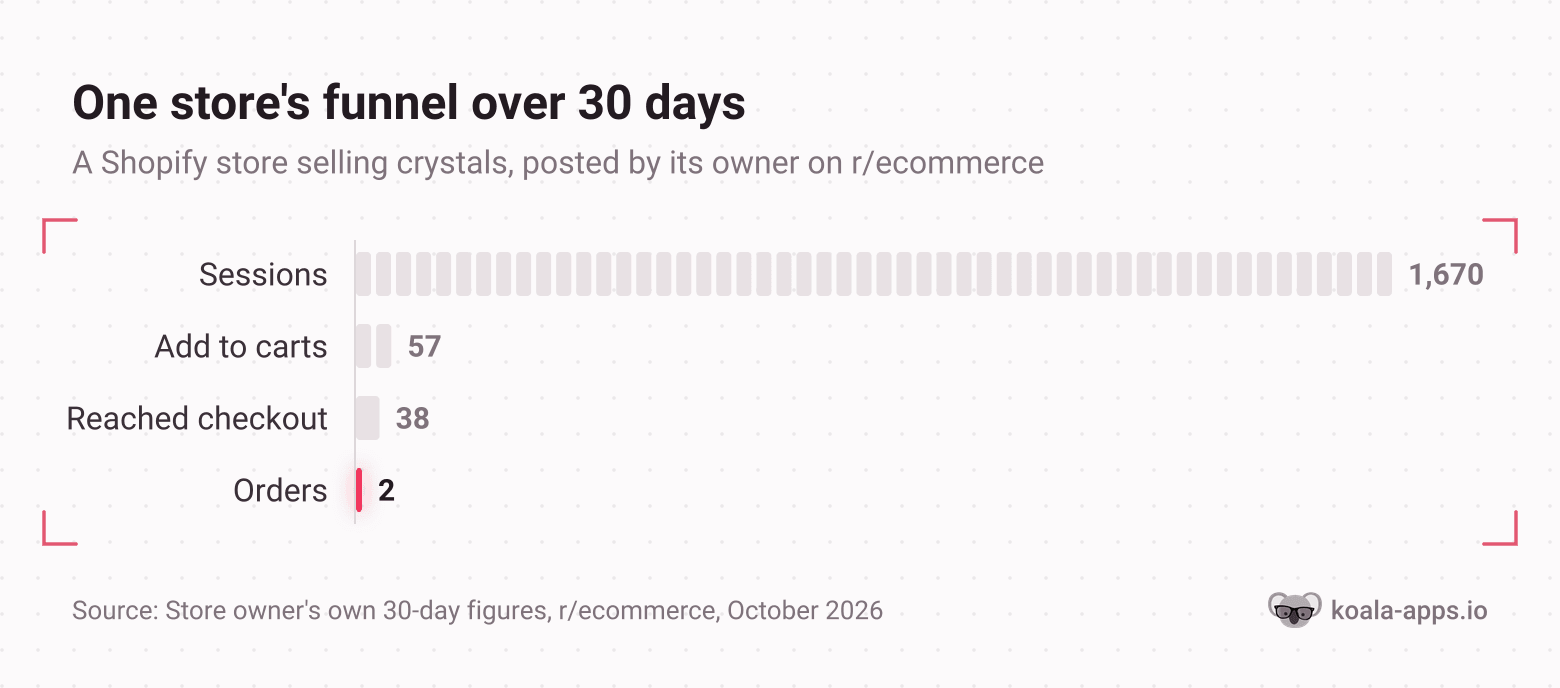
A store owner selling crystals posted their last 30 days on r/ecommerce: 1,670 sessions, 57 add to carts, 38 people who reached checkout, and 2 orders. A 3.41% add to cart rate, a 0.11% conversion rate, $129 in sales. The question was the one every owner eventually asks: what am I missing?
The numbers already said it. Thirty six of the 38 people who reached checkout walked away. Across 50 documented studies, Baymard Institute puts the average cart abandonment rate at 70.22%, so losing 95% of checkouts is not the normal tax on ecommerce. It is a specific, findable defect, and the store was buying traffic to feed it.
This is the audit for that situation. Seven checks, in the order that loses you the most money first, each one with a benchmark so you can tell a real problem from a normal one. For every check there is also an outside reading: what the stores already selling in your niche run, so "good" is a number instead of an opinion.
Where a figure below comes from Koala's own data, it describes the Shopify stores Koala tracks rather than every store on the platform, and it is dated.
Before you start: the two inputs
You need your own funnel for the last 30 days, straight from Shopify analytics: sessions, add to cart rate, reached checkout, orders, average order value. Write the five numbers down. Most of this audit is comparing them against a benchmark.
You also need a way to read a store that is not yours. Koala Inspector is the free Chrome extension we build for this: open any Shopify store and its one click shop analysis loads that store's active theme, every app it has installed grouped by type, its full catalogue with prices and likely best sellers, its product count, creation date and currency. Those readings cost nothing and need no sign-up, which is what makes a seven-check audit practical in an afternoon rather than a project.
Check 1. The theme
What to look at. Your theme name, its version, and your mobile Core Web Vitals. Google's "good" thresholds, at the 75th percentile of page loads, are a Largest Contentful Paint of 2.5 seconds or less, an Interaction to Next Paint of 200 milliseconds or less, and a Cumulative Layout Shift of 0.1 or less. Shopify's own documentation names theme code first in the list of features that affect loading speed, interactivity and visual stability.
What good looks like. A theme Shopify still sells and still updates, passing all three thresholds on a phone.
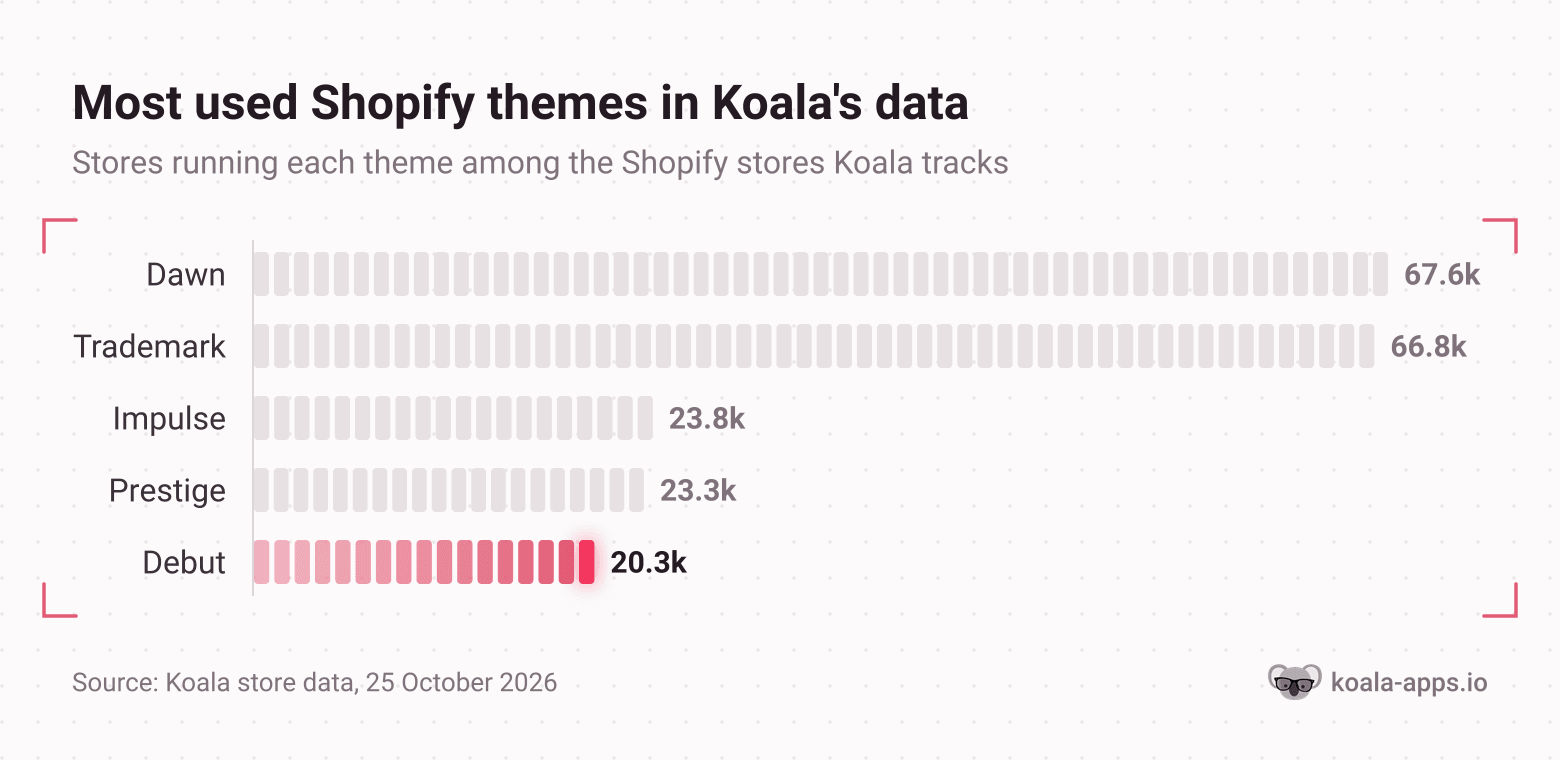
How you compare. In Koala's theme data on 25 October 2026, Dawn leads at 67,648 stores and Trademark follows at 66,834. Both Dawn and Horizon are built by Shopify and listed free in its theme store. Debut is the interesting row: 20,306 stores in Koala's data still run it, and Debut no longer appears in Shopify's free theme collection at all, which lists 23 themes as of October 2026 and does not include it. If your theme is one Shopify has stopped listing, you are maintaining it alone, and page speed is usually the first thing to go.
Read the theme on three stores selling what you sell before you decide yours is fine. Koala Inspector's shop analysis names the active theme on any Shopify store and links straight to it, so you find out in seconds whether the stores above you are on something current. If you are the one on a retired theme, our guides on choosing a Shopify theme and fixing a bad speed score are the next two reads.
Check 2. The app stack
What to look at. Count your installed apps. Then open your Shopify bill and total the app charges.
What good looks like. Every app on the list can be traced to someone clicking add to cart or completing checkout. Apps you cannot trace are costing you money twice, in subscription and in page weight, because Shopify lists apps alongside theme code as a feature that affects performance.
How you compare. Among the 300 highest-traffic stores in Koala's data on 25 October 2026, the median store runs 16 apps and the range is 0 to 41. Those are large brands with staff to maintain them. The merchant conversation runs the other way: a one-person store on r/shopify tallied six small apps at $167 a month and said none of them drove a single extra sale, another thread titled "App Fatigue" reports app charges running to more than a third of the monthly Shopify bill, and a seller on r/dropshipping who cut from 14 apps to 3 wrote that store speed improved immediately and conversion improved alongside it.
Fourteen apps on a store doing a few hundred sessions a day is the common shape of this defect: countdown timers, spin to win wheels, exit popups, social proof notifications, each one sold as a conversion lift and each one adding a request to every page load.
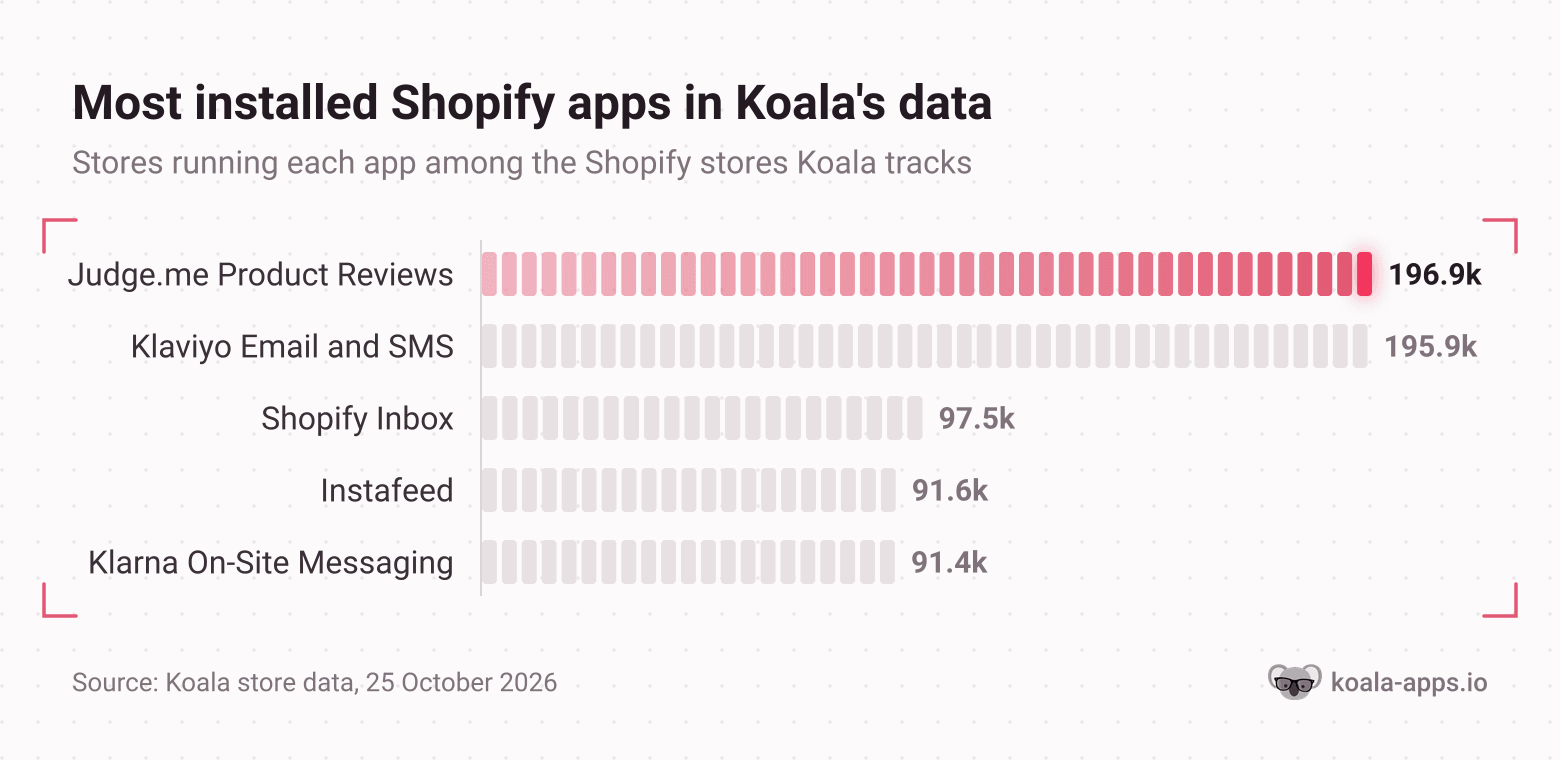
Across the whole dataset the most installed apps are Judge.me at 196,922 stores and Klaviyo for email at 195,932, followed by Shopify Inbox at 97,469, Instafeed at 91,552 and Klarna's on-site messaging at 91,359. Reviews and email sit a long way clear of everything else.
The outside reading is the useful part here. Open two stores that are clearly outselling you and read their app list in the shop analysis, grouped by type. You will usually find fewer apps than you expected and a different mix: reviews and email rather than urgency widgets. Our roundup of the Shopify apps worth installing covers what survives that cut.
Check 3. Product page furniture
What to look at. On a phone, on your single best selling product page: are there reviews visible without scrolling past the price, is there a stated delivery window, and is there a second product offered anywhere on the page.
What good looks like. Reviews on the page, a delivery expectation in writing, and one relevant cross sell.
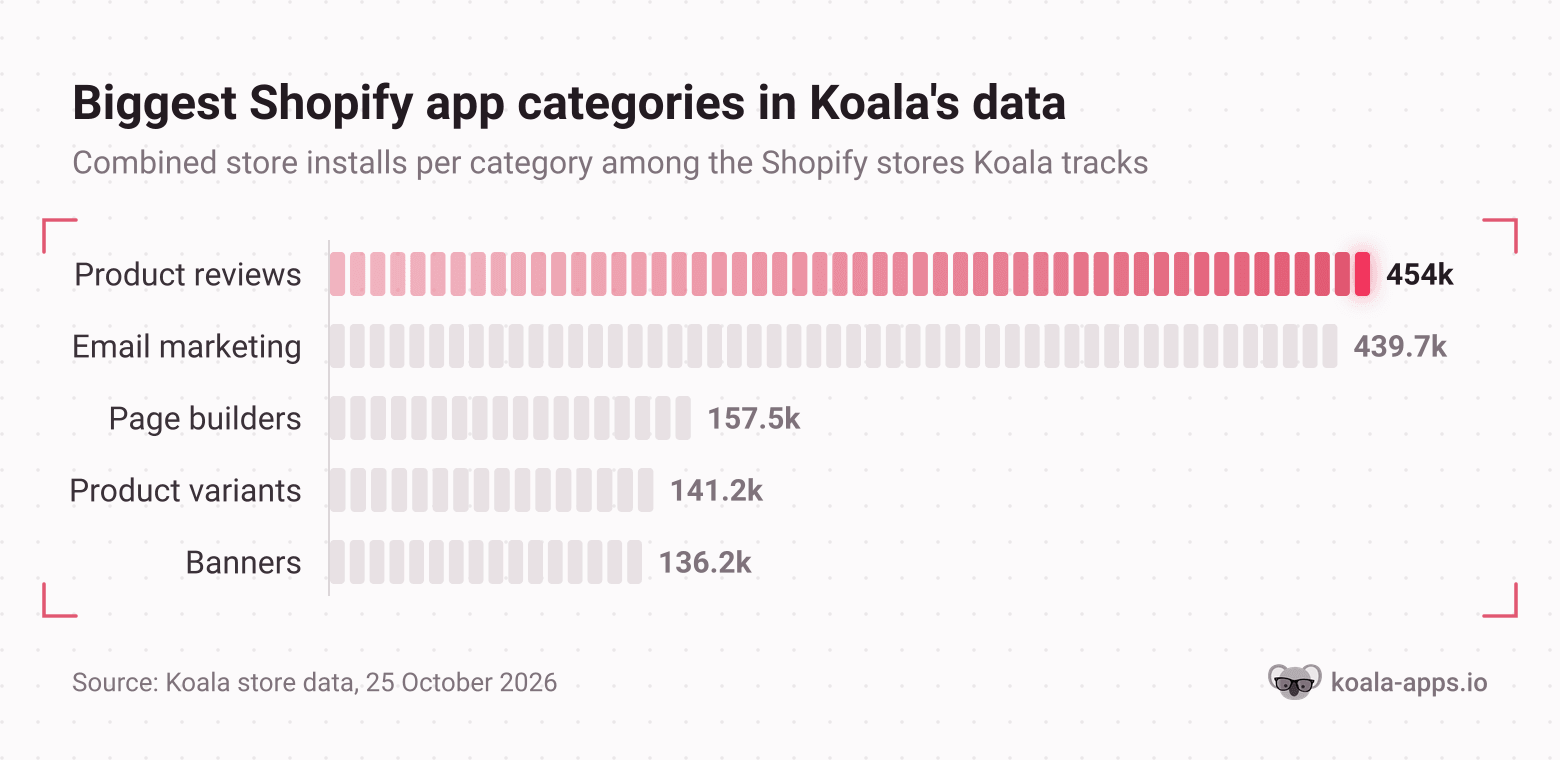
How you compare. Product reviews is the largest app category in Koala's data on 25 October 2026: 18 review apps across 453,978 store installs, ahead of email marketing at 439,739, page builders at 157,504, product variant apps at 141,190 and banner apps at 136,175. Judge.me, the review app on 196,922 of those stores, is the most installed app Koala sees anywhere. A product page with no reviews is not competing on a level field with the stores in your search results, because almost all of them have them.
Resist the urge to fix this with photography first. A seller on r/ecommerce spent $12,347 on a professional shoot for about 40 pieces and measured the result: the old iPhone and white wall setup converted at 3.2%, the new professional photos at 2.7%, a 15% drop. The thread drew 178 comments arguing about why, and the honest reading is that studio polish removed the context that made the product legible. Reviews and a delivery promise are cheaper and they move the number more reliably. Our guide to adding reviews to a Shopify store covers the setup.
To see what the winners put on the page, read their installed apps in the shop analysis and look at the review and social proof categories specifically. That tells you which review app the stores ranking above you chose and whether they run bundles or upsells at all.
Check 4. Cart and checkout friction
This is the check that saves the crystal store, and it is the one most owners skip because they have never completed their own checkout as a stranger.
What to look at. Open your store on a phone, on mobile data, in a private window, and buy something with a real card. Count the steps. Note the exact screen where the shipping cost first appears. Try to check out without creating an account. Watch what happens when you mistype a phone number.
What good looks like. Guest checkout available, shipping cost visible before the email field, no errors on a real mobile purchase.
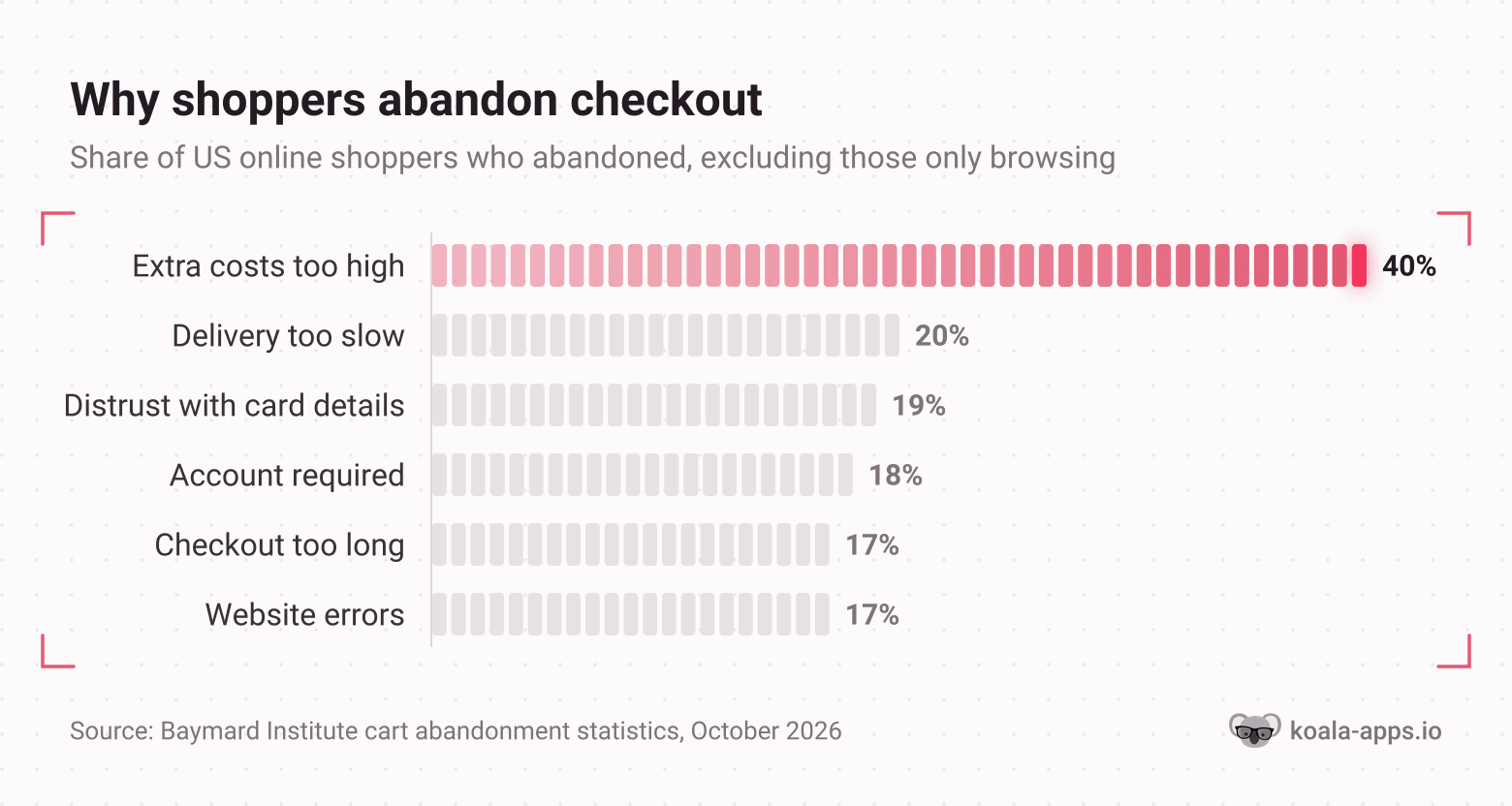
How you compare. Baymard's figure of 70.22% average abandonment comes from 50 studies. Excluding the 42% of US shoppers who were only browsing, the top reasons given are extra costs too high at 40%, delivery too slow at 20%, distrust of the site with card details at 19%, a required account at 18%, a checkout that was too long or complicated at 17%, and website errors or crashes at 17%. Four of those six are things you can see in ten minutes with your own phone.
The crystal store offered free shipping and still lost 36 of 38 checkouts, which rules out the most common cause and points at the remaining three: trust, a required account, or a payment step that silently failed on mobile. That is a one hour investigation with a clear answer at the end of it.
On the competitor side, the shop analysis shows you the checkout adjacent stack another store runs: which currency converter, which order tracking app, which upsell app. If every store in your niche runs a currency converter and you take one currency, you have found your 19%.
Check 5. Pricing against the niche
What to look at. Your price for your three best sellers, against the same or nearest product on three competing stores, including their shipping.
What good looks like. You know your band and you chose it. Being the most expensive store in a niche is a position; being the most expensive by accident is a leak.
How you compare. This is the check that needs outside data and nothing else will do. Koala Inspector's shop analysis opens a competitor's full catalogue with prices, sortable, with a stats header giving total product count, the price range high to low, and the date the store first published. Reading three stores takes a few minutes and costs nothing. Our guide to competitor pricing analysis covers how to turn that into a decision rather than a spreadsheet.
Watch for the gap between your landed cost and your price rather than your price alone. A store priced 20% above the niche with a slower delivery promise is losing on both at once.
Check 6. The catalogue and the best sellers
What to look at. How many products you list, and how many of them have sold in the last 90 days. Sort by units, not revenue.
What good looks like. A short, honest catalogue where your top few products carry the revenue and the rest are either earning or gone. Long tails of dead listings dilute your collection pages and your own attention.
How you compare. The shop analysis lets you filter a competitor's catalogue to its likely best sellers, so you can see which products the stores in your niche are actually pushing rather than which ones they list. Comparing their best sellers against yours is the fastest product research there is, and it is free. Our guide to tracking competitor best sellers covers doing it repeatedly instead of once.
Two patterns show up constantly. A store listing 400 products with 6 that sell is a merchandising problem, not a traffic problem. And a product your competitors all stock that you do not is usually a gap for a reason worth knowing before you fill it.
Check 7. Traffic and the offer mix
What to look at. Your traffic sources split for the last 30 days, and your conversion rate per source. One bad source can hide a healthy store.
What good looks like. At least one source converting above your site average, and a paid channel you could switch off without the store going quiet.
How you compare. Among the stores Koala records as running ads on 25 October 2026, the median store has 30 live Facebook and Instagram creatives at once, with the busiest running twice that. Testing two creatives against that is not a test. If paid social is your main channel and your conversion rate is the problem, you are paying the full cost of every defect in checks 1 to 6.
Koala Inspector reads a competitor's traffic profile and ad campaigns too. Site Traffic (3 tokens) gives their monthly volume, the source split, engagement, geography and top keywords; Ad Campaigns (2 tokens) lists their live Google and Facebook or Instagram ads with the creative titles and offers. The free plan carries 15 tokens a month with no card, which is enough to read a handful of stores properly. For the full method, our Shopify competitor analysis guide goes deeper than an audit needs to.
The audit checklist
Print this, or paste it into a note. Every line is answerable yes or no in about a minute, and the order is the order to work in.
Theme
- I know my theme name and whether Shopify still sells it
- Mobile LCP is 2.5s or less, INP 200ms or less, CLS 0.1 or less
- I have read the theme on three competing stores
Apps
- I have counted my installed apps
- Every app traces to add to cart or checkout
- I have read the app list on two stores outselling me
Product page
- Reviews are visible on mobile without scrolling past the price
- A delivery window is stated in writing
- One relevant cross sell appears on the page
Checkout
- I have completed a real purchase on my own phone, on mobile data, this month
- Shipping cost appears before the email field
- Guest checkout works
- No validation or payment error appeared on mobile
Pricing
- I have compared my three best sellers against three competing stores
- I know whether I am above, at, or below the niche band, and why
Catalogue
- I know how many of my products sold in the last 90 days
- I have compared my best sellers against a competitor's best sellers
Traffic
- I know my conversion rate per source, not just site wide
- I know how many live creatives my main competitors are running
What good looks like
One row per check: the symptom you would see, the number to aim at, and the change that gets you there. Figures from Koala's data describe the stores Koala tracks on 25 October 2026.
| Check | Symptom | Aim at | The change |
|---|---|---|---|
| Theme | Slow mobile pages, layout jumping | LCP 2.5s, INP 200ms, CLS 0.1 | Move to a theme Shopify still updates |
| Apps | App charges over a third of the Shopify bill | Every app traceable to a sale | Remove anything not tied to add to cart or checkout |
| Product page | Add to cart rate under 3% | Reviews and a delivery window on the page | Install one review app and state shipping times |
| Checkout | More than 70% of checkouts abandoned | At or under the 70.22% average | Guest checkout, shipping cost shown early, test on a phone |
| Pricing | Unknown position in the niche | A band you chose deliberately | Read three competitors' catalogues and prices |
| Catalogue | Hundreds of listings, a handful selling | Top products carrying revenue | Cut or fix listings with no sales in 90 days |
| Traffic | One paid channel carrying everything | A source converting above site average | Fix checks 1 to 6 before raising ad spend |
Work top to bottom. The theme and the checkout are where the money is, and they are also the two checks a competitor tool cannot answer for you. The rest of the audit is a comparison, and the comparison is free: install Koala Inspector, open the three stores you lose to most often, and read their theme, their apps, their catalogue and their prices before you change anything on your own store.
Shopify store audit: FAQ
What store owners ask while they are diagnosing a store that gets traffic and few orders.
Why pay Shopify 30 to 40 bucks a month before you've made a sale?+
For the first three months you mostly do not. Shopify's US pricing page, as of October 2026, offers 3 days free and then $1 a month for 3 months, after which Basic is $39 a month billed monthly or $29 a month billed annually. That is about $3 for the window in which you should be auditing and fixing the store rather than buying traffic for it. The spend worth questioning is ad budget poured into a store that has never passed a checkout test, not the platform fee.
How to do dropshipping on Shopify step by step?+
Open a Shopify store, pick one product category you can describe better than anyone else selling it, find a supplier and buy a sample before you list anything, publish the product page with real reviews and a stated delivery window, then send a small amount of paid or organic traffic and read the funnel from sessions to add to cart to checkout to order. The order of operations matters more than the tool list: most dropshipping stores that fail have a supplier and an ad account before they have a product page that converts. Our guide to how Shopify dropshipping works covers the setup end to end.
Is Shopify no longer free?+
Shopify's US pricing page, as of October 2026, lists a 3-day free trial followed by $1 a month for 3 months, then Basic at $39 a month billed monthly or $29 a month billed annually. There is also a $0 a month Agentic plan described as being for selling in AI channels, where you add products to Shopify's catalogue and pay card rates from 2.9% plus 30 cents only when you make a sale. A storefront on Basic, Grow, Advanced or Plus carries a monthly fee.
How much does Shopify cost?+
On the US pricing page as of October 2026: Basic is $39 a month billed monthly or $29 billed annually, Grow is $105 or $79, Advanced is $399 or $299, and Plus starts at $2,300 a month. Shopify Payments online card rates run from 2.9% plus 30 cents on Basic down to 2.25% plus 30 cents on Plus. Apps are the cost most owners underestimate: merchants on r/shopify report app charges running to more than a third of their monthly Shopify bill, and one one-person store tallied six small apps at $167 a month.
How does Shopify work?+
Shopify hosts your storefront, your product catalogue and your checkout, and bills you a monthly plan fee plus a card rate on each sale. You choose a theme that controls how the store looks, install apps for anything the theme does not do, and Shopify handles the hosting, the cart and the payment flow. Your two biggest levers on conversion are therefore the theme and the app stack, because Shopify's own documentation names theme code, apps, images, videos, carousels, social feeds and analytics as the features that affect how fast a page loads.
What is Shopify and how does it work?+
Shopify is a hosted ecommerce platform: you pay a monthly plan fee and Shopify runs the storefront, catalogue, cart and checkout for you. You pick a theme for the design, add products, install apps for extra functionality, and connect a payment method, and Shopify takes a card rate on each order on top of the plan fee. Because Shopify runs the same checkout for every store, the parts you control and can audit are the theme, the app stack, the product page, your prices and your traffic mix. Those are the seven checks in this guide.
Sources
- Reddit, r/ecommerce: 1,670 sessions, 57 add to carts, 38 checkouts, 2 orders - the funnel this audit is built around.
- Baymard Institute: cart abandonment rate statistics - the 70.22% average across 50 studies and the reasons shoppers give.
- web.dev: Core Web Vitals - the LCP, INP and CLS thresholds and the 75th-percentile rule.
- Shopify Help Center: online store speed - the features Shopify names as affecting web performance.
- Shopify Theme Store: Dawn and the free themes collection - who builds Dawn and Horizon, and which themes are still listed.
- Shopify: pricing - plan prices, card rates, the trial and the Agentic plan, US pricing, October 2026.
- Reddit, r/shopify: six small apps at $167 a month and App Fatigue - what app bills look like from the merchant side.
- Reddit, r/dropshipping: cutting from 14 apps to 3 - the speed and conversion result that seller reported.
- Reddit, r/ecommerce: a $12,347 photoshoot that converted worse - 3.2% against 2.7%.
- Shopify App Store: Judge.me Product Reviews - the review app Koala sees on more stores than any other app.
- Theme, app, store and ad figures are from Koala's own store data, 25 October 2026, covering the Shopify stores Koala tracks. Koala Inspector feature and token details are from the product's current plans and pricing, October 2026.
Written by
Assaf Shalin
Co-founder & Developer, Koala Apps
Assaf Shalin is a co-founder of Koala Apps and one of the developers behind Koala Inspector. He builds the tools that let Shopify sellers see what is actually working in other stores, from installed apps and themes to best-selling products. On the blog he covers the technical side of store research: how competitor research really works, what public store signals can and cannot tell you, and how to turn them into decisions.
Connect on LinkedIn