Hire a Shopify Expert for $39: Meet help1, From the Koala Team
 By Assaf ShalinSeptember 29, 2026
Your checkout breaks on mobile at 9pm on a Friday. A theme update pushes the add-to-cart button below the fold. An app you installed last week starts fighting with your product page. Every hour it stays broken is an hour of paid traffic landing on a store that cannot sell, and every usual way to hire a Shopify expert starts with a wait: a job post, a pile of proposals, a quote, a slot next week.
help1 is how we got rid of the wait. It comes from the team behind Koala Inspector, the Chrome extension more than 250,000 Shopify sellers use to research their competitors, and it does two jobs. A free Shopify app scans your store against 42 health checks and hands you a ranked fix list. When you want a human, a vetted Shopify expert joins a live chat, usually within five minutes. Your first 15 minutes are free. After that, a full session of up to 60 minutes costs $39.

Table of Contents
- What help1 is
- What Shopify expert help costs in September 2026
- Start with the free scan: 42 checks in about 30 seconds
- How a live expert session works
- What $39 buys you
- Koala Inspector shows what winners run, help1 gets it into your store
- help1 FAQ
- Get your store fixed today
- Sources
What help1 is
help1 is on-demand Shopify expert help, built in two parts that feed each other.
- The help1 app, free forever. Install it from the Shopify App Store and it scans five areas of your store: products and catalog, theme and storefront, pages and content, configuration and settings, and performance. You get a health score from 0 to 100, every issue graded by severity, step-by-step fix instructions, and one-click fixes for 14 of the most common problems. Rescans are unlimited and it works on every Shopify plan.
- Live expert chat, first session free. When a fix needs a person, you chat live with a vetted Shopify expert who can already see your scan results. The first 15 minutes cost nothing and need no credit card. As of September 2026, a full session runs up to 60 minutes for a one-time $39, with no subscription behind it.
We built it because Koala Inspector kept showing us the same pattern. Sellers study the stores beating them, spot what those stores do better, then go back to their own store and hit a wall they cannot climb alone. Missing alt text dragging down search traffic. A checkout that breaks on phones. Shipping zones set up so international buyers cannot pay. The fixes were usually small. Finding someone to do them fast, at a fair price, was the hard part.
What Shopify expert help costs in September 2026
Every route to a Shopify expert works eventually. The routes differ in how long you wait before anyone looks at your store, and in what you pay once they do. Here is how the main options compare, with every price taken from the provider's own published page on 29 September 2026.
| Route | Published price | How it starts |
|---|---|---|
| Shopify Support | Included in your Shopify plan | Chat with Support. Predefined customizations on free Shopify themes and up to 60 minutes of design support, in 15-minute blocks, on Basic and above. No custom code. |
| Upwork freelancer | Median $20 an hour, typically $15 to $29 | Post a job, review proposals, interview, hire |
| Storetasker | $65 to $120 an hour, by seniority | Send a brief, an expert replies with a quote |
| HeyCarson | Quotes from $85 an hour | Submit a task, confirmation within one business day |
| help1 | First 15 minutes free, then $39 per session of up to 60 minutes | Enter your store URL and chat live, average response under 5 minutes |
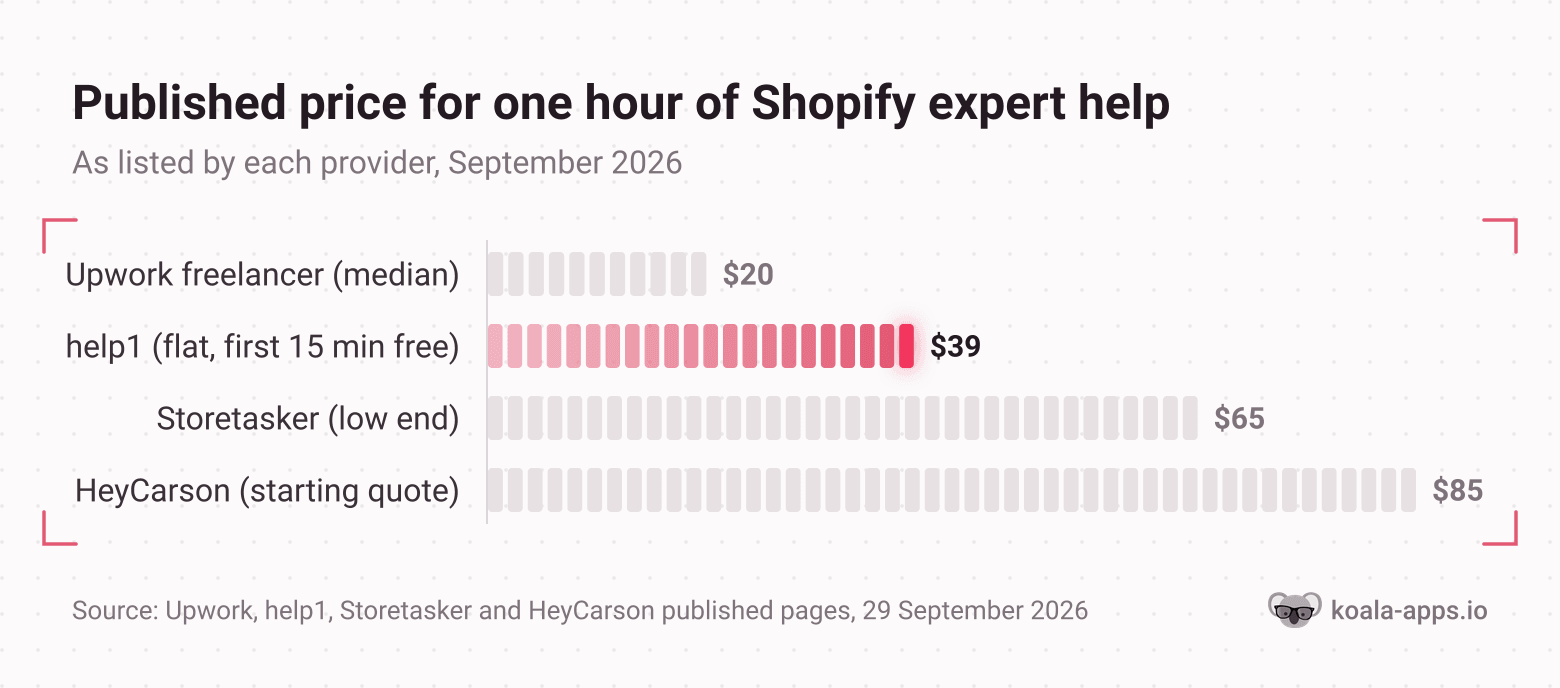
How to read this: the bar is the price for one hour of expert time as each provider publishes it. The number it leaves out is the wait before that hour starts, which is where help1 is built to win.
Shopify Support is the right first call for account and billing questions, and it is free. Its own help center draws the line clearly: Shopify Support doesn't write custom code or make arbitrary code changes, and third-party theme developers don't provide customizations either. Shopify's advice at that point is to hire a Shopify Partner.
Upwork is the cheapest per hour on paper. Upwork's own rate page puts the median Shopify developer at $20 an hour. The cost that page leaves out is your time. You write the brief, sort the proposals, vet the profiles, then wait while the person you picked gets up to speed on your store. For a two-week theme build that trade can pay off. For a checkout that broke tonight, it costs a day of sales you don't have.
Expert marketplaces take the vetting off your plate. Storetasker puts rates on its platform at $65 to $120 an hour, and HeyCarson's project quotes start at $85 an hour, with a reply to your request within one business day. Both are built for projects with a scope and a quote.
help1 is built for the moment something is wrong and you want a person on it now: one flat price, a vetted Shopify Partner, and a live conversation that starts in minutes.
Start with the free scan: 42 checks in about 30 seconds
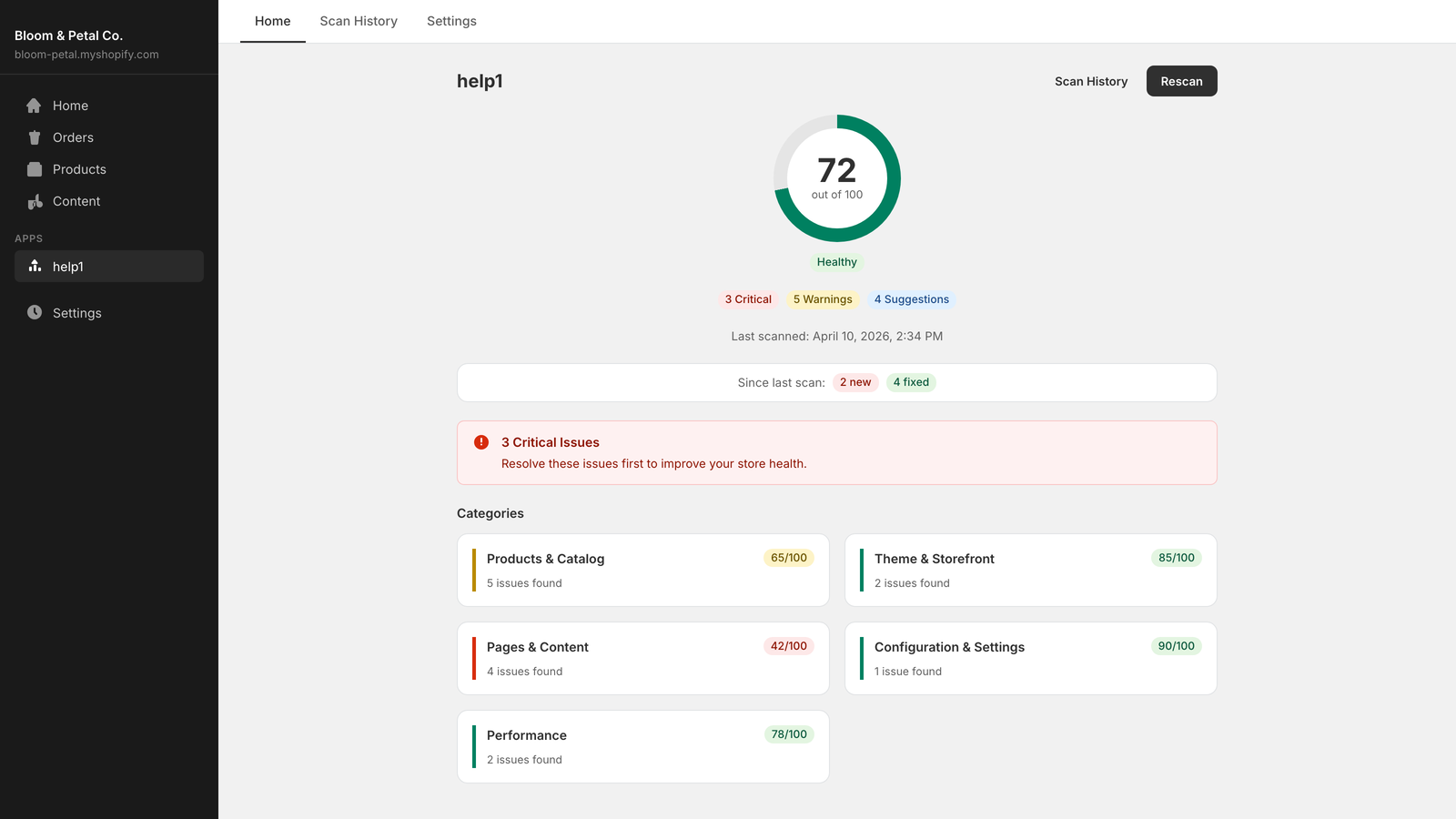
Most of what costs a store sales is invisible from the storefront. A product with no SEO title looks fine to you and reads as a generic listing to Google. A missing refund policy costs nothing until a cautious buyer goes looking for it and leaves. The help1 scan finds these in under 30 seconds and scores your store from 0 to 100, broken down by category, so you see at a glance where the damage sits.
Here is what the 42 checks cover:
- Products and catalog: products with no images, no description or a thin one, missing SEO titles and meta descriptions, missing image alt text, duplicate titles, missing prices and product types.
- Theme and storefront: broken section and snippet references, deprecated theme code, an outdated theme version, placeholder homepage content left over from the demo, a missing favicon or social sharing image, and old unpublished themes piling up.
- Pages and content: missing About, Contact, FAQ, privacy, refund and terms pages, thin pages, and a blog that is missing or has gone stale.
- Configuration and settings: no shipping zones, which means customers cannot complete checkout at all, plus no custom domain, the default store name, a single language and a currency that doesn't match your country.
- Performance: redirect chains, oversized theme assets, excessive templates and too many apps.
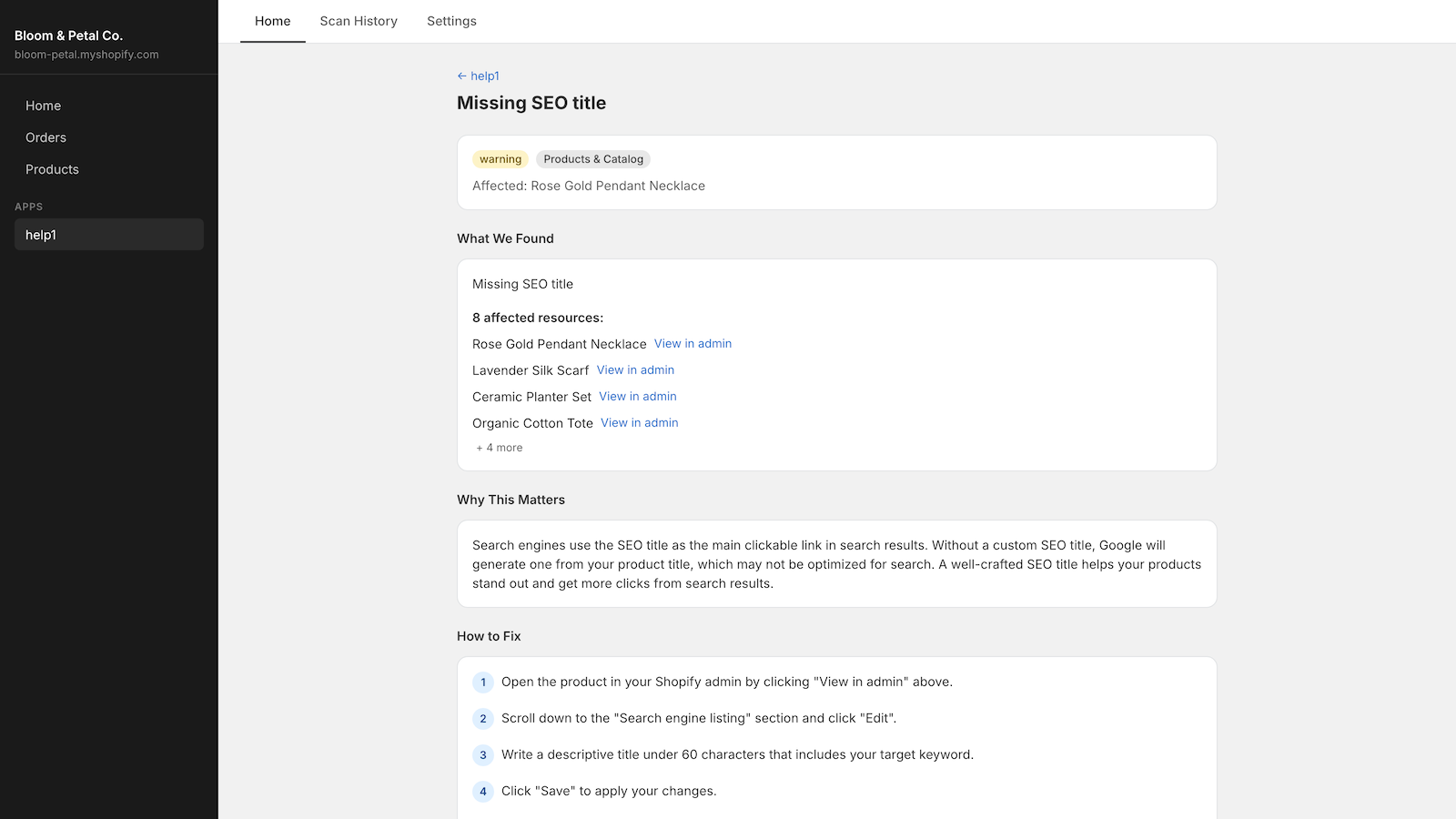
Every issue opens to the same three answers: what was found, with a "View in admin" link to each affected product or page, why it matters, and how to fix it step by step. Issues are graded critical, warning or suggestion, so you fix what loses money first.
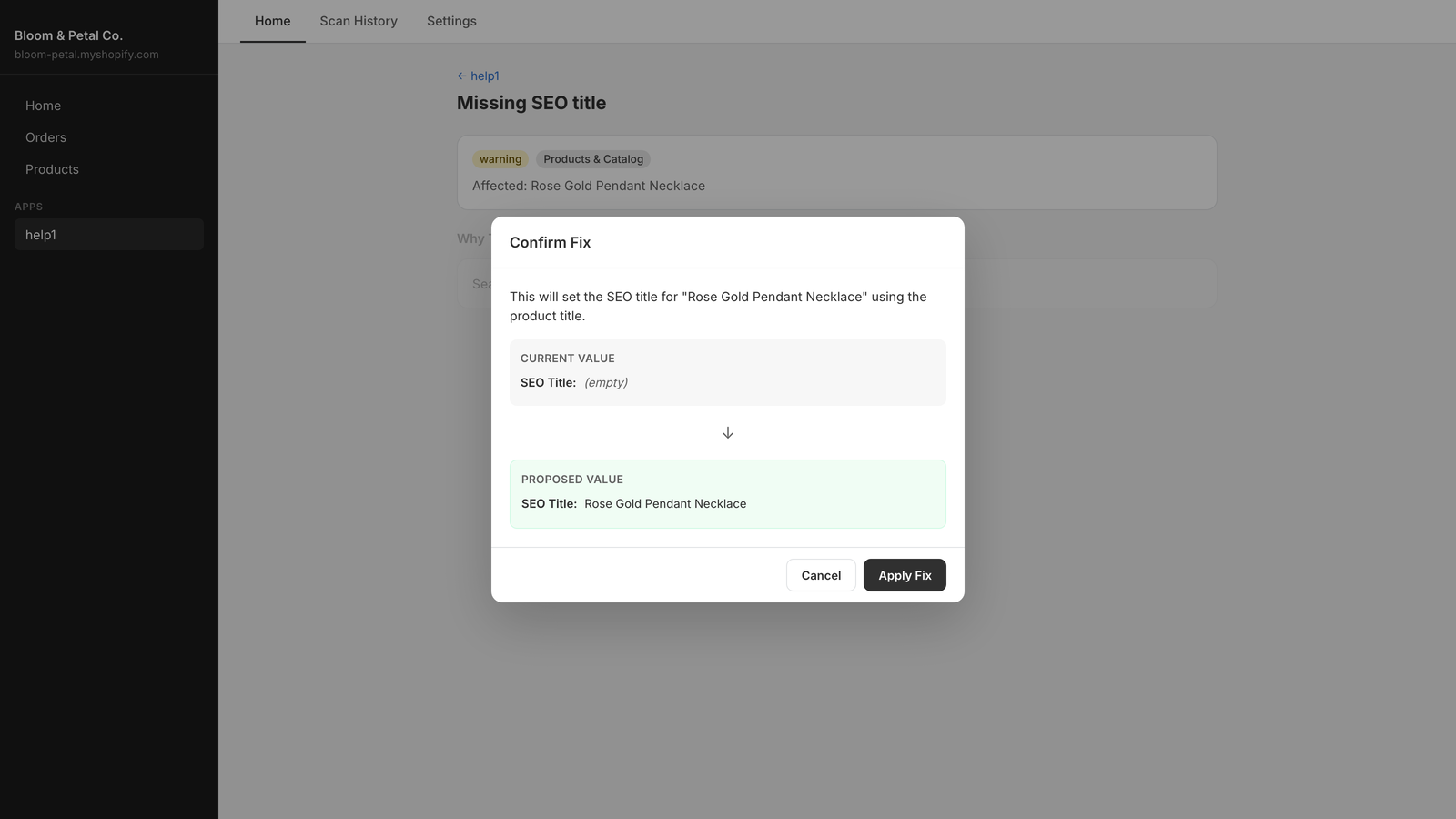
For 14 of the most common problems you can skip the steps. help1 fixes them in one click and shows you the current and proposed value before anything changes: product SEO titles, SEO descriptions and image alt text, the six standard store pages when they're missing, a missing favicon or social image, deprecated theme code, unused themes and redirect chains.
Rescan whenever you like. Scan history tracks your score over time and marks which issues are new and which you've fixed since the last scan, and a weekly email report keeps the number in front of you. The app is free forever, on any Shopify plan, with no credit card.
How a live expert session works
When the scan finds something you can't fix alone, or your problem was never on a checklist in the first place, the expert chat takes over. Getting help takes three steps.
- Connect. Enter your store URL on help1.io/get-help. It installs the free help1 app and takes you straight into a chat. Your first session needs no credit card.
- Describe. Tell the expert what's wrong in your own words. They can already see your scan results, so "my product pages look off on mobile" is enough to get going.
- Fix it together. A vetted Shopify expert joins, on average in under five minutes. They diagnose the problem, walk you through the fix in your own Shopify admin and send direct links to the exact settings page you need. For anything visual, share your screen so they see exactly what you see.
You never hand over a password or a staff account. The expert guides and you click, so every change happens in your own admin, under your own login. Each session is saved as a transcript, which means the fix is on record the next time the same problem shows up.
The experts are Shopify Partners with at least a year of professional experience, and each one passes a technical assessment, a live mock session and reference checks before taking a chat. They handle the problems that actually cost sales: broken checkouts, slow page speed, theme customization, app conflicts, SEO, shipping configuration, product data cleanup and mobile display bugs.
What $39 buys you
As of September 2026, help1 prices in US dollars, the same for every country:
- Your first session is free. 15 minutes with a real expert, no credit card and no commitment. Bring any issue from your scan.
- Every session after that is $39. Up to 60 minutes with a dedicated expert, paid once. No hourly meter, no subscription, no retainer.
If one session isn't enough, book another at the same $39. The next expert reads your earlier transcript and picks up where the last one stopped, so you never pay twice to explain the same problem.
Your money is covered too. help1's refund policy gives you a full refund if you cancel before the session starts, or if no expert joins within 10 minutes. If an expert works the full session and the issue still isn't resolved, help1 reviews the transcript and can refund part or all of it. A plain email within 30 days is all it takes.
Put that next to the table above: $39 is less than half of a single HeyCarson hour at its starting quote, and it buys a full hour of a Shopify Partner's attention on your store today.
Koala Inspector shows what winners run, help1 gets it into your store
This is where our two products meet, and it's the workflow we built help1 for.
Koala Inspector answers "what are the stores beating me doing?". Open any Shopify store with the extension and its free Shopify app detector lists every app the store runs, grouped by type, while the theme detector names its theme, paid and custom themes included, with a link to it in the theme store. Neither one costs a token.
help1 answers the question that comes straight after: "how do I get that into my store without breaking anything?". Here is the loop:
- Read the winners. Open the stores in your niche that clearly outsell you with Koala Inspector. Write down their theme and the apps they share, especially reviews, upsells, email capture and currency.
- Scan yourself. Run help1 on your own store and clear the one-click fixes on the spot.
- Book one session for the gap. Take the list to a $39 session. "Two of my three competitors run the same review app and I have none, help me set it up on my product pages" is exactly the kind of job that fits inside an hour.
- Rescan. Your health score moves, the fixed issues show up as fixed in your scan history, and you go back to Koala Inspector for the next gap.
Our guide to reverse-engineering the stores that already convert goes deeper on the reading half. If speed is your problem, start with what a good Shopify speed score looks like, then let the scan's performance checks and an expert handle the rest. And if you're adding up your running costs, our breakdown of what a Shopify store really costs per month puts a one-off expert session in perspective.
help1 FAQ
How much does it cost to hire a Shopify expert?+
Published rates vary by route. As of September 2026, Upwork puts the median Shopify developer at $20 an hour, Storetasker estimates $65 to $120 an hour on its platform, and HeyCarson project quotes start at $85 an hour. help1 charges a flat $39 for a live session of up to 60 minutes, and your first 15 minutes are free. The bigger difference is time to start: a help1 expert joins a live chat in under five minutes on average, while the marketplaces begin with a brief and a quote.
Is the help1 Shopify app really free?+
Yes. The help1 app is free forever on any Shopify plan: 42 health checks, a health score from 0 to 100, fix instructions for every issue, 14 one-click fixes, unlimited rescans and weekly email reports. You only pay if you book a live expert session after your free first 15 minutes.
Does a help1 expert need access to my Shopify admin?+
No. help1 experts never ask for your password or a staff account. They walk you through the fix in live chat, send direct links to the right pages in your admin, and can view your screen if you choose to share it. Every change happens in your own admin, under your own login.
What if my Shopify problem takes more than one session?+
Most issues fit in a single session of up to 60 minutes. If yours needs more time, book another session at the same $39. The next expert can read the transcript of your earlier session and carry on from where it stopped.
Who is behind help1?+
help1 is built by Koala Apps, the team behind Koala Inspector, the Chrome extension more than 250,000 Shopify sellers use to research competitors. Koala Inspector shows you what successful stores run, and help1 helps you fix and upgrade your own store.
Get your store fixed today
Somewhere in your store there is a problem costing you orders right now, and you may not even know which one. Run the free scan, clear the one-click fixes in a minute, and put a Shopify expert on whatever is left. Your first 15 minutes are on us.
Sources
- help1, pricing, get help and refund policy - the free 15-minute first session, the $39 session of up to 60 minutes, the expert vetting, the under-5-minute average response and the refund terms, read 29 September 2026.
- help1 on the Shopify App Store - the 42 diagnostic checks, 14 one-click fixes, scan history and weekly email reports, read 29 September 2026.
- Shopify Help Center, theme support - what Shopify Support will and won't customize, and the 60 minutes of design support on Basic and above, read 29 September 2026.
- Upwork, Shopify developer hourly rates - the $20 median and $15 to $29 typical range, read 29 September 2026.
- Storetasker, freelance vs full-time - the $65 to $120 hourly range on its platform, read 29 September 2026.
- HeyCarson, submit a task - quotes from $85 an hour and confirmation within one business day, read 29 September 2026.
Written by
Assaf Shalin
Co-founder & Developer, Koala Apps
Assaf Shalin is a co-founder of Koala Apps and one of the developers behind Koala Inspector. He builds the tools that let Shopify sellers see what is actually working in other stores, from installed apps and themes to best-selling products. On the blog he covers the technical side of store research: how competitor research really works, what public store signals can and cannot tell you, and how to turn them into decisions.
Connect on LinkedIn