Best Shopify Translation Apps in 2026, Ranked by Stores That Run Them
 By Koala TeamOctober 20, 2026
Across the Shopify stores Koala tracks, the most-installed app in the translation and currency category is a currency converter: BUCKS Currency Converter PRO++ on 48,709 stores. Transcy: AI Language Translate follows on 18,021, T Lab on 10,153, Weglot on 6,731 and langify on 4,090, read on 20 October 2026.
That ordering is the finding. Stores buy currency conversion long before they buy translation, and the gap is not close.

Want to see apps on any Shopify store?
Download for free and start exploring a whole new ecommerce world!

Currency comes first, translation comes second
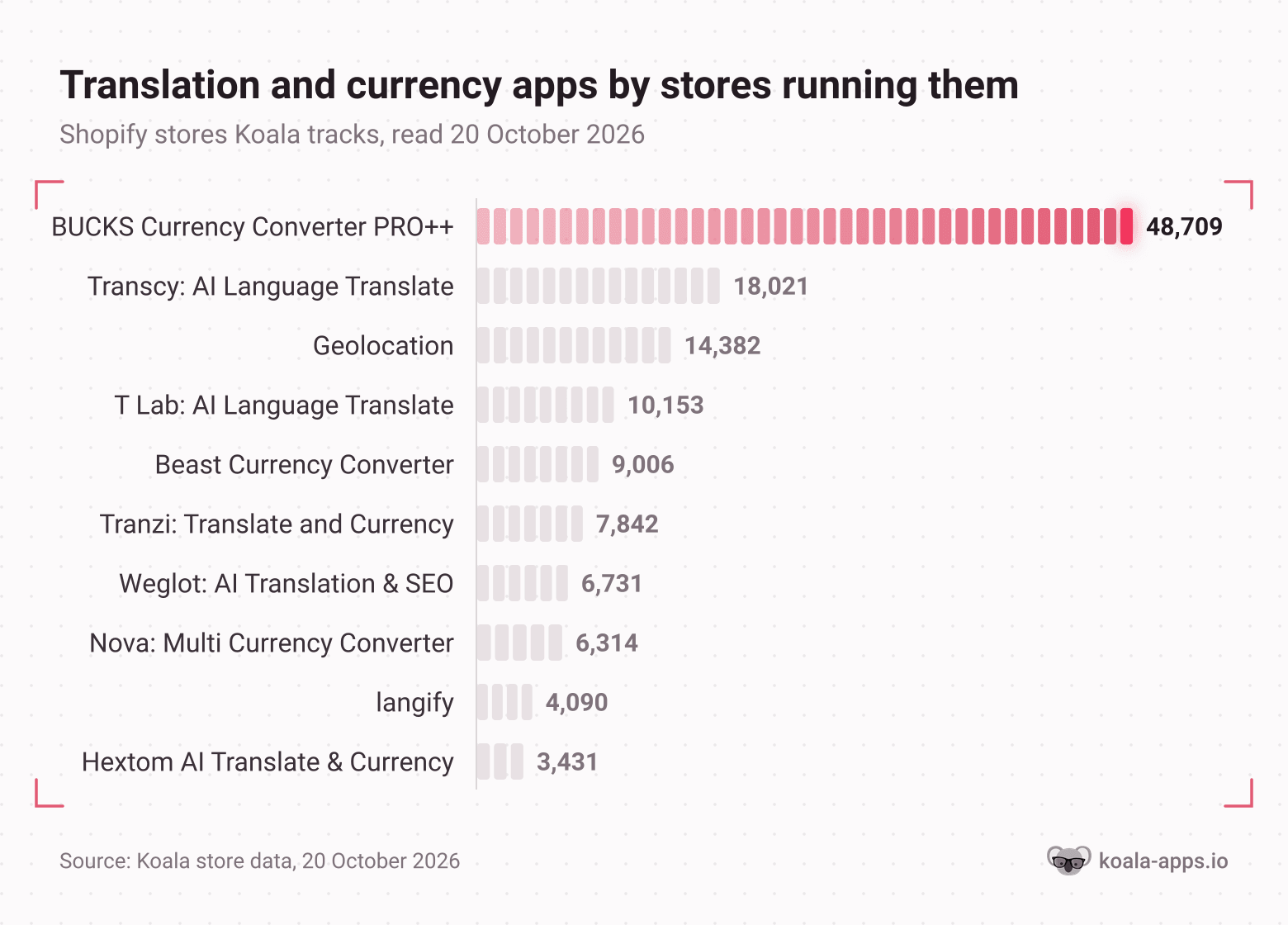
Split the category by what each app actually does and the pattern is stark. The three apps that only convert currency (BUCKS, Beast and Nova) account for 64,029 installs between them. The six that translate content (Transcy, T Lab, Tranzi, Weglot, langify and Hextom) account for 50,268, and that total is spread across six subscriptions rather than three.
A fourth app points the same way. "Geolocation" sits on 14,382 stores and does neither job: it recommends a country, redirects visitors and swaps the switcher. Its only purpose is to notice that a shopper is foreign.
So the typical sequence in a store's app bill is: notice foreign traffic, show local prices, and only then start paying per word. That is a rational order. Changing the price a shopper reads is one free setting and it applies to every product you will ever list. Translating is an ongoing bill that grows with your catalogue and needs reviewing every time you publish.
Two caveats on the numbers before the rankings. These are counts across the Shopify stores Koala tracks rather than a census of the platform, and the coverage leans toward the dropshipping and direct-to-consumer stores our users research. And an install count measures what merchants bought, not what worked for them. Tranzi is the proof: 7,842 installs against a 3.0 rating from two reviews. Read the count as evidence of demand and the rating as evidence of satisfaction, then decide.
What you are actually buying: two jobs, often one subscription
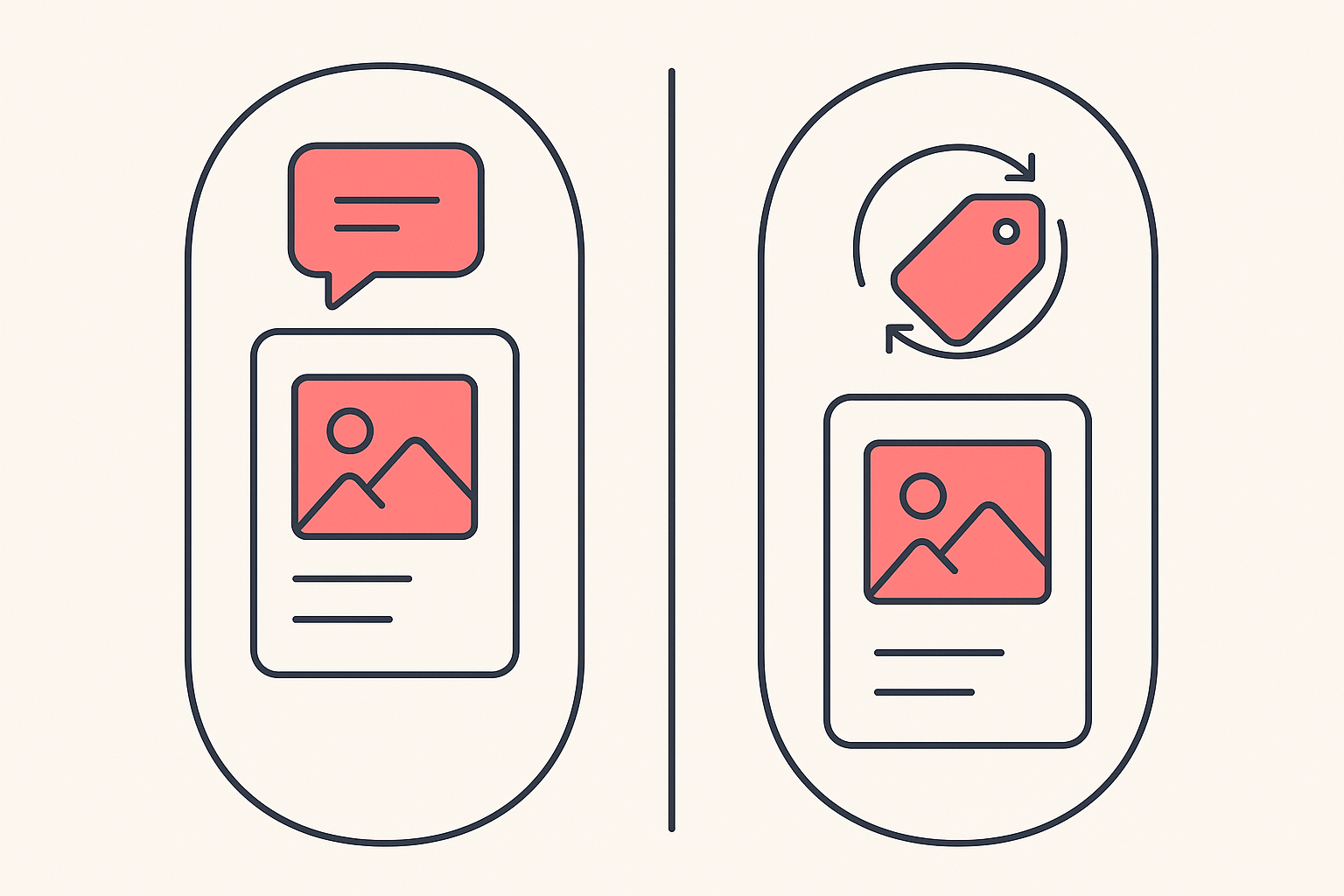
Language means the words on your storefront: product titles and descriptions, collection pages, navigation, buttons, policy pages, email templates and the strings your apps inject. Paid apps produce it three ways, and most offer more than one. Machine translation runs your text through an engine such as DeepL, Google or an OpenAI model. Manual translation is you or a translator typing in a side-by-side editor. Professional translation is ordering a human pass from inside the app.
Currency means the price a shopper reads, converted from your store currency at a live rate and usually triggered by their location. Whether they are also charged in that currency is a separate setting that runs through Shopify Markets.
Both matter and they fail differently. Bad translation loses trust at the product page. A missing local price loses the sale at the cart.
BUCKS Currency Converter PRO++: 48,709 stores
The most-installed app in the category by a wide margin, and it is currency only. BUCKS auto-converts prices into 160 or more currencies based on the shopper's location, with real-time exchange rates, a switcher you can style to your theme, price formatting, and local currency checkout through Shopify Markets. Its listing also reports AI Revenue Insights, which surfaces the countries and currencies the store is doing best in. It carries the Built for Shopify badge and rates 5.0 across 1,288 reviews, read on 20 October 2026.
Its language section covers the switcher and auto-redirect rather than translating any content, so pair it with a translation app if your copy also needs to change.
What 48,709 installs tell you is which problem gets solved first. The free plan is free for life with unlimited currencies and location switching, so the barrier to trying it is a single click, and a store sees the result on its own product pages within a minute. Paid plans add your own conversion rates and formatting at $9.99 a month, with AI analytics at $19.99 after a 7-day trial.
Transcy: AI Language Translate: 18,021 stores
Transcy is the most-installed app in Koala's data that actually translates, and it does both jobs in one subscription: 147 languages and 168 currencies, with the language and currency picked automatically from the visitor's location. Translation starts as machine output (the listing names OpenAI, DeepL and Gemini), and the feature list also carries manual translation, bulk translation, image translation, glossary management for locking brand and technical terms, and professional translation. Multilingual SEO covers translated URLs, hreflang and meta tags. It rates 4.5 across 2,570 reviews.
The install count reflects the shape of the offer rather than the quality of the prose. A merchant who has just noticed German traffic wants prices and words fixed in one evening, and Transcy sells exactly that, with a free tier covering one language and one currency so the first market costs nothing. Paid tiers start at $29 a month for 3 languages and 200 products, then $69 for 15 languages and 300 products, and $99 for 50 languages and 1,500 products, each after a 7-day trial.
Note the product caps. On a catalogue of thousands, the plan you need is higher than the plan the pricing page draws your eye to.
T Lab: AI Language Translate: 10,153 stores
T Lab, listed as Translation Lab, is the highest-rated app in the category at 4.9 across 1,034 reviews. It covers language and adds multi-currency support, and its distinguishing feature is control over the engine: bring your own API key for DeepL, Google or ChatGPT and the translation volume is yours to meter. Autopilot AI translates new or updated content on its own, and the feature list carries manual, bulk and image translation, glossary management, third-party app translation and a language switcher.
Its install count sits at roughly half of Transcy's with a higher rating, which usually means a narrower buyer. The own-key option is the tell: it appeals to a merchant who already has an engine preference and wants the app to be plumbing. Free to install with AI translations for one language and unlimited manual translation, then $11.99 a month, $29.99 for multiple currencies and 10 languages, and $59.99 for unlimited AI translation on your own key.
Weglot: AI Translation & SEO: 6,731 stores
Weglot is language only and sells on SEO. It generates machine translations from DeepL, Google or Microsoft across 110 or more languages, lets you edit them manually or collaborate with a team, and lets you order professional translations from the same dashboard. A custom AI language model can be tuned to your brand voice. Translated pages ship with hreflang, metadata and clean URLs so they can be indexed. It rates 4.5 across 825 reviews.
The pricing is the part to read twice, because Weglot bills by translated words rather than by product. Free covers one language and 2,000 words, Starter is $17 a month for 10,000 words, Business $32 for 3 languages and 50,000 words, and Pro $87 for 5 languages and 200,000 words. Its listing also warns that external charges may be billed by Weglot separately from your Shopify invoice. A 40-product store with long, considered descriptions fits that model well. A 4,000-SKU catalogue does not.
Merchants ask about it precisely because the SEO claim is load-bearing. One store owner doing around $30,000 a month, expanding into France and Germany, asked whether the SEO side was actually solid, wanting proper hreflang and translated URLs rather than a widget that swaps text on the page, and what support looked like when something broke. Those are the two questions to put to any app on this list before you subscribe.
langify: 4,090 stores
langify is the manual-first option and the oldest reputation in the group, at 4.6 across 725 reviews. It covers language and currency: local currency checkout, multi-currency and a country selector on the money side, machine and manual translation, image translation, metafields, bulk translation and URL translation on the words side, with SEO run through subfolders and an option for a custom domain. Export and import let you take translations out, work on them elsewhere, and bring them back.
Its free plan is the most generous on the list for anyone willing to do the work: unlimited manual translations across up to 5 languages, at no cost. Paid plans buy AI word allowances and third-party app translation, from $17.50 a month for up to 20 languages, then $29.95 and $59.95 for larger word budgets.
The smallest install count of the five, and a predictable one. Manual translation is a decision to spend time instead of money, which is a minority choice in a category where the pitch is usually a button that does everything. Merchants who make it tend to stay, and the reviews single out support that goes into theme code to fix things.
The comparison table
Install counts are Koala's own, read on 20 October 2026. Coverage, translation method, ratings and prices come from each app's Shopify App Store listing, read the same day, and every app is linked so you can check it yourself before you subscribe.
| App | What it covers | How the translation is produced | Stores in Koala's tracked set | Free plan | Paid entry | Rating |
|---|---|---|---|---|---|---|
| BUCKS Currency Converter PRO++ | Currency, 160+ currencies, local currency checkout | No content translation | 48,709 | Free for life | $9.99/month | 5.0 (1,288) |
| Transcy: AI Language Translate | Both, 147 languages and 168 currencies | Machine, manual and professional, plus glossary | 18,021 | 1 language, 1 currency | $29/month | 4.5 (2,570) |
| Geolocation | Neither, country recommendation and redirects | No content translation | 14,382 | No longer on the App Store | No longer on the App Store | Not listed |
| T Lab: AI Language Translate | Both, language plus multi-currency on higher plans | Machine on your own engine key, manual and bulk | 10,153 | Free to install, 1 AI language | $11.99/month | 4.9 (1,034) |
| Beast Currency Converter | Currency, unlimited currencies | No content translation | 9,006 | Free plan | $9.95/month | 4.5 (1,111) |
| Tranzi: Translate and Currency | Both, 100+ languages | Machine and manual, plus glossary | 7,842 | No free plan | $7.99/month | 3.0 (2) |
| Weglot: AI Translation & SEO | Language only, 110+ languages | Machine, manual and professional, custom brand model | 6,731 | 1 language, 2,000 words | $17/month | 4.5 (825) |
| Nova: Multi Currency Converter | Currency, 130+ currencies | No content translation | 6,314 | Free | Free | 4.9 (762) |
| langify | Both, language plus local currency | Manual first, machine and AI on paid plans | 4,090 | Unlimited manual, 5 languages | $17.50/month | 4.6 (725) |
| Hextom AI Translate & Currency | Both, 130+ languages and 180+ currencies | Machine across several models, manual and import | 3,431 | 3 auto languages, 180+ currencies | $9.99/month | 4.7 (1,233) |
One row deserves a second look. "Geolocation" is on 14,382 stores and its App Store page now reads "This app is not currently available on the Shopify App Store", with support provided by Shopify. Thousands of live stores are running a country-recommendation app that nobody new can install, which is a good reminder to check a competitor's stack against the current store rather than against a list from last year.
Work out whether you need this at all
Start with which countries are already sending a store traffic, because translation only pays where demand exists.
Most merchants guess. The usual version of the guess looks like this: one store owner posted that parts of their site showed in Danish while other parts were still in English, wanting visitors from Denmark to get a fully Danish store and visitors from Germany a fully German one, and asking which app or Shopify feature would do it. The app choice is the easy half. The hard half is whether Danish and German visitors are arriving in the first place, and in what proportion.
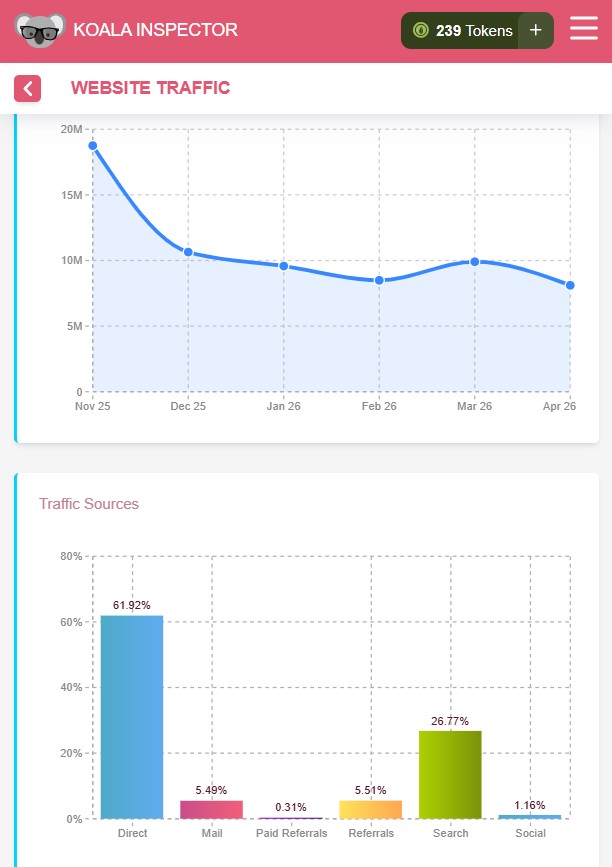
Koala Inspector's Site Traffic screen answers that for any live Shopify storefront, including yours. It reports traffic volume with a monthly trend, the split across direct, search, referral, mail and social, engagement figures, top keywords, demographics, and geography as a world map with the share each country contributes.
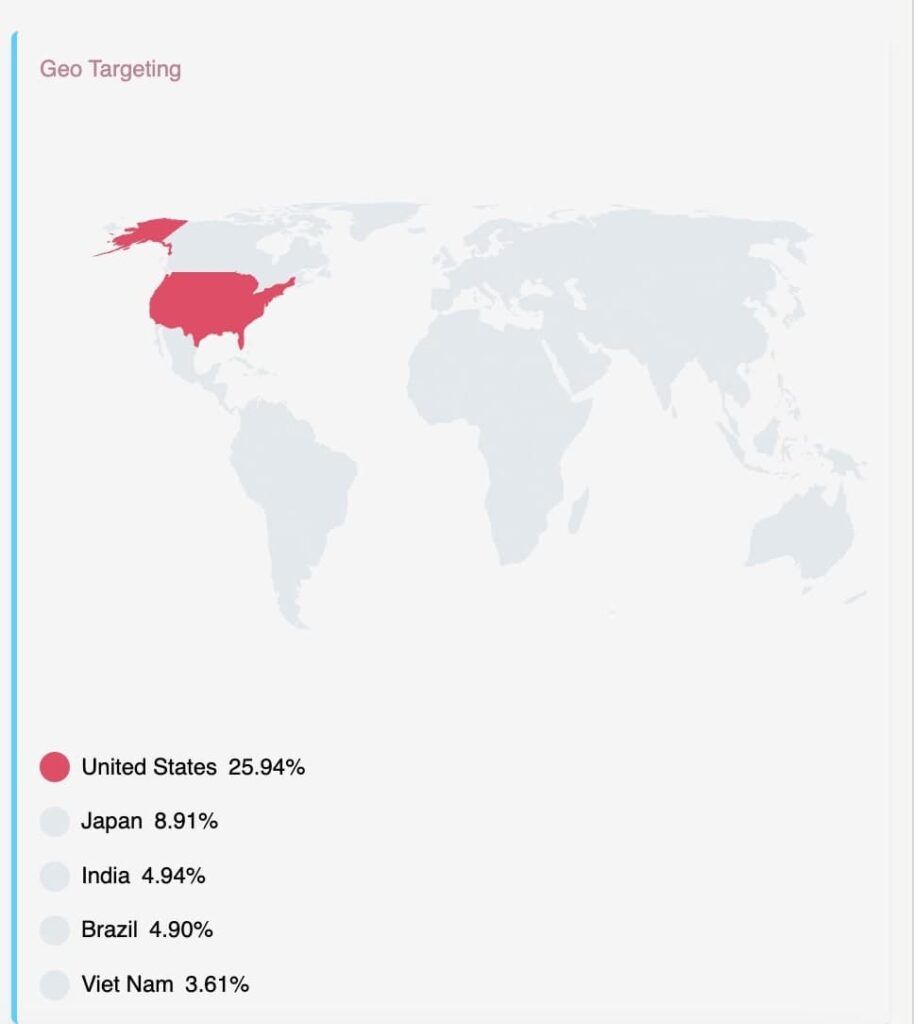
That geography panel is the whole decision in one screen. A store whose top five countries are the United States, Japan, India, Brazil and Vietnam has a translation problem worth paying for. A store at 85 percent United States does not, and the subscription would have bought nothing.
Run the check in this order and it takes about ten minutes:
- Open your own store, click Koala Inspector and read the geography panel. Note every country above a few percent of traffic and the language it buys in.
- Read the traffic sources beside it. A country arriving through search needs translated URLs and hreflang so the local results can rank. A country arriving through paid social needs the product page to read well and little else.
- Open the three stores outranking you in that country's results and read their stacks. The free app detector names every app on a live Shopify storefront, so you can see which translation and currency apps are standard in that market before you commit to one.
- Compare the app bill to the opportunity. If Germany is 4 percent of your traffic, a $69 plan is buying a 4 percent slice of your conversion rate, and you can work out from your own order value whether that clears.
Site Traffic costs 3 tokens, and the free plan carries 15 tokens a month with no card, so the geography read on your store and a couple of competitors is free. The app and theme detectors never cost tokens at all. Install Koala Inspector free and look at your geography before your next subscription, not after it.
Where a machine pass stops being enough
Translation that reads as translation costs sales in the markets it was bought to win. CSA Research surveyed 9,909 consumers across 33 countries in 2021 and found 40 percent said they would not buy from a website in a foreign language, which is the figure usually quoted to justify translating at all. The same analysis points out the harder part: in Europe, where 95 percent of adults use the internet and 78 percent of those have bought online, cross-border buying stays low, with only 20 percent of Germans and 13 percent of Poles buying from sellers in other EU countries in 2024, and awkward, overly literal copy is a live part of why.
So treat a machine pass as a first draft that goes live. Three things are worth a human eye in every language you publish:
- Your brand and product terms. Glossary features exist in Transcy, T Lab, Weglot, langify and Hextom because an engine will happily translate a product name. Lock those terms before the first run.
- The copy that does the selling. Product titles, the first paragraph of each description and your calls to action are a small share of your word count and nearly all of your conversion rate. Edit those by hand.
- The parts that stay English. Reviews, FAQs and anything an app injects are the usual leftovers, and a half-translated page reads worse than an untranslated one.
How we counted
- Install counts: the number of Shopify stores in Koala's tracked set observed running each app, read on 20 October 2026. This is Koala's own store coverage, weighted toward the dropshipping and direct-to-consumer stores our users research, so treat it as a strong sample of working merchants rather than a Shopify-wide census. An install count is a count of installs, not of unique stores, since one store can run a currency app and a translation app at once.
- Coverage, translation method, ratings, review counts and prices: taken from each app's Shopify App Store listing on 20 October 2026 and linked in the table above. "What it covers" follows the feature list each developer publishes. Paid entry means the cheapest recurring plan, and a free plan is listed separately from a free trial, because they are different offers.
- Rankings: by install count only. No app paid for a position on this page.
What merchants say about Koala Inspector
Verified reviews from the Chrome Web Store.
“I was a bit skeptical about all the hype but gave Koala Inspector a shot. It's user-friendly and provides useful data on what's working for others. The support team is also there when you need them.”
 Martin René
“Great tool for competitor research and customer support is really quick!”
 Aiswarya S
“great app for ecommerce, there are a lot of useful information. Friendly customer service!”
 Lavender Yuzu
Sources for the Shopify and search answers below: Translate & Adapt, Google on localized versions of a page, Google's spam policies, PCI compliance, Shopify domains and ads in ChatGPT.
Shopify translation and currency apps: frequently asked questions
Does Shopify translate a store natively?+
Partly, and for free. Shopify's own Translate & Adapt app auto-translates up to two languages using translations by Shopify, lets you add as many manual translations as you want, and gives you a side-by-side editor for reviewing them. It also adapts wording between markets that share a language, so British and American spellings can differ. It rates 4.4 across 1,399 reviews. What it does not do is convert currency, translate images, or translate the content third-party apps inject into your theme, which is where the paid apps earn their fee.
Does machine translation hurt SEO?+
Not by itself. Google's own documentation states that localized versions of a page are only considered duplicates if the main content of the page remains untranslated, and it gives three ways to declare your alternate pages: hreflang tags in the HTML, a sitemap, or HTTP headers. The spam policies target something different, namely scaled content abuse such as scraping content and running it through automated transformations including translation where little value is provided to users. Translating your own catalogue for a market you actually sell into is not that. The two real risks are copy that reads badly enough to lose the sale, and a setup that never tells Google which version belongs to which language.
Is a currency converter enough on its own?+
It is the cheapest first step and it has a hard edge. A converter rewrites the price a shopper reads on your product page. Whether they are charged in that currency is a separate setting. Beast Currency Converter says so on its own listing: Shopify does not allow developers to convert prices on the checkout page, so the app offers a cart-page message instead. Apps that advertise local currency checkout do it through Shopify Markets rather than through the switcher. Convert prices to win the browse, and set up local currency checkout before you spend on traffic, because a price in euros followed by a charge in dollars is where the cart dies.
Anyone actually running ChatGPT ads for their Shopify store?+
It is a real channel. OpenAI began testing ads in ChatGPT in the United States on 9 February 2026, then opened a self-serve Ads Manager with cost-per-click bidding and budget controls, and has since extended buying to the United Kingdom, Mexico, Brazil, Japan, South Korea, India, Europe, the Middle East and North Africa. Benchmarks are still thin. If you are weighing it against a translation subscription, check which countries already send you traffic first, because paid clicks into a store a visitor cannot read are the most expensive way to learn that lesson.
Are Shopify point of sale payments secure?+
Shopify is certified Level 1 PCI DSS compliant, and that compliance extends by default to all stores powered by Shopify. Shopify Payments is the processor behind in-person sales on integrated POS hardware, so card data is handled by Shopify's payment infrastructure rather than sitting in your own systems. What remains yours is account hygiene: staff permissions, two-step verification and a locked-down admin.
Can I use my own domain name with Shopify?+
Yes. You can buy a domain through Shopify, or connect one you already own from another registrar, then set it as your primary domain so every visitor and every search engine sees that address. This matters for selling abroad, because the three standard ways of running multiple languages are subfolders, subdomains and separate country domains, and all of them start from a domain you control rather than a myshopify address.
Can Shopify spy on sales?+
Shopify does not hand your sales figures to other merchants. The analytics in your admin are yours, and another store owner cannot open them. What anyone outside your business can do is estimate how a store is performing from what its storefront shows any visitor, which is what competitor research tools report. Those are modelled estimates for comparing stores and spotting trends rather than a copy of someone's accounts, and the same is true of what anybody can model about you.
Do I need to be a designer or developer to use Shopify?+
No. Themes are configured in the theme editor with no code, and the same is true of localization: Shopify's Translate & Adapt works from the theme editor or any resource page in your admin, and langify states on its listing that setup needs no coding skills. Where a developer earns their money is the awkward remainder, such as hard-coded text sitting in a theme file or an app that renders its strings outside the translation system.
How can I check my Shopify store's sales for free?+
For your own store, the Analytics section of your Shopify admin reports sales, sessions and conversion rate on every plan at no extra cost. For somebody else's store, Koala Inspector reads a live Shopify storefront and reports its catalogue, likely best-sellers, apps and theme free with no token cost, and its free plan carries 15 tokens a month, which covers about five Site Traffic reads for traffic volume, sources and geography.
Keep going
- Best Shopify apps is the full category index, ranked the same way.
- Shopify plugins covers how app subscriptions add up across a store.
- Shopify app detector names every app on any live storefront, free.
- How much Shopify apps cost puts a translation bill next to every other category.
- Monitor your competitors' store traffic goes deeper on reading the traffic screen.
Written by
Koala Team
Koala Apps Editorial Team
The Koala Team is the crew behind Koala Inspector. We test tools, track what is selling across Shopify, and turn it into practical roundups and reference guides for store owners and dropshippers.