9 Best Wappalyzer Alternatives in 2026 (Free and Paid)
 By Ana GelevskaJuly 27, 2026
Short answer: if you research Shopify stores, Koala Inspector is the best Wappalyzer alternative, because it reads a store's full app stack, active theme, product catalog and sales signals instead of just confirming "this site runs Shopify". If you research the wider web, WhatRuns is the best free swap and BuiltWith is the one to pay for when you need years of technology history.
Wappalyzer earned its place. Install the extension, open any site, and you get a tidy list of the frameworks, analytics, pixels and payment tools that page loads. For a quick "what is this built with", it still works.
The reasons people go shopping for a replacement are consistent. The free account now stops at 50 technology lookups a month, and paid plans start at $250 a month and climb to $850 and beyond (Wappalyzer pricing). The detection is also front-end shaped. On Hacker News, one user looking for a replacement put the limitation plainly: Wappalyzer "doesnt do a good a job at detecting the infrastructure a company uses. Like if they use Grafana or Snowflake or ChatGPT APIs" (Ask HN thread). And since the project moved away from its open ruleset, community forks such as enthec/webappanalyzer have kept the old signature set alive for people who want to self-host (SEOmator's 2026 roundup).
There is a third reason, and it is the one this guide cares about most: general detectors answer the wrong question for ecommerce. Knowing a competitor runs Shopify is table stakes. What actually changes your roadmap is which apps they pay for, which theme they bought, what they sell, and what is moving.
Wappalyzer alternatives compared
| Tool | What it detects | Shopify apps + theme | Free tier | Browser extension |
|---|---|---|---|---|
| Koala Inspector | Shopify apps, theme, products, best-sellers, traffic, ads, trends | Yes, full stack plus the active theme | Yes, free forever, no card | Yes (Chrome) |
| Wappalyzer | Front-end tech, CMS, analytics, pixels, plus lead data | Partial, names some apps | 50 lookups/month | Yes |
| BuiltWith | Broad web tech with long technology history | Partial, no theme detail | Free single-site lookups | No |
| WhatRuns | Web apps, CDN, tracking, WordPress plugins, fonts | Partial, names some apps | Yes, fully free | Yes (Chrome) |
| WhatWeb | 1,800+ plugins: CMS, servers, libraries, versions | No | Yes, open source | No (command line) |
| CRFT Lookup | 2,500+ technologies plus performance and meta checks | No | Yes, unlimited scans | No (web app) |
| Store Leads | Ecommerce stores across 410 platforms, apps with install dates, themes | Yes, at database scale | Trial only | Yes (paid plans) |
| PPSPY | Shopify stores, products, sales estimates, themes, ads | Yes | Free trial, no card | Yes (Chrome) |
| Bloomberry | Enterprise stack signals: CRMs, ERPs, AI tooling, adoption and churn | No | Trial | No |
Prices and tiers below come from each vendor's own pages, checked in July 2026.
1. Koala Inspector: best for Shopify store research
Koala Inspector is a Chrome extension built for one job: taking apart a Shopify store while you are standing on it. Open a competitor's storefront, click the icon, and the dashboard loads the store's active theme, its category, product count, creation date and localization, with previews of apps, traffic, best-sellers and ad campaigns.
The parts most people come for are free and cost no tokens: the Shopify app detector, the theme detector, full product browsing with best-seller filtering, favorites, and a history of every store you have analyzed. The free plan gives you 15 tokens a month with no credit card. Premium is $22 a month for 220 tokens and tracking on up to 50 stores.
Tokens only come into play for the heavier reports: 1 token for a CSV export or an AI Shop Chat session, 2 for Find Suppliers, ad campaigns or product trends, 3 for a full site-traffic profile, and 15 to put a store under ongoing tracking.
Strengths: the deepest free Shopify data in this list, a clean interface, and change tracking that flags apps added or removed, theme swaps, new products and price moves.
Limits: it only works on Shopify stores. Traffic and sales figures are estimates, useful for ranking stores against each other rather than as exact revenue. Shop tracking is switched off on the free plan.
Best for: Shopify sellers, dropshippers, agencies and app developers researching stores on the platform.
What a seller actually sees, and what to do next
Here is the walkthrough that makes the difference concrete. Say a competitor in your niche has been outranking you for months.

Step one, read the app stack. Koala Inspector lists the apps on the store, grouped by type, with a link to each one in the Shopify App Store. This is where a general detector stops after two or three names. Across the top Shopify stores in Koala's own data, the average store runs about 12 apps and the median is 11, with the deepest stack we see hitting 39. If your store runs four apps and your competitor runs sixteen, you are looking at a list of the decisions they have already tested.
Step two, check the theme. The theme detector names the active theme, paid or custom, with a link to it in the theme store. If three of your best competitors run the same theme, that is a signal about what converts in your category, not a coincidence.
Step three, read the catalog. Browse the full product list, filter to likely best-sellers, sort by date added, and check the price range. New products added in the last month tell you what they are testing. The best-seller view tells you what is paying for the tests.
Step four, decide. Export the app list and the products to CSV, open a traffic profile if you want sources and geography, and turn on tracking so you get told when they add an app or drop a price. That is the loop: read the stack, copy what works, watch for the next move.
For the head-to-head detail on how this compares with Wappalyzer feature by feature, see our Wappalyzer vs Koala Inspector comparison.
What the app data looks like at scale
The reason app detection matters is that Shopify stacks cluster. Across the stores Koala tracks, a small group of apps shows up again and again, which makes an unfamiliar app on a competitor's store worth a second look.
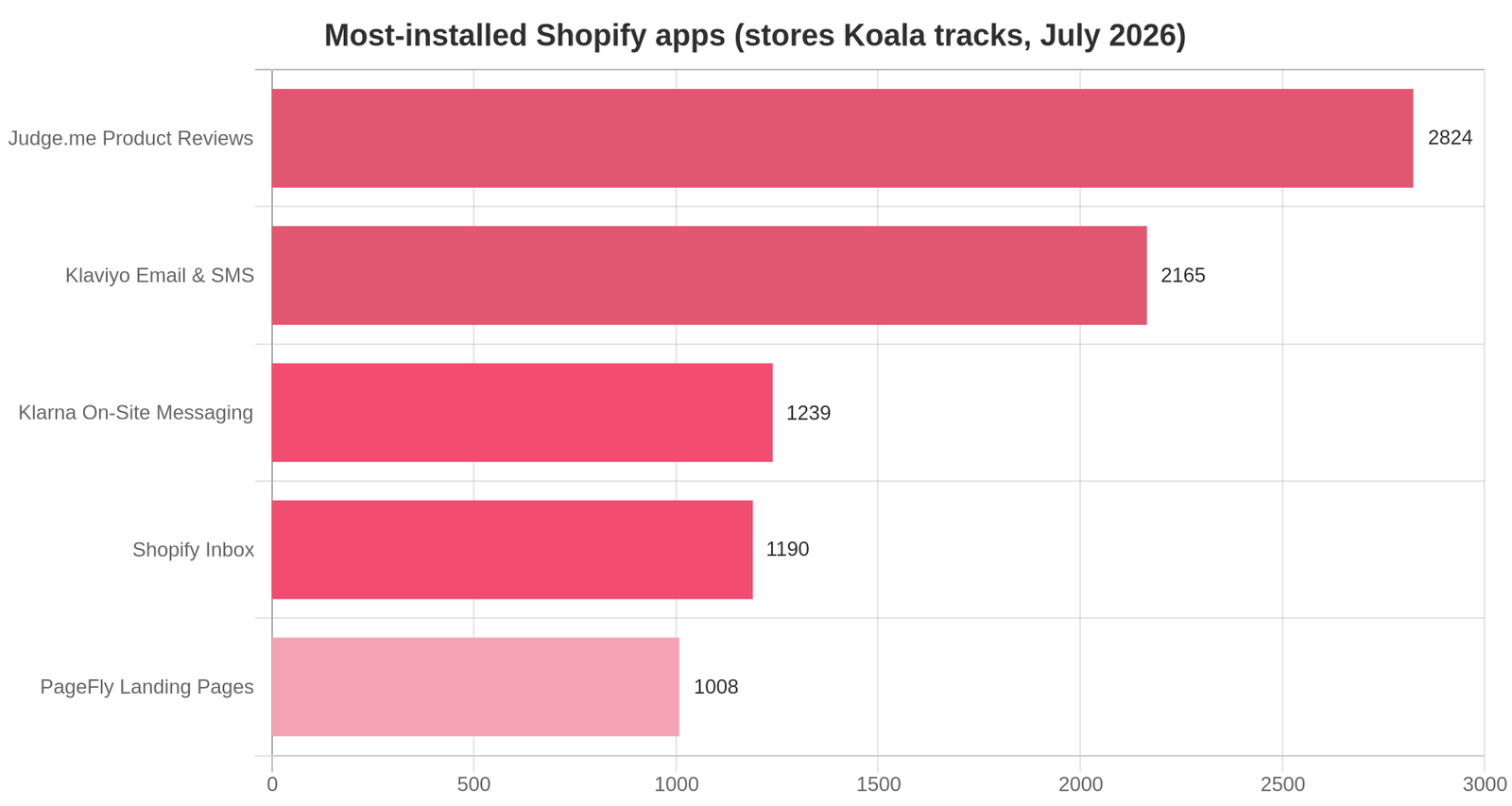
In Koala's July 2026 snapshot, Judge.me Product Reviews leads with 2,824 stores, followed by Klaviyo for email and SMS on 2,165, Klarna On-Site Messaging on 1,239, Shopify Inbox on 1,190 and PageFly Landing Page Builder on 1,008. These counts cover the Shopify stores Koala tracks, not every store on Shopify, so read them as a popularity ranking rather than a market share.
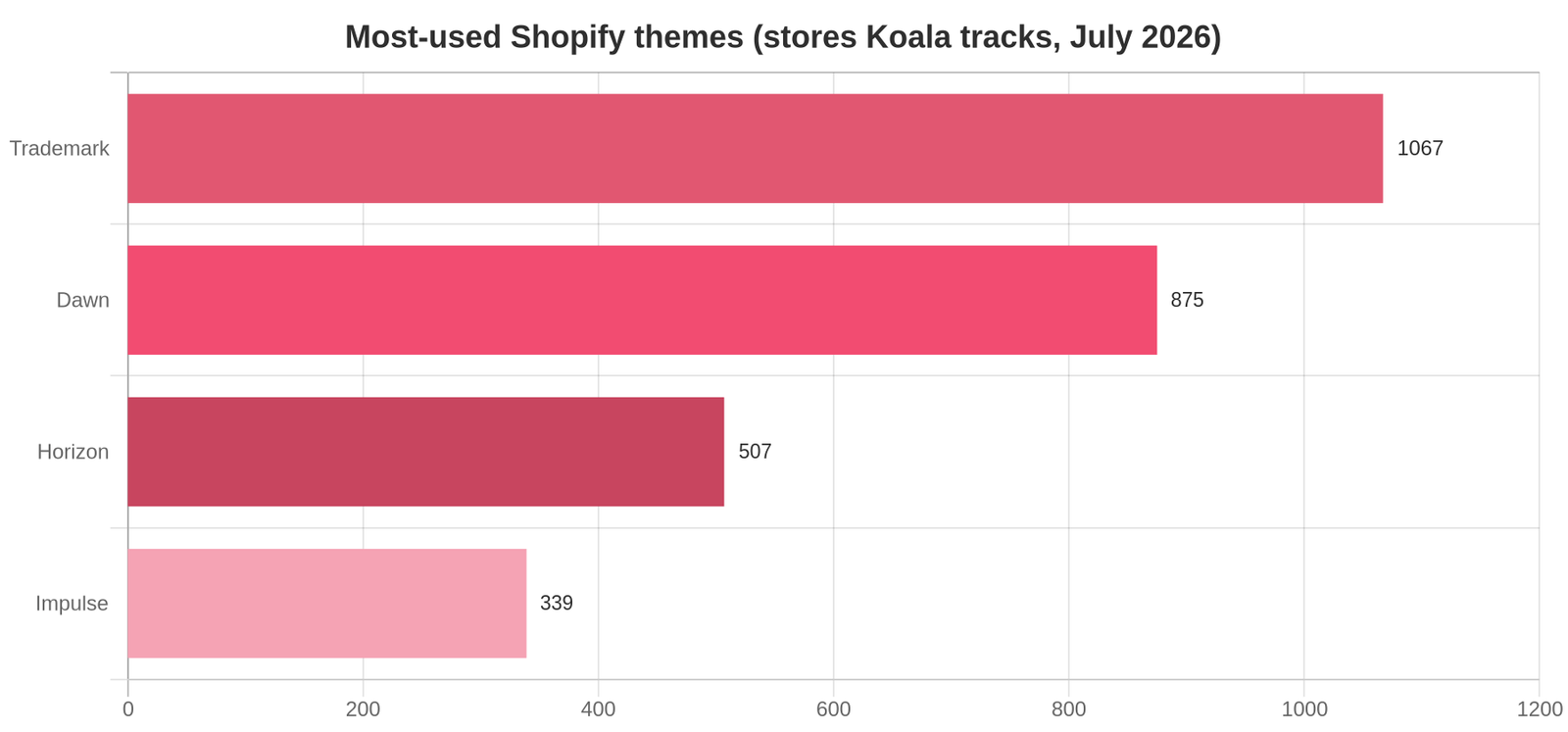
Themes cluster the same way. Trademark leads with 1,067 stores in the same snapshot, ahead of Dawn on 875, Horizon on 507 and Impulse on 339. A general detector will happily tell you a site runs Shopify and leave both of those lists on the table.
2. WhatRuns: the free general-purpose swap
WhatRuns is the closest free like-for-like replacement for the Wappalyzer extension. It reports, in its own words, "web apps they pay for, CDN they're hosted on, how they track their visitors, Wordpress plugins, fonts" (WhatRuns). No subscription, no sign-up, no lookup cap.
The trade-off is depth. In that same Hacker News thread, one user who tried it called WhatRuns "pretty bare bones. Not useful at all" for the deeper infrastructure question. For a quick front-end read on any site, it does the job for nothing.
Best for: anyone who wants the Wappalyzer extension habit back without a bill.
3. BuiltWith: the historical database
BuiltWith is a database rather than an extension. Its strength is history: technology records going back many years, so you can see when a site adopted or dropped a tool. Individual site lookups are free forever, and paid plans start at $295 a month for Basic, $495 for Pro and $995 for Team (BuiltWith plans).
That pricing puts it out of reach for most solo sellers, which is why we wrote a full BuiltWith alternatives guide. For an agency sizing a market or a sales team building lists by technology, it is still the reference set.
Best for: market sizing, technology adoption history, prospect lists at scale.
4. WhatWeb: free, open source, command line
WhatWeb is a scanner with more than 1,800 plugins that identifies CMSs, blogging platforms, analytics packages, JavaScript libraries, web servers and embedded devices, including version numbers and framework modules. It is GPLv2 and free (WhatWeb on GitHub).
You run it from a terminal (./whatweb example.com), which rules it out for most marketers and makes it excellent for anyone scripting bulk checks or working in security research.
Best for: developers and security researchers who want scriptable detection with no API bill.
5. CRFT Lookup: unlimited free scans in the browser
CRFT Lookup identifies more than 2,500 technologies and bundles in performance metrics, meta tag previews and sitemap visualization. It is free with unlimited scans, and reports are kept for 30 days (CRFT Lookup).
There is no browser extension, so it is a paste-a-URL workflow rather than a one-click one. For occasional checks and a bit of SEO context alongside the tech list, that is a fair trade.
Best for: free one-off lookups with performance and meta data included.
6. Store Leads: ecommerce data at database scale
Store Leads tracks more than 13.6 million active stores across 410 ecommerce platforms, with 2.9 million of them on Shopify. It records over 40 attributes per store, including installed apps with their installation dates, themes, third-party technologies, estimated monthly sales and social following (Store Leads).
Plans run from $75 a month for Premium, capped at two platforms and 2,000 searches, up to $250 for Pro, $450 for Elite and $950 for Enterprise. A Chrome extension is included on paid plans, and there is a limited trial rather than a free tier.
This is the tool for building a filtered list of ten thousand stores. It is not the tool for standing on one competitor's product page and asking what they are running right now.
Best for: B2B prospecting, agency lead generation and market research at volume.
7. PPSPY: Shopify sales estimates
PPSPY is a Shopify-native research tool covering more than a million active stores and over 200 million products, with sales tracking, store filtering by revenue and traffic, theme research, traffic sources and ad monitoring (PPSPY). There is a Chrome extension and a free trial that does not ask for a card.
It sits closest to Koala Inspector in purpose. The honest split: PPSPY leans hardest on sales prediction, while Koala Inspector gives more away free and covers apps, theme, catalog, traffic and ads in one extension at a lower entry price. If sales estimates are the only thing you care about, try both.
Best for: dropshippers who want sales estimates front and center.
8. Bloomberry: enterprise stack signals
Bloomberry answers the question Wappalyzer users on Hacker News were actually asking: which internal tools does this company run? It looks past the front end to surface CRMs, ERPs and AI tooling, with adoption and churn signals, at $199 a month (Bloomberry's own roundup).
It has nothing to say about Shopify apps or themes. If you sell B2B software and need to know who just adopted Snowflake, it is the closest fit in this list.
Best for: B2B sales teams targeting by internal technology.
9. Wappalyzer itself, on the free extension
Worth saying plainly: if you check one site a week and the extension is enough, staying on Wappalyzer is a reasonable answer. The extension is still free to install, and 50 lookups a month covers light use. The problem is a ceiling, not a defect. You hit it the moment your research becomes routine.
When a general detector is still the right tool
This guide is not an argument that Shopify-native tools win every time. There are jobs where a general detector is the correct choice and a Shopify tool returns nothing at all.

The site is not on Shopify. WooCommerce, BigCommerce, Magento, a custom build, a SaaS marketing site: Koala Inspector will tell you it is not a Shopify store and stop. Wappalyzer, WhatRuns, WhatWeb and CRFT Lookup all work anywhere.
You need the whole technical stack, not the commerce layer. CDN, hosting, server software, JavaScript frameworks, tag managers, consent tools. That is exactly what the general detectors are built to enumerate.
You need history. Only BuiltWith holds years of adoption records. If the question is "when did they switch analytics providers", no extension will answer it.
You need bulk or an API. Scanning ten thousand domains programmatically is a database and API job. WhatWeb does it free from a terminal; Wappalyzer, BuiltWith and Store Leads do it commercially.
You are doing security or QA work. Version fingerprints and server details are what WhatWeb was built for, and no ecommerce research tool covers that ground.
The rule of thumb is simple. If the question is "what is this website built with", use a general detector. If the question is "how is this store making money", use a Shopify tool.
How to choose in 60 seconds
- Researching Shopify competitors, on a budget: Koala Inspector, free plan.
- Researching Shopify competitors with sales estimates as the priority: try PPSPY alongside it.
- Any website, free, one click: WhatRuns.
- Any website, free, no extension: CRFT Lookup.
- Technology history and market sizing: BuiltWith.
- Bulk scanning and scripting: WhatWeb.
- Ecommerce lead lists at scale: Store Leads.
- B2B internal-stack targeting: Bloomberry.
If Shopify is where you work, start with the free tier. Install Koala Inspector, open the last competitor store you were curious about, and read the app stack and the theme before you spend anything. Our Shopify spy tools guide covers the wider category if you want to compare further.
FAQ
What is the best free alternative to Wappalyzer?
It depends on the site. For Shopify stores, Koala Inspector is the best free pick: app detection, theme detection, product browsing and best-seller views cost nothing and need no credit card. For any other site, WhatRuns is free with no paid tier, and CRFT Lookup runs unlimited free scans from the browser. WhatWeb is free and open source if you are comfortable at a terminal.
How accurate are these tools?
What a tool can read directly, such as the platform, the theme and the installed apps, is reliable. Anything a tool estimates rather than reads, such as traffic or revenue, is a modeled figure: treat it as a range for comparing stores, not as an exact number. Backend infrastructure that leaves no visible trace is the weak spot for every detector here, which is the gap Bloomberry set out to fill.
Do these tools work on non-Shopify sites?
The general detectors do. Wappalyzer, BuiltWith, WhatRuns, WhatWeb and CRFT Lookup work on any website. The Shopify-native tools do not: Koala Inspector and PPSPY only return data on Shopify stores, and Store Leads covers ecommerce platforms rather than the whole web. Most people researching competitors end up keeping one of each.
Is Wappalyzer's browser extension still free?
Yes, the extension is free to install, and a free account covers 50 technology lookups a month. Paid plans start at $250 a month for Pro and go to $450 for Business and $850 and up for Enterprise (Wappalyzer pricing).
Can these tools show me a competitor's revenue?
None of them read a store's real sales. Tools that show a revenue or traffic figure are modelling it from signals a visitor's browser can already see, sampled over time. Koala Inspector's traffic and sales views are estimates in exactly that sense: good for ranking competitors and spotting movement, not for quoting as fact.
Which one should I install first?
If you sell on Shopify, Koala Inspector, because the app detector and theme detector are free and answer the question you actually have. Add WhatRuns as a free second extension for everything that is not a Shopify store, and you have most of the ground covered for nothing.
Written by
Ana Gelevska
eCommerce Content Writer
Ana Gelevska is a content writer with more than five years of experience creating content for eCommerce brands and global clients. She digs into each topic and the people it is for, then turns it into clear, useful articles that Shopify sellers and dropshippers can act on.
Connect on LinkedIn