Shopify Horizon Theme Review: Is the Free Flagship Worth It?
 By Ana GelevskaAugust 31, 2026
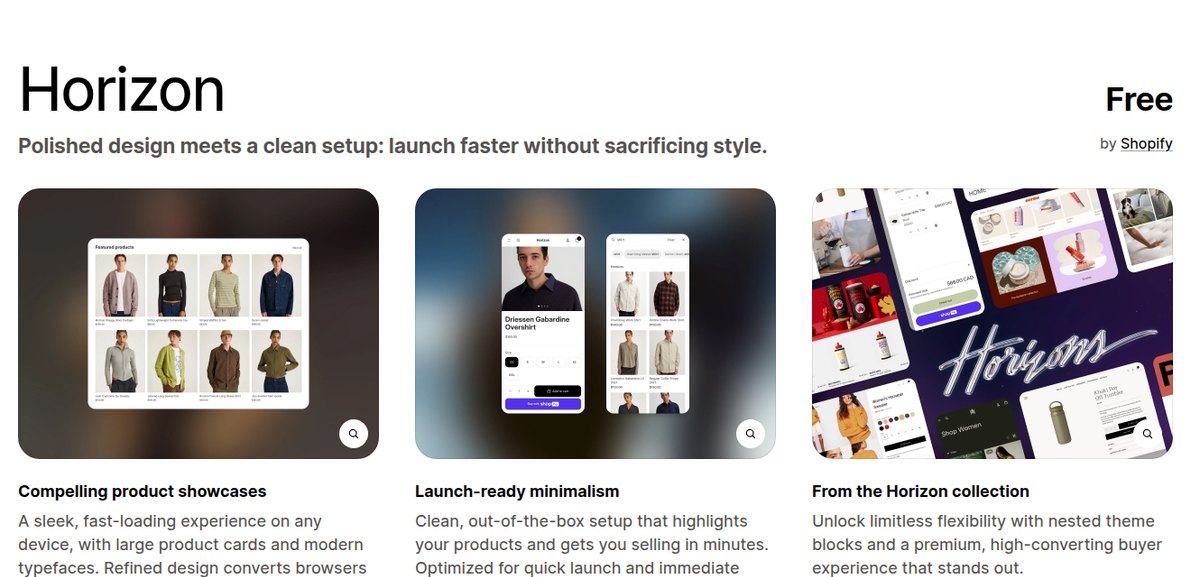
Horizon is Shopify's free flagship theme, made by Shopify and listed at $0 in the Shopify Theme Store. Its pitch is "Polished design meets a clean setup: launch faster without sacrificing style." It is built on Shopify's theme-block system, so you assemble pages from stackable blocks in the editor instead of editing code, and it ships with search, filtering, swatches, a slide-out cart and back-in-stock alerts.
If you cannot code and you do not want to pay $300 for a theme before you have made a sale, Horizon is the strongest free starting point Shopify currently ships. This review covers what it actually includes, how widely merchants have adopted it, what its own reviewers complain about, and the cases where Dawn or a paid theme still wins.
How many stores actually run Horizon
Adoption is the fastest sanity check on a theme. A theme nobody deploys has no community, no tutorials and no examples to copy.
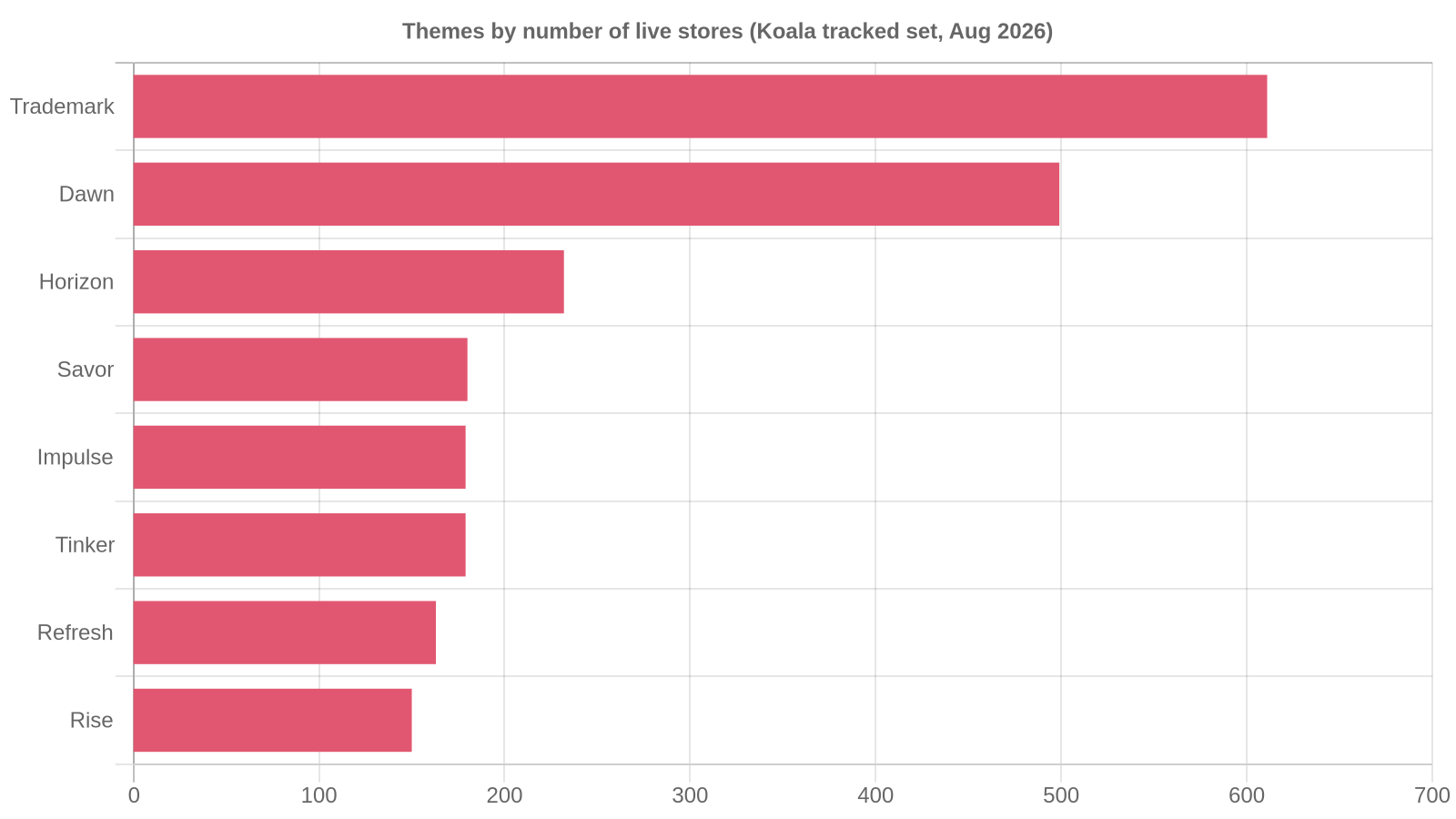
Across the Shopify stores Koala tracks, Horizon is live on 232 storefronts. That puts it third among named themes, behind Trademark on 611 and Dawn on 499, and ahead of Savor on 180 and Impulse on 179. Two of the themes right behind it, Savor and Tinker, belong to the same Horizon collection Shopify launched alongside it, so the design family as a whole reaches further than the single theme name suggests.
Read that as Koala's own data covering the stores Koala tracks, not a census of every shop on Shopify and not a market-share figure. It is a large real sample of live storefronts, and what it tells you is that Horizon has moved past the trial stage into genuine production use in a little over a year.
Our fuller breakdown of the ranking, including the paid themes above it, is in the most-used Shopify themes study.
Layout and section presets: what you get out of the box
Horizon is the design foundation for Shopify's current generation of themes. Shopify's Summer 2025 Editions release described it as "our new design foundation, harnessing the power of theme blocks for total flexibility," and shipped ten themes built on top of it.
In practice that means a Horizon page is a stack of sections, and each section is a container you drop blocks into. Blocks nest inside other blocks, which is the part the theme store calls "limitless flexibility with nested theme blocks and a premium, high-converting buyer experience that stands out." A product page is not a fixed template you work around. You add a size chart block, a shipping information block and a cross-sell block, drag them into the order you want, and the page keeps working.
The theme's own three-panel pitch is worth reading literally, because it tells you what Shopify optimised for:
- Compelling product showcases. "A sleek, fast-loading experience on any device, with large product cards and modern typefaces."
- Launch-ready minimalism. "Clean, out-of-the-box setup that highlights your products and gets you selling in minutes."
- Horizon collection flexibility. Nested theme blocks for merchants who want to keep restructuring.
The included feature list is wide for a free theme. Product discovery covers enhanced search, infinite scroll, a mega menu, filtering and sorting, a sticky header and swatch filters. Cart and checkout covers cart notes, in-store pickups, pre-order, quick buy, Sign in with Shop and a slide-out cart. Merchandising covers animation, colour swatches, image galleries, rollover, zoom, lookbooks, size charts, product videos and nutritional or usage information. Marketing adds back-in-stock alerts, cross-selling, product badges, promo banners, quick view, recently viewed, recommended products and a stock counter.
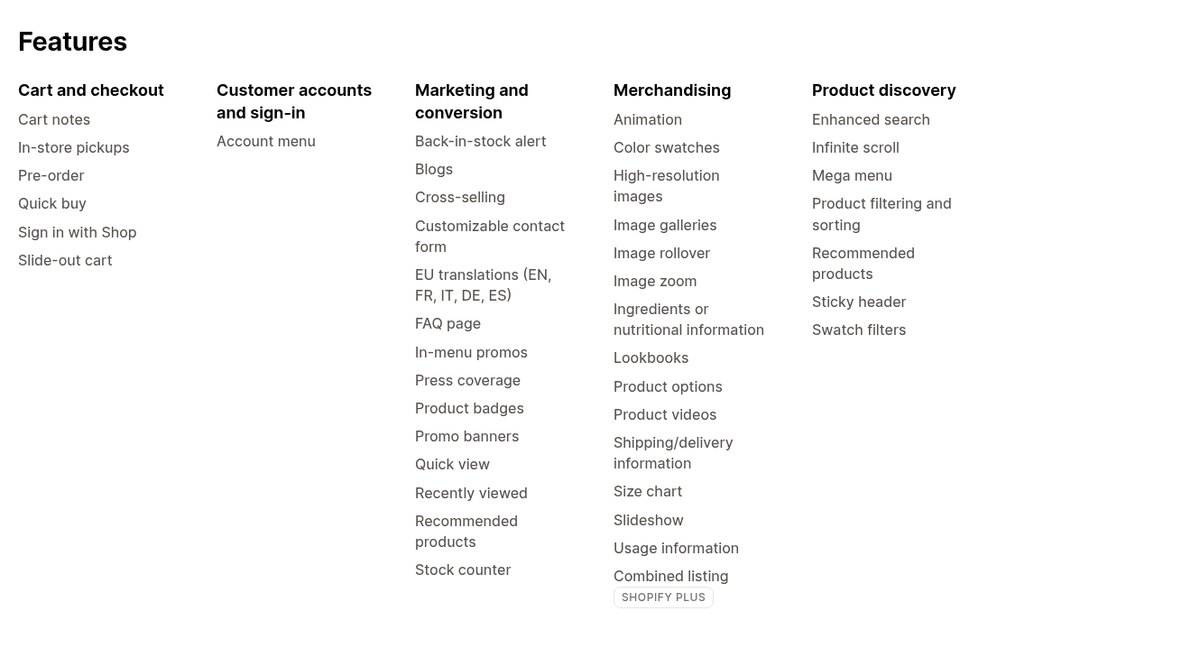
Several of those are features merchants routinely pay a monthly app fee for. Back-in-stock alerts, a stock counter, swatch filters and quick view all sit inside the free theme.
Speed and what "launch-ready" really means
Shopify does not publish a Lighthouse score on the theme listing, and any number you see quoted for a theme is measured on a demo store with tidy images and no apps. Your score will be lower, and the gap is almost always caused by what you added rather than by the theme.
What Horizon gives you is a light starting point: a Shopify-maintained codebase, current Liquid, and a layout that does not depend on a page-builder app to look finished. Where merchants lose that advantage is the week after launch, when four apps inject scripts into every page. If you want the number that matters, measure your own store rather than the demo, and read our guide to what counts as a good Shopify speed score before you start optimising.
The theme is also actively maintained. The listing shows version 4.1.4, released 10 August 2026, with bug fixes and performance improvements. That matters more than a benchmark: a free theme that stops shipping updates becomes a liability the moment Shopify changes something.
Customising Horizon without writing code
This is the section that decides whether Horizon is right for you, because "needing coding or design experience" is the single most common blocker merchants describe when they try to build a store themselves.
Shopify's own guidance is blunt about where the work happens: "The Shopify theme editor is your main design workspace. It's where you adjust the look and layout of your store without touching code." On Horizon that editor is the whole job. Shopify's customisation guide notes that "with Shopify's new Horizon framework, themes are more modular than ever, so you can move faster from out-of-the-box to fully branded," and that the Summer 2025 update built into Horizon themes "lets you generate design blocks instantly with a text prompt."
A realistic first day on Horizon looks like this:
- Install the theme and set your logo, colours and fonts in the theme settings.
- Build the homepage by adding sections: a slideshow, a featured collection, a promo banner, a testimonial block.
- Turn on the merchandising blocks your products need, such as size charts, swatches or nutritional information.
- Enable filtering and the mega menu once your collections exist.
- Preview on mobile, reorder blocks, publish.
None of that touches a .liquid file. If you have never installed a theme before, our walkthrough on how to install a Shopify theme covers the first step in detail.
The honest limit: block-based editing gets you a well-built store, not a distinctive one. Anything genuinely bespoke, such as a custom quiz flow or a non-standard product configurator, still needs a developer or an app.
Who Horizon suits
Horizon is a good fit when:
- You are launching a first or second store and want it to look current on day one.
- Your catalogue runs from a handful of products up to a few hundred, and filtering plus a mega menu covers your navigation.
- Your photography is strong enough to carry large product cards.
- You want conversion features such as back-in-stock alerts and a stock counter without adding apps.
- You expect to keep restructuring pages yourself as the store grows.
It is a weaker fit when you sell one hero product that needs a long custom sales page, when you run heavy daily promotions with countdowns and tiered offers, or when your brand needs a look nobody else on Shopify has.
When Dawn or a paid theme is the better pick
Horizon is newer, but newer is not automatically better for your store.
Choose Dawn if you want the most documented theme on the platform. Dawn is Shopify's minimalist reference theme, described as "a minimalist theme that lets product images take center stage," and it has been the default for years. That history is the real argument for it: nearly every Shopify tutorial, freelancer and forum answer assumes Dawn. On a stripped-back catalogue where the product photography does all the work, Dawn's plainness is the point. Our Dawn theme review goes through its features and limits in full.
Choose a paid theme when your merchandising is the business. Impulse, at $500 in the theme store, exists for stores running constant promotions, and Prestige at $400 exists for luxury and high-ticket brands. In Koala's data, Trademark leads every theme on deployed stores, and premium themes cluster on larger, more established storefronts. That is the pattern to copy when you get there: pay for a theme once the store is earning enough that a better-merchandised page returns the licence fee in a month.
Stay where you are if you already run a customised theme that converts. A theme migration is not a swap. Merchants who have done it describe rebuilding metafields, recoding custom sections and hunting down undocumented tweaks that nobody wrote down. If your current theme works, the burden of proof is on the move.
Horizon vs Dawn at a glance
| Horizon | Dawn | |
|---|---|---|
| Price | Free | Free |
| Made by | Shopify | Shopify |
| Theme Store rating | 34% positive, 202 reviews | 35% positive, 287 reviews |
| Styles in the listing | Default | 1 (Dawn) |
| Slide-out cart | Yes | Not listed |
| Pre-order | Yes | Not listed |
| Back-in-stock alerts | Yes | Not listed |
| Stock counter | Yes | Not listed |
| Quick view | Yes | Not listed |
| Infinite scroll | Yes | Not listed |
| Product badges | Yes | Not listed |
| Sign in with Shop | Yes | Not listed |
| Mega menu, filtering, swatch filters | Yes | Yes |
| Lookbooks, size charts, image zoom | Yes | Yes |
| Live stores in Koala's tracked set | 232 | 499 |
Figures are read from each theme's Shopify Theme Store listing, linked in the sources below, and the store counts are Koala's own data for the stores Koala tracks.
What Horizon's own reviewers complain about
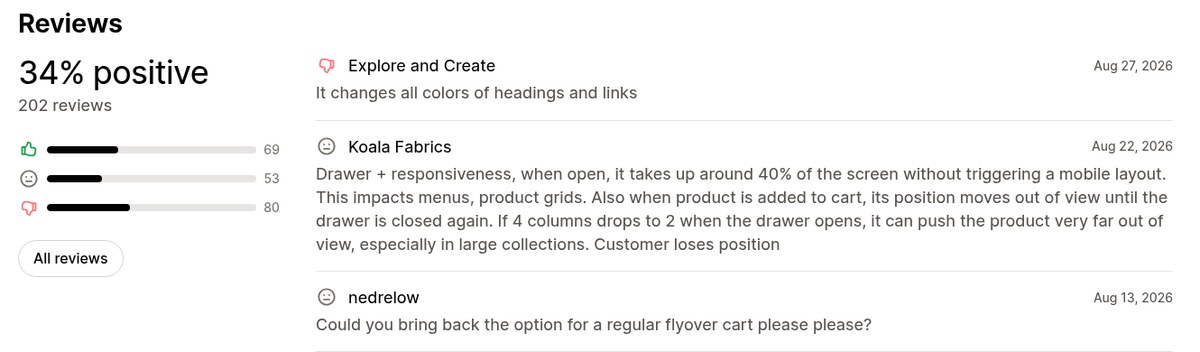
A free theme with a 34% positive rating deserves a straight answer rather than a shrug. Of 202 reviews on the listing, 69 are positive, 53 neutral and 80 negative.
Theme Store ratings skew harsh across the board, and Dawn sits at a similar 35%, so this is closer to a platform-wide pattern than a Horizon-specific verdict. The substantive complaints in the recent reviews are worth knowing before you commit: the slide-out cart drawer takes a large share of the screen when it opens, which pushes product grids and menus around on smaller screens, and some merchants want the older flyover cart back. One reviewer sums the theme up as excellent bones for someone building something real, and a poor fit for anyone expecting a drop-in store that needs no work.
Read the live listing reviews before you install. They move as Shopify ships updates.
How to check what theme any live store runs
The best theme research is not reading reviews. It is opening the ten stores in your category that are clearly working and seeing what they built on.
Koala Inspector is a free Chrome extension that names the active theme on any public Shopify storefront in one click, including paid and custom themes, with a link straight to that theme in the Shopify Theme Store. Open a competitor, click the Koala icon, and the panel reads the store back to you.
That answers the question this whole review circles: you cannot code, so the fastest route to a good-looking store is to copy the setup of a store that already sells to your customers. The same panel runs a free app detector listing every Shopify app the store has installed, so you see the theme and the stack behind it together.
Both are free with no credit card. Install Koala Inspector and check five stores in your niche this afternoon, or read how the Shopify theme detector works first. If you are still choosing, our guide on how to choose a Shopify theme walks through the decision.
What merchants say about Koala Inspector
Verified reviews from the Chrome Web Store.
“Invaluable for competitive insights, Koala Inspector is easy to navigate and helps stay ahead in the Shopify marketplace.”
 Merico Monaldo
“Very easy to use and install. Helps with identifying Shopify stores quickly and saves time by listing best sellers. Also has handy feature of the traffic which I found very valuable.”
 Ali Baloch
“I was a bit skeptical about all the hype but gave Koala Inspector a shot. It's user-friendly and provides useful data on what's working for others. The support team is also there when you need them.”
 Martin René
Horizon and Shopify questions people ask
Frequently asked questions
The questions that come up alongside a theme decision, answered straight.
Can you make 10k a month on Shopify?+
Some stores do and most do not, and the theme is not what decides it. Horizon is free, so it removes a cost rather than creating revenue. What moves the number is the product, where the traffic comes from and the conversion rate. The useful move is to study stores already at that level in your category and copy the parts of their setup you can see.
are shopify point of sale payments secure?+
Shopify states it is certified Level 1 PCI DSS compliant and that this compliance extends by default to all stores powered by Shopify, covering all six PCI standard categories. Your theme plays no part in that. Horizon supports in-store pickups and Sign in with Shop, and the payment handling itself sits with Shopify.
which shopify preorder app do you use for partial payments & deposits?+
Horizon lists pre-order as a built-in feature, but splitting a payment into a deposit and a balance needs an app rather than a theme setting, and we will not recommend one we have not tested. Open two or three stores in your category that already sell on deposit and read which pre-order app they run with Koala Inspector's free app detector. A stack running in production is better evidence than a shortlist.
is shopify suitable for beginners?+
Yes. Shopify describes the theme editor as the workspace where you adjust the look and layout of your store without touching code, and Horizon is designed to be assembled from blocks in that editor. A first-time merchant can launch a presentable Horizon store without hiring anyone. Bespoke work such as a custom product configurator still needs a developer.
Does Kim Kardashian use Shopify?+
Yes. Shopify's own enterprise blog says SKIMS, co-founded by Kim Kardashian and Jens Grede, is built entirely on Shopify Plus and uses Shopify's back end to power global drops and high-volume flash sales without downtime. SKIMS does not run Horizon, because brands at that scale almost always run a custom theme, which is exactly the kind of thing a theme detector tells you in one click.
anyone have any recommendations for relatively easy-to-learn consignment software that integrates seamlessly with shopify?+
We have not tested consignment platforms, so we will not name one. Find live Shopify stores already running consignment or resale in your category and read their installed apps with Koala Inspector's free app detector. That gives you a shortlist of tools proven on real storefronts rather than one assembled from a forum thread.
Is the Horizon theme free?+
Yes. Horizon is listed at Free in the Shopify Theme Store, made by Shopify, and free themes include updates. The current listing shows version 4.1.4, released 10 August 2026.
Is Horizon better than Dawn?+
Horizon ships more out of the box: a slide-out cart, pre-order, back-in-stock alerts, a stock counter, quick view, product badges and infinite scroll are all on its listing and not on Dawn's. Dawn's advantage is history, since years of tutorials, freelancers and forum answers assume it. For a new store that wants conversion features without apps, Horizon is the stronger free pick.
Sources
- Shopify Theme Store, Horizon listing - the tagline, price, developer, full feature list, the three-panel pitch, the 34% positive rating across 202 reviews, and version 4.1.4 dated 10 August 2026. Read 31 August 2026.
- Shopify Theme Store, Dawn listing - Dawn's tagline, free price, 35% positive rating across 287 reviews, single style and feature list. Read 31 August 2026.
- Shopify, Summer 2025 Editions - Horizon described as "our new design foundation, harnessing the power of theme blocks for total flexibility," and the ten themes built on it.
- Shopify, Shopify Customization 2026 - the theme editor as the no-code design workspace, and the Horizon framework's modularity.
- Shopify, PCI compliance - Level 1 PCI DSS certification extending by default to all stores powered by Shopify.
- Shopify Enterprise, best fashion ecommerce sites - SKIMS, co-founded by Kim Kardashian, built entirely on Shopify Plus.
- Koala Inspector reviews on the Chrome Web Store.
Theme deployment counts are Koala's own store intelligence, snapshotted 30 August 2026, covering the Shopify stores Koala tracks rather than the whole platform. Quote them with that caveat attached.
Written by
Ana Gelevska
eCommerce Content Writer
Ana Gelevska is a content writer with more than five years of experience creating content for eCommerce brands and global clients. She digs into each topic and the people it is for, then turns it into clear, useful articles that Shopify sellers and dropshippers can act on.
Connect on LinkedIn