How To Find Shopify Stores: 4 Workflows That Actually Work
 By Ana GelevskaAugust 14, 2024 · Updated July 30, 2026
To find Shopify stores, start from the goal rather than the tool: search operators and store directories surface stores in a niche, reverse product search finds the stores selling one specific item, and the ad libraries surface stores that are spending money right now. Then open any candidate with a Shopify store analyzer like Koala Inspector, which turns a bare URL into the store's theme, full app stack, product catalogue and traffic profile in one click.
That second half is where most store-finding advice stops being useful. A list of 200 domains is not research. A shortlist of eight stores you have actually read is.
Pick the workflow that matches your goal
| What you are trying to do | The workflow | Where it ends |
|---|---|---|
| Map a niche before you enter it | Operators plus directories | 20 to 40 candidate stores |
| Find who else sells one product | Reverse product search | Every retailer carrying it |
| Find stores scaling right now | Ad libraries plus growth signals | Stores with live spend |
| Trace the store behind an ad or a TikTok | Follow the link, then verify | One confirmed storefront |
Each of the four below is a numbered sequence you can run this afternoon. All four converge on the same last step, which is the qualification checklist further down.
Workflow 1: Find Shopify stores in a specific niche
This is the workflow behind most searches for Shopify stores, and it is the one people over-complicate.
- Run the subdomain operator first. Every Shopify store keeps its
*.myshopify.comaddress even after connecting a branded domain, soinurl:myshopify.com "matcha"returns stores whose Shopify subdomain carries your niche term. Merchants pick that subdomain at signup, usually from their brand or their category, which makes it a surprisingly honest filter. - Add the footer phrase. The default Shopify theme ships a "Powered by Shopify" line in the footer. Pairing it with a niche keyword (
"powered by Shopify" + "candle") surfaces live stores on default or lightly customised themes. Plenty of merchants delete that line, so treat this as an additive pass rather than a complete list. - Tighten with standard modifiers. Quotes force exact matches, and a minus sign strips the noise:
site:myshopify.com "cold brew" -wholesale -jobs. Two or three iterations usually get you from thousands of results to a page you can actually read. - Mine a hosting directory for volume. Reverse-lookup directories let you filter the web by host and sort by daily visitors, which turns "every Shopify store" into "Shopify stores with real traffic." One widely upvoted r/dropship walkthrough describes doing exactly this on myip.ms: filter by Shopify as the hosting provider, set a minimum visitors-per-day threshold, and work down the list (r/dropship). It is blunt, it is free, and the traffic sort does the qualifying for you.
- Steal the editorial shortlists. Shopify publishes its own roundups of merchants worth studying (shopify.com/blog/shopify-stores), and our list of top Shopify stores covers the category leaders. These skew large and established, so use them for structure and conversion ideas rather than for finding a peer-sized competitor.
- Open your shortlist in Koala Inspector. Install the free extension, visit each candidate, and the Explorer dashboard confirms it is Shopify and reports the theme, the installed apps, the product count, the store's creation date and its localisation. That takes a domain list and makes it a comparison table.
Steps 1 to 5 cost nothing. Step 6 is where the raw list becomes something you can make a decision from.
Workflow 2: Find Shopify stores selling a specific product
You have a product, and you want to know who else is running it and at what price. Working backwards from the product is faster than searching for stores and hoping.
- Search the exact product name in quotes. Manufacturer names and supplier listing titles travel almost unchanged across dropshipping stores, so an exact-phrase search often returns a dozen stores selling the identical item.
- Use reverse image search on the product photo. Most stores reuse the supplier's photography verbatim. Dropping that image into a reverse image search surfaces the storefronts using the same shot.
- Run Find Suppliers from inside the store. Koala Inspector puts a Find Suppliers button on every product, and you can right-click any product image on any website and pick "Find suppliers for product" from the menu. It lists the suppliers selling the same product, split into exact matches and similar products, each with a match score, a View Store link, its delivery time and your landed cost delivered to the country you ship to. It costs 2 tokens, and the free plan gives you 15 tokens a month with no card.
- Check whether the product is already everywhere. If Find Suppliers comes back with a long list of exact matches at near-identical delivered prices, that is your margin forecast, and the estimated profit per unit at your selling price shows how thin it already is. Sellers describe burning through test budgets on products that four hundred other people launched the same week, which is the failure mode this step exists to catch.
- Sort the catalogue by best-sellers on each store you find. Koala Inspector's product research view filters any store's catalogue to its likely best-sellers and shows the price range and the first-published date, so you can see whether the product is a genuine hero or a filler SKU nobody buys.
Workflow 3: Find Shopify stores that are scaling right now
Established brands are easy to find and hard to learn from. The stores worth studying are mid-sized, three to six months into a push, and still spending.
- Start from the ad libraries. A store running ads is a store with a budget. The TikTok Creative Center's top ads surface brands with live paid campaigns and let you filter by industry and region, and Meta's public ad library does the same for Facebook and Instagram. Ad spend is the cleanest liveness signal there is.
- Read the ad activity on a store you already have. Koala Inspector's Ad Campaigns view shows the Google and Facebook or Instagram ads a store is running, split by platform, with the URL, title, description and tags on each campaign card. A store with a dozen live variations is testing. A store with none is coasting.
- Check the traffic trend, not the traffic number. The Site Traffic view gives average monthly visits over the last three months plus the month-over-month change, alongside sources, top keywords, demographics and geography. A store at 40,000 visits and climbing is more instructive than one at 400,000 and flat.
- Compare it against what a scaling store looks like. That is where the numbers below come in.
What a scaling store actually looks like in Koala's data
Across the stores Koala tracks, the operational profile of the biggest merchants is consistent enough to use as a benchmark. Looking at the 300 highest-traffic stores in that view: they run an average of 11.7 apps each, 176 of the 300 run ten or more, and the heaviest runs 39. App count on its own is not a virtue, but a store running fifteen apps has made fifteen deliberate decisions about reviews, email, upsells and page building, and those decisions are readable from the outside.
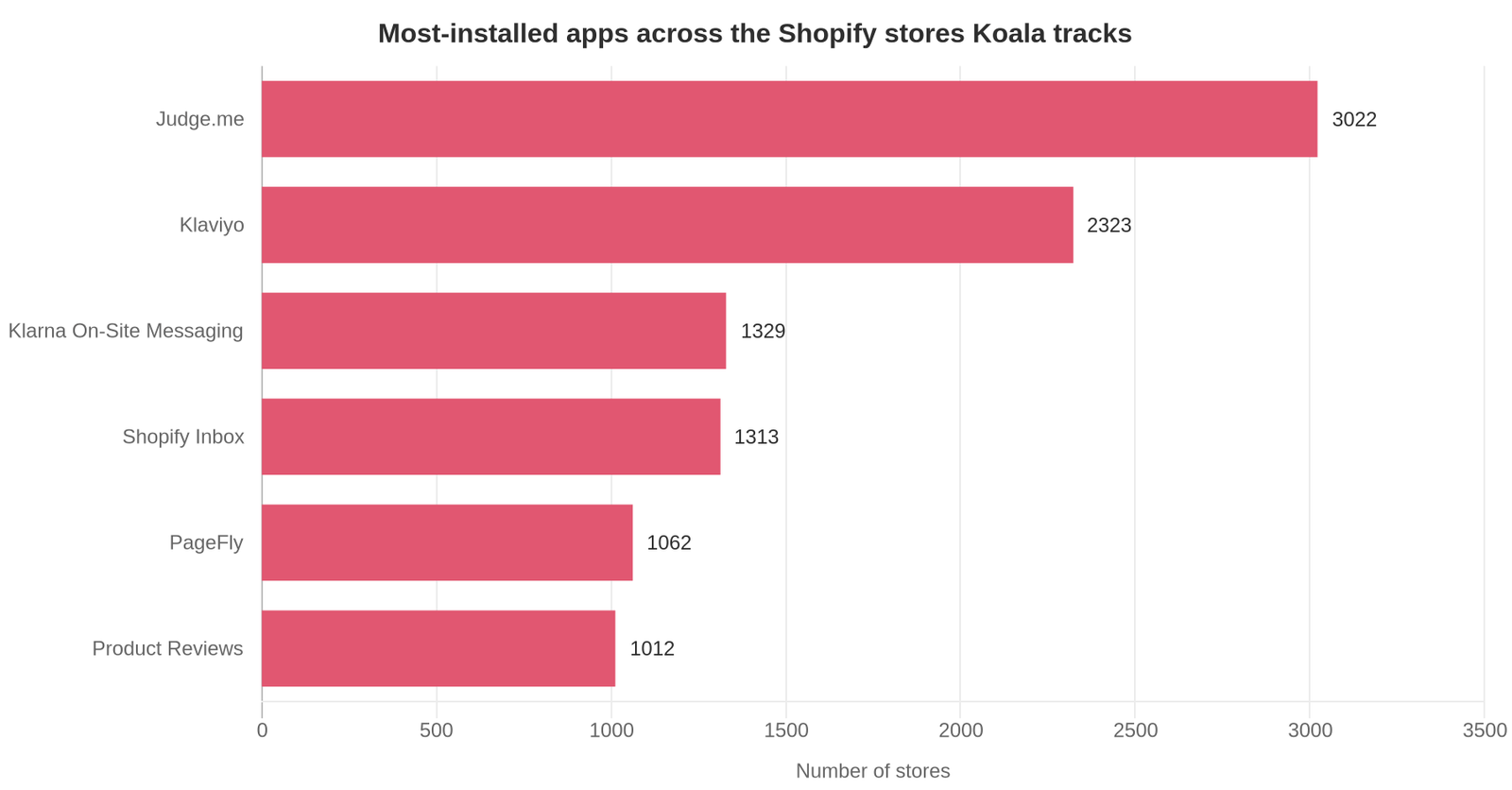
Judge.me leads the whole app ranking at 3,022 stores, with Klaviyo second at 2,323. Reviews and email keep showing up at the top, which tells you what the market treats as non-negotiable rather than optional. Klarna's on-site messaging, Shopify Inbox and PageFly follow. If you are choosing your own stack, that ordering is a defensible starting point.
The category mix of those top 300 stores skews the way you would expect from consumer ecommerce: Apparel (55 stores), Home and Garden (48), Food and Drink (34) and Beauty and Fitness (26) lead. Themes concentrate hard too. The ten most common themes account for 4,746 of the 9,094 theme installs Koala sees, so roughly half of stores sit on a small handful of designs, with Dawn and Trademark the most common. Seeing the same theme repeatedly across one niche is a signal it converts there.
These figures cover the Shopify stores Koala tracks rather than the whole platform, so read them as a large, current sample instead of a census. That is still a far better reference point than guessing.
One more benchmark worth having. A founder who analysed hundreds of stores doing over €10M a year published what they share: two main colours used consistently, a first product image on a plain background followed by detail and in-use shots, free delivery and returns stated at the top of the page, support contact visible, reviews repeated in several places on the product page, and a default three-tier quantity offer at roughly 10, 20 and 30 percent off (r/dropshipping). When you audit a scaling store, that list is what to look for.
Workflow 4: Find the store behind an ad or a TikTok video
The most common version of this search is the most specific: you saw something, you want the shop.
- Follow the link in the bio or the ad, and note where it lands. Paid traffic almost always goes to a product page, not a homepage, which is useful because the product page tells you what they are actually pushing.
- Strip the tracking parameters. Everything after the
?in the URL is attribution. Cut it to get the clean product URL. - Confirm it is Shopify. Try the myshopify subdomain if you can guess the brand handle, or just open the page with Koala Inspector, which auto-detects Shopify and shows a "not a Shopify store" card when the site is on something else.
- Screenshot and log it before it disappears. Ad creatives rotate and landing pages get swapped. Koala Inspector keeps an inspection history of every store you analyse, and captures a screenshot of the storefront tab you are viewing.
- Track it if it matters. Add the store to Shop Tracking and Koala re-scans it, recording apps added or removed, theme changes, products added or removed, price changes and variant changes across more than ten event types. Tracking costs 15 tokens per shop and needs a paid plan; Premium is $22 a month for 220 renewing tokens and up to 50 tracked stores.
That last step is the one that turns a one-off discovery into a standing intelligence feed. Merchants routinely describe missing a competitor's price drop for weeks. A change feed removes that failure mode entirely.
How to qualify a store once you have found it
Finding stores is the easy half. Deciding which of them deserve twenty minutes is the half that saves your week. Run every candidate through the same six checks, in this order.
- Is it actually on Shopify? Confirm before you spend any effort. A WooCommerce or BigCommerce store is fine to learn from, but its app and theme signals will not map onto your build.
- Is it alive? Check the last update date and the product catalogue. A store with no new products in a year is an archive.
- What theme is it running? A store on a paid theme like Prestige or Impulse has spent money on conversion design deliberately. Koala Inspector's theme detector names the theme even when it has been renamed or customised, and links to it in the Shopify theme store so you can price it.
- What is the app stack telling you? Apps are a store's admitted priorities. Three review apps means social proof is the battleground in that niche. A page builder plus an upsell app means they are optimising average order value. Our guide to what a Shopify app detector is covers how to read a stack, and the free app detector lists every app on a store grouped by type.
- How deep is the catalogue, and where does pricing cluster? Total product count, the high and low of the price range, and the first-published date together tell you whether this is a one-product store, a curated brand or a catalogue play.
- Is anyone paying to reach these customers? Live ads plus a rising traffic trend means the niche has proven demand. No ads anywhere in a category is either an opening or a warning, and the rest of your research decides which.
Six checks, five minutes per store once you have the extension open. Thirty candidates become the four worth studying properly.
Get the whole picture on any store you find
Every workflow above ends at the same place: a URL you need to read. Koala Inspector is the free Chrome extension that does the reading. Open it on any Shopify storefront and you get the theme, every installed app grouped by category, the full product catalogue with likely best-sellers, the store's creation date and localisation, and inspection history so nothing you find gets lost.
Store analysis, app detection, theme detection, product research and best-sellers are free forever, with no card required. The free plan adds 15 tokens a month for the deeper views: traffic profiles, competitor ad campaigns, Find Suppliers and AI Shop Chat.
Turn any Shopify URL into real competitive intelligence
Install Koala Inspector free and see the theme, apps, products and traffic behind any store you find. No credit card, no trial timer.
Finding Shopify stores: FAQ
The questions people ask most before and after they start researching stores.
Are Shopify and MyShopify the same?+
They refer to the same store. Shopify is the platform; myshopify.com is the permanent subdomain Shopify hands every store at signup, in the form yourbrand.myshopify.com. When a merchant connects a branded domain, the branded address becomes what shoppers see, and the original myshopify.com address usually keeps resolving to the same storefront. That is why a myshopify.com URL is a dependable way to confirm a site is on Shopify, and why searching for that subdomain surfaces real stores.
Are Shopify theme detectors free to use?+
Koala's is. Theme detection is one of Koala Inspector's always-free features, so you can identify the theme on any store you visit without spending a token or entering a card. There is also a free browser-based Shopify theme detector at koala-apps.io/tools/theme-detector/ if you want to check a URL without installing anything. Other detectors exist and many gate results behind a signup or a trial, so check before you rely on one.
Can you make 10k a month on Shopify?+
Yes, and merchants post the receipts regularly, but it is a milestone rather than a starting point. A 10k month usually means a product with enough margin to survive paid acquisition, an average order value lifted by bundles or upsells, and several months of testing behind it. Reading the breakdowns from sellers who got there is more useful than any revenue promise, because the ones who publish numbers also publish the ad spend and the failures that came first.
Has anyone else experienced something similar while scaling a Shopify brand?+
Almost certainly, and the fastest way to confirm it is to search the exact symptom in r/shopify, r/dropshipping and r/ecommerce rather than asking a fresh question. Rising costs after a good week, a competitor undercutting you out of nowhere, creatives that stop converting at higher budgets: each of those has long threads with real numbers attached. Store research plays the same role. Seeing that five stores in your niche all added the same app after they grew tells you the problem is structural.
How does a theme detector work?+
A theme detector reads the public signals any visitor's browser already receives when it loads a storefront, and reports which Shopify theme the store runs. Good ones name the theme and its version even when the merchant has renamed or heavily customised it, and they link straight to that theme in the Shopify theme store so you can price it. What they cannot see is anything private: no orders, no admin, no customer data.
How does Shopify work?+
Shopify is hosted commerce software. A merchant pays a monthly subscription and gets a storefront, a product catalogue, a checkout, payment processing and an admin panel, all running on Shopify's infrastructure rather than their own servers. Design comes from a theme, and extra functionality comes from apps installed from the Shopify App Store. That structure is what makes stores researchable: the theme and the app stack are visible from the outside, so you can read a competitor's setup from the storefront alone.
Where to go next
Pick the workflow that matches this week's question and run it end to end rather than sampling all four. If you are mapping a niche, workflow one plus the six-point checklist will give you a defensible shortlist in an afternoon. If you are chasing a product, start at workflow two.
For the category leaders worth studying on structure, see our top Shopify stores roundup. To go deeper on reading a competitor's stack, start with the Shopify app detector guide.
Written by
Ana Gelevska
eCommerce Content Writer
Ana Gelevska is a content writer with more than five years of experience creating content for eCommerce brands and global clients. She digs into each topic and the people it is for, then turns it into clear, useful articles that Shopify sellers and dropshippers can act on.
Connect on LinkedIn