
Koala Inspector: The Ultimate Shopify Spy Tool
Free Shopify spy tool to check store sales, product data, ad campaigns, themes and apps of any Shopify store.
Trusted by 250,000+ merchants & marketers
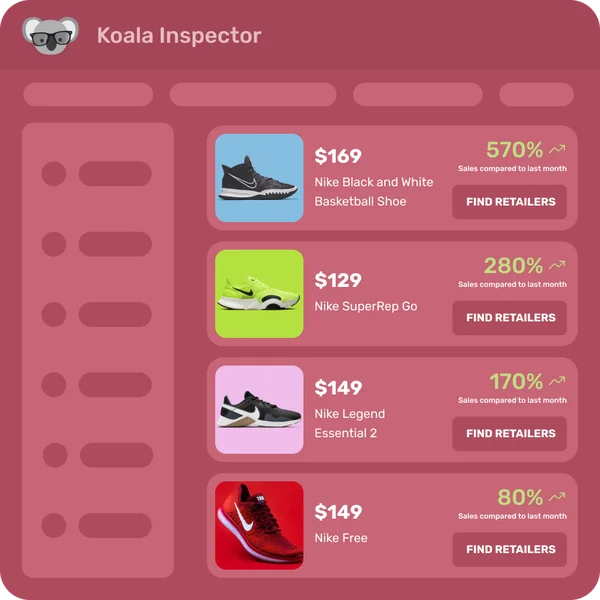
What is Koala Inspector?
Koala Inspector is a free Chrome extension that shows you what any Shopify store is doing. Open a store, click the extension, and it reveals that store's best-selling products, the apps it has installed, its active theme, estimated sales and traffic, and the ad campaigns it is running. It is built for dropshippers, Shopify store owners, and product researchers who want competitor data without the manual digging, and it installs in one click from the Chrome Web Store.
How Our Free Shopify Spy Tool Works

Competitor Analysis
Koala Inspector is the Chrome extension built for Shopify store owners and dropshippers who want to know what their competitors are actually selling and how well it's moving.

See Inside Any Store
Open any Shopify store in your browser, click the extension, and get best-selling products, installed apps, active themes, estimated traffic, and ad creatives in seconds.

Cut Research Time
Instead of manually browsing dozens of stores and guessing at what's working, Koala Inspector pulls the data automatically so you can act on it.

Run Better Ad Campaigns
See what creatives and offers competitors are running before you spend on ads. Use real data to inform your targeting, copy, and product selection.
What is a Shopify spy tool?
A Shopify spy tool reads publicly available data from Shopify stores to surface competitor insights: which products sell best, which apps are installed, what themes they use, and how their traffic breaks down. The goal is to turn browsing a competitor's storefront into structured, exportable data you can act on.
For a deeper look at the category, see our guide to the best Shopify spy tools.
Essential Features of Shopify Spy Tools
Product Analysis
See which products are selling best in a store, not just what's listed.
Traffic Analysis
Find out where a store's visitors come from, including search, social, and direct.
Pricing Strategy Insights
Compare how competitors price their catalog and identify gaps.
Ad Insights
View the ad campaigns a store is running, including creatives and platforms.

Theme Detector
Identify which Shopify theme a store uses, including paid and custom themes.
App Detector
Discover which apps a store has installed, from review tools to upsell widgets.
What Kind of Data a Shopify Spy Tool Shows You
Public store signals
The core of what a spy tool reads is what a store already shows every visitor: its products, prices, descriptions, images, best sellers and newest additions, plus the theme and apps the store runs. None of it touches the store's private dashboard. The limitation is that it is a read of what is public right now, so it can miss historical price changes, recently sold-out products, and anything an owner has deliberately hidden.
Traffic and market context
On top of a single store's public signals, a capable tool adds traffic and market context: estimated visitors, the mix of channels driving them, and broad geographic spread. That turns a point-in-time snapshot into something closer to a trend, and a single traffic number into a cross-channel picture. Koala Inspector estimates monthly visitors, traffic channel mix, and geographic spread so you read a store in context, not as one figure on its own.
Are Free Shopify Spy Tools Worth Using?
Free Shopify spy tools give you enough to do real research: check top-selling products, estimate traffic, review store layouts, and see what apps a competitor relies on. The free tier is genuinely functional for occasional research. Where limits bite is depth and volume: fewer stores you can analyze per month, capped exports, or no access to ad creative data. Koala Inspector's free plan covers 15 store analyses per month with no credit card needed. The Premium plan at $22/month unlocks 220 analyses and 50-store tracking for sellers doing this daily.
Is a Shopify spy Chrome extension useful?
Yes, and the Chrome extension format specifically helps. You can browse a competitor's store naturally, then click the extension to pull the underlying data without switching to a separate app or copying URLs into a research dashboard. The research happens in context, which is faster and less disruptive than jumping between tools.
What our clients are saying
Real, unedited reviews from the Chrome Web Store.
“Very easy to use and install. Helps with identifying Shopify stores quickly and saves time by listing best sellers. Also has handy feature of the traffic which I found very valuable.”
 Ali Baloch
“I was a bit skeptical about all the hype but gave Koala Inspector a shot. It's user-friendly and provides useful data on what's working for others. The support team is also there when you need them.”
 Martin René
“Great tool for competitor research and customer support is really quick!”
 Aiswarya S
“great app for ecommerce, there are a lot of useful information. Friendly customer service!”
 Lavender Yuzu
“Excellent tool for Shopify research! simple, accurate, and packed with insights. Highly recommend it.”
 Data Analysis
“The service has been great, very responsive and the most comprehensive spying of global markets Ive seen!”
 Adrienne Greenwood
Koala Inspector FAQ
Detailed answers and insights about our Shopify spy tool.
What is Koala Inspector?+
Koala Inspector is a free Chrome extension that reveals data about any Shopify store: its best-selling products, the apps it has installed, its active theme, estimated sales and traffic, and the ad campaigns it is running. You browse a store as usual, click the extension, and the data appears in a panel you can export to CSV or Excel.
What does the Koala Inspector app do?+
It turns any public Shopify storefront into structured competitor data. In one click it shows the store's product catalog and likely best-sellers, installed apps, active theme, traffic estimates and sources, estimated monthly sales, and the ads the store is running, so you can research a niche without opening dozens of tabs by hand.
How accurate is Koala Inspector?+
Product lists, installed apps, and the active theme are read directly from a store's public pages, so they reflect what the store actually publishes. Sales and traffic figures are estimates modeled from public signals rather than the store's private backend, so use them to compare stores and spot trends, not as exact revenue accounting.
Is Koala Inspector free?+
Yes. Koala Inspector has a free forever plan with 15 tokens per month and no credit card required. Premium is $22/month for 220 tokens, tracking of up to 50 Shopify stores, and VIP support, and one-time token packs start at $3.99.
Who is Koala Inspector designed for?+
Primarily dropshippers, Shopify store owners, and eCommerce marketers. If you want to know what products are moving in a niche, which apps successful stores use, or what ads competitors are running, Koala Inspector is built for that research.
What specific data can I access with Koala Inspector?+
You get store themes, installed apps, full product lists, estimated best-sellers, traffic estimates, traffic sources, estimated monthly sales, and export to CSV or Excel.
Can I export the data I find with Koala Inspector?+
Yes. Both free and paid users can export product and store data to Excel or CSV, though export limits apply on the free plan.
How does Koala Inspector compare to other Shopify spy tools?+
Koala Inspector combines theme detection, app tracking, sales estimates, and ad insights in one free-to-start extension. Tools like Commerce Inspector cost $499/month at their higher tiers, while ShopHunter starts at $50/month. Koala Inspector covers most of the same core data at a fraction of the cost, with a free tier that most competitors don't offer.
Can store owners tell if someone is analyzing their store?+
No. Koala Inspector reads publicly available information, the same data any browser visitor can access. Store owners see you as ordinary traffic.
How often should I analyze my competitors?+
Monthly analysis is enough for most niches to catch meaningful shifts. For faster-moving categories like fashion or electronics, weekly checks are worth it since product catalogs and ad spend change quickly.
Can I use Koala Inspector for dropshipping research?+
Yes, it's one of the most common use cases. You can identify which products are selling, check which apps a store relies on, and validate demand before adding a product to your own catalog.
Is using Shopify spy tools legal?+
Yes. These tools only read publicly visible information, the same pages any customer could browse. They do not access private store data, admin panels, or checkout systems.
Built for your workflow
Whether you sell, source, or scale ads, Koala Inspector adapts to the questions you're trying to answer.
For Dropshippers
Find winning products, validate sales, and reverse-engineer the stores your audience already buys from.
For Product Researchers
Spot trends early, track competitor catalogs, and confirm demand with real Shopify data.
For Ad Buyers
See competitor creatives, funnels, and offers so you can launch ads that already match what converts.
Recommended resources

August 26, 2026
Shopify Abandoned Cart Apps: What Winning Stores Actually Install
Ranked by real install counts from Koala's store intelligence: the cart recovery apps busy Shopify stores run, plus the one-minute method for reading any competitor's recovery stack yourself.
August 25, 2026
How I Track a Competitor's Best Sellers on Shopify Every Week
The weekly routine I use to see which of a competitor's Shopify products actually keep selling, why a repeat restock beats an ad you happened to see, and what it costs.
August 24, 2026
7 Best Peeksta Alternatives for Product Research and Sourcing
Peeksta alternatives ranked on what each tool covers, real vendor pricing, and whether it closes the sourcing loop. See which one finds the product and the seller behind it.