Dropshipping on Facebook: How to Use the Facebook Marketplace
 By Ana GelevskaJanuary 19, 2024 · Updated June 4, 2026
If you're building a dropshipping business, Facebook Marketplace is worth understanding. It has a massive built-in audience, no listing fees for individuals, and lower competition than Amazon or eBay in many categories. But it also has real friction points that catch new sellers off guard, things like the US-only checkout, slow payment release, and strict policy enforcement that can get your account restricted fast.
This guide covers how Facebook Marketplace dropshipping actually works, what you need to get started, how to research and list products, and what to watch out for.
Introduction to Facebook Marketplace Dropshipping
Facebook Marketplace launched in 2016 as a local buy-and-sell tool, and for years it wasn't particularly interesting to online sellers. That changed when Facebook added checkout and shipping options for US sellers, turning the Marketplace from a local classifieds board into a proper e-commerce channel.
For dropshippers specifically, the appeal is organic visibility. Facebook surfaces Marketplace listings to logged-in users browsing the app, which means your products can get in front of buyers without paying for ads. This is unusual compared to platforms like Amazon or Google Shopping, where paid placement is almost a requirement.
How Does Dropshipping Work on Facebook Marketplace?
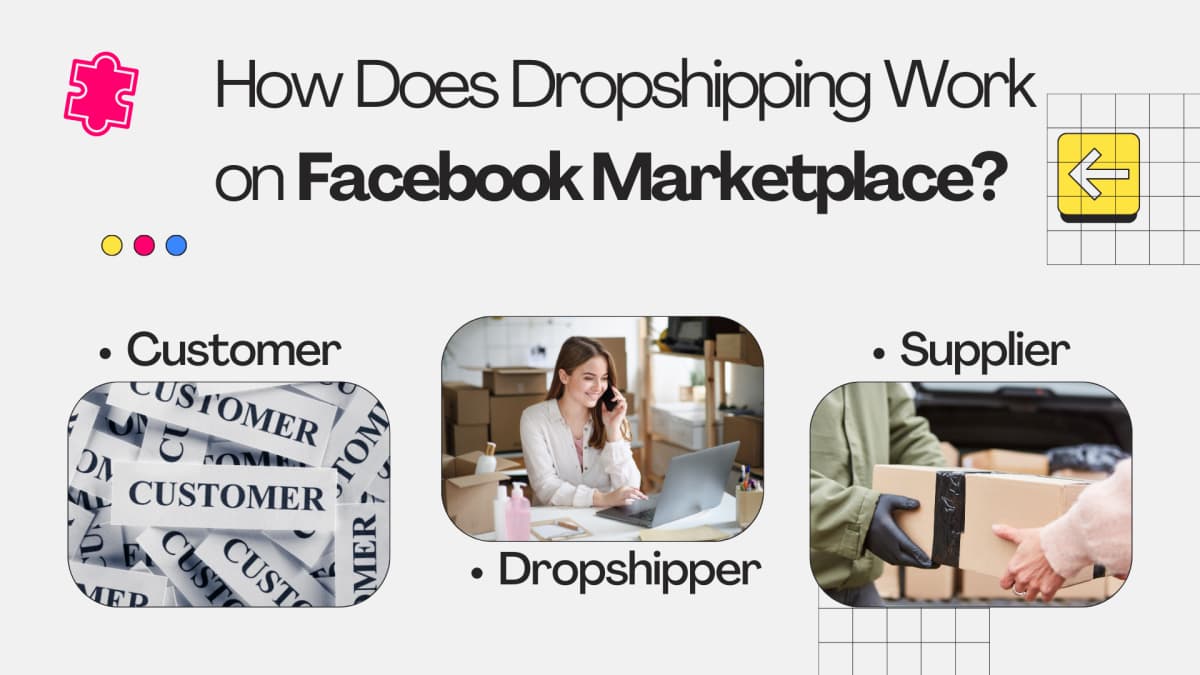
To understand Facebook dropshipping, it helps to start with what dropshipping is. The model involves three parties:
- Customer buys an item from your Marketplace listing.
- You (the dropshipper) receive the order, then place a matching order with a supplier, giving them the buyer's shipping details.
- Supplier packs and ships the product directly to the customer.
You never hold inventory. Your job is sourcing the right products, listing them accurately, and making sure your supplier can ship within Facebook's timing requirements (items should be marked as shipped within three days of purchase).
Facebook Marketplace vs. Facebook Shop
There are two separate selling surfaces on Facebook, and they work differently.
Facebook Marketplace is where individual listings live. Anyone with a personal Facebook account can post there. The audience is broad, discovery is organic, and you can start listing immediately without a business account. The tradeoff is that stats are thin (you mainly see buyer ratings), and product management is manual.
Facebook Shop requires a business page and connects through Commerce Manager. It offers better analytics, including page views, demographics, and account health data. You can also feed your Shop into the Marketplace as an additional sales channel. However, the partner platform list for Shop is limited, and your supplier may not integrate with it.
For most dropshippers starting out, direct Marketplace listings are the faster path. Once you have volume and a supplier integration, a Shop setup makes more sense.
Requirements To Sell Products On The Facebook Marketplace
Before you can start, Facebook has a few basic gates.
Active Facebook Account
You need an active Facebook account. New accounts with no post history or friends can raise flags, so if you're starting fresh, spend a bit of time making your profile look like a real person before you start listing. Follow the instructions in Facebook's Help Center if you need to create one.
Age Requirement
You must be 18 or older to sell on Facebook Marketplace.
Location
Facebook Marketplace's shipping and checkout features are only available in the US. Sellers in the UK, Canada, Australia, and most other countries can post local listings and arrange payment outside the platform, but they can't use Facebook's built-in checkout. This is a significant limitation that many guides gloss over. If you're not in the US, you'll need to collect payment via PayPal, Cash App, or another agreed method, and coordinate shipping yourself.
Compliance with Facebook's Commerce Policies
You need to comply with Facebook's Commerce Policies. Facebook actively reviews and removes listings that violate these policies, and repeat violations can get your account permanently restricted. Read them before you list anything.
Accurate Product Descriptions and Images
Every listing needs accurate photos and descriptions. Misleading images or descriptions, including copying competitor photos that misrepresent what you're actually selling, are a fast path to buyer complaints and account action. Facebook's policy enforcement leans toward protecting buyers, not sellers.
Prohibited and Restricted Products
Facebook maintains a list of 27 prohibited and restricted product categories. It's worth reading in full before you start sourcing. Getting your account restricted over a prohibited product is avoidable with basic due diligence.
Quality Standards
Your listing images, titles, and descriptions all factor into how Facebook evaluates your seller quality. Poor ratings from buyers affect your Marketplace standing.
Pricing Transparency
List your total price honestly. Facebook's Marketplace has a price floor of $5 and a ceiling of $500. Make sure your pricing covers the product cost, Facebook's transaction fee, shipping, and your margin.
Shipping and Delivery
Use a shipping service that provides tracking. Mark orders as shipped within three days of purchase. Some suppliers from China can take 10 to 20 days to deliver, while listings promise 2 to 3 day shipping. That gap creates complaints, refund requests, and account restrictions. Before you list a product, confirm with your supplier whether they can reliably meet Facebook's timing expectations.
Payment Methods
For US sellers using checkout, Facebook pays out to a bank account. PayPal, credit cards, and debit cards are accepted from buyers. Outside the US, payment is negotiated directly between buyer and seller.
What Are Prohibited Products On Facebook Marketplace?
When searching for products to sell, you need to know what Facebook won't allow. Violations can result in temporary listing removal or permanent account bans. The prohibited list covers 27 categories, including:
- Adult products such as sex toys (though condoms and lubricants are permitted).
- Alcohol (though related items like glasses, coolers, and bottle holders can be sold).
- Healthcare products including first-aid kits, breast pumps, and contact lenses (lifestyle and fitness accessories are fine).
- Prescription and over-the-counter drugs.
- Tobacco and e-cigarette products.
- Weapons including guns and ammunition (educational material on weapon safety is allowed).
When you're doing product research, build a habit of cross-checking any category against the prohibited list before you invest time in a listing.
How Much Does Dropshipping on Facebook Cost?
Individual sellers pay nothing to list on the Marketplace. If you operate as a merchant and use Facebook's shipping checkout, the fees are:
- 5% transaction fee on each sale.
- $0.40 minimum per sale for orders under $8.
On top of fees, you may also pay for Facebook Ads to promote your listings. One advantage of Facebook Ads is that you set a budget and can stop at any time. Other costs depend on your setup. If you want to automate order processing, tools like AutoDS add a monthly subscription cost.
How To Do Facebook Marketplace Product Research
Choosing the right products matters more on Marketplace than on many other platforms, because you're doing most of the work manually and the $500 price ceiling means high-ticket items aren't an option.
You can browse Amazon, eBay, and Etsy to find trending products, but that process is slow and hard to systematize. A faster approach is using the Koala Inspector Chrome extension. It lets you pull data from any Shopify store, including competitor dropshipping stores, and surfaces:
- Full product lists
- First and last published products
- Most and least expensive items
- Newly added products
- Best sellers
The "Find Retailers" feature inside Koala Inspector also helps you locate the suppliers those stores use, which cuts the sourcing step down considerably.
When evaluating a product, check that it's not on Facebook's prohibited list, that it can ship reliably within a few days, and that the price point leaves room for the 5% fee, shipping costs, and your margin.
Getting Started with Dropshipping on Facebook Marketplace
Set Up a Marketplace Account
Log into your Facebook account and click the Marketplace icon (the storefront icon in the left sidebar or bottom navigation bar). Your profile should be complete and public. Buyers look at seller profiles before purchasing, and an empty profile reduces trust.
Once you're in the Marketplace, you can create listings directly. Alternatively, create a Store via your Facebook business page and connect it to Marketplace through Commerce Manager. For most dropshippers starting out, direct listings are simpler.
Find Products and a Supplier
Look for products that will sell, not just products you personally like. Since the maximum price is $500, volume matters. Focus on items that are easy to ship (not fragile, not oversized), have a reliable and relatively fast supplier, and won't draw policy flags.
Strategies that tend to work on Marketplace:
- Seasonal products (holiday decor, garden supplies, outdoor gear timed to the season)
- Everyday consumables and household items with repeat demand
- Niche items with a specific buyer that doesn't price-shop heavily
- Accessories for popular products where buyers compare less aggressively
Once you've found products through Koala Inspector or manual research, confirm with your supplier that they can fulfill orders within the shipping window you'll advertise.
List Your Products
Here's the step-by-step:
- Open Marketplace and click "Create New Listing."
- Choose "Items for Sale."
- Fill in the product details: title, price, category, condition.
- Copy product photos and description from the supplier's or retailer's website. Adjust the language so it reads naturally and accurately reflects what the buyer will receive.
- Write an SEO-friendly title using keywords buyers would actually search. Avoid generic titles like "Great product for home."
- Set delivery to "Shipping," not "Local Pick Up."
- Select a prepaid Facebook shipping label (sized by weight) or use your own carrier.
- Choose whether to list only on Marketplace or also in relevant local buy/sell groups.
Set Product Pricing
Work backward from the selling price. You need the supplier's cost, Facebook's 5% fee, shipping costs, and your margin all to fit within $500. Check what competitors on Marketplace are charging for the same or similar product. Going too far above market price kills conversions; going too far below makes the math not work.
Facebook's fee is 5% of the sale price, or $0.40 for items sold at $8 or less.
Promote Your Products
Getting listed is not the same as getting seen. You need to push traffic to your listings, especially early on.
Organic approaches:
- Post your listings in relevant Facebook buy/sell groups. Many are organized by geography or category, and active groups can drive real traffic without ad spend.
- Cross-post on Instagram and other platforms where you have reach.
- Use specific, keyword-rich titles and good photos. These affect where Facebook surfaces your listing in search results within the platform.
- Respond to buyer questions quickly. Facebook's algorithm rewards sellers with strong engagement and response rates, and buyers often message before purchasing.
Paid ads:
If you want to accelerate, Facebook Marketplace ads let you promote your listing with a budget you control. For your ad creative:
- The headline is the first thing buyers see, so make it specific, not clever.
- The description should explain what the buyer gets and why they should buy now.
- Use a 1:1 image at 1080 x 1080 resolution.
Pros and Cons of Facebook Marketplace Dropshipping
| Pros | Cons |
|---|---|
| Good entry point for new dropshippers, no listing fees. | Shipping and checkout only available in the US. |
| Can start through a personal account without a business setup. | Product listings are done manually, which doesn't scale easily. |
| Organic reach through Facebook's feed and Marketplace search. | Payout takes 15 to 20 days after shipping, or 5 days after delivery confirmation. |
| Lower fees than eBay or Amazon in most categories. | You need funds upfront to pay your supplier before Facebook releases payment. |
| Direct messaging makes customer service straightforward. | The $500 price ceiling limits what you can sell. |
Is Facebook Dropshipping Profitable?
It can be, but the conditions matter. Facebook Marketplace works best when you can find products with genuine organic demand, a supplier who ships reliably within the timing Facebook expects, and a price point that leaves margin after the fee.
The accounts that get banned or hit with restrictions usually share the same failure modes: misleading shipping times, fake or mismatched tracking numbers, orders from unreliable suppliers that cancel frequently, and accidentally listing prohibited products. These are all avoidable with careful setup.
Facebook Marketplace is not the highest-ceiling dropshipping channel (the $500 limit rules out a lot of product categories), but for low-cost, everyday goods with fast turnover it can generate consistent income, especially if you're not ready to invest in a Shopify store and paid ads yet.
Final Tip: Using Koala Inspector for Facebook Dropshipping
The biggest time sink in Marketplace dropshipping is product research and supplier discovery. Koala Inspector cuts that time down by letting you see exactly what's working in any Shopify store, which products they list, which ones sell, and who their suppliers are. It was built by dropshippers for dropshipping, and the intelligence it provides, especially the "Find Retailers" feature, is directly useful for the Marketplace use case where supplier reliability and shipping speed make or break your account health.
FAQs
How do I receive payment for items sold on Facebook Marketplace?
You provide your bank account details in the Marketplace settings. Facebook transfers payment directly to your bank account after the payout period clears.
When will I receive payment for items sold on Facebook Marketplace?
Facebook typically releases funds 15 to 20 days after you mark an item as shipped, or 5 days after the buyer confirms delivery, whichever comes first. Your bank's own processing time can add a day or two on top of that.
Is a minimum amount of sales required to receive payment on Facebook Marketplace?
No minimum. Facebook processes payment for each completed transaction once you've provided valid bank account details.
Is there a fee for receiving payment on Facebook Marketplace?
Facebook doesn't charge a receiving fee. The 5% (or $0.40 minimum) is a selling fee charged to you as the seller, not a payment-receipt fee. Depending on your bank, there may be standard incoming transfer fees, but that's outside Facebook's control.
Can you dropship on Facebook Marketplace outside the US?
The built-in checkout and shipping labels are US-only. Sellers in the UK, Canada, and other countries can post local Marketplace listings, but they have to arrange payment and shipping directly with buyers, outside the platform. That adds friction and reduces buyer trust, which is why most non-US dropshippers use a different primary channel.
Written by
Ana Gelevska
eCommerce Content Writer
Ana Gelevska is a content writer with more than five years of experience creating content for eCommerce brands and global clients. She digs into each topic and the people it is for, then turns it into clear, useful articles that Shopify sellers and dropshippers can act on.
Connect on LinkedIn