Saturation Inspector vs Koala Inspector
 By Assaf ShalinMarch 28, 2022 · Updated June 4, 2026
Picking the Best Dropshipping Tool for Your Store
If you just started dropshipping, one of the first practical decisions is which Shopify inspector to install. A good tool should show you what apps and themes competitors run, reveal their traffic, and flag product trends before you sink ad spend into a saturated niche. Two options that come up regularly in this category are Saturation Inspector and Koala Inspector. Here is how they compare.
Why Use a Shopify Inspector for Dropshipping?
Manually crawling competitor stores is slow and incomplete. A dedicated tool pulls that data for you in seconds, so you can spend time on decisions that actually move revenue. The core things you want from a Shopify inspector: competitor app and theme detection, traffic data, product tracking, and a way to export what you find. A Shopify theme detector alone can save hours of guesswork when you are building out your first store.
What Is Saturation Inspector?
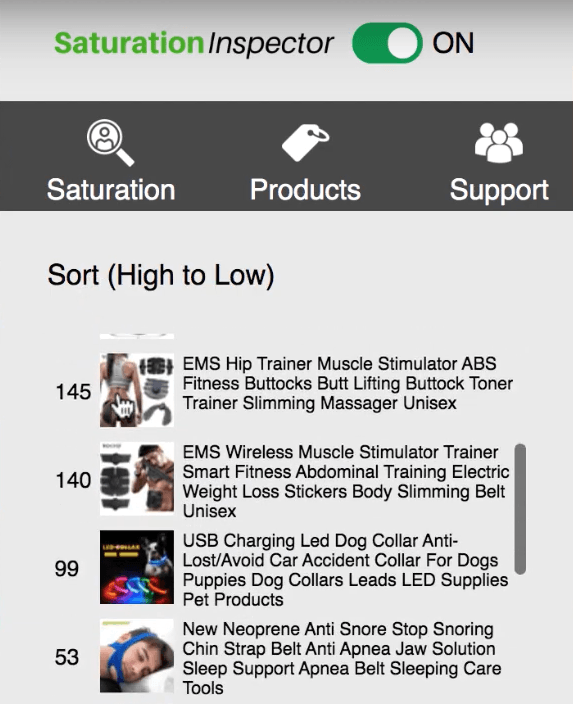
Saturation Inspector focuses on one specific problem: figuring out how many stores are already selling a given product on supplier marketplaces such as AliExpress, CJDropshipping, Spocket, and Alibaba. It scores each product as Untapped, Competitive, or Saturated based on how many stores list it. The idea is to avoid committing to a saturated niche before you have spent money testing it.
That is a useful signal, but it is also a narrow one. Here is where the tool falls short.
What Are Saturation Inspector's Limitations?
Variation Splitting
Saturation Inspector counts product variations (color, size, shape) as separate products. That means a single item with five color options can show up as five different products with five different saturation scores, giving you a fragmented picture rather than the true demand for the SKU.

No Free Plan
There is no free version. You get a 7-day trial, but if you are early in your dropshipping journey and working with a tight budget, there is no low-cost entry point. There is also a reported delay when activating via PayPal, which adds friction on day one.
Page Detection Failures
According to Saturation Inspector's own FAQ, the extension sometimes fails to identify product pages. Their workaround is to look for pages with at least 5 product images. That is a real constraint given that many legitimate product pages use fewer images.
300 Monthly Searches
The tool caps you at 300 searches per month, which works out to around 10 per day. For a store owner doing active product research across multiple niches, that ceiling runs out quickly.
Links Without Analysis
When Saturation Inspector finds other stores selling a product, it returns a list of links. There is no breakdown of store traffic, revenue estimates, ad spend, or performance trends. You get the list; you still have to do the analysis yourself.

A Note on the Saturation Logic
Saturation Inspector treats a high store count as a signal that a product is hard to sell. That is not always true. High demand products attract many sellers precisely because customers keep buying them. The store count metric is one data point, not a verdict.
What Features Does Saturation Inspector Miss?
Beyond its saturation indicator, Saturation Inspector does not include: a Shopify apps detector, a Shopify theme detector, Export CSV, daily tracking of competitor product changes, shop traffic data, or ad campaign data.

How Does Koala Inspector Compare?
Koala Inspector covers the features Saturation Inspector skips. Here is what it adds.
Shopify Apps Detector
With over 6,000 apps in the Shopify ecosystem, figuring out which ones actually drive revenue is hard. Koala Inspector shows you exactly which apps each competitor store runs. If a competitor is using a specific upsell app or loyalty program, you can see it immediately and decide whether to add the same to your store.
Shopify Theme Detector
Koala Inspector identifies the Shopify theme a store is using. If you are building your first store and want a proven starting point, seeing which theme a high-performing competitor runs gives you a concrete answer instead of guesswork.
Export CSV
Koala Inspector lets you export product lists and favorites lists to CSV in one click. That means your research goes directly into whatever spreadsheet or planning process you already use, without manual copy-paste.
Daily Competitor Tracking
Through the My Shops tab, Koala Inspector monitors competitor stores and alerts you to changes: new products added, products removed, apps added or dropped, and price changes. If a competitor pivots their product lineup, you find out the same day.

Shop Traffic Data
Knowing your own store's traffic means little without context. Koala Inspector surfaces competitor traffic data so you can benchmark your own performance and spot stores that are gaining momentum before they show up in ad feeds.
Ad Campaign Data
Koala Inspector gives you visibility into competitors' ad campaigns. Rather than guessing at your ad budget or targeting, you can see what similar stores are running and adjust from there.
Saturation Inspector vs Koala Inspector: Summary
| Feature | Saturation Inspector | Koala Inspector |
|---|---|---|
| Saturation scoring | Yes | No |
| Shopify apps detector | No | Yes |
| Shopify theme detector | No | Yes |
| Competitor traffic data | No | Yes |
| Ad campaign data | No | Yes |
| Export CSV | No | Yes |
| Daily change tracking | No | Yes |
| Free plan | No (7-day trial only) | Yes (free for life) |
Saturation Inspector is a narrow tool for one specific question: how many stores are selling a product. Koala Inspector covers that question as part of a broader picture that includes store apps, themes, traffic, and ad data. For most Shopify dropshippers, Koala Inspector's feature set does more of what a competitor research workflow actually requires, and the free tier means there is no cost to start.
Written by
Assaf Shalin
Co-founder & Developer, Koala Apps
Assaf Shalin is a co-founder of Koala Apps and one of the developers behind Koala Inspector. He builds the tools that let Shopify sellers see what is actually working in other stores, from installed apps and themes to best-selling products. On the blog he covers the technical side of store research: how competitor research really works, what public store signals can and cannot tell you, and how to turn them into decisions.
Connect on LinkedIn