Peeksta: Everything You Need to Know in 2026
 By Ana GelevskaJanuary 13, 2025 · Updated June 9, 2026
Peeksta is a paid, web-based product research tool for Shopify dropshippers that combines store and ad tracking with AI ad creation. It fits sellers who already have a research routine and want video, thumbnail, and description tools built into one dashboard. The verdict: solid for ad production, thinner on store-level data, and if your goal is researching individual competitor stores, a free Chrome extension like Koala Inspector covers that gap without a subscription.
Finding a product research tool that fits how you actually run your store takes real testing. Peeksta is one of the more talked-about options for Shopify dropshippers, partly because of who built it. Kamil Sattar, better known as The Ecom King, launched Peeksta to package the product research workflow he personally uses into a single platform. Sattar has built a large YouTube following covering e-commerce, and that audience has driven a lot of interest in the tool.
This review covers how Peeksta works, what each feature actually does, its pricing, and where it falls short compared to alternatives.
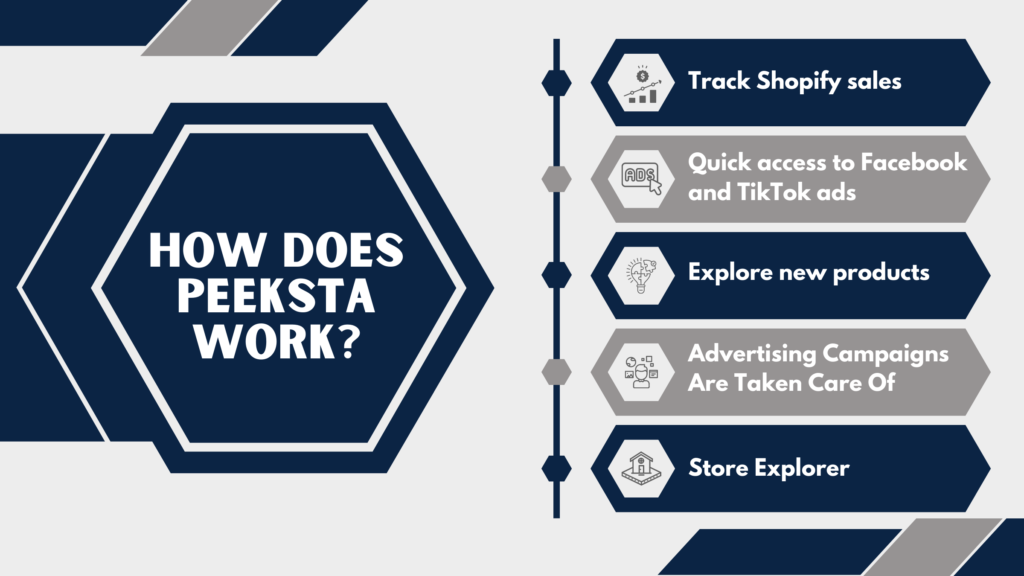
I. How does Peeksta work?
Peeksta is a web-based product research tool aimed at small and medium dropshipping stores. Its core job is helping you spot products that are already selling before you commit to testing them yourself. It combines Shopify store tracking, ad library access, and AI-powered listing tools in one dashboard.
Here is what each piece does in practice:
-
Track Shopify sales with Peeksta
Peeksta tracks sales data from Shopify stores and surfaces it inside the dashboard. You can see buying patterns, identify which products are moving, and get a sense of which niches have active demand. This is the same data other competitor spy tools aim to provide, so the value here depends on how current and complete Peeksta's data actually is for the stores you care about.
-
Quick access to Facebook and TikTok ads
The ad library pulls live Facebook and TikTok ads tied to products in the database. You can click through to the original ad directly. One limitation worth knowing: Peeksta shows you product ads, but it does not rank them by performance. You have to open each ad individually and check its engagement numbers yourself to gauge whether it is actually converting or just running.
-
Explore new products with Peeksta
The product explorer lets you filter by category, trend signals, and other parameters to surface potential winners. Each result links to the store running that product, which helps you build a list of stores worth tracking. The daily "product of the day" feature is a curated pick, though this is standard across most product research tools and should be treated as one signal among many rather than a shortlist.
-
Ad creation tools
This is the area where Peeksta stands apart from most research-only tools. Beyond finding products, Peeksta includes:
- An AI product description writer
- A video ad generator
- A thumbnail ad generator
- Facebook audience targeting suggestions
These features reduce the manual work involved in launching a new product. If you have high-resolution product photos but no experience with video editing, the video and thumbnail generators give you a usable starting point quickly.
-
Store Explorer
Store Explorer gives you access to data from over 100,000 dropshipping stores. You can filter by sales price range, category, and best-selling items. One gap that users have noted: there is no option to sort stores by revenue or order volume directly in the explorer view. That makes it harder to quickly identify which stores are actually performing at the top end, since you have to dig into individual store pages to get that context.
II. How to find winning products with Peeksta?
Peeksta gives you several inputs for product decisions: the curated daily product list, ad engagement data from Facebook and TikTok, and Shopify store tracking.
The ad data is particularly useful for gauging current interest. TikTok and Facebook engagement on a product ad, including views, likes, and shares, tells you whether an audience is responding to that product right now. You do have to click into each ad to see those numbers, which adds some manual effort, but the signal is real.
Supplier sourcing is another piece Peeksta addresses. Many Shopify stores source from China, and shipping times from Chinese suppliers to US or UK customers typically run 6 to 8 weeks. Peeksta lets you filter for US and UK-based suppliers, which matters if delivery speed is part of your store's positioning. The catch is that supplier location is not surfaced in the main product view. You have to click into a product to see the supplier and its expected delivery window. For a fast-moving category, that extra step can slow your research.
III. Should I Use the Free or the Paid Peeksta plan?
Peeksta does not offer a free tier, but it does offer a $1 for 1-day trial, which lets you test the full platform before committing. After that, pricing runs at roughly $20 per month for the standard plan. An annual subscription works out to a lower monthly rate.
This is competitive with comparable tools. For reference, Ecomhunt's basic plan starts at $23/month, and Dropship.io starts at $19/month billed annually. Peeksta sits in the same range. Pricing and the trial offer change over time, so confirm the current plans on peeksta.com before you sign up.
Pros and Cons
-
Pros
The ad creation tools are the clearest differentiator. The video ad generator, thumbnail creator, and AI description writer cover the production work that typically slows down product launches. If you find a product but lack the skills or time to build out the ad creative, these tools address that gap directly.
The TikTok Spy tool pairs naturally with the thumbnail generator if TikTok is your main ad channel.
The $1 trial removes the main objection to trying a new paid tool: you can see everything before deciding.
The interface is clean and accessible for someone early in their dropshipping journey. You can get to the features you need without a steep learning curve.
-
Cons
Store Explorer does not sort by orders or revenue in the main view. Finding stores that are genuinely high-volume requires clicking into individual store pages, which slows comparative research.
The supplier filter does not exist at the product level. You cannot filter your product search to show only US or UK-supplied items. Instead, you click into a product, find the supplier section, and check the delivery estimate. For a product with multiple potential suppliers, this adds friction.
The TikTok ad library shows you ads that are running, not necessarily ads that are performing well. There is no built-in engagement filter, so assessing whether a TikTok ad is actually driving sales requires manual review of each result.
Peeksta does not link out to The Ecom King's YouTube tutorials or any external learning resources from within the platform. Given that Kamil Sattar has a large library of dropshipping content, that connection would be a natural fit but it is absent.
IV. Is Peeksta worth it?
Peeksta works best for dropshippers who already have a product research process and want the ad creation layer built in. The video generator and thumbnail tool save real time compared to using separate software or hiring a freelancer for each product test.
Where it is weaker is in the depth of its store and sales data. Store Explorer will not sort by orders or revenue in the main view, and supplier location is buried inside each product, so the competitive picture takes more clicks than it should.
V. A stronger Peeksta alternative: Koala Inspector
If your real question is "what is this competitor actually doing", Koala Inspector covers that better, and it covers it for free. Here is where it is the stronger choice:
- It is a free Chrome extension, with no subscription to start. You install it and inspect stores right away, instead of paying for a trial before you can see anything.
- One-click store inspection. Open any Shopify store and Koala Inspector surfaces the apps and theme it runs, its live and historical product list, and pricing, in one pass. Peeksta makes you click into individual store and product pages to assemble the same picture.
- Built for competitor intelligence, not ad production. Peeksta's strongest features are its AI video, thumbnail, and description generators. That is ad creation, not store research. When you want to reverse-engineer a competitor's tech stack and catalog, that is the job Koala Inspector is built for.
Peeksta and Koala Inspector solve different problems: Peeksta leans on ad creation, Koala Inspector on deep store inspection. For competitor research specifically, the free tool gives you more of the data that matters with less friction. You can also pair it with the broader category of Shopify spy tools when you want a wider view of the market.
Install Koala Inspector free from the Chrome Web Store and inspect your first competitor store in under a minute.
VI. Peeksta FAQ
Is Peeksta free?
Peeksta does not have a permanent free plan. It offers a low-cost paid trial so you can test the full platform for a day before committing, and after that it runs on a paid monthly or annual subscription. Because pricing and the trial terms change, check peeksta.com for the current offer.
What does Peeksta do?
Peeksta is a web-based product research tool for Shopify dropshippers. It tracks sales from Shopify stores, surfaces live Facebook and TikTok ads, lets you explore products and stores, and adds AI ad creation tools including a video ad generator, a thumbnail generator, and a product description writer.
Is there a better Peeksta alternative?
For research on individual Shopify stores, Koala Inspector is a strong alternative. It is a free Chrome extension that gives one-click inspection of any store's apps, theme, products, and pricing with no subscription to start, where Peeksta is a paid platform built mainly around ad creation.
Written by
Ana Gelevska
eCommerce Content Writer
Ana Gelevska is a content writer with more than five years of experience creating content for eCommerce brands and global clients. She digs into each topic and the people it is for, then turns it into clear, useful articles that Shopify sellers and dropshippers can act on.
Connect on LinkedIn